










Honeycomb and Chronosphere both target teams drowning in high-cardinality telemetry data, but they solve the problem in fundamentally different ways. Honeycomb’s event-based model excels at arbitrary dimension queries across distributed traces. Chronosphere’s time-series approach focuses on metrics at scale with aggressive cost controls built on top of open-source Prometheus and Cortex. According to the CNCF Annual Survey 2023, 89% of organizations use Prometheus for monitoring, which explains why Chronosphere’s Prometheus-compatible architecture resonates with infrastructure-heavy teams already invested in that ecosystem.
Both platforms can handle billions of events per day. Both claim to solve the “observability cost crisis.” But their pricing models, query paradigms, and deployment options diverge sharply. This comparison covers pricing transparency, OpenTelemetry compatibility, high-cardinality handling, and where each tool genuinely leads.
Disclosure: CubeAPM is our own product and is included in this comparison. We have disclosed this transparently so you can weigh it accordingly.
Quick Comparison: Honeycomb vs Chronosphere vs CubeAPM
| Honeycomb | Chronosphere | CubeAPM | |
|---|---|---|---|
| Best for | High-cardinality event analysis, distributed trace debugging | Metrics-first teams at scale, cost control for Prometheus workloads | On-prem APM + logs + traces with unified retention |
| Pricing model | Free tier, Pro $130/mo, Enterprise custom | Custom pricing, annual contracts typical | $0.15/GB all-in, no user seats |
| OTel-native? | Yes | Yes | Yes |
| On-prem deployment? | Yes (Enterprise) | Yes (self-hosted or managed) | Yes (vendor-managed) |
| Primary data type | Events (wide, structured) | Metrics (time-series) | Traces, logs, metrics unified |
| High-cardinality strength | Event-level arbitrary dimensions | Time-series with cardinality controls | Full-fidelity trace search |
| Query language | Honeycomb Query Builder (visual) | PromQL (Prometheus-compatible) | SQL-based, OTel-native |
| Retention limits | Plan-dependent, 60 days typical | Custom, cost-optimized tiers | Unlimited at flat rate |
Pricing based on publicly available information as of June 2026. Enterprise discounts and negotiated rates are not reflected here.
Honeycomb Overview

Honeycomb positions itself as an observability platform built for high-cardinality event data. Unlike traditional APM tools that pre-aggregate metrics at write time, Honeycomb stores raw events with arbitrary dimensions, letting you ask any question about your system without predefined dashboards or indexes.
Core strengths:
- Event-based data model supports arbitrary cardinality without pre-aggregation
- BubbleUp and heatmap visualizations surface outliers and anomalies quickly
- Native OpenTelemetry support with SDKs for all major languages
- SLO tracking tied directly to event-level telemetry
- Distributed trace analysis with query-time pivoting across any dimension
Architectural approach:
Honeycomb’s architecture revolves around wide events. Each event is a structured record with dozens or hundreds of key-value pairs. Instead of storing pre-computed metrics like p95 latency, Honeycomb computes percentiles and breakdowns at query time across the full event dataset. This enables questions like “show me all traces where user_id contains ‘test’ AND region = ‘us-west-2’ AND cache_hit = false” without needing an index on those specific combinations.
Pricing:
Honeycomb offers a free tier with 20 million events per month. The Pro plan starts at $130/month. Enterprise pricing is custom and typically negotiated annually. Honeycomb bills on event volume, not hosts or users, which avoids per-seat taxation but can scale unpredictably as event cardinality increases.
Pricing based on publicly available information as of June 2026. Enterprise discounts and negotiated rates are not reflected here.
Documented limitations:
- Cost visibility becomes difficult as event volumes scale into billions per month. A Reddit thread noted Honeycomb bills can jump unexpectedly when trace volume spikes during incidents.
- Query performance degrades with extremely high cardinality (hundreds of millions of unique dimension combinations) unless sampling is applied.
- Limited support for metrics-based alerting compared to Prometheus-native tools. Honeycomb is event-first, which means traditional infrastructure metrics require event conversion.
- On-prem deployment is Enterprise-only, ruling out self-hosting for smaller teams.
Chronosphere Overview
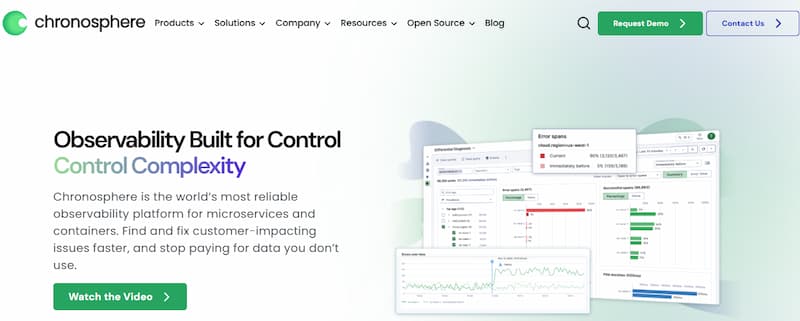
Chronosphere is a metrics-focused observability platform built on top of open-source Prometheus and Cortex. It targets teams dealing with metrics cardinality explosions, offering aggressive cost controls through metric streaming, aggregation rules, and intelligent data retention policies.
Core strengths:
- Built on Prometheus and Cortex, so PromQL queries and existing Prometheus workflows port directly
- Metrics streaming and aggregation at ingest reduce storage and query costs by 50–80% compared to storing raw metrics
- Control Plane surfaces metric cardinality explosions before they impact cost or performance
- Native Kubernetes support with deep understanding of pod, node, and cluster lifecycle signals
- Self-hosted or managed deployment options
Architectural approach:
Chronosphere’s architecture is designed around metrics cardinality management. Instead of storing every time-series forever, Chronosphere applies configurable rules to downsample, aggregate, or drop low-value metrics at ingest. The Control Plane dashboard shows which services are generating the most cardinality and lets platform teams set policies before the data hits storage. This is critical for teams running Kubernetes at scale, where a single misconfigured Helm chart can generate millions of useless metric series.
Pricing:
Chronosphere pricing is custom and typically structured as annual contracts. Public rate cards are not available. Based on community discussions, Chronosphere is positioned as a premium platform for large-scale metrics workloads. Pricing is tied to metric volume, retention, and whether the deployment is self-hosted or managed.
Pricing starts from mid-five-figure annual contracts for enterprise deployments. Verify current rates at [chronosphere.io/pricing](https://chronosphere.io/pricing/).
Documented limitations:
- No public pricing page makes it difficult to estimate costs before a sales conversation.
- Focused heavily on metrics. Traces and logs are supported but feel secondary compared to Honeycomb’s event-first model or unified platforms like CubeAPM.
- Requires deep Prometheus knowledge to unlock full value. Teams unfamiliar with PromQL or Prometheus architecture face a steep learning curve.
- Less suited for exploratory debugging compared to Honeycomb. Chronosphere excels at known-unknown queries (predefined dashboards, SLIs) but struggles with arbitrary high-cardinality exploration across dimensions.
Feature-by-Feature Comparison
High-Cardinality Handling
Honeycomb stores raw events with arbitrary dimensions. This means you can query on any combination of fields without pre-indexing. The trade-off is storage cost and query performance at extreme scale. Honeycomb mitigates this with tail-based sampling, where traces are kept or discarded based on heuristics like error presence, latency outliers, or custom rules.
Chronosphere handles cardinality through aggressive metric streaming and aggregation. Instead of storing every unique time series, Chronosphere applies rules at ingest to reduce cardinality by 50–80%. For example, you can configure it to drop ephemeral pod metrics after 24 hours or aggregate fine-grained container metrics into service-level rollups. This reduces storage cost but sacrifices granularity for post-hoc debugging.
CubeAPM uses AI-based smart sampling to retain traces that matter while discarding redundant happy-path requests. Unlike random sampling, smart sampling evaluates context (latency, error, user ID) before deciding whether to keep a trace. This cuts storage by up to 95% while preserving full fidelity for incidents.
Verdict: Honeycomb wins for exploratory debugging across arbitrary dimensions. Chronosphere wins for proactive cardinality control at metrics scale. CubeAPM wins for cost-efficient full-fidelity trace retention.
Alerting and SLOs
Honeycomb ties alerts directly to event-level queries. You can alert on any BubbleUp result or derived column, which gives flexibility but requires careful tuning to avoid noise. SLOs in Honeycomb are event-based, meaning you define success criteria (e.g., p99 latency under 500ms) and track burn rate over rolling windows.
Chronosphere’s alerting is Prometheus-native. If you already have PromQL alert rules, they port directly. Chronosphere adds anomaly detection and intelligent routing, but the foundation is still PromQL. SLOs are tracked using Prometheus recording rules and can trigger alerts based on error budget burn rate.
CubeAPM supports alerting on any span, metric, or log combination without a separate query language. Alerts include full trace context, so when an alert fires, the on-call engineer sees the exact request that triggered it. Anomaly detection is built in, with noise suppression to reduce alert fatigue.
Verdict: Chronosphere wins for Prometheus-heavy teams. Honeycomb wins for event-driven alerting flexibility. CubeAPM wins for contextual alerting with trace correlation.
Query Experience
Honeycomb’s Query Builder is visual and designed for iterative exploration. You start with a dataset (e.g., all HTTP requests), group by a dimension (e.g., endpoint), visualize as a heatmap, and drill into outliers. BubbleUp automatically surfaces which dimensions are associated with slow requests. This is powerful for unknown-unknown debugging but less efficient for dashboard-driven monitoring.
Chronosphere uses PromQL, which is text-based and requires upfront knowledge of metric names and label structure. PromQL is incredibly powerful for known-unknown queries (e.g., “What is the p95 latency of service X?”) but terrible for exploratory analysis across high-cardinality dimensions. Chronosphere’s Control Plane helps by showing which metrics exist and their cardinality, but the query paradigm is still metrics-first.
CubeAPM uses SQL-based queries against OpenTelemetry data. If you know SQL, you can query traces, logs, and metrics in a unified interface. The UI also supports visual query builders for non-SQL users.
Verdict: Honeycomb wins for exploratory debugging. Chronosphere wins for Prometheus-fluent teams. CubeAPM wins for SQL-familiar teams wanting unified trace + log + metric queries.
OpenTelemetry Compatibility
Honeycomb is OpenTelemetry-native. It was one of the first vendors to fully embrace OTel and contributes actively to the project. All Honeycomb SDKs use OTel under the hood, and the platform ingests OTel traces and metrics natively. If you are already sending OTel to another backend, switching to Honeycomb requires only a configuration change.
Chronosphere supports OpenTelemetry but is Prometheus-first. OTel metrics are converted to Prometheus format at ingest. This works well for metrics but adds friction for traces and logs, which are less central to Chronosphere’s architecture.
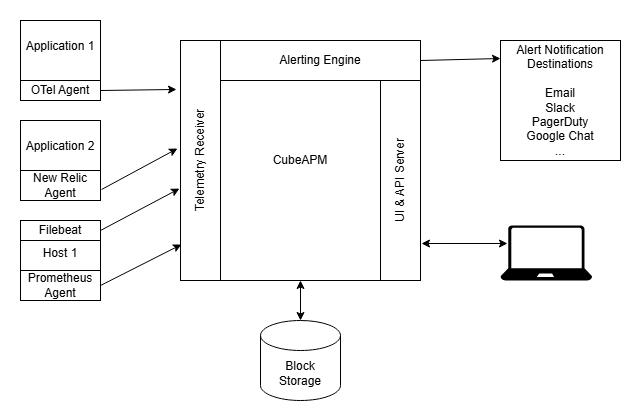
CubeAPM is built natively on OpenTelemetry from day one. It ingests OTel traces, metrics, and logs without conversion. You can use the OpenTelemetry Collector to send data to CubeAPM and retain the option to route telemetry to other backends simultaneously.
Verdict: Honeycomb and CubeAPM tie for OTel-native support. Chronosphere is strong on metrics but feels Prometheus-first.
Deployment Model
Honeycomb is SaaS-only on the Pro plan. Enterprise customers can deploy Honeycomb on-prem or in a customer-controlled VPC, but this is limited to large contracts. Most teams use Honeycomb’s hosted SaaS, which means telemetry data leaves your infrastructure.
Chronosphere offers both SaaS and self-hosted deployment. The self-hosted option runs in your VPC or data center, giving full data control. Chronosphere manages the control plane remotely, so you get the operational benefits of SaaS without telemetry egress.
CubeAPM deploys inside your VPC or on-prem by default. The platform is fully managed by CubeAPM, so you avoid Day-2 ops burden (upgrades, patches, scaling), but telemetry never leaves your infrastructure. This eliminates AWS/GCP egress costs (~$0.10/GB) and keeps PII and sensitive logs local.
Verdict: CubeAPM wins for data residency and zero-egress deployment. Chronosphere wins for flexible deployment (SaaS or self-hosted). Honeycomb is SaaS-first with on-prem limited to Enterprise.
Integrations and Ecosystem
Honeycomb integrates with common CI/CD tools, Slack, PagerDuty, and supports webhooks for custom workflows. The ecosystem is smaller than Datadog’s but sufficient for most teams. Honeycomb’s strength is its API, which lets you programmatically query event data and build custom integrations.
Chronosphere inherits the Prometheus ecosystem, which means it integrates with anything Prometheus does (Grafana, Alertmanager, Thanos, etc.). Chronosphere also provides Kubernetes Operators for streamlined deployment and native support for service meshes like Istio and Linkerd.
CubeAPM supports 800+ integrations including Slack, Jira, webhooks, and CI/CD platforms. It is compatible with OpenTelemetry, Prometheus, Elastic, Datadog, and New Relic agents, so migration is incremental rather than a hard cutover.
Verdict: Chronosphere wins for Prometheus ecosystem integration. CubeAPM wins for agent compatibility across vendors. Honeycomb is strong but narrower in scope.
Pricing Comparison
Honeycomb Pricing Breakdown
Honeycomb’s pricing page lists three tiers:
- Free: 20 million events/month, 60 days retention, 1 environment, community support
- Pro: Starts at $130/month for 250 million events/month, 60 days retention, unlimited environments, email support
- Enterprise: Custom pricing, custom retention, SSO, on-prem deployment, premium support
For a mid-sized team ingesting 10 billion events per month (roughly equivalent to 30TB of trace data), Honeycomb Pro costs scale linearly with event volume. At $130/month for 250 million events, 10 billion events would cost approximately $5,200/month before retention extensions or additional features.
This estimate models a production-ready setup with standard retention. Actual costs vary by event cardinality, retention period, and negotiated Enterprise discounts.
Chronosphere Pricing Breakdown
Chronosphere does not publish a public rate card. Based on community reports and vendor conversations, Chronosphere is positioned as a premium platform for large-scale metrics. Annual contracts typically start in the mid-five-figure range for teams running hundreds of services and millions of active metric series.
For a team ingesting 500,000 active time-series with 30-day retention, estimated annual cost is $75,000 to $150,000 depending on whether deployment is self-hosted or managed. Chronosphere’s value proposition is reducing metrics cardinality by 50–80%, which can offset the platform cost if you are currently paying for massive Prometheus storage.
Pricing based on publicly available information as of April 2026. Enterprise discounts, custom contracts, and negotiated rates are not reflected here.
CubeAPM Pricing Breakdown
CubeAPM’s pricing page lists ingestion-based pricing:
- Pro: $0.20/GB ingested, unlimited users, unlimited retention, quarterly billing
- Enterprise: Custom pricing, annual billing, dedicated account rep, premium support
For a team ingesting 30TB/month (traces, logs, metrics combined), CubeAPM Pro costs $6,000/month. There are no additional charges for users, hosts, or retention.
Total monthly cost: $6,000 (no hidden fees, no egress charges).
This estimate models a production-ready setup with high availability. A smaller or simpler deployment may cost significantly less.
Cost Comparison Summary
| Tool | Monthly cost (30TB/month equivalent) | Pricing transparency | Hidden costs |
|---|---|---|---|
| CubeAPM | ~$6,000 | Excellent | None (runs on your infra) |
| Honeycomb | ~$5,200 | Good | Egress ~$3,000 if hosted SaaS |
| Chronosphere | ~$8,000–$12,000 (estimated annual/12) | Poor | Managed deployment fees |
Pricing based on publicly available information as of April 2026. Enterprise discounts and negotiated rates are not reflected here.
Who Should Choose Each
Choose Honeycomb if:
- You need arbitrary high-cardinality event analysis across distributed traces
- Your team values exploratory debugging over predefined dashboards
- You are already sending OpenTelemetry data and want a native OTel backend
- You can tolerate SaaS-only deployment (or have an Enterprise budget for on-prem)
- Your debugging workflow relies on asking questions you did not anticipate in advance
Choose Chronosphere if:
- You are a Prometheus-heavy team drowning in metrics cardinality
- You need aggressive cost controls for time-series storage at scale
- Your workload is Kubernetes-native, and you want deep cluster lifecycle visibility
- You value self-hosted deployment with managed control plane
- You prefer PromQL over event-based query paradigms
Choose CubeAPM if:
- You need unified APM, logs, and traces in one platform
- Data residency or compliance requirements rule out SaaS
- You want predictable pricing with no user seats or host taxes
- You value full-fidelity trace retention with AI-based smart sampling
- You need on-prem deployment without DIY operational burden
Verdict
Honeycomb and Chronosphere solve different problems. Honeycomb excels at exploratory debugging across high-cardinality event data, making it ideal for distributed systems teams that need to ask arbitrary questions about traces. Chronosphere excels at metrics-first observability with aggressive cost controls, making it ideal for Prometheus-heavy teams at scale.
Neither platform is universally better. The right choice depends on whether your primary pain is trace cardinality and exploratory debugging (Honeycomb) or metrics cardinality and cost control (Chronosphere).
CubeAPM offers a third option: unified traces, logs, and metrics with on-prem deployment, ingestion-based pricing, and no vendor lock-in. If data residency, cost predictability, or operational simplicity matter more than picking a specialized trace or metrics platform, CubeAPM is worth evaluating.
For teams already invested in Prometheus, alternatives to Chronosphere cover other metrics-first platforms. For teams evaluating Honeycomb, Honeycomb alternatives compare event-based observability platforms. For teams monitoring AWS Lambda, AWS Lambda monitoring covers serverless-specific observability patterns.
Disclaimer: The information in this article reflects the latest details available at the time of publication and may change as technologies and products evolve. Features, pricing, and plan limits can change over time. Always verify the latest information directly with the vendor before making purchasing or deployment decisions.
Frequently Asked Questions
What is the main difference between Honeycomb and Chronosphere?
Honeycomb is event-based and designed for exploratory debugging across high-cardinality trace data. Chronosphere is metrics-first and designed for cost control and cardinality management in Prometheus workloads.
Does Honeycomb support Prometheus metrics?
Yes, Honeycomb supports Prometheus metrics via OpenTelemetry Collector conversion, but it is not Prometheus-native. Metrics are stored as events, not time-series.
Can Chronosphere replace Grafana?
Chronosphere can replace Grafana for metrics visualization if you are comfortable with PromQL. Chronosphere uses Grafana under the hood but manages it as part of the platform.
Which tool is better for Kubernetes monitoring?
Chronosphere is better for Kubernetes metrics at scale. Honeycomb is better for Kubernetes trace debugging across pod, node, and service dimensions.
Does CubeAPM support both traces and metrics?
Yes, CubeAPM unifies traces, logs, and metrics in one platform with full OpenTelemetry compatibility.
How does Honeycomb pricing scale with data volume?
Honeycomb charges per event. As event volume grows, costs scale linearly unless you apply sampling to reduce ingestion.
Is Chronosphere suitable for small teams?
Chronosphere is designed for large-scale metrics workloads. Smaller teams may find the pricing and complexity unnecessary unless they already have Prometheus cardinality problems.