










NGINX serves as a web server, reverse proxy, load balancer, and API gateway for a large share of modern web infrastructure. Monitoring it well means tracking more than just whether the process is running. You need visibility into active connections, request rates, response codes, upstream health, cache hit rates, SSL handshake failures, slow log events, and worker process saturation. A monitoring gap on any of these can mean undetected upstream failures, missed SSL certificate expirations, or degraded throughput that only becomes visible once users start complaining.
NGINX exposes metrics through two primary built-in mechanisms: the stub_status module for NGINX Open Source (active connections, total requests, connection state breakdown), and the richer NGINX Plus API and live activity monitoring dashboard, which adds per-upstream metrics, cache statistics, per-server-zone response code breakdown, and SSL statistics.
Every external NGINX monitoring dashboard in this guide builds on top of one or both of these data sources, plus NGINX access and error logs.
Key Takeaways
- NGINX Open Source exposes basic metrics through the stub_status module. NGINX Plus exposes a significantly richer set via its REST API, including per-upstream, per-cache-zone, SSL, and 4xx/5xx breakdown metrics.
- The officially maintained nginx-prometheus-exporter by NGINX is the standard way to bridge NGINX stub_status and NGINX Plus API metrics into Prometheus for Grafana dashboard visualization. It is Apache 2.0 licensed.
- CubeAPM is a self-hosted, OpenTelemetry-native platform that monitors NGINX metrics, logs, and upstream traces in a single dashboard at ingestion-based pricing of $0.15/GB with no per-host fees.
- The NGINX Plus built-in live activity monitoring dashboard (available since NGINX Plus Release 9) provides real-time visibility out of the box with no external tooling.
- NGINX One Console provides centralized fleet monitoring, configuration management, certificate tracking, and CVE visibility across all NGINX instances as part of the NGINX One enterprise subscription.
- Datadog’s NGINX integration is included in the Datadog Agent package at no additional per-integration cost, covering NGINX Open Source and NGINX Plus with metrics, log, and APM trace correlation.
What NGINX metrics should your dashboard cover?
Before comparing tools, it is worth establishing what a complete NGINX monitoring dashboard needs to show. The NGINX Plus live activity monitoring guide and stub_status module documentation define the core signal set.
- From stub_status (NGINX Open Source): active connections, connections accepted, connections handled, total requests, and the breakdown of connections in reading/writing/waiting state.
- From the NGINX Plus API: all of the above, plus per-upstream server health and connection counts, per-server-zone request and response code breakdown (2xx, 3xx, 4xx, 5xx), cache zone hit/miss/bypass statistics, SSL handshake counts and failed handshake counts, and stream (TCP/UDP) metrics.
- From NGINX access logs: request latency per route, HTTP status code distribution, bytes sent per request, upstream response times, and client breakdown.
- From NGINX error logs: upstream connect failures, SSL certificate errors, worker process crashes, and timeout events (502/504 patterns).
The richest dashboards combine all four sources: stub_status or Plus API for server-level metrics, access logs for traffic analytics, and error logs for failure triage.
1. CubeAPM
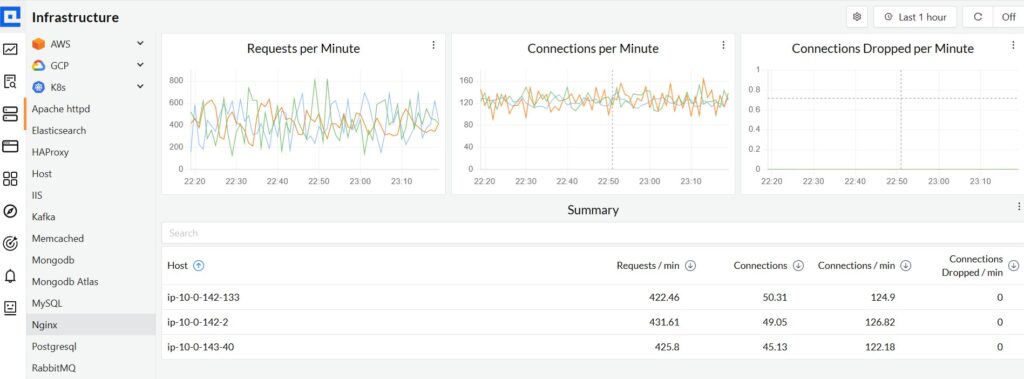
CubeAPM is a self-hosted, OpenTelemetry-native APM and infrastructure monitoring platform that supports NGINX monitoring alongside full application observability. NGINX is listed as a supported infrastructure component on CubeAPM’s infrastructure monitoring docs.
Features
- Collects NGINX metrics via the OpenTelemetry Collector’s NGINX receiver or nginx-prometheus-exporter; sample configurations available at CubeAPM’s sample infra monitoring repository
- Tracks active connections, request rates, upstream response times, error rates (4xx, 5xx), cache metrics, SSL handshake failures, and worker connection saturation
- Structured NGINX access log and error log ingestion alongside metrics in a single dashboard
- Upstream performance correlation: tie 502/504 error spikes to specific backend routes and traces
- Correlates NGINX metrics and logs with application traces: navigate from an NGINX upstream timeout directly to the backend service trace that caused it
- NGINX Ingress Controller monitoring for Kubernetes deployments via OTel collectors
- Smart sampling: prioritizes error and latency-heavy traces to reduce storage costs without losing signal
- Self-hosted inside your VPC; telemetry data never leaves your infrastructure
Pricing: $0.15/GB of data ingested. No per-host, per-instance, per-container, or per-user fees.
Limitations: Requires self-hosting and infrastructure management. Not open-source. NGINX monitoring is part of its broader infrastructure monitoring capability, not a dedicated NGINX-specific product.
Best for: Teams that want NGINX monitoring correlated with application APM traces and infrastructure metrics in a single self-hosted platform, with ingestion-based pricing that does not scale with NGINX instance count.
2. Prometheus nginx-prometheus-exporter + Grafana
The most widely deployed open-source NGINX monitoring stack combines the officially maintained nginx-prometheus-exporter (by NGINX/nginxinc, Apache 2.0 licensed) with Prometheus and Grafana dashboards.
What the nginx-prometheus-exporter does:
- Scrapes the NGINX stub_status page and converts output to Prometheus metric format on port 9113
- For NGINX Plus, scrapes the NGINX Plus API at /api and exposes the richer metric set including upstreams, server zones, caches, SSL, and streams
- Available as a binary, Docker image, and Kubernetes deployment
- Commercial support available for NGINX Plus customers using the exporter with NGINX Ingress Controller
The stub_status module is not built into NGINX Open Source by default; it must be enabled at compile time with –with-http_stub_status_module. Most Linux distribution packages include it. Verify with nginx -V 2>&1 | grep http_stub_status_module.
Grafana NGINX dashboards: The Grafana dashboard marketplace hosts multiple community and official NGINX dashboards, including the official NGINX Prometheus Exporter dashboard maintained by NGINX. Grafana Cloud also provides a dedicated NGINX integration with pre-built dashboards combining metric and log data.
Pricing:
- nginx-prometheus-exporter: Free; Apache 2.0 license
- Grafana self-hosted: Free; core components (Loki, Mimir, Tempo) are AGPLv3 licensed
- Grafana Cloud Free: $0; includes 10,000 active metric series, 50 GB logs and traces, 14-day retention
- Grafana Cloud Pro: $19/month platform fee, then $6.50/1,000 active metric series and $0.50/GB for logs and traces
Limitations: Requires assembling and operating multiple components. The stub_status module exposes only basic counters; per-upstream and per-location breakdowns require NGINX Plus or additional modules. No built-in APM correlation between NGINX metrics and backend service traces.
Best for: Teams already running Prometheus and Grafana who want NGINX visibility without a new vendor, and teams comfortable operating a multi-component open-source stack.
3. NGINX Plus built-in live activity monitoring dashboard
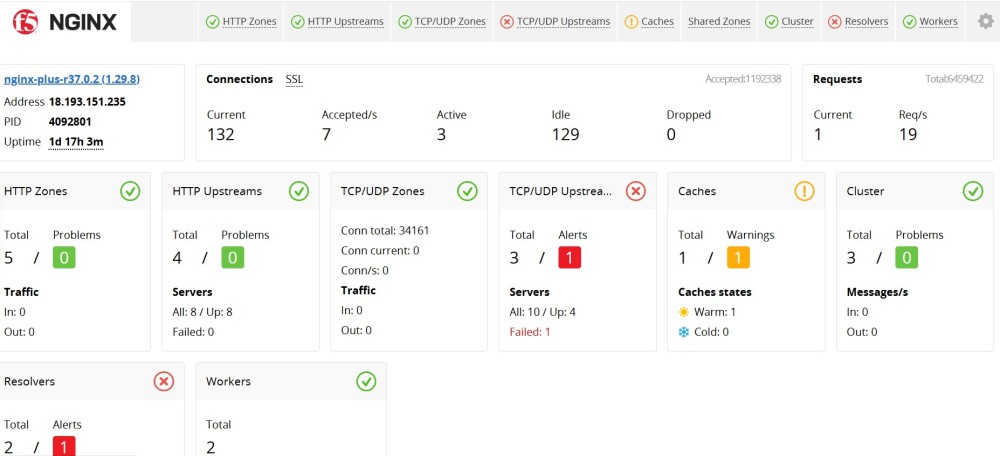
NGINX Plus ships with a built-in live activity monitoring dashboard that requires no external tooling. It is the fastest path to NGINX Plus visibility for teams not wanting to manage additional infrastructure.
Features
- Real-time dashboard available at /dashboard.html on the configured NGINX Plus API port
- Displays connections, requests, server zones, upstreams (health, active connections, response codes, health check status), caches (hit/miss/bypass/expired), streams, and SSL statistics
- Available since NGINX Plus Release 9; the underlying REST API is available since Release 14
- API returns JSON, enabling integration with third-party tools via the /api endpoint
- Statistics can be reset via DELETE requests to the API in read-write mode
- Current release as of June 2026 is NGINX Plus R37 (LTS)
Pricing: Included with NGINX Plus. NGINX Plus is a commercial product; pricing requires contacting F5/NGINX sales.
Limitations: Real-time only with no historical metric retention. For time-series analysis, alerting, and historical comparison, you need to export metrics to Prometheus or a third-party platform.
Best for: Teams running NGINX Plus who need immediate real-time visibility into upstream health, server zones, and cache performance without deploying additional infrastructure.
4. NGINX One Console
NGINX One Console is F5’s centralized management and monitoring platform for NGINX fleets. It is part of the NGINX One enterprise subscription, which bundles NGINX Plus, NGINX Ingress Controller, NGINX Gateway Fabric, NGINX Instance Manager, and NGINX One Console into a single package.
Features
- Centralized fleet dashboard: monitor and control all NGINX instances across environments (cloud, on-premises, hybrid, Kubernetes) from one place
- Performance metrics: CPU, memory, connection counts, and request rates per instance
- Configuration management: check configurations, push config changes to multiple instances simultaneously, draft and test configurations, and use config templates
- Certificate management: track SSL certificate expiration dates across the fleet with alerts
- CVE and security vulnerability tracking: identify NGINX instances running versions with known CVEs
- Kubernetes integration: monitor NGINX Ingress Controller deployments for CVEs and certificates
- Metric export via OpenTelemetry for integration with external observability platforms
- REST API for automation
Pricing: Included as part of the NGINX One enterprise subscription. Pricing is not published and requires contacting F5/NGINX sales.
Limitations: Requires an NGINX One enterprise subscription. Not available as a standalone free tool. Not a full observability platform; it lacks log analytics, distributed tracing, and APM correlation.
Best for: Enterprise teams managing large NGINX fleets who need centralized configuration management, certificate monitoring, and CVE visibility alongside performance metrics.
5. Datadog
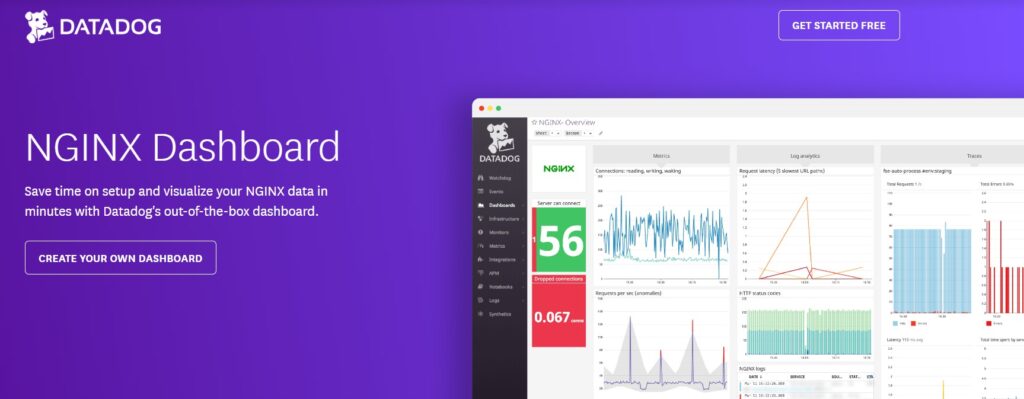
Datadog provides a first-party NGINX integration included in the Datadog Agent package, covering both NGINX Open Source and NGINX Plus with no additional installation required.
Features
- For NGINX Open Source: collects total requests, active connections, accepted connections, handled connections, and reading/writing/waiting connection states via the stub_status endpoint
- For NGINX Plus: collects the richer NGINX Plus API metric set, including per-upstream active connections, 5xx codes, health check status, cache hits/misses, SSL handshake counts, and stream metrics; uses http_api_module for NGINX Plus R13 and above
- Log collection from NGINX access and error logs with automatic parsing and correlation to metrics
- Out-of-the-box NGINX dashboard in Datadog
- NGINX Ingress Controller monitoring via a separate nginx-ingress-controller integration
- NGINX metrics available via OpenTelemetry Collector’s NGINX receiver for teams using OTel pipelines
- APM correlation: correlate NGINX metrics and logs with distributed traces from upstream services
Pricing
- Infrastructure Monitoring Pro: $15/host/month (annual). NGINX monitoring is included with no additional per-integration cost.
- APM (standalone, for upstream trace correlation): $36/host/month (annual)
- Log ingestion and other products are priced separately
Limitations: Per-host pricing scales directly with the number of NGINX instances monitored. No free self-hosted option; all data leaves your infrastructure to Datadog’s SaaS.
Best for: Enterprise teams that want managed, zero-infrastructure NGINX monitoring with deep correlation between NGINX metrics, logs, and APM traces from upstream services.
Comparison table
| Tool | Type | NGINX OS support | NGINX Plus support | APM correlation | Self-hosted | Free tier | Pricing model |
| CubeAPM | Self-hosted APM + infra monitoring | Yes | Yes | Yes | Yes | No | $0.15/GB ingested |
| Prometheus nginx-prometheus-exporter + Grafana | Open-source collector + visualization | Yes | Yes | No | Yes | Yes (fully free) | Infrastructure costs only |
| NGINX Plus built-in dashboard | Built-in (NGINX Plus only) | No | Yes (real-time) | No | Yes | Included with NGINX Plus | Commercial |
| NGINX One Console | F5 enterprise fleet management | Yes | Yes | No | No (SaaS console) | No | NGINX One subscription |
| Datadog | Enterprise SaaS observability | Yes | Yes | Yes | No | No | $15/host/month (infra) |
Which NGINX monitoring dashboard tool should you choose?
- Choose CubeAPM if you want NGINX monitoring correlated with application APM traces, structured log analysis, and infrastructure metrics in a single self-hosted platform, with pricing that scales on data volume rather than instance count.
- Choose Prometheus nginx-prometheus-exporter + Grafana if you are already running Prometheus and Grafana and want to add NGINX dashboard visibility without a new vendor. It is free, officially maintained by NGINX, and covers both NGINX Open Source and NGINX Plus.
- Choose the NGINX Plus built-in dashboard if you are already running NGINX Plus and need immediate real-time visibility into upstreams, server zones, caches, and SSL without deploying additional infrastructure. Pair it with Prometheus export for historical trending.
- Choose NGINX One Console if you manage a large NGINX fleet across environments and need centralized configuration management, certificate expiry tracking, and CVE monitoring under a single enterprise subscription.
- Choose Datadog if your team needs managed, zero-infrastructure NGINX monitoring with deep correlation between NGINX metrics, access logs, error logs, and distributed traces from upstream services.
Summary
NGINX monitoring spans three distinct data sources: stub_status or NGINX Plus API for server-level metrics, access logs for traffic analytics, and error logs for failure triage. The right dashboard tool depends on which NGINX edition you run, whether you need historical trending or real-time visibility only, whether APM correlation with upstream services matters, and how your monitoring costs should scale.
For teams that want NGINX metrics, access logs, error logs, and upstream application traces correlated in one self-hosted platform without per-instance pricing, CubeAPM provides OpenTelemetry-native full-stack monitoring at $0.15/GB ingested.
| Tool | Best for | Free | Self-hosted |
| CubeAPM | APM + NGINX infra correlation, no per-instance fees | No | Yes |
| Prometheus nginx-prometheus-exporter + Grafana | Open-source Prometheus-native teams | Yes | Yes |
| NGINX Plus built-in dashboard | Immediate real-time NGINX Plus visibility | Included with NGINX Plus | Yes |
| NGINX One Console | Enterprise fleet management, cert and CVE tracking | No | No (SaaS console) |
| Datadog | Managed monitoring with APM and log correlation | No | No |
Disclaimer: Features and pricing are verified from official vendor documentation as of June 2026, including NGINX’s official documentation, NGINX One Console docs, nginx-prometheus-exporter on GitHub, Grafana’s pricing page, Datadog’s NGINX integration docs and Datadog’s pricing page, and CubeAPM’s infrastructure monitoring docs. Always verify current pricing and feature availability directly with each vendor before making purchasing decisions.
Also read:
What Are the Best Open Source Nginx Monitoring Tools in 2026