










There are three ways to add OpenTelemetry tracing to a Spring Boot application in 2026, and choosing the wrong one for your setup causes configuration conflicts that are hard to debug. The OTel Java agent attaches at JVM startup via -javaagent with zero code changes and the widest library coverage. The OTel Spring Boot community starter adds tracing as a Spring dependency and integrates with application.properties.
The Spring Boot 4 native starter (spring-boot-starter-opentelemetry) ships with Spring Boot 4 itself and uses Micrometer internally with management.* configuration properties. This guide covers all three, when to use each, and how to add manual spans on top of any approach.
Key Takeaways
- Spring Boot 4.0.6 (latest stable as of April 23, 2026) ships its own native OTel starter (org.springframework.boot:spring-boot-starter-opentelemetry) that is separate from and incompatible with the community OTel starter. It uses Micrometer internally and management.* config properties
- The OTel Java agent (v2.28.1, latest as of May 2026) is the default recommendation from the official OTel docs for Spring Boot applications because it provides more out-of-the-box instrumentation than either starter
- The community OTel Spring Boot starter (io.opentelemetry.instrumentation:opentelemetry-spring-boot-starter, BOM version 2.28.0) supports Spring Boot 2.6+ and 3.x and uses otel.* config properties. Do not mix it with the Spring Boot 4 native starter
- Default OTLP export protocol since Java agent v2.0.0 is HTTP/protobuf (port 4318), not gRPC
- @WithSpan for declarative span creation requires both opentelemetry-instrumentation-annotations and spring-boot-starter-aop when using the OTel community starter. Without AOP, the annotation has no effect
- The Java agent does not work with Spring Boot Native Image (GraalVM). Use the OTel community starter or Spring Boot 4 native starter for native image builds
The Three Approaches at a Glance
| Approach | Spring Boot version | Zero code changes | Native Image support | Config prefix |
| OTel Java agent (v2.28.1) | Any | Yes (javaagent flag) | No | otel.* (system properties or env vars) |
| OTel community starter (BOM 2.28.0) | 2.6+ and 3.x | No (add dependency) | Yes | otel.* (in application.properties) |
| Spring Boot 4 native starter | 4.x only | No (add dependency) | Yes | management.* |
Option 1: OTel Java Agent (Recommended Starting Point)
The Java agent is the official OTel recommendation for Spring Boot applications. It attaches to the JVM at startup, rewrites bytecode at class load time, and instruments HTTP, JDBC, gRPC, Kafka, Redis, and hundreds of other libraries without any code changes.
Download the agent
curl -L -o opentelemetry-javaagent.jar \

https://github.com/open-telemetry/opentelemetry-java-instrumentation/releases/latest/download/opentelemetry-javaagent.jarStart your Spring Boot application with the agent
java -javaagent:opentelemetry-javaagent.jar \

  -Dotel.service.name=order-service \

  -Dotel.service.version=1.0.0 \

  -Dotel.resource.attributes=deployment.environment=production \

  -Dotel.exporter.otlp.endpoint=http://otel-collector:4318 \

  -Dotel.exporter.otlp.protocol=http/protobuf \

-jar order-service.jarAlternatively, use environment variables (these take precedence over system properties):
export OTEL_SERVICE_NAME=order-service

export OTEL_EXPORTER_OTLP_ENDPOINT=http://otel-collector:4318

export OTEL_EXPORTER_OTLP_PROTOCOL=http/protobuf

java -javaagent:opentelemetry-javaagent.jar -jar order-service.jarDocker Compose
services:

  order-service:

    image: order-service:latest

    environment:

      OTEL_SERVICE_NAME: order-service

      OTEL_EXPORTER_OTLP_ENDPOINT: http://otel-collector:4318

      OTEL_EXPORTER_OTLP_PROTOCOL: http/protobuf

      JAVA_TOOL_OPTIONS: "-javaagent:/app/opentelemetry-javaagent.jar"

    volumes:

- ./opentelemetry-javaagent.jar:/app/opentelemetry-javaagent.jarWhat the agent instruments automatically
With no code changes, every incoming HTTP request to your Spring Boot controller gets a span with the method, URL template, status code, and duration. Every outgoing HTTP call via RestTemplate, WebClient, or HttpClient gets a span. Every JDBC query gets a span with the SQL statement. Kafka producer and consumer operations, Redis calls via Jedis or Lettuce, gRPC calls, and Spring Scheduling tasks are also instrumented. W3C TraceContext headers are propagated on all outbound calls automatically.
When not to use the agent
- Spring Boot Native Image (GraalVM): the agent requires bytecode manipulation at class load time, which does not work with ahead-of-time compiled native images
- If another Java agent is already attached: two agents can conflict. Check compatibility before using both
- If JVM startup overhead is a concern: the agent adds measurable startup latency due to class instrumentation
Option 2: OTel Community Spring Boot Starter (Spring Boot 2.6 and 3.x)
The OpenTelemetry community starter adds instrumentation as a Spring dependency. It supports application.properties and application.yml for configuration and works with Spring Boot Native Image builds.
Maven (using the BOM)
<dependencyManagement>

  <dependencies>

    <dependency>

      <groupId>io.opentelemetry.instrumentation</groupId>

      <artifactId>opentelemetry-instrumentation-bom</artifactId>

      <version>2.28.0</version>

      <type>pom</type>

      <scope>import</scope>

    </dependency>

  </dependencies>

</dependencyManagement>

<dependencies>

  <dependency>

    <groupId>io.opentelemetry.instrumentation</groupId>

    <artifactId>opentelemetry-spring-boot-starter</artifactId>

  </dependency>

</dependencies>Gradle
implementation(platform("io.opentelemetry.instrumentation:opentelemetry-instrumentation-bom:2.28.0"))

implementation("io.opentelemetry.instrumentation:opentelemetry-spring-boot-starter")Note: do not combine the BOM import with the io.spring.dependency-management plugin in Gradle. Use Gradle’s native platform import instead, as the official OTel docs explicitly warn against mixing these two approaches.
Configure via application.properties
otel.service.name=order-service

otel.service.version=1.0.0

otel.resource.attributes=deployment.environment=production

otel.exporter.otlp.endpoint=http://otel-collector:4318

otel.exporter.otlp.protocol=http/protobufOr application.yml:
otel:

  service:

    name: order-service

  exporter:

    otlp:

      endpoint: http://otel-collector:4318

protocol: http/protobufOption 3: Spring Boot 4 Native Starter
Spring Boot 4 ships spring-boot-starter-opentelemetry as a first-party dependency. It uses Micrometer’s tracing bridge internally and exports via OTLP. Configuration uses the management.* property namespace, not otel.*.
Do not combine this with the community OTel starter. They configure different underlying components that will conflict.
Maven
<dependency>

  <groupId>org.springframework.boot</groupId>

  <artifactId>spring-boot-starter-opentelemetry</artifactId>

</dependency>Configure via application.properties (Spring Boot 4)
management.opentelemetry.resource-attributes.service.name=order-service

management.opentelemetry.tracing.export.otlp.endpoint=http://otel-collector:4318

management.tracing.sampling.probability=1.0The management.tracing.sampling.probability=1.0 setting is required to collect all traces in development. The default sampling rate in Spring Boot 4 is 0.1 (10%), which means 90% of traces are dropped unless you raise this value.
Step: Add Manual Spans for Business Logic
All three instrumentation approaches automatically capture HTTP, database, and messaging spans. For business logic inside your handlers, add manual spans.
Using @WithSpan (declarative, requires AOP)
When using the OTel community starter or Java agent, add these dependencies for @WithSpan:
<!-- Required for @WithSpan annotation -->

<dependency>

  <groupId>io.opentelemetry.instrumentation</groupId>

  <artifactId>opentelemetry-instrumentation-annotations</artifactId>

</dependency>

<!-- Required for AOP processing of @WithSpan when using the OTel starter -->

<dependency>

  <groupId>org.springframework.boot</groupId>

  <artifactId>spring-boot-starter-aop</artifactId>

</dependency>Then annotate methods:
import io.opentelemetry.instrumentation.annotations.WithSpan;

import io.opentelemetry.instrumentation.annotations.SpanAttribute;

@Service

public class OrderService {

    @WithSpan("order.validate")

    public void validateOrder(

            @SpanAttribute("order.id") String orderId,

            @SpanAttribute("order.amount") double amount) {

        // validation logic

    }

}@WithSpan only works on Spring-managed beans and on methods called from outside the bean via proxy interception. Internal calls within the same class do not create new spans. This is a standard Spring AOP limitation.
Using the Tracer API (programmatic, works everywhere)
import io.opentelemetry.api.trace.Tracer;

import io.opentelemetry.api.trace.Span;

import io.opentelemetry.api.trace.StatusCode;

import io.opentelemetry.context.Scope;

@RestController

public class OrderController {

    private final Tracer tracer;

    public OrderController(Tracer tracer) {

        this.tracer = tracer;

    }

    @PostMapping("/orders")

    public ResponseEntity<Order> createOrder(@RequestBody OrderRequest request) {

        Span span = tracer.spanBuilder("order.process")

            .setAttribute("order.customer_id", request.getCustomerId())

            .setAttribute("order.item_count", request.getItems().size())

            .startSpan();

        try (Scope scope = span.makeCurrent()) {

            Order order = processOrder(request);

            span.setAttribute("order.id", order.getId());

            return ResponseEntity.ok(order);

        } catch (Exception e) {

            span.recordException(e);

            span.setStatus(StatusCode.ERROR, e.getMessage());

            throw e;

        } finally {

            span.end();

        }

    }

}span.makeCurrent() sets the span as the active span on the current thread. Any child spans created during the try block automatically become children of this span. Always call span.end() in a finally block. A span that is not ended is never exported.
Adding attributes to the current active span
import io.opentelemetry.api.trace.Span;

@GetMapping("/orders/{orderId}")

public Order getOrder(@PathVariable String orderId) {

    Span.current().setAttribute("order.id", orderId);

    return orderRepository.findById(orderId);

}Step: Configure the OTel Collector
All three approaches export OTLP to a Collector. A minimal otel-collector-config.yaml:
receivers:

  otlp:

    protocols:

      grpc:

        endpoint: 0.0.0.0:4317

      http:

        endpoint: 0.0.0.0:4318

processors:

  batch:

    timeout: 5s

    send_batch_size: 512

exporters:

  otlp:

    endpoint: your-backend:4317

service:

  pipelines:

    traces:

      receivers: [otlp]

      processors: [batch]

      exporters: [otlp]

    metrics:

      receivers: [otlp]

      processors: [batch]

      exporters: [otlp]

    logs:

      receivers: [otlp]

      processors: [batch]

exporters: [otlp]Common Setup Problems
| Problem | Likely cause | Fix |
| No traces appearing in the backend | Sampling probability is too low | For the Spring Boot 4 native starter, set management.tracing.sampling.probability=1.0. For the Java agent or OTel starter, set OTEL_TRACES_SAMPLER=always_on during development |
| @WithSpan annotation has no effect | spring-boot-starter-aop is missing, or the method is called internally within the same class | Add the AOP dependency and ensure the method is called via Spring’s proxy, not directly from within the same bean |
| Traces appear but have no database spans | Using the OTel community starter without JDBC library instrumentation | Switch to the Java agent for full automatic JDBC instrumentation, or add the opentelemetry-jdbc library instrumentation manually |
| Spring Boot 4 app has no traces | management.tracing.sampling.probability defaults to 0.1 | Set it to 1.0 in development. For production, set a value that matches your expected trace volume |
| Two starters cause bean definition conflicts | Mixing io.opentelemetry.instrumentation:opentelemetry-spring-boot-starter with org.springframework.boot:spring-boot-starter-opentelemetry | Use only one. For Spring Boot 4, use the native starter. For Spring Boot 3.x, use the OTel community starter |
| Java agent not working with native image | GraalVM ahead-of-time compilation is incompatible with bytecode manipulation | Use the OTel community starter or Spring Boot 4 native starter for native image builds |
| Gradle BOM import not resolving versions | Using BOM platform import alongside the io.spring.dependency-management plugin | Use Gradle’s native platform() import without the Spring dependency management plugin, as the official OTel docs explicitly warn against mixing these |
From Traces to Root Cause: Where CubeAPM Fits
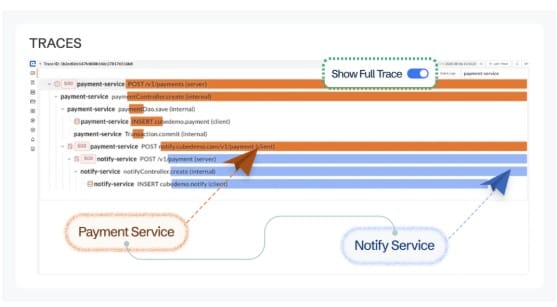
Once OpenTelemetry tracing is flowing from your Spring Boot application, the value it delivers depends on what the backend does with the trace data. A trace viewer that shows individual spans is a starting point. What matters in production is whether you can move from a slow span to the infrastructure metric that explains it, the logs from that same request, or the downstream service call that caused the latency.
CubeAPM accepts OTLP directly from your existing OTel Java agent or Spring Boot starter with no additional configuration. It auto-instruments Spring Boot, Hibernate, Tomcat, and Kafka via the OTel Java agent and correlates distributed request traces directly with JVM metrics such as GC pause time, heap usage, and thread activity. When a slow trace appears, CubeAPM links it to the specific database query, downstream service call, or JVM event responsible. It runs self-hosted inside your own infrastructure at $0.15/GB ingestion with no per-user fees, and its smart sampling preserves slow, error-prone, and unusual traces while reducing ingestion volume by up to 80%.
Summary
The Java agent is the right starting point for most Spring Boot applications because it provides the widest automatic library coverage with no code changes. Use the OTel community starter for Spring Boot 3.x applications, where you need native image support or prefer application.properties-based configuration. Use the Spring Boot 4 native starter for Spring Boot 4.x applications and remember that its default 10% sampling rate must be raised during development. Add @WithSpan for declarative span creation on service methods, and use the Tracer API directly when you need programmatic control over span lifecycle.
| Approach | Spring Boot version | Best for | Key caveat |
| Java agent v2.28.1 | Any | Most teams. Zero code changes, widest library coverage | Does not work with GraalVM native image |
| OTel community starter (BOM 2.28.0) | 2.6+ and 3.x | Native image builds, properties-based config | Less automatic coverage than the agent. Requires AOP for @WithSpan |
| Spring Boot 4 native starter | 4.x only | Spring Boot 4 applications | Uses management.* config. Default 10% sampling rate. Do not mix with community starter |
| @WithSpan annotation | Any (with AOP) | Declarative span creation on service methods | Spring-managed beans only. Requires spring-boot-starter-aop with OTel community starter |
| Tracer API | Any | Programmatic spans, exception recording, conditional span creation | More verbose but works in all contexts including internal method calls |
Disclaimer : Spring Boot version (4.0.6, April 23, 2026), OTel Java agent version (v2.28.1, confirmed from opentelemetry.io/docs/languages/java last modified May 21, 2026), OTel instrumentation BOM version (2.28.0, from opentelemetry.io/docs/zero-code/java/spring-boot-starter/getting-started last modified April 23, 2026), and Spring Boot 4 native starter behavior are verified against spring.io/blog, opentelemetry.io/docs/zero-code/java/spring-boot-starter, and the opentelemetry-java-instrumentation GitHub releases page as of May 2026.
Also read:
What is the Difference Between Synthetic monitoring and Real User Monitoring (RUM)?
What Are the Best Synthetic Monitoring Tools in 2026?
What Is Synthetic Monitoring and How Does It Differ From Uptime Monitoring?