










If you are running workloads on Amazon EKS, you need visibility into pod health, node resource usage, and application performance. Prometheus is the most widely adopted open-source monitoring tool for Kubernetes, and this guide shows you exactly how to set it up. You will deploy Prometheus using the kube-prometheus-stack Helm chart and configure persistent storage so your metrics survive pod restarts.
- Use kube-prometheus-stack, not bare Prometheus. It bundles Alertmanager, Node Exporter, and kube-state-metrics in a single install for full coverage.
- Persistent storage is not optional in production. No PVC means all metrics vanish on pod restart. Set it up in values.yaml before going live.
- On EKS 1.23+, install the EBS CSI driver first. Without it, PVCs stay Pending and Prometheus never starts.
- Port-forwarding is for local testing only. Use a LoadBalancer or Ingress for team access, locked down with Security Groups or AWS WAF.
- CloudWatch gets expensive at scale. Use it for AWS-managed services and Prometheus for everything inside Kubernetes.
- Amazon Managed Prometheus (AMP) removes operational overhead. Fully Prometheus-compatible with no storage, upgrades, or HA to manage.
- Start with the four PromQL queries in this guide. CPU per node, memory per pod, non-running pods, and disk pressure cover the most common EKS failure modes.
To set up Prometheus monitoring on AWS EKS:
- Create a monitoring namespace
- Add the
prometheus-communityHelm repo - Install
kube-prometheus-stackwithhelm install - Port-forward to access the Prometheus UI on port 9090
This guide covers each step with verified commands and explains what each component does.
What Is EKS Monitoring and Why Does It Matter?
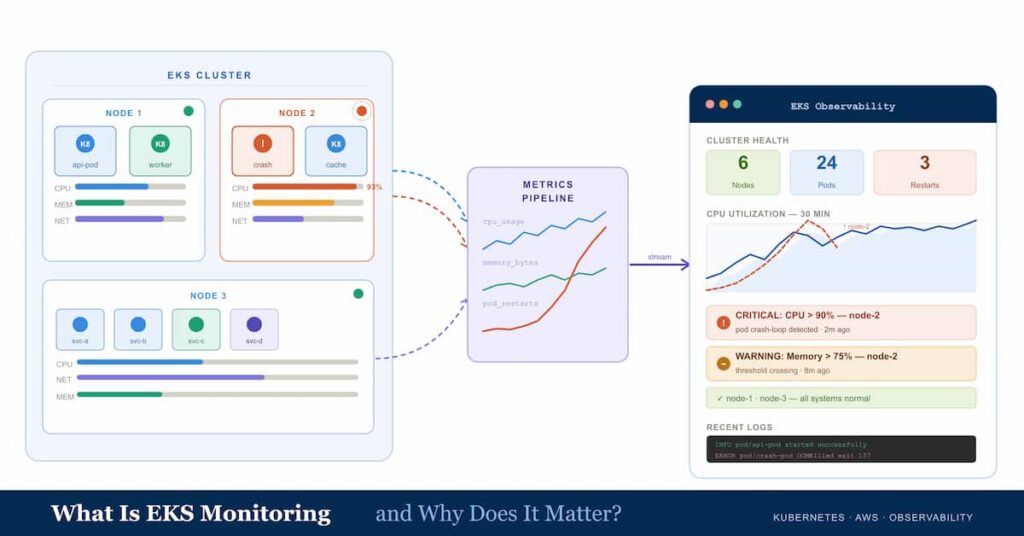
EKS monitoring refers to collecting, storing, and visualizing metrics from your Amazon Elastic Kubernetes Service cluster. Without monitoring, you cannot reliably answer questions like: Is my cluster running out of memory? Which pod is consuming the most CPU? Why did my deployment fail at 2 a.m.?
Prometheus addresses this by continuously scraping metrics exposed by your nodes, pods, and Kubernetes API objects. It stores these in a time-series database and lets you query them with PromQL. From there you can build dashboards, set alert rules, and track resource usage across your entire cluster.
According to the AWS EKS documentation, Prometheus is the recommended self-managed monitoring approach for EKS clusters, with Amazon Managed Service for Prometheus (AMP) available as the fully managed alternative.
Prerequisites
Before you start, make sure you have the following in place:
- A running Amazon EKS cluster (version 1.21 or later recommended)
- kubectl: installed and configured with access to your cluster. Verify with: kubectl cluster-info
- Helm v3+: the Kubernetes package manager. Install from https://helm.sh/docs/intro/install/
- AWS CLI: configured with credentials and the correct region
- IAM permissions to create namespaces and deploy Helm charts
If your EKS nodes lack sufficient CPU or memory, the Prometheus stack will enter a Pending state. A minimum of 2 vCPUs and 4 GB RAM across your node group is recommended for the full kube-prometheus-stack.
Step 1: Create a Dedicated Monitoring Namespace
Isolating your monitoring stack in its own namespace keeps it separate from application workloads and simplifies access control.
kubectl create namespace monitoringConfirm the namespace exists:
kubectl get namespace monitoringStep 2: Add the Prometheus Helm Repository
Helm charts for Prometheus are maintained by the prometheus-community organization. Add the repository and update the local chart index:
helm repo add prometheus-community https://prometheus-community.github.io/helm-chartshelm repo updateStep 3: Install kube-prometheus-stack
The kube-prometheus-stack Helm chart is the recommended way to deploy Prometheus on Kubernetes. It installs the following components in a single command:
- Prometheus Server
- Alertmanager
- Prometheus Operator
- Node Exporter (collects node-level metrics like CPU and memory)
- kube-state-metrics (exposes Kubernetes API object state)
Run the install command:
helm install kube-prometheus-stack \ prometheus-community/kube-prometheus-stack \ --namespace monitoring \ --create-namespaceHelm will output the release name and status. The –create-namespace flag ensures the namespace is created if it does not already exist.
The chart deploys several pods. Allow 2 to 3 minutes for all of them to reach Running status, especially on new clusters where container images need to be pulled.
Step 4: Verify That All Pods Are Running
Check the health of all pods in the monitoring namespace:
kubectl get pods -n monitoringYou should see output similar to this:
NAME READY STATUS RESTARTSalertmanager-kube-prometheus-stack-alertmanager-0 2/2 Running 0kube-prometheus-stack-kube-state-metrics-XXXXXX 1/1 Running 0kube-prometheus-stack-operator-XXXXXXXXXXX 1/1 Running 0kube-prometheus-stack-prometheus-node-exporter-X 1/1 Running 0prometheus-kube-prometheus-stack-prometheus-0 2/2 Running 0If any pod shows Pending status, check whether PersistentVolumeClaims are bound (see Step 6). If a pod shows CrashLoopBackOff, inspect its logs with: kubectl logs <pod-name> -n monitoring
Step 5: Access the Prometheus UI
Access Prometheus UI
Use kubectl port-forward to reach the Prometheus UI from your local machine:
kubectl port-forward -n monitoring \ svc/kube-prometheus-stack-prometheus 9090:9090Open your browser and go to http://localhost:9090. You can now run PromQL queries, browse scrape targets under Status > Targets, and view alert rules.
Step 6: Configure Persistent Storage (Production)
By default, Prometheus stores metrics in memory and local ephemeral storage. When a pod restarts, all historical data is lost. In production, configure a PersistentVolumeClaim backed by Amazon EBS so your metrics survive restarts.
Create a values.yaml file with the following storage configuration:
prometheus: prometheusSpec: storageSpec: volumeClaimTemplate: spec: storageClassName: gp2 accessModes: ["ReadWriteOnce"] resources: requests: storage: 20GiInstall or upgrade the chart with this values file:
helm upgrade --install kube-prometheus-stack \ prometheus-community/kube-prometheus-stack \ --namespace monitoring \ -f values.yamlThe gp2 StorageClass is available by default on EKS clusters. For clusters running Kubernetes 1.23 or later, you may need to install the Amazon EBS CSI driver as an EKS add-on before PVCs can be provisioned. See: docs.aws.amazon.com/eks/latest/userguide/ebs-csi.html
Step 7: Set Up Basic Alerting with Alertmanager
The kube-prometheus-stack includes Alertmanager. You can configure it to send notifications to Slack, PagerDuty, or email. The following values.yaml snippet routes alerts to a Slack webhook:
alertmanager: config: global: resolve_timeout: 5m route: group_by: ['alertname', 'namespace'] group_wait: 30s group_interval: 5m repeat_interval: 12h receiver: 'slack' receivers: - name: 'slack' slack_configs: - api_url: 'https://hooks.slack.com/services/YOUR/WEBHOOK/URL' channel: '#alerts' send_resolved: trueApply the updated values:
helm upgrade kube-prometheus-stack \ prometheus-community/kube-prometheus-stack \ --namespace monitoring \ -f values.yamlStep 8: Expose Prometheus Externally (Optional)
If your team needs to access Prometheus from outside the cluster, you have two options:
Option A: LoadBalancer Service
Patch the Prometheus service to create an AWS Application Load Balancer:
kubectl patch svc kube-prometheus-stack-prometheus \  -n monitoring \  -p '{"spec": {"type": "LoadBalancer"}}'
kubectl get svc -n monitoring
The EXTERNAL-IP column will show the AWS ELB DNS name once provisioned. Restrict access using Security Groups so only authorized IP ranges can reach the endpoint.
Option B: AWS Load Balancer Controller with Ingress
For HTTPS and path-based routing, use the AWS Load Balancer Controller with an Ingress resource. This approach lets you terminate TLS at the ALB and restrict access with AWS WAF.
Alternative: Amazon Managed Service for Prometheus (AMP)
If you do not want to manage Prometheus storage and scaling yourself, AWS offers Amazon Managed Service for Prometheus (AMP). AMP is a fully managed, Prometheus-compatible monitoring service that scales automatically and stores metrics durably in AWS infrastructure.
With AMP, you still run a Prometheus agent or the AWS Distro for OpenTelemetry (ADOT) Collector inside your EKS cluster to scrape and forward metrics. AMP then handles long-term storage and querying. Any Prometheus-compatible tool can connect to AMP using SigV4 authentication.
Self-managed Prometheus vs Amazon Managed Service for Prometheus
| Factor | Self-managed (Helm) | Amazon AMP |
|---|---|---|
| Cost | Pay for EC2 storage and compute only | Pay per metric sample ingested and queried |
| Setup time | 15 to 30 minutes | 30 to 60 minutes (IAM, IRSA, ADOT) |
| Scaling | Manual (add storage, scale pods) | Automatic |
| Durability | Depends on EBS or S3 config | Built-in, multi-AZ |
| Best for | Small to medium clusters, cost-sensitive setups | Large clusters, multi-cluster, production at scale |
Prometheus vs CloudWatch for EKS Monitoring
A common question is whether to use CloudWatch instead of Prometheus. Both work, but there are meaningful differences.
CloudWatch integrates natively with AWS services, requires no additional tooling, and is a good fit for small EKS clusters where you are already invested in the AWS ecosystem. However, CloudWatch costs can escalate quickly. Custom metrics are priced at roughly $0.30 per metric per month, and costs multiply across dimensions (nodes, pods, namespaces). Teams managing clusters with many custom application metrics have reported monthly bills in the thousands of dollars.
Prometheus stores metrics locally, which makes it free at the metric-collection level. The tradeoff is operational overhead: you manage storage, upgrades, and high availability yourself. For teams already using Kubernetes, the Prometheus ecosystem is well-supported and provides richer Kubernetes-native metrics out of the box.
If you need metrics from AWS managed services like RDS, ALB, or SQS, those only expose data through CloudWatch. You can use the CloudWatch Prometheus exporter to pull them into Prometheus, but monitor API call volume carefully as it can become expensive at scale.
Common Issues and Fixes
Pods Stuck in Pending: PersistentVolumeClaim Not Bound
If the Prometheus server or Alertmanager pod shows Pending status, check the PVC:
kubectl get pvc -n monitoringIf the PVC is in Pending state, your cluster may not have a default StorageClass, or the EBS CSI driver is not installed. On EKS 1.23+, install the Amazon EBS CSI add-on through the EKS console or with:
eksctl create addon \ --name aws-ebs-csi-driver \ --cluster <your-cluster-name> \ --region <your-region> \ --forceYour Observability Tool Shows No Metrics
If your observability tool is not receiving data from Prometheus, verify the Prometheus service endpoint is reachable inside the cluster. The internal service URL for Prometheus is:
http://kube-prometheus-stack-prometheus.monitoring.svc.cluster.local:9090Point your tool to this URL as the Prometheus data source. If scrape targets are missing, check Status > Targets in the Prometheus UI at http://localhost:9090 after port-forwarding.
Port-Forward Disconnects After Idle Period
kubectl port-forward is designed for short-term local access. In production, expose services using a LoadBalancer or an Ingress controller rather than relying on port-forwarding.
Useful PromQL Queries for EKS Monitoring
Once Prometheus is running, use these queries in the Prometheus UI to get immediate visibility into your cluster:
CPU usage per node:
100 - (avg by(instance) (rate(node_cpu_seconds_total{mode="idle"}[5m])) * 100)Memory usage per pod:
sum by(pod, namespace) (container_memory_working_set_bytes{container!=""})Number of pods not in Running state:
count by(namespace) (kube_pod_status_phase{phase!="Running"})Node disk pressure:
kube_node_status_condition{condition="DiskPressure",status="true"}Summary
Setting up Prometheus monitoring on AWS EKS comes down to four core steps: create a monitoring namespace, add the Helm repository, install kube-prometheus-stack, and access the dashboards. From there, configure persistent storage for production, set up Alertmanager for notifications, and use PromQL queries to monitor the metrics that matter to your workloads.
For teams that prefer not to manage the monitoring stack themselves, Amazon Managed Service for Prometheus is a fully managed alternative that requires no storage configuration and scales automatically.
If your AWS CloudWatch, Datadog, or New Relic bill is climbing faster than your infrastructure, CubeAPM is worth a look. At $0.15/GB with no per-host or per-metric charges, it runs inside your own VPC, gives you unlimited retention, and keeps your data off third-party servers.
Disclaimer: This article contains pricing estimates based on publicly available AWS CloudWatch Logs rates as of May 2026. Actual costs may vary by AWS region, account type, and usage patterns. Always verify current pricing before making infrastructure decisions.
FAQs
1. What is the best way to monitor Amazon EKS?
Install the kube-prometheus-stack Helm chart. It bundles Prometheus, Alertmanager, Node Exporter, and kube-state-metrics in a single command and works out of the box with EKS.
2. Do I need anything before setting up Prometheus on EKS?
Yes. You need kubectl, Helm v3+, and the AWS CLI. On EKS 1.23 and later, also install the Amazon EBS CSI driver or your Prometheus storage will never provision.
3. How do I stop losing metrics when my Prometheus pod restarts?
Add a PersistentVolumeClaim backed by Amazon EBS in your values.yaml using the gp2 StorageClass. Without it, all historical metrics are wiped on every pod restart.
4. Is Prometheus cheaper than CloudWatch for EKS monitoring?
Yes, significantly. Prometheus is free and open source. CloudWatch charges roughly $0.30 per custom metric per month per dimension, which adds up fast across pods and namespaces.
5. My Prometheus pods are stuck in Pending. What do I check?
Run kubectl get pvc -n monitoring. If the PVC is unbound, the EBS CSI driver is likely missing. Install it as an EKS add-on and the pods will start.