










RDS Enhanced Monitoring pricing is based on CloudWatch Logs data ingestion and storage, not a separate RDS feature charge. The final cost depends on the monitoring interval you configure for each Amazon RDS instance.
RDS Enhanced Monitoring provides OS-level visibility into the host running your Amazon RDS instance, covering per-process CPU, memory, disk I/O, and file system utilization. Unlike standard CloudWatch metrics, which report database-level data from the hypervisor, Enhanced Monitoring deploys an agent directly on the underlying EC2 host.
This guide covers the exact cost breakdown by granularity setting, real-world usage estimates, and a practical assessment of whether Enhanced Monitoring is worth enabling for your workload.
- •The feature itself is free. You only pay for CloudWatch Logs data ingestion. There is no separate RDS charge.
- •The free tier covers most teams. At 60-second granularity, one instance uses ~0.27 GB/month, covering ~18 instances before any cost.
- •Granularity drives the cost. Data ranges from 0.27 GB/month at 60 seconds to 16.07 GB/month at 1 second.
- •Most instances cost $0 to $4/month. A t3.large at 15-second granularity generates ~4.1 GB/month, or ~$2.10/month after the free tier.
- •It surfaces data standard CloudWatch cannot. Per-process CPU, memory, file system usage, and OS-level disk I/O are exclusive to Enhanced Monitoring.
- •Worth it for virtually every production workload. If your instance costs $200+/month to run, $0 to $4 for deeper visibility is an easy call.
RDS Enhanced Monitoring has no direct cost of its own. You pay for the CloudWatch Logs data it generates. At the 60-second granularity setting, a single instance generates roughly 0.27 GB per month, which fits well within the 5 GB free tier. At the 1-second setting, that jumps to about 16 GB per month, costing approximately $5 to $8 per instance at standard CloudWatch Logs rates. For most production workloads, the 15-second or 60-second granularity delivers the best balance of visibility and cost.
What Is RDS Enhanced Monitoring?
Amazon RDS Enhanced Monitoring is a feature that collects operating system (OS) level metrics from the host on which your RDS DB instance runs. Standard CloudWatch metrics show you database-level data such as CPU utilization reported by the hypervisor. Enhanced monitoring goes deeper: it deploys an agent on the EC2 host and reports metrics from the OS itself, including per-process CPU usage, memory usage broken down by process, file system utilization, and disk I/O activity.
These are published into a CloudWatch Logs log group called RDSOSMetrics by default. They are not standard CloudWatch metric data points, which means you access them through CloudWatch Logs Insights rather than through the standard metrics console.
Supported DB engines include MySQL, PostgreSQL, MariaDB, Oracle, Microsoft SQL Server, Amazon Aurora, and IBM Db2. See the official AWS documentation for the full list of supported instance classes.
How RDS Enhanced Monitoring Pricing Works
Enhanced Monitoring itself does not carry a separate line item on your AWS bill. You are charged through Amazon CloudWatch Logs. Two components drive the cost:
- Data ingestion into CloudWatch Logs, billed at $0.50 per GB in most regions (verify current rates at aws.amazon.com/cloudwatch/pricing)
- Data storage in CloudWatch Logs, billed at $0.03 per GB per month after the retention period
The amount of data generated is determined by the granularity (monitoring interval) you choose and the number of DB instances you monitor. AWS also notes that instances handling more compute-intensive workloads report more OS process activity, which slightly increases the data volume.
CloudWatch Logs offers a free tier of 5 GB of data ingestion per month. This resets monthly and is shared across all CloudWatch Logs usage in your account. Once you exceed 5 GB, the standard rate applies. Source: Amazon CloudWatch Pricing
RDS Enhanced Monitoring Cost by Granularity
The table below is sourced directly from the AWS RDS FAQ and shows the approximate volume of data ingested into CloudWatch Logs per instance per month for each available granularity setting.
| Granularity | Data / Month (GB) | Free Tier Covers? | Est. Ingestion Cost* | Recommended For |
|---|---|---|---|---|
| 60 seconds | 0.27 GB | Yes (for ~18 instances) | ~$0.00 | Low-traffic, dev/staging |
| 30 seconds | 0.53 GB | Yes (for ~9 instances) | ~$0.00 to $0.03 | Standard workloads |
| 15 seconds | 1.07 GB | Yes (for ~4 instances) | ~$0.04 | Production databases |
| 10 seconds | 1.61 GB | Partial | ~$0.06 | I/O intensive workloads |
| 5 seconds | 3.21 GB | Partial | ~$0.11 | High-throughput apps |
| 1 second | 16.07 GB | No | ~$5.50 | Real-time diagnostics only |
*Estimated ingestion cost based on $0.50/GB after the 5 GB free tier for a single instance. Actual costs vary by AWS region and account-level free tier usage. Storage costs are additional at $0.03/GB/month based on your log retention setting.
Real-World Cost Examples
Example 1: Single instance at 15-second granularity
A t3.large Multi-AZ MySQL instance with Enhanced Monitoring at 15 seconds generates roughly 140 MB per day, or about 4.1 GB per month. If this is your only CloudWatch Logs usage and you are within the free tier, your cost is $0. Once you exceed the 5 GB free tier, you pay approximately $2.10 per month in ingestion for that one instance. This is a real usage figure shared in community discussions by AWS users with t3.large instances.
Example 2: Single instance at 60-second granularity
At 60-second monitoring, one instance generates 0.27 GB per month. You could monitor approximately 18 instances at this interval before exceeding the 5 GB CloudWatch Logs free tier. For small-to-medium teams, the monitoring cost is effectively $0.
Example 3: Single instance at 1-second granularity
At the finest 1-second interval, one instance generates roughly 16 GB per month. After the 5 GB free tier, that is 11 GB billed at $0.50/GB, or approximately $5.50 in ingestion charges alone per instance per month. Storage charges for retaining those logs add to the total. AWS recommends using 1-second granularity only when you need real-time diagnostics, and switching back afterward.
Example 4: Ten instances at mixed granularities
A team with 10 production databases might configure five instances at 60 seconds (1.35 GB total), three at 15 seconds (3.21 GB total), and two at 5 seconds (6.42 GB total). Combined data: approximately 10.98 GB per month. After the 5 GB free tier, 5.98 GB is billed at $0.50/GB, resulting in roughly $3 per month across all instances. Log storage costs are additional depending on your retention window.
How to Estimate Your RDS Enhanced Monitoring Cost
Follow these steps to get an accurate estimate before committing:
- Step 1: Enable Enhanced Monitoring at 60-second granularity on one instance. Let it run for a few hours.
- Step 2: Open CloudWatch Logs in the AWS console. Navigate to the RDSOSMetrics log group. Check the total data ingestion for that instance.
- Step 3: Extrapolate to a monthly figure. Multiply the hourly ingestion rate by 720 (hours in a 30-day month).
- Step 4: Multiply by the number of instances you plan to monitor.
- Step 5: Subtract your remaining free tier allowance (5 GB total per month per account).
- Step 6: Multiply the remaining GB by $0.50 to get your estimated monthly ingestion charge. Add log storage charges based on your retention setting.
You can also use the AWS CloudWatch Pricing Calculator to model your costs before enabling the feature. Adjust your granularity setting per instance to manage costs. AWS explicitly supports setting different granularities for different instances within the same account.
What RDS Enhanced Monitoring Gives You
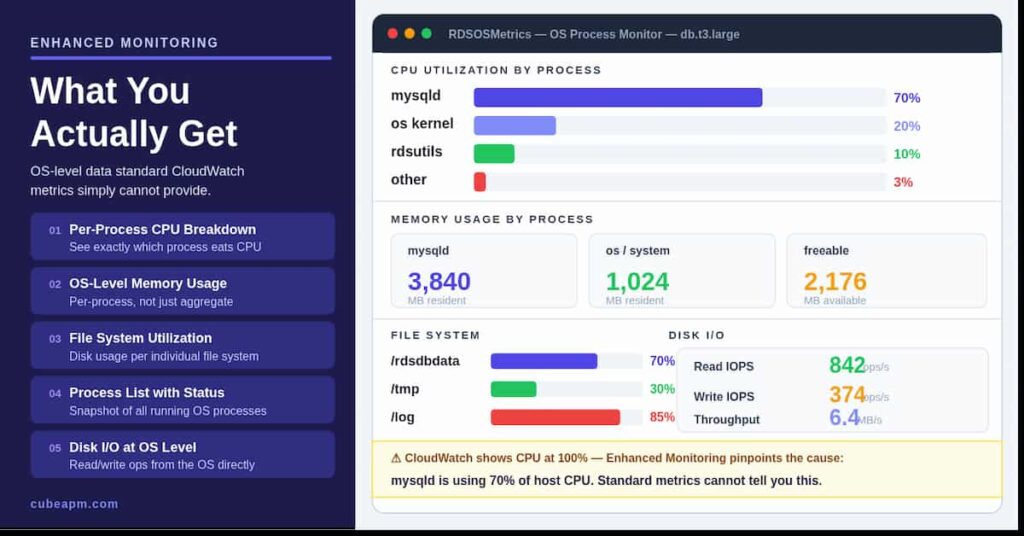
Standard CloudWatch metrics report database-level data from the hypervisor. Enhanced Monitoring reports OS-level data from the host. The distinction matters in real debugging scenarios. Here is what you get that standard metrics do not provide:
- Per-process CPU breakdown: See exactly which processes on the database host are consuming CPU, not just the total utilization.
- OS-level memory usage: Track memory per process, not just the aggregate freeable memory metric.
- File system utilization: Monitor disk usage across individual file systems on the host.
- Process list with status: Get a snapshot of running processes on the OS, useful for identifying rogue queries or system daemons consuming resources.
- Disk I/O at OS level: See read/write operations as reported by the OS, complementing the CloudWatch storage metrics.
This data is especially valuable when your CloudWatch CPU metric shows 100% but you cannot tell whether the load is coming from the database engine, the OS scheduler, or another process. Enhanced Monitoring resolves that ambiguity quickly.
Is RDS Enhanced Monitoring Worth It?
For most teams, yes. Here is a practical breakdown:
When it is clearly worth it
- You run production databases where a performance issue costs more per hour than the monthly monitoring fee.
- You have experienced unexplained CPU spikes or memory pressure and need OS-level context to root-cause them.
- You are right-sizing instances and need per-process data to identify whether the database engine or the OS is the bottleneck.
- You have I/O costs that have grown unexpectedly and want to correlate them with OS-level disk activity.
- Your security or compliance requirements call for detailed host-level monitoring of your database infrastructure.
When you might skip it or limit it
- Dev and staging environments where detailed OS metrics are rarely consulted. Use 60-second granularity or keep it off.
- Very small instances (t3.micro) under light load where CloudWatch standard metrics are sufficient.
- Cost-sensitive environments with many instances at fine granularities. The 1-second setting can add meaningful cost at scale.
The cost-benefit in plain terms
A single production database instance at 15-second granularity costs at most $2 to $4 per month after the free tier. If that instance costs $200 to $2,000 per month to run and serves a business-critical workload, spending $3 per month for the visibility to catch and fix a performance issue faster is straightforward to justify.
The only scenario where Enhanced Monitoring becomes a meaningful cost is when you run it at 1-second granularity across a large number of instances for extended periods. That is not a recommended steady-state configuration. Use it temporarily during active incident investigation, then dial back the granularity.
How to Control RDS Enhanced Monitoring Costs
- Use the coarsest granularity that meets your needs. For routine health monitoring, 60 seconds is often sufficient. Reserve 1-second and 5-second intervals for active troubleshooting.
- Set different granularities for different instances. Production databases can use 15 seconds while dev instances use 60 seconds. AWS supports per-instance configuration.
- Adjust CloudWatch Logs retention. Enhanced Monitoring data defaults to a log retention period in CloudWatch Logs. Reducing this period (for example, to 7 days instead of 30) lowers your storage charges without affecting real-time visibility.
- Monitor your CloudWatch Logs data volume. Check the RDSOSMetrics log group size regularly in the CloudWatch console. Set a CloudWatch Logs data ingestion alarm to alert you if costs rise unexpectedly.
- Use CloudWatch Metric Filters to extract specific OS metrics into CloudWatch Metrics for alarming, rather than retaining the full log stream indefinitely.
If you want to forward Enhanced Monitoring data to a different system, such as a third-party SIEM or observability platform, AWS provides a method to import RDS Enhanced Monitoring metrics into Amazon CloudWatch via Lambda. See the AWS Database Blog walkthrough for the implementation details.
How to Enable RDS Enhanced Monitoring
Enabling Enhanced Monitoring requires an IAM role with the correct permissions. Here is the process:
- Step 1: Create an IAM role for Enhanced Monitoring. Attach the Monitoring Role managed policy to a new role with the trust relationship set to monitoring.rds.amazonaws.com.
- Step 2: In the RDS console, select your DB instance and choose Modify.
- Step 3: Under Monitoring, enable Enhanced Monitoring and select the granularity interval.
- Step 4: Assign the IAM role you created in Step 1.
- Step 5: Apply immediately or during the next maintenance window.
You can also enable it at instance creation time. The setting is available in the AWS CLI using the –monitoring-interval and –monitoring-role-arn parameters on the create-db-instance and modify-db-instance commands.
Third-Party Monitoring Tools for RDS Enhanced Monitoring Data
Several third-party monitoring tools can ingest RDS Enhanced Monitoring data and present it alongside your other infrastructure metrics. This is useful if your team already uses a centralized observability platform and wants to avoid switching between tools:
- CubeAPM: Brings RDS metrics into a broader observability view with application traces, logs, infrastructure metrics, and Kubernetes signals. It is useful for teams that want database performance context without moving monitoring data outside their own environment.
- New Relic: Provides a quickstart integration for RDS Enhanced Monitoring data with pre-built dashboards.
- Datadog: Supports RDS Enhanced Monitoring as a configurable check with alerts and anomaly detection.
- Site24x7: Offers native RDS monitoring with Enhanced Monitoring support, including per-process dashboards and alert thresholds.
Using a third-party tool does not eliminate the CloudWatch Logs cost. The data still flows through CloudWatch Logs before being picked up by the external integration. Your CloudWatch Logs ingestion and storage charges apply regardless of which tool you use to visualize the data.
Summary
RDS Enhanced Monitoring pricing is driven entirely by CloudWatch Logs data ingestion and storage charges. The feature itself is free to enable. Here is the key information:
| Item | Detail |
|---|---|
| Direct cost of the feature | None |
| What you pay for | CloudWatch Logs ingestion and storage |
| Data ingestion rate | $0.50/GB (most regions) |
| Free tier | 5 GB/month of CloudWatch Logs ingestion |
| Lowest cost setting (60s) | ~0.27 GB/month per instance |
| Highest cost setting (1s) | ~16.07 GB/month per instance |
| Practical cost (1 instance, 15s) | $0 to ~$4/month |
| How to control costs | Reduce granularity, reduce log retention |
For production databases on workloads where downtime or slow queries cost real money, RDS Enhanced Monitoring is one of the lowest-cost, highest-value monitoring investments available in the AWS ecosystem. Enable it at 60-second or 15-second granularity to start, verify your CloudWatch Logs costs after the first billing cycle, and adjust from there.
All pricing figures in this article are based on published AWS rates as of 2025 and 2026. Always verify current rates at aws.amazon.com/cloudwatch/pricing before making infrastructure decisions, as AWS pricing can change.
CloudWatch Logs gives you the raw data. CubeAPM turns it into answers. Get unified visibility across your RDS Enhanced Monitoring metrics, query performance, and infrastructure health in a single pane of glass, without the CloudWatch Logs query overhead.
Disclaimer: This article contains pricing estimates based on publicly available AWS CloudWatch Logs rates as of May 2026. Actual costs may vary by AWS region, account type, and usage patterns. Always verify current pricing before making infrastructure decisions.
FAQs
1. Does RDS Enhanced Monitoring have a free tier?
Not directly. The free tier that applies is the CloudWatch Logs free tier of 5 GB of data ingestion per month. At 60-second granularity, a single instance generates about 0.27 GB per month, so you can monitor roughly 18 instances at that interval before exceeding the free tier. The 5 GB free tier is available to all AWS accounts, not just new accounts.
2. Will enabling Enhanced Monitoring affect my RDS instance performance?
AWS states that the performance impact is minimal. The monitoring agent runs on the underlying EC2 host and does not execute inside the database engine. The overhead is small relative to the value of the data collected for production workloads.
3. How is Enhanced Monitoring different from Performance Insights?
Enhanced Monitoring reports OS-level metrics from the host: CPU per process, memory, disk, and file system. Performance Insights reports database engine activity: active sessions, wait events, SQL query load, and top SQL statements. They are complementary. A common pattern is to use both for production databases. Performance Insights has its own separate pricing, with a free tier for seven days of retention.
4. Can I change the granularity setting after enabling it?
Yes. You can modify the monitoring interval on a running instance at any time through the RDS console or CLI. The change takes effect without requiring a database restart. Reducing the granularity immediately reduces the rate of data ingestion into CloudWatch Logs.
5. How long is Enhanced Monitoring data retained?
Enhanced Monitoring data is stored in CloudWatch Logs. The default retention period depends on your CloudWatch Logs configuration. You can set a custom retention period for the RDSOSMetrics log group, from one day to ten years, or choose to never expire. Shorter retention periods reduce your storage costs.
6. Is Enhanced Monitoring available for all RDS instance types?
Most current-generation RDS instance classes support Enhanced Monitoring. It is available for db.t3, db.t4g, db.m5, db.m6g, db.r5, db.r6g, and other instance families. It is not supported on db.t1.micro or older legacy instance types. Check the AWS RDS documentation for the current list of supported instance classes by region and engine.