










SolarWinds has been one of the most widely deployed IT monitoring platforms for more than two decades. In 2026, buying decisions around it have become significantly more complex, not because the monitoring capabilities have weakened, but because the licensing model has fundamentally changed.
This review provides an independent, vendor-neutral analysis of SolarWinds in 2026 covering its current pricing structure, core product capabilities, real user sentiment, deployment architecture, and the alternatives that deserve a formal evaluation before any multi-year commitment is signed.
Disclaimer: This review is an independent editorial analysis based on publicly available SolarWinds documentation, pricing pages, and product materials, supplemented by verified user reviews from TrustRadius, Gartner Peer Insights, G2, and Capterra at the time of writing. Pricing, feature availability, packaging, and licensing terms may change; readers should verify current details directly with SolarWinds before making purchasing decisions.
What Is SolarWinds?
Platform Overview
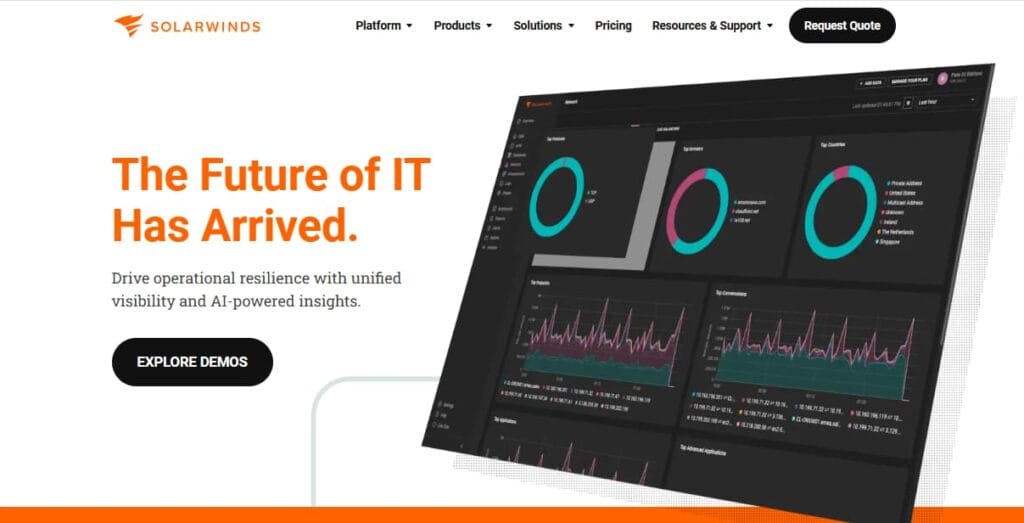
SolarWinds builds IT monitoring, observability, database, and service management tools used by IT operations teams, NOC engineers, network administrators, and other infrastructure-focused teams across enterprise environments. Its portfolio today is centered on hybrid IT use cases, with products covering observability, database performance, and IT service management.
The company’s historical flagship was the Orion Platform, the common backend for a suite of on-premises monitoring modules typically deployed in Windows Server environments. Those well-known modules included:
- NPM (Network Performance Monitor): network device health and performance
- SAM (Server & Application Monitor): server and application monitoring
- NCM (Network Configuration Manager): device configuration management
- NTA (NetFlow Traffic Analyzer): traffic analysis and bandwidth monitoring
- VMAN (Virtualization Manager): virtual infrastructure monitoring
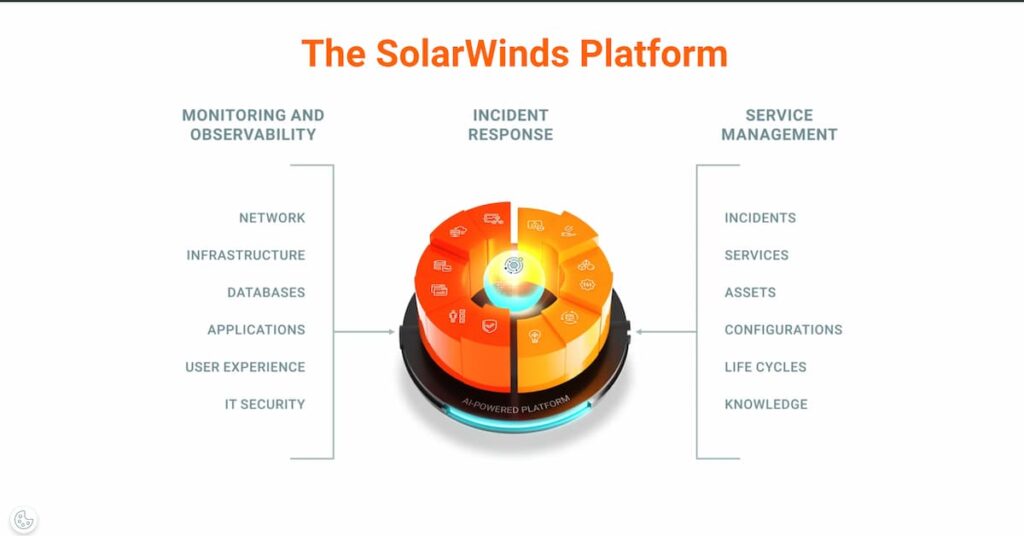
Today, SolarWinds presents its observability platform around two deployment options: SolarWinds Observability Self-Hosted and SolarWinds Observability SaaS. Beyond observability, the broader portfolio also includes database performance tools and IT service management products such as Service Desk.
SolarWinds’ Market Positioning in 2026
The IT monitoring market in 2026 can be viewed in three broad groups.
On one side are self-managed infrastructure monitoring tools such as Nagios and Zabbix, along with more traditional network monitoring products like PRTG. These tools can offer strong control and lower entry costs, but they often require more hands-on setup, maintenance, and scaling effort over time.
On the other side are cloud-native and full-stack observability platforms such as Datadog, Dynatrace, New Relic, and CubeAPM. These platforms are generally stronger in application performance monitoring, distributed tracing, and developer-centric investigation workflows, especially in microservices and cloud-heavy environments.
SolarWinds has traditionally sat in the middle. Its strongest identity has been commercially supported, infrastructure-led monitoring with deep enterprise network visibility and the option for self-hosted deployment. In 2026, that position remains largely the same, but the platform is now presented more clearly around two deployment models, Self-Hosted and SaaS, with both offerings expanding toward broader hybrid visibility.
The challenge for SolarWinds is that this middle ground is more competitive than it used to be. LogicMonitor, for example, now positions LM Envision as a SaaS-based hybrid observability platform with AI-driven operations features and fast time to value. That means SolarWinds is no longer competing only with legacy monitoring tools below it or cloud-native observability platforms above it. It is also competing with modern hybrid monitoring vendors that target a very similar buyer.
Key Features of SolarWinds
SolarWinds NPM remains one of the strongest products in the portfolio. TrustRadius shows very high feature ratings for network monitoring and network topology and mapping, and SolarWinds’ own product pages highlight auto-discovery, customizable thresholds, path analysis, and broad visibility across hybrid environments. These are some of the reasons SolarWinds remains a serious option for network-heavy teams.
SolarWinds is also well regarded for dashboards and reporting. TrustRadius shows very strong user feedback for report customization, and SolarWinds has long emphasized scheduled, customizable reporting as one of its operational strengths. This is especially useful for teams that need recurring performance, availability, or compliance reporting.
Current SolarWinds Observability messaging includes anomaly-based alerting powered by a cloud-based AIOps service and enhanced with machine learning. The practical goal is to reduce alert noise and help teams focus more quickly on likely problem sources. This is a meaningful improvement over simple static-threshold monitoring.
SolarWinds now positions its observability platform around two deployment options, Self-Hosted and SaaS, and its current documentation says both offerings can provide end-to-end hybrid visibility. That makes SolarWinds relevant for teams monitoring a mix of on-premises infrastructure and cloud environments such as AWS, Azure, and GCP.
SolarWinds also offers database observability features for teams that need deeper visibility into database performance. The current SaaS pricing page highlights database observability as a separate module, and SolarWinds describes related capabilities such as query-level visibility, wait analysis, and performance troubleshooting across major database platforms.
SolarWinds Service Desk adds IT service management features such as ticketing, self-service, SLA support, change management, and CMDB capabilities. It is not part of core observability pricing, but it matters for organizations that want to connect monitoring and service workflows more closely.
SolarWinds Network Configuration Manager supports automated configuration backups, change monitoring, rollback, and compliance-focused workflows. Current SolarWinds pages also highlight change management and compliance assessments, which make it especially relevant for teams operating in controlled or audit-heavy environments.
SolarWinds also supports wireless monitoring as part of its broader network visibility story, including wireless discovery and mapping. This is useful, though it is usually not the feature that most clearly differentiates the platform compared with its stronger core network monitoring capabilities.
How SolarWinds Works: Architecture and Deployment
SolarWinds Observability Self-Hosted follows the SolarWinds Platform architecture and is deployed in the customer’s own environment. Current 2026.1 platform requirements support Windows Server 2016, 2019, 2022, and 2025 for platform servers and additional polling engines. The platform uses a polling-based model, with SolarWinds documentation continuing to support methods such as SNMP, WMI, and ICMP for monitoring different types of infrastructure.
Discovered resources and monitored entities are managed through the SolarWinds platform, where teams can configure dashboards, alerting, and reporting. The architecture can also scale through additional polling engines, additional web servers, and high-availability components, which is reflected in the current release notes and system requirements.
Key architectural characteristics:
- Self-hosted monitoring backend, managed by the customer
- Polling-based architecture for infrastructure monitoring
- Support for additional polling engines and related scalability components
- Windows-based core platform deployment
- Strong fit for organizations that want more deployment control than a pure SaaS model offers
SolarWinds Observability SaaS is cloud-hosted by SolarWinds. Instead of running the monitoring backend yourself, you connect your environment to SolarWinds using SaaS onboarding workflows, agents, and collectors. SolarWinds documents both the SolarWinds Observability Agent and a customized OpenTelemetry Collector for collecting and forwarding telemetry into the SaaS platform.
This model reduces the operational burden of managing the observability platform infrastructure yourself. At the same time, it means telemetry is sent to SolarWinds’ SaaS environment rather than being kept entirely inside a self-hosted platform stack. SolarWinds’ documentation also notes the service’s data centers and endpoint URIs, which reinforces that SaaS collection depends on sending telemetry to SolarWinds-managed endpoints.
SolarWinds’ current documentation says the platform offers two deployment options, Self-hosted and SaaS, and that both now aim to provide end-to-end hybrid visibility. In practice, the difference is operational model: Self-Hosted gives customers more control over where the platform runs and how it is managed, while SaaS reduces backend management effort but routes telemetry through SolarWinds’ cloud service. That distinction is important for buyers comparing SolarWinds with other hybrid monitoring and observability platforms.
What Are SolarWinds’ Pricing Options?
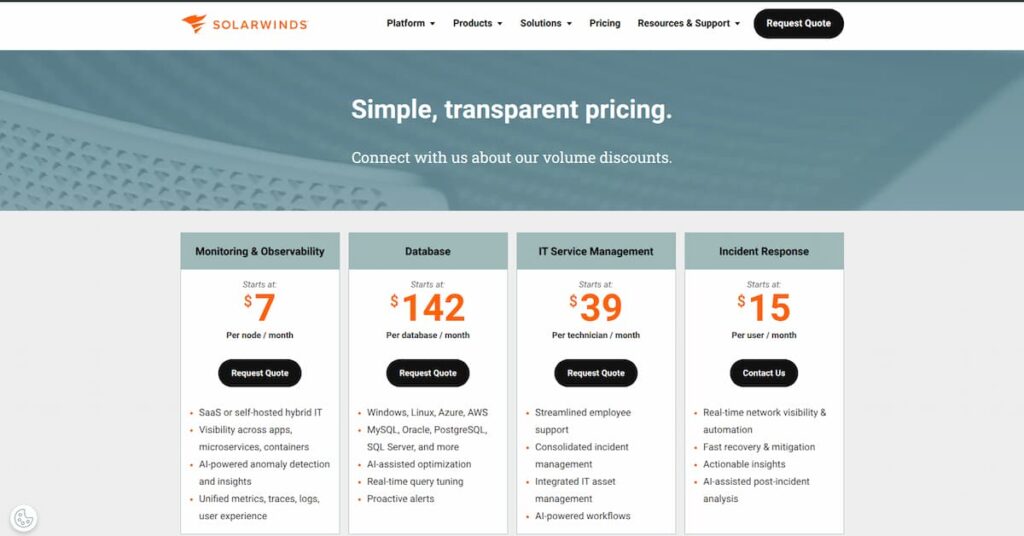
SolarWinds no longer fits neatly into one old-style pricing table. In 2026, the company presents Monitoring & Observability as a broader category that can be deployed as SaaS or self-hosted, with public pricing starting at $7 per node per month on the main pricing page. The dedicated SolarWinds Observability Self-Hosted page lists a more specific starting price of $7.42 per node per month, billed annually, while the SolarWinds Observability SaaS pricing page breaks observability into separate modules with different billing units.
That means SolarWinds buyers are really choosing between two pricing structures:
- SolarWinds Observability Self-Hosted
- SolarWinds Observability SaaS
What Is the Billing Unit in SolarWinds?
SolarWinds does not use one universal billing unit across its observability platform.
For SolarWinds Observability Self-Hosted, pricing is node-based. The Self-Hosted product page lists pricing starting at $7.42 per node per month, billed annually, with volume discounts available.
For SolarWinds Observability SaaS, pricing depends on the module:
- Network and Infrastructure Observability is priced per active network device or host.
- Application Observability is priced per service.
- Log Observability is priced per GB per month.
- Database Observability is priced per database instance.
- Digital Experience Observability is priced separately for synthetic monitoring and real user monitoring.
That means SolarWinds pricing is modular on the SaaS side and node-based on the Self-Hosted side. Unlike platforms that use one blended billing unit across infrastructure types, SolarWinds requires buyers to model the actual mix of infrastructure, services, logs, and databases they plan to monitor.
Pricing Options
SolarWinds’ current product pages show:
- SolarWinds Observability Self-Hosted: fully functional for 30 days
- Service Desk: fully functional for 30 days
- SolarWinds Observability SaaS modules: free trial options are shown on the pricing page
- Starting price: $7.42 per node per month, billed annually
- Deployment model: self-hosted
- Positioning: for on-prem, hybrid, and cloud environments where teams want more deployment control
- Commercial note: volume discounts are available
- Trial: fully functional for 30 days
This is the cleaner pricing path for buyers who still think about SolarWinds in its traditional infrastructure-led, self-hosted form. It is the easiest SolarWinds option to model at a high level because the billing starts with nodes, not multiple separate usage dimensions.
- Starting price: $12.00 per active network device or host per month
- Billing unit: active network device or active infrastructure host
- Positioning: infrastructure and network monitoring in the SaaS platform
- Trial: free trial available on the pricing page
This is the main SaaS entry point for teams focused on infrastructure and network visibility. It is the closest SaaS equivalent to SolarWinds’ traditional monitoring identity.
- Starting price: $27.50 per service
- Billing unit: service
- Positioning: real-time application metrics, distributed tracing, and code profiling
- Trial: free trial available on the pricing page
This is the application-layer module in the SaaS platform. It is relevant when SolarWinds is being evaluated as a broader observability product, not just as an infrastructure monitoring tool.
- Starting price: $5.00 per GB per month
- Billing unit: GB
- Positioning: centralized log collection and analysis in the SaaS observability platform
- Trial: free trial available on the pricing page
This is one of the most important pricing lines to explain clearly because log volume can become a major driver of total spend. For SolarWinds, the platform can look reasonably priced at the host level, then change materially once log usage grows.
- Starting price: $70.00 per database instance
- Billing unit: database instance
- Positioning: database performance visibility inside the SaaS platform
- Trial: free trial available on the pricing page
This module matters most for environments where database performance is a meaningful part of incident response and operations visibility.
SolarWinds also prices digital experience modules separately:
- Synthetic Monitoring starts at $10.00 per 10 uptime checks or 2 transaction checks
- Real User Monitoring starts at $10.00 per 100,000 page views
These are separate from the core infrastructure, application, log, and database observability modules.
What This Means for Buyers
SolarWinds pricing is easier to understand once you separate it into two stories:
- Self-Hosted is node-based and easier to model at a high level.
- SaaS is modular and becomes more sensitive to actual product scope, especially log volume.
What does SolarWinds really cost?
Scenario 1: Small hybrid team using Self-Hosted
Assumptions:
- 500 monitored nodes
- Self-Hosted pricing
- No extra modules modeled
- No services, discounts, or support upgrades included
Disclaimer: These are directional editorial estimates for comparison only. They are not official SolarWinds quotes. Actual pricing depends on deployment model, product scope, negotiated terms, volume discounts, and how much telemetry is routed through the platform.
| Item | Value |
| Nodes | 500 |
| Price per node / month | $7.42 |
| Estimated monthly cost | $3,710 |
| Estimated annual cost | $44,520 |
This is the cleaner SolarWinds story. If your main need is infrastructure and network visibility in a self-hosted model, the math is easy to follow. The real question is whether you stay close to this base scope or grow into broader product use. The calculation uses SolarWinds’ public Self-Hosted starting price.
Scenario 2: Mid-market enterprise using Self-Hosted
Assumptions:
- 1,500 monitored nodes
- Self-Hosted pricing
- No extra modules modeled
- No discounts included
Disclaimer: These are directional editorial estimates for comparison only. They are not official SolarWinds quotes. Actual pricing depends on deployment model, product scope, negotiated terms, volume discounts, and how much telemetry is routed through the platform.
| Item | Value |
| Nodes | 2,000 |
| Price per node / month | $7.42 |
| Estimated monthly cost | $14,840 |
| Estimated annual cost | $178,080 |
This is where SolarWinds starts to become a serious annual line item, even before professional services, support upgrades, or wider platform use. For larger teams, quote negotiation and real scope control matter a lot more than the headline entry price. The calculation again uses the public Self-Hosted starting price.
Scenario 3: Cloud-heavy Mid-market team using SolarWinds Observability SaaS
Assumptions:
- 120 active network devices or hosts
- 40 application services
- 1000 GB of logs per month
- 15 database instances
- Digital experience modules not included
Disclaimer: These are directional editorial estimates for comparison only. They are not official SolarWinds quotes. Actual pricing depends on deployment model, product scope, negotiated terms, volume discounts, and how much telemetry is routed through the platform.
| Item | Quantity | Unit price | Monthly cost |
| Network and Infrastructure Observability | 120 | $12.00 | $1,440 |
| Application Observability | 40 | $27.50 | $1,100 |
| Log Observability | 1000 GB | $5.00 | $5,000 |
| Database Observability | 15 | $70.00 | $1,050 |
| Total | $8,590 |
Estimated annual cost: $103,080
This scenario shows why the SaaS side needs more careful modeling. The bill is no longer driven by one number. It grows by monitored hosts, services, log volume, and database count. That can be flexible, but it also means costs can move faster as usage expands. Prices used here come directly from SolarWinds’ SaaS observability pricing page.
Scenario 4: Enterprise Team SaaS deployment
Assumptions:
- 400 active network devices or hosts
- 60 application services
- 2000 GB of logs per month
- 40 database instances
- digital experience modules not included
Disclaimer: These are directional editorial estimates for comparison only. They are not official SolarWinds quotes. Actual pricing depends on deployment model, product scope, negotiated terms, volume discounts, and how much telemetry is routed through the platform.
| Item | Quantity | Unit price | Monthly cost |
| Network and Infrastructure Observability | 400 | $12.00 | $4,800 |
| Application Observability | 60 | $27.50 | $1,650 |
| Log Observability | 4000 GB | $5.00 | $20,000 |
| Database Observability | 60 | $70.00 | $4,200 |
| Total | $30,650 |
Estimated annual cost: $367,800
This is the important SolarWinds pricing lesson in 2026: the SaaS platform can scale nicely, but it can also become expensive once you combine multiple observability layers. Log volume especially becomes a major driver. The math is based on public modular SaaS pricing.
What Actually Drives SolarWinds Costs
Understanding SolarWinds cost requires looking beyond one headline price. In 2026, SolarWinds does not use one simple observability billing model across the platform. SolarWinds Observability Self-Hosted starts at $7.42 per node per month, billed annually, while SolarWinds Observability SaaS prices different observability layers separately, including infrastructure, applications, logs, and databases. That means total cost depends on deployment model, product scope, and usage mix, not just on one entry-level rate.
Cost drivers at a glance
1. Deployment model
The first major cost driver is whether you are evaluating SolarWinds Observability Self-Hosted or SolarWinds Observability SaaS.
- Self-Hosted starts at $7.42 per node per month, billed annually.
- SaaS starts with separate module pricing instead of one blended rate.
- This means the same environment can price out very differently depending on which deployment path you choose.
Self-Hosted vs SaaS: infrastructure-only comparison
Formula:
- Self-Hosted monthly cost = hosts × $7.42
- SaaS infrastructure monthly cost = hosts × $12.00
- % increase = (SaaS – Self-Hosted) ÷ Self-Hosted × 100
| Scenario | Hosts | Self-Hosted at $7.42/node | SaaS Infrastructure at $12/host | Monthly increase | % increase |
| Growing team | 60 | $445.20 | $720.00 | $274.80 | 61.7% |
| Mid-market team | 200 | $1,484.00 | $2,400.00 | $916.00 | 61.7% |
| Enterprise team | 600 | $4,452.00 | $7,200.00 | $2,748.00 | 61.7% |
What this shows:
- Even before adding application observability, logs, or databases, SolarWinds SaaS starts higher than Self-Hosted for the same infrastructure footprint.
- The pricing gap is already meaningful at the infrastructure layer alone.
- This is the clearest starting point for understanding how deployment model changes total cost.
2. Infrastructure footprint
Infrastructure size is still a core cost driver.
- On the Self-Hosted side, pricing starts per node.
- On the SaaS side, Network and Infrastructure Observability starts per active host or device.
- As infrastructure grows, costs scale linearly, but from different starting points depending on deployment model.
3. Application scope
SolarWinds SaaS separates application observability from infrastructure monitoring.
- Application Observability starts at $27.50 per service.
- Monitoring a few critical services keeps this line item small.
- Broader service coverage pushes cost higher independently of infrastructure size.
4. Log volume
Log volume is one of the clearest cost multipliers in SolarWinds SaaS.
- Log Observability starts at $5 per GB per month.
- Log-heavy environments can become much more expensive than host count alone suggests.
- This is one of the biggest reasons SolarWinds should not be evaluated only from its infrastructure starting price.
5. Database footprint
Database monitoring is also priced separately.
- Database Observability starts at $70 per database instance.
- For small environments, this may remain modest.
- For larger environments with many production databases, it becomes a meaningful extra cost layer.
6. Product scope
The broader the SolarWinds footprint, the higher the total platform cost.
A team may start with:
- infrastructure monitoring only
Then expand into:
- application observability
- log observability
- database observability
- digital experience monitoring
- service management products like Service Desk
That broader adoption can increase value, but it also makes the pricing story much less about one starting rate and much more about combined scope.
7. Contract terms and packaging
SolarWinds’ public pages show starting prices, not one fixed final price for every customer.
- Self-Hosted pricing is billed annually.
- SolarWinds explicitly mentions volume discounts.
- Larger deployments are likely to be shaped by negotiated packaging and commercial terms.
What this shows
- Deployment model is the first pricing decision, not a small detail.
- Self-Hosted starts lower at the infrastructure level.
- SaaS cost rises faster once more observability layers are enabled.
- Buyers should model SolarWinds based on the exact mix of infrastructure, services, logs, and databases they expect to monitor, not just on the entry price.
Hidden costs buyers should plan for
A team may start with infrastructure monitoring and then add app observability, logs, databases, or Service Desk later. That broadens value, but it also broadens spend.
Self-Hosted gives you more control, but it also means your team carries more operational responsibility than with SaaS. That includes rollout, administration, upkeep, and internal ownership. SolarWinds makes the deployment choice explicit, which is useful, but buyers should still treat self-hosted operations as part of total cost.
On the SaaS side, logs are priced per GB. That means noisy environments can push spend upward quickly if teams do not control volume carefully.
Once teams move beyond core infrastructure into applications, databases, and user experience modules, the total price becomes less about one headline rate and more about combined platform usage.
Is SolarWinds the right fit for your team?
- Large enterprises with complex, multi-site, multi-vendor network infrastructure: where NPM’s depth and device coverage justify the cost
- Organizations already deeply embedded in the SolarWinds ecosystem: where switching costs outweigh pricing concerns
- Teams with on-premises or hybrid deployment requirements: due to compliance, data residency, or air-gap needs
- Dedicated network operations or NOC teams: with the expertise to manage the platform’s complexity and leverage its customization depth
- Organizations needing integrated ITSM + monitoring: where closed-loop incident management from a single vendor is a priority
- Small to mid-size teams: where per-node subscription economics are hard to justify against lower-cost or open-source alternatives
- Cloud-native or developer-first organizations: where APM, distributed tracing, and code-level insight are primary requirements; Datadog or Dynatrace are better fits
- Teams mid-transition on perpetual licenses: who are facing renewal sticker shock and have budget flexibility to re-evaluate
- Linux-native infrastructure environments: where the Windows Server requirement for HCO is a practical constraint
- Organizations needing full APM and distributed tracing: SolarWinds does not natively support this; alternatives like CubeAPM or Datadog are purpose-built for it
SolarWinds vs. Infrastructure Monitoring: Where It Fits vs. Full-Stack Observability
Modern ops teams need more than basic uptime checks. Infrastructure monitoring helps track network devices, servers, cloud resources, and system health. Full-stack observability goes deeper by connecting metrics, logs, traces, and user experience data so teams can investigate application issues faster.
SolarWinds still fits best as an infrastructure-first monitoring platform. It is especially useful for network-heavy, hybrid, and on-prem environments where teams need visibility into device health, server metrics, configuration changes, and operational dashboards.
That said, SolarWinds has expanded beyond classic infrastructure monitoring. SolarWinds Observability SaaS now includes application observability, distributed tracing, code profiling, synthetic monitoring, and real user monitoring.
So the practical distinction is simple:
- Use SolarWinds if your main need is infrastructure, network, and hybrid environment monitoring.
- Compare other platforms if you need deeper application tracing, OpenTelemetry-native instrumentation, and stronger control over observability data.
Feature comparison
| Feature | SolarWinds | CubeAPM |
| Infrastructure metrics monitoring | Yes | Yes |
| Cloud resource monitoring | Yes | Yes |
| Application Performance Monitoring | Yes | Yes |
| Distributed tracing | Yes | Yes |
| Log management | Yes | Yes |
| Real User Monitoring (RUM) | Yes | Yes |
| Synthetic monitoring | Yes | Yes |
| Self-hosted deployment | Yes | Yes |
| Pricing model | Node-based for Self-Hosted; modular for SaaS | Per GB ingested |
What this shows
- SolarWinds is no longer just a traditional infrastructure monitoring tool. Its current portfolio includes tracing, application observability, and digital experience modules.
- Even so, SolarWinds’ strongest identity is still infrastructure-led monitoring, especially in network-heavy and hybrid environments.
- CubeAPM is the stronger fit when the priority is application-centric observability, OpenTelemetry-native instrumentation, and running the observability stack fully inside your own environment.
- SolarWinds is the stronger fit when network operations, hybrid visibility, and broader IT operations tooling matter more.
SolarWinds Alternatives: How It Compares to Competitors
How does SolarWinds compare to CubeAPM?
CubeAPM and SolarWinds address different layers of operational visibility. SolarWinds is strongest in infrastructure-led monitoring, especially for hybrid environments and enterprise network operations. CubeAPM is more application-centric, with stronger emphasis on OpenTelemetry-native tracing, application performance monitoring, and running observability fully inside your own infrastructure.
| Pricing Component | SolarWinds | CubeAPM |
| Pricing model | Self-Hosted: per node/month; SaaS: modular | Per GB ingested |
| Starting price | Self-Hosted starts at $7.42/node/month | Starts at $0.15/GB |
| Application observability | Available in SaaS | Core platform strength |
| Deployment | Self-Hosted or SaaS | Your own cloud / infrastructure |
| Best fit | Hybrid infrastructure and network-heavy operations | APM-first, Kubernetes, microservices teams |
How does SolarWinds compare to Datadog?
Datadog is generally stronger for cloud-native, developer-first observability. SolarWinds is generally stronger for organizations that want deeper network monitoring and the option for self-hosted deployment.
| Pricing Component | SolarWinds | Datadog |
| Pricing model | Self-Hosted node-based or modular SaaS | Host-based plus usage-based add-ons |
| Starting price | Self-Hosted starts at $7.42/node/month | Infrastructure Monitoring Pro starts at about $15/host/month |
| Main cost driver | Deployment model, infrastructure, apps, logs, databases | Hosts, logs, APM, indexed spans, metrics, enabled products |
| Deployment | Self-Hosted or SaaS | SaaS |
| Best fit | Hybrid infrastructure and network-heavy environments | Cloud-native and developer-centric teams |
How does SolarWinds compare to ManageEngine?
ManageEngine is one of the most common SolarWinds alternatives for buyers that want a more traditional IT operations platform. It is often compared with SolarWinds in network monitoring, server monitoring, and ITSM-led environments.
| Pricing Component | SolarWinds | ManageEngine |
| Pricing model | Self-Hosted node-based or modular SaaS | Product-based and quote-based, depending on scope |
| Network monitoring depth | Strong | Strong |
| ITSM integration | Service Desk as separate SolarWinds product | Tight integration with ServiceDesk Plus |
| Best fit | Hybrid enterprise monitoring, network-heavy operations | Cost-conscious IT operations teams that want a broader IT management stack |
How does SolarWinds compare to LogicMonitor?
LogicMonitor targets a similar buyer in hybrid infrastructure monitoring, but with a modern SaaS-first delivery model. Its pricing is based on Hybrid Units, while SolarWinds now splits pricing between Self-Hosted node-based pricing and modular SaaS pricing. LogicMonitor’s public pricing starts at $16 per Hybrid Unit/month for Essentials.
| Pricing Component | SolarWinds | LogicMonitor |
| Pricing model | Self-Hosted node-based or modular SaaS | Per Hybrid Unit/month |
| Starting price | Self-Hosted starts at $7.42/node/month | Essentials starts at $16/HU/month |
| Deployment | Self-Hosted or SaaS | SaaS |
| MSP multi-tenancy | More limited | Stronger MSP focus |
| Best fit | Enterprise hybrid environments, self-hosted option | MSPs and SaaS-first hybrid monitoring teams |
How does SolarWinds compare to PRTG?
PRTG remains a well-known alternative for teams that prefer a sensor-based approach and smaller-scope network monitoring deployments. SolarWinds is generally the stronger fit for larger and more complex enterprise network environments, while PRTG is often easier to understand in smaller or mid-sized deployments. PRTG pricing is sensor-based, with subscription tiers such as PRTG 500.
| Pricing Component | SolarWinds | PRTG |
| Pricing model | Self-Hosted node-based or modular SaaS | Sensor-based subscription tiers |
| Starting point | Self-Hosted starts at $7.42/node/month | Tier-based by sensor count |
| Network monitoring depth | Stronger in enterprise-heavy environments | Strong for SMB and mid-market teams |
| Best fit | Larger hybrid and network-heavy environments | Smaller teams that want simpler sensor-based monitoring |
Conclusion
SolarWinds is still a strong platform in 2026 for teams that need deep network monitoring and hybrid infrastructure visibility. TrustRadius data still reflects that strength, with SolarWinds NPM at 7.8/10 from 619 reviews and especially strong scores for network monitoring and mapping.
The main change is commercial, not technical. Since SolarWinds became private after Turn/River completed its acquisition in April 2025, buyers need to pay closer attention to pricing structure, deployment model, and total cost over time. For the right hybrid, network-heavy environment, SolarWinds can still be a strong fit, but it should be modeled carefully against real alternatives before a final decision.
FAQs
1. How much does SolarWinds cost in 2026?
SolarWinds pricing depends on which product path you choose. The main pricing page lists Monitoring & Observability starting at $7 per node per month, while SolarWinds Observability Self-Hosted starts at $7.42 per node per month, billed annually. On the SaaS side, pricing is modular: Network and Infrastructure Observability starts at $12 per active network device or host, Application Observability at $27.50 per service, Log Observability at $5 per GB per month, and Database Observability at $70 per database instance.
2. What is SolarWinds Observability Self-Hosted?
SolarWinds Observability Self-Hosted is SolarWinds’ self-hosted observability and IT management offering for on-premises, hybrid, and cloud environments. SolarWinds presents Self-Hosted and SaaS as the two main deployment options for its observability platform.
3. What is the difference between SolarWinds Self-Hosted and SolarWinds SaaS?
The main difference is deployment model and pricing structure. Self-Hosted is deployed and managed in your own environment and uses node-based pricing, while SolarWinds Observability SaaS is cloud-delivered and prices different observability modules separately, such as infrastructure, application observability, logs, and databases.
4. Does SolarWinds offer a free trial?
Yes. SolarWinds currently offers a fully functional 30-day free trial for Network Performance Monitor, and that page says the trial includes everything SolarWinds Observability Self-Hosted offers. SolarWinds also has a general products page for free trials across monitoring, observability, ITSM, and database tools.
5. Is SolarWinds good for network monitoring?
Yes. SolarWinds remains one of the stronger commercial options for network-heavy environments. The NPM product page still emphasizes proactive network monitoring across hybrid environments, and TrustRadius continues to show strong review volume for NPM, with 619 reviews visible.
6. What does SolarWinds SaaS charge for infrastructure monitoring?
SolarWinds Observability SaaS charges for Network and Infrastructure Observability based on active network devices and active infrastructure hosts. SolarWinds’ subscription documentation says a host or network device is counted as active if telemetry was received from it within the previous calendar day.
7. Does SolarWinds support application observability and tracing?
Yes. SolarWinds Observability SaaS includes an Application Observability module, and SolarWinds describes it as covering real-time application metrics, distributed tracing, and code profiling. That means SolarWinds is no longer only a traditional infrastructure monitoring vendor, even though network and hybrid monitoring remain core strengths.