










Quick Answer: Log management is the end-to-end process of collecting, centralizing, parsing, storing, analyzing, and disposing of log data generated by applications, servers, networks, and cloud infrastructure. Its purpose is to give engineering, security, and operations teams a complete, searchable record of everything that happens inside a software system so they can troubleshoot faster, detect threats earlier, and meet compliance requirements with confidence.
Most teams make this choice under pressure and cut retention too far. By the time they need answers, the data is gone. A security issue from January is missing by July. An audit asking for 18-month-old access logs comes up empty. A recurring bug cannot be traced back to when it first appeared.
This guide explains log management from first principles and takes a clear position on retention, one that most vendors are financially incentivized not to take.
What Is a Log?
A log is a timestamped, automatically generated record of a specific event or action inside a system. Almost every component of a modern software stack produces them:
- Applications: Function calls, API requests, errors, user actions
- Operating systems: Kernel events, process starts and stops, hardware faults
- Web servers: HTTP requests, response codes, latency
- Databases: Queries executed, transactions committed or rolled back, slow queries
- Network devices: Firewall decisions, routing events, traffic anomalies
- Cloud services: Autoscaling events, authentication attempts, storage access
A single log line might look like this:
2026-03-15T09:42:11.034Z ERROR [payment-service] Payment gateway timeout after 5000ms — order_id=ORD-8821 user_id=U-4421That line tells you what happened (timeout), where (payment-service), when (timestamp), and who was affected. Multiply that across millions of events per second across dozens of services, and you begin to understand why log management exists and why the question of which events to keep and for how long matters so much.
Types of Logs
Capture events generated by your code errors, debug output, and business logic outcomes. These are the logs most engineers interact with day-to-day.
Record operating system events: process management, hardware events, kernel messages. On Linux these typically live in /var/log/syslog or /var/log/messages, and on Windows in the Windows Event Log.
Record who accessed what and when: login attempts, API authentication, and file access. Critical for security monitoring and compliance audits and among the most painful to lose when a breach is discovered months after the fact.
They are an immutable, tamper-evident record of security-relevant events. Regulators rely on these. Kubernetes audit logs, for example, capture every request to the API server.
Isolate failure events from informational noise useful for fast-path investigation of what’s broken.
Stems from firewalls, load balancers, and routers, recording traffic flows, blocked connections, and routing decisions.
Log Formats
| Format | Description | Common source |
| Plain text / syslog | Human-readable, line-by-line | Linux daemons, legacy apps |
| JSON | Structured key-value pairs, machine-friendly | Modern microservices |
| XML | Verbose but schema-validated | Enterprise middleware |
| CEF / LEEF | Common Event Format used in SIEM | Security appliances |
| W3C Extended | Standard web server format | IIS, older Apache |
Structured formats like JSON are strongly preferred in modern log management because they eliminate custom parsing rules and make every field queryable from day one.
What Is Log Management?
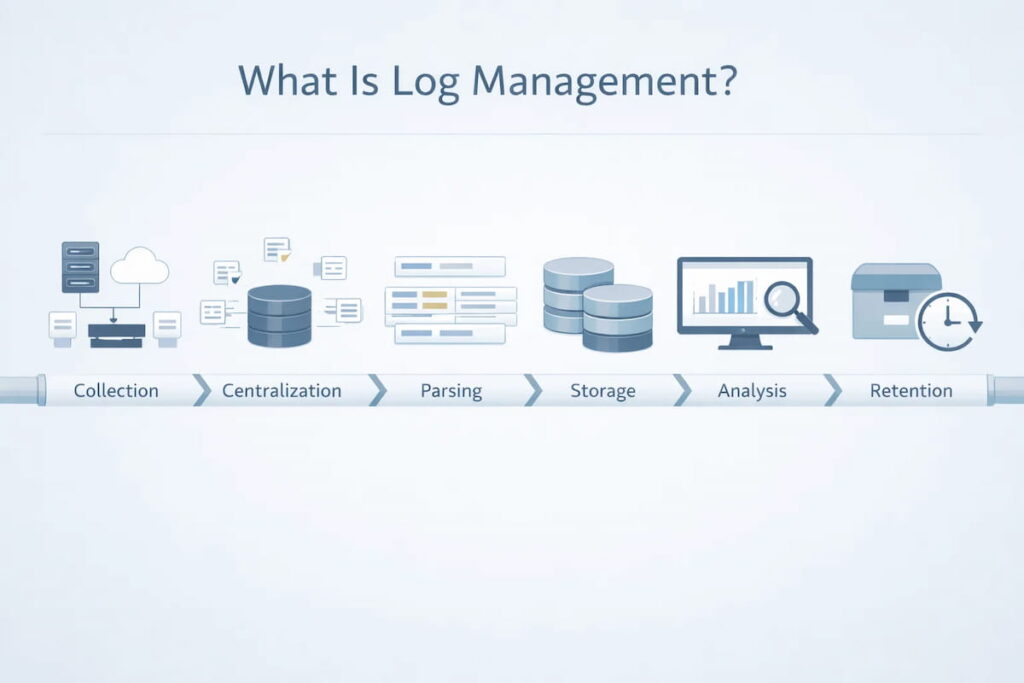
Log management is the complete lifecycle process for handling log data across an IT environment. It spans:
- Generation: Configuring what your systems log and at what verbosity
- Collection: Gathering logs from all sources into a central pipeline
- Parsing and normalization: Transforming varied formats into a consistent schema
- Storage and indexing: Persisting and making logs searchable at scale
- Analysis and alerting: Querying logs for insights, anomalies, and incidents
- Visualization: Presenting log data in dashboards and reports
- Archival and retention: Deciding how long each log type lives, and where
Log Management vs. Logging
- Logging is the act of writing log records of what your application code does when it calls
`logger.error("...")`. - Log management is everything that happens after logs are written: collection, storage, analysis, action, and retention.
Good logging practices feed into good log management outcomes. Structured, consistently formatted output is dramatically easier to manage at scale than free-form text.
Log Management vs. Log Monitoring
Log monitoring is a subset of log management, specifically the real-time alerting layer that watches incoming logs for anomalies or threshold violations. Log management is the broader discipline; monitoring is one of its operational outputs.
Why Log Management Matters
Faster Incident Response
When something breaks at 2 AM, logs are the fastest path to root cause. Well-managed logs mean engineers search across all services in seconds rather than SSH-ing into individual servers. Mean Time to Resolution (MTTR) is directly tied to how quickly a team can surface the relevant log lines and, critically, whether those log lines still exist.
Security and Threat Detection
Logs are the primary evidence in any security investigation. Failed login attempts, unusual API access patterns, privilege escalations, and data exfiltration all leave log trails. A significant percentage of security incidents are only discovered weeks or months after initial compromise. If your logs expire in 30 days, those trails are gone before you even know to look.
Log management is a foundational requirement for SIEM (Security Information and Event Management) systems. Splunk SIEM, Microsoft Sentinel, and IBM QRadar all consume logs as their primary data feed.
Regulatory Compliance
Many frameworks require logging, auditability, and documented retention policies, but they do not all define one fixed log retention period. Retention requirements depend on the regulation, the type of record, the industry, and local legal obligations.
Audit trail history for at least 12 months, with at least 3 months immediately available
Audit controls and documentation retention obligations, but not one universal log-retention period for every log type.
Logging and monitoring controls based on risk and control design; no fixed universal retention period.
Access and process records where appropriate, with retention based on necessity, proportionality, and a legal basis.
Log management and retention based on agency or organizational policy
Protected event logging and documented retention policies based on business, legal, and security needs.
The key point is simple: many teams keep logs for less time than their security, audit, or investigation needs actually require. That gap creates risk during incidents, audits, and post-mortems.
Performance Optimization
Logs are a leading indicator of degradation. A spike in database slow-query logs is your first signal before users notice latency. Rising 5xx error rates in access logs surface deployment issues before uptime monitors fire. Effective log management turns this reactive signal into a proactive capability.
The MELT Framework: Where Logs Fit in Full Observability
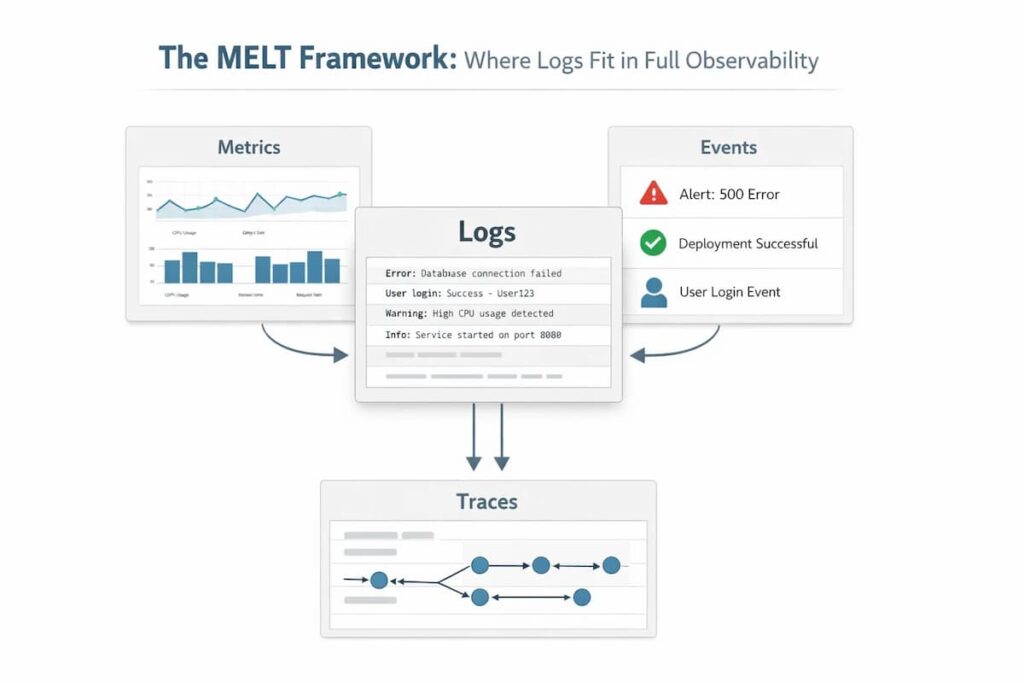
Modern observability is built on four data types (MELT):
- Metrics: Aggregated numerical measurements (CPU, request rates, error rates)
- Events: Discrete application occurrences
- Logs: Granular, timestamped event records
- Traces: Distributed request flows across services
Logs are foundational. Logs provide detailed context for system activity, while metrics, events, and traces each contribute different kinds of visibility. In modern observability, logs are one of several core telemetry signals. The connected workflow, latency spike in metrics → slow trace → specific log lines from involved services, is what makes modern observability work. Log management is not a silo; it sits at the center.
The Log Management Process, Step by Step
Step 1: Log Generation and Configuration
Before you can manage logs, you need to decide what to log. Logging levels give you control:
| Level | Use |
| DEBUG | Detailed diagnostic output; development only |
| INFO | Normal operational events |
| WARN | Unexpected situations that aren’t yet errors |
| ERROR | Failures requiring attention |
| FATAL / CRITICAL | System-level failures |
In production, most teams log at INFO or WARN and capture DEBUG selectively. Logging everything at DEBUG creates enormous volume with low signal density — and drives storage costs up sharply.
Structured logging emitting JSON rather than free text is the highest-impact decision at the generation layer. It eliminates downstream parsing complexity and makes every field queryable immediately.
Step 2: Log Collection
Collection gathers logs from all sources and routes them to a central destination. Two approaches:
Agent-based: A lightweight agent (Fluentd, Fluent Bit, or Vector) runs alongside each service and forwards logs. Standard for Kubernetes environments.
Agentless / API-based: Logs are pushed via HTTP or a message queue. Common for cloud-native services (AWS CloudWatch, GCP Cloud Logging, Azure Monitor).
The emerging best practice is the OpenTelemetry Collector, a vendor-neutral agent that collects logs, metrics, and traces through a single pipeline, reducing operational overhead and avoiding lock-in.
Step 3: Parsing and Normalization
Raw logs from different systems look nothing alike. Parsing extracts meaningful fields from raw text; normalization maps them to a consistent schema. A Nginx access log, a Python error, and a Kubernetes event all become queryable using the same field names.
Enrichment adds context not in the raw log, Kubernetes pod labels, geographic IP data, and service topology.
Step 4: Storage, Indexing, and Critical Retention
This is the step where most guides lose the plot.
Storage discussions usually focus on query speed and cost. Both matter. But the more consequential decision is retention policy: how long does each log type live, where does it live, and what happens when that window closes?
The Industry Default Is Too Short
Many commercial log management tools are optimized around shorter hot-retention windows, often with higher costs for longer searchable retention. In practice, this can push teams toward shorter retention periods than they actually need for security, compliance, and investigations.
The practical result: organizations treat log retention as a cost problem to minimize, not an operational requirement to satisfy. They set 30-day windows, accept the compliance gap, and hope an incident or audit doesn’t surface data older than a month.
What You Actually Lose With Short Retention
Here are real scenarios where truncated log retention causes direct harm:
- Security investigation: The average time between initial breach and discovery is measured in weeks to months across the industry. A 30-day log window means the initial compromise event, the most valuable evidence, is gone by the time you know to look for it.
- Recurring bugs: Some failure modes are intermittent and seasonal; they appear during peak traffic, at end-of-month batch runs, or under specific combinations of user behavior. A 90-day window may capture one instance; a longer window shows the full pattern.
- Compliance audit: An auditor requesting access logs for a specific user action from 14 months ago will find nothing in a system with 90-day retention. Producing a formal record of “logs not retained” is, at minimum, an audit finding.
- Post-mortem analysis: Serious post-mortems require understanding not just what happened this time but what the system’s behavior looked like in the months prior. Was this gradual degradation? A sudden change? You can’t answer that without historical log data.
The Tiered Storage Compromise (and Its Limits)
The conventional solution is tiered storage:
- Hot (indexed): 7–30 days fast, full-text search; highest cost
- Warm (compressed): 30–90 days slower retrieval, lower cost
- Cold (archive): 90 days to years blob storage (S3, GCS), near-zero cost, slow retrieval
Tiered storage reduces cost, but it introduces a serious operational problem: Cold logs are often harder to use during live investigations because retrieval may be slower, involve restore steps, or depend on separate tooling. Archived logs can still be valuable, but they may introduce retrieval delay and operational friction during investigations. That makes older data less accessible than hot, searchable data, even when the data is technically retained.
The architecture delivers compliance on paper (the data technically exists) while failing to deliver operational value.
The Case for Unlimited Retention at Full Query Speed
A more operationally useful model is long-term searchable retention, where older logs remain easy to access without complex restore workflows or sharp usability tradeoffs. Every log from six months ago is as queryable as one from six minutes ago.
Achieving this well depends on storage architecture, indexing strategy, and cost design. One reason this has not become the default across the industry is that long-term searchable retention can be expensive or operationally complex, depending on the platform design.
CubeAPM is built specifically to break this tradeoff. As a self-hosted observability platform, CubeAPM stores your logs in your own infrastructure so retention is limited only by your storage, not by a SaaS vendor’s pricing tier. Teams running CubeAPM routinely keep 12, 18, 24+ months of fully queryable logs at a fraction of the cost of equivalent commercial retention windows. There are no per-GB overage fees, no “archive restore” workflows, no artificial retention caps.
This matters most for three types of organizations: those with serious compliance requirements (HIPAA and PCI DSS), those operating in security-sensitive environments where historical log evidence is critical, and fast-growing engineering teams whose log volume is scaling beyond what SaaS pricing makes sustainable.
Step 5: Analysis and Alerting
With logs collected, parsed, and stored, teams can:
- Query logs: Using a search language (Lucene, SPL, KQL, LogQL, SQL) to investigate incidents.
- Correlate with traces: Linking a log error to the exact trace that generated it. Injecting a trace_id into every log line is the single practice that most reduces investigation time.
- Set log-based alerts: Fire a PagerDuty incident when the error rate in payment services exceeds 1% over 5 minutes.
- Detect anomalies: ML-based detection identifies unusual patterns without requiring explicit thresholds.
- Build dashboards: visualize error rates, top error messages, and SLO burn rates.
Step 6: Archival and Disposal
Even with a generous retention policy, logs eventually need to be disposed of either because they’ve aged past regulatory requirements or because they’re genuinely no longer useful. Secure disposal matters: logs often contain sensitive data, and deletion should be verifiable for compliance purposes.
Log Management Challenges
A mid-size organization running 50 microservices can produce 10TB+ of logs per day. At typical SaaS tool pricing, this becomes expensive fast. The most common mistake is treating all logs equally; critical security logs and verbose DEBUG output should not live on the same tier.
In Kubernetes, pods are ephemeral; they disappear, and local logs disappear with them. Log collection must capture and forward logs before pods terminate. This is table stakes for Kubernetes observability; any serious log management tool handles it, but the configuration matters.
Microservices also mean a single user request may touch 10+ services. Without consistent trace_id propagation, cross-service log correlation requires painful manual filtering.
Without intentional log hygiene, high-volume environments accumulate noise: health check logs every 10 seconds, verbose framework output, and repeated warnings from stable conditions. This noise buries meaningful signals and leads to alert fatigue. Mitigations: log sampling for high-volume, low-signal sources; minimum severity thresholds per service; and regular audits of what’s being logged vs. what’s being queried.
Logs often contain sensitive data inadvertently: user emails in error messages, request bodies with PII, and authentication tokens in URLs. Log management must include PII scrubbing before logs leave the application, encryption in transit (TLS) and at rest, role-based access to log data, and tamper-evident storage for compliance logs.
Many organizations end up with 3–5 different log management tools: one for applications, one for infrastructure, one for security, and one for cloud services. Each has its own query language, its own alerting system, and its own retention policy. The industry trend is consolidation: unified observability platforms that handle logs, metrics, and traces in a single interface.
Log Management Best Practices
Make JSON logging your organizational standard for every service, every language, and every environment. The downstream benefits compound over time. Good libraries include Zap (Go), Structlog (Python), Logback with JSON encoder (Java), and Winston (Node.js).
Define a canonical log schema across all services. At minimum: timestamp, log_level, service_name, environment, trace_id, request_id, message. The OpenTelemetry Log Data Model is an excellent vendor-neutral starting point.
A trace_id in every log matching the distributed trace for the same request transforms the investigation. Instead of searching a 5-minute window, you search for the exact trace ID from a failed request and instantly surface every log line from every service involved. OpenTelemetry makes this automatic.
This is the most important best practice in this guide. Don’t accept 30-day retention because it’s the default. Map your actual requirements:
- What’s your longest compliance obligation? (Often 12–24 months minimum)
- What’s your realistic incident discovery lag? (Often 30–90 days for security incidents)
- What historical depth do post-mortems actually need? (Often 6–12 months)
Set your retention to the maximum of these, not the minimum. The cost difference between 90-day and 12-month retention is smaller than most engineers assume, especially with modern storage architectures. The operational difference when you actually need old logs is enormous.
“More than 100 errors in 5 minutes” fires the same whether you’re handling 1,000 requests or 1,000,000. “Error rate exceeds 1% of total requests over 5 minutes” is meaningful at any traffic level. Tie log-based alerts to SLO burn rates where possible.
Put a message queue (Kafka, Kinesis, or a managed equivalent) between your collection agents and your storage backend. This gives you buffering, replay capability in case of downstream outages, and the ability to fan logs to multiple destinations simultaneously, including your analysis tool and your compliance archive.
Run an analysis of log volume by source and level every quarter. For the top 10 noisiest sources, ask: “Is this data ever queried in practice?” If not, reduce verbosity or apply sampling. This prevents log sprawl and controls costs without sacrificing signal.
Choosing a Log Management Tool: What to Actually Evaluate
| Dimension | What to ask |
| Retention policy | What’s the default? What’s the maximum? What does extended retention cost? Can you retain it indefinitely? |
| Query performance on old data | How fast is full-text search on data that’s 6 months old? 12 months? Is there a performance cliff? |
| Ingestion scale | Can it handle your peak log volume without backpressure? |
| Pricing model | Per-GB ingested? Per user? Per query? What happens at 3x current volume? |
| Vendor lock-in | Is your data exportable? What’s the migration path if you switch? |
| Compliance features | Immutable audit storage, access controls, HIPAA/SOC2 certification? |
| Self-hosted option | Can you run it in your own infrastructure for data residency or cost control? |
| Observability breadth | Does it also handle metrics and traces? Or does it require additional tools? |
Notice that “retention policy” is the first item not because it’s a solid feature, but because it’s the one most teams evaluate last and regret first.
A Note on the Commercial vs. Self-Hosted Tradeoff
Commercial SaaS log management tools (Splunk, Datadog, New Relic, and Dynatrace) offer excellent UX, fast time-to-value, and minimal operational burden. Their pricing model, typically per GB ingested, works well at low volumes and becomes painful at scale. More critically, their retention limits and overage costs make long-term storage economically unfavorable for the vendor to offer generously.
Self-hosted tools (ELK stack, Grafana Loki, OpenSearch, and CubeAPM) require more operational investment upfront but offer fundamentally different economics at scale: you pay for infrastructure, not for data. For organizations that generate a lot of logs, need to keep data for compliance, or have specific data location requirements, using a self-hosted model often becomes a better choice once they have the technical skills to manage it.
CubeAPM sits in a specific niche here: it’s a self-hosted full observability platform (logs, metrics, and traces) designed to minimize operational complexity while offering the economics of self-hosted storage, including unlimited log retention with full query access, not archival. For teams that have outgrown the cost of SaaS tools but don’t want to stitch together an ELK stack, it’s a pragmatic middle path.
Top Log Management Tool Landscape in 2026
- Splunk Observability Cloud: The enterprise market leader for log management and SIEM. Powerful correlation and security analytics. Volume-based pricing escalates significantly at scale; retention costs are a common pain point.
- Datadog Logs: Tight integration with Datadog’s metrics and APM. Excellent UX. Per-GB pricing with additional charges for extended retention. Strong choice for teams already in the Datadog ecosystem.
- New Relic: Unified observability with competitive pricing and a generous free tier. Retention limits on lower tiers.
- Dynatrace: AI-powered observability with strong automatic discovery. Premium pricing for enterprise environments.
- Elastic (ELK Stack): Elasticsearch + Logstash + Kibana, one of the most widely deployed log stacks globally. Highly capable but operationally demanding to self-manage at scale.
- Grafana Loki: Cost-efficient log storage that indexes only labels, not full text. Excellent fit for teams using Prometheus and Grafana. Requires careful schema design to maintain query performance.
- OpenSearch: AWS-maintained Elasticsearch fork. Feature-rich, Apache 2.0 licensed, and no commercial licensing constraints.
- Graylog: Open-source with a good UI out of the box. The community edition is free; enterprise features require a license.
- CubeAPM: Self-hosted full observability platform (logs, traces, metrics) with unlimited retention. OpenTelemetry-native. Designed for engineering teams that want the economics and data control of self-hosting without the complexity of assembling their own stack.
- OpenTelemetry Collector: The emerging standard for vendor-neutral, unified telemetry collection.
- Fluent Bit: Lightweight, preferred for Kubernetes sidecar deployments.
- Fluentd: CNCF-graduated, highly pluggable, large ecosystem.
- Vector: High-performance Rust-based collector for complex routing and transformation.
Conclusion
Log management is foundational infrastructure for any engineering organization operating at scale. The discipline covers a lot of ground: collection, parsing, storage, analysis, and alerting, but the decisions that matter most are often the ones treated as afterthoughts: schema design, trace correlation, and retention policy.
The industry has a retention problem. Most tools default to windows that are too short for the compliance requirements and operational realities of modern software teams. The pricing incentives of SaaS vendors push this in the wrong direction. Teams that accept 30-day defaults and call it done are one audit finding or one delayed security incident discovery away from wishing they’d thought harder about it.
The right retention policy starts with your actual requirements, regulatory, operational, and investigative, and works backward to the architecture that satisfies them. For many teams, that architecture turns out to be one where they control their own storage, and retention is limited only by that storage, not by a vendor’s pricing tier.
Log management done right gives you a complete, permanent, searchable record of your system’s behavior. That record is the foundation on which faster incident response, stronger security posture, and confident compliance all rest.
Disclaimer: The information in this article reflects the latest details available at the time of publication and may change as technologies and products evolve.
FAQs
1. How long should I retain log data?
The honest answer: longer than your vendor defaults. Compliance minimums run from 12 months (PCI DSS) to 6 years (HIPAA). Security best practices call for at least 12 months of immediately searchable logs to account for incident discovery lag. Post-mortem quality improves significantly with 6–12 months of historical context. If your current retention is 30–90 days, you are almost certainly under-retaining relative to your actual operational and compliance needs.
2. What’s the difference between log management and SIEM?
Log management is a broad operational discipline used by engineering, DevOps, SRE, and security teams. SIEM (Security Information and Event Management) is specifically security-focused: it ingests logs, applies correlation rules to detect threats, generates security alerts, and supports incident response. Most SIEMs rely on a log management platform as their data foundation. Some tools (Splunk) serve as both.
3. What is centralized log management?
Centralized log management means aggregating logs from all sources, applications, infrastructure, cloud services, and network devices into a single platform where they can be searched, correlated, and analyzed together. It’s the foundational architectural decision in log management; checking logs server-by-server doesn’t scale beyond a handful of services.
4. What’s the best log format to use?
JSON. It’s machine-readable, supports rich structured data without custom parsing, and is natively understood by every modern log management tool. Pair it with a consistent schema (standardized field names across services) and you eliminate most parsing friction.
5. How does OpenTelemetry change log management?
OpenTelemetry standardizes how logs, metrics, and traces are collected and exported through a single, vendor-neutral agent. For log management specifically: OTel automatically injects trace context into logs, enabling seamless log-to-trace correlation. It also eliminates vendor lock-in at the collection layer your collection pipeline is independent of whichever storage or analysis backend you use.
6. What should I look for in a log management tool if I have compliance requirements?
Prioritize: (1) retention flexibility; can you set custom retention per log type, and does the tool make long-term data accessible rather than just stored? (2) immutable storage for audit logs; (3) role-based access controls; (4) a clear audit trail of who accessed which logs; (5) formal compliance certifications (SOC 2, HIPAA BAA, PCI DSS attestation) if required by your regulation. Many tools check boxes 2–5 while quietly defaulting to 30-day retention that violates box 1.