










Introduction
Memcached is one of the most widely deployed in-memory caching systems in the world. It reduces database load by storing frequently accessed data in RAM, allowing applications to respond in sub-millisecond time. But Memcached does not stay healthy on its own. When the cache fills up, it starts silently evicting live items. When hit rates drop, every cache miss becomes a database query. When memory is misconfigured, the cache stops being an accelerator and starts being a bottleneck.
Effective Memcached monitoring means tracking three core signal groups: hit rates (is the cache doing its job?), evictions (is the cache under memory pressure?), and memory usage (how close is the cache to its limit?). Together these three metrics tell you whether Memcached is working as intended, and they give you the earliest possible warning before performance degrades.
This guide covers how to collect these metrics using the native stats command, how to instrument Memcached with Prometheus, and how APM tools can give you full-stack visibility from cache to application layer.
Key Takeaways
- A healthy Memcached hit rate is above 90%; anything lower means your database is absorbing excess traffic.
- Sustained evictions above zero are a direct sign that your cache is memory-constrained and needs scaling.
- Keep memory usage below 85% of
limit_maxbytesto maintain a buffer before eviction storms start. - The native
statscommand (port 11211) exposes all critical counters with zero configuration. - Prometheus with
memcached_exporterenables time-series tracking, alerting, and Grafana dashboards. - APM tools such as CubeAPM correlate cache metrics with traces and application performance in a single view.
- Monitor uptime: a Memcached restart wipes everything in memory and causes a temporary cache cold-start.
Memcached Monitoring at a Glance
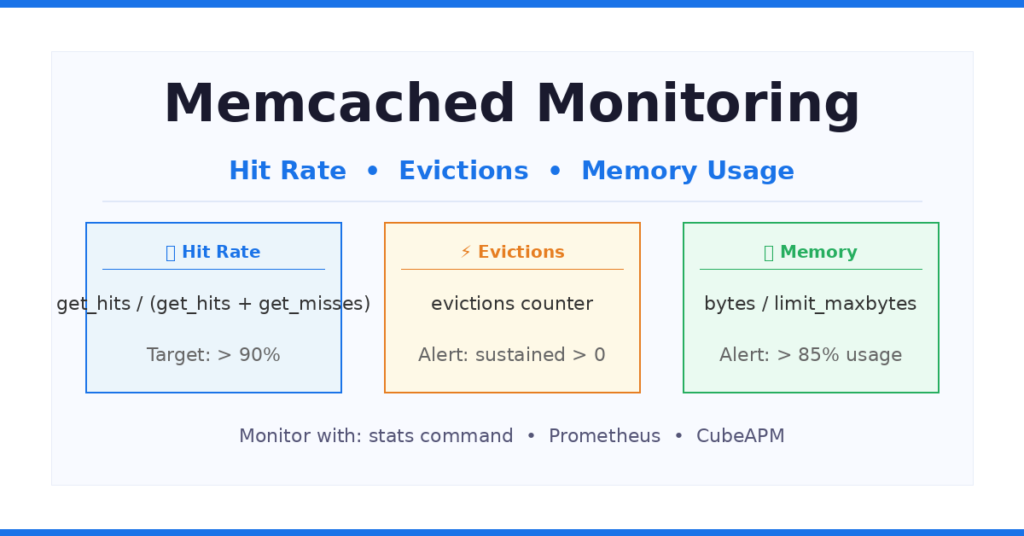
Figure 1: The three core Memcached monitoring signal groups.
Step 1: Query Memcached with the Native stats Command
Memcached exposes all internal counters through a simple text protocol on its default port 11211. You can query these counters without any additional tooling using netcat or telnet.
Run a basic stats query
# Using netcat (nc)echo "stats" | nc localhost 11211
# Or using telnettelnet localhost 11211> statsThe output is a flat list of counter-value pairs. Each counter is prefixed with STAT. The most important lines for monitoring are shown below.
STAT uptime 432600STAT curr_connections 84STAT total_connections_received 10482STAT cmd_get 1840200STAT cmd_set 204500STAT get_hits 1726100STAT get_misses 114100STAT evictions 0STAT bytes 312445952STAT limit_maxbytes 536870912STAT curr_items 184320STAT bytes_read 4291820STAT bytes_written 5120044These counters are cumulative since Memcached last started. To calculate rates, you take two snapshots separated by a time interval and divide the delta by the elapsed seconds.
Calculate hit rate manually
# hit_rate = get_hits / (get_hits + get_misses)# Using two snapshots 60 seconds apart:
hits_1 = 1726100  ;  misses_1 = 114100hits_2 = 1728900  ;  misses_2 = 114500
delta_hits   = hits_2   - hits_1   # 2800delta_misses = misses_2 - misses_1  # 400
hit_rate = delta_hits / (delta_hits + delta_misses) = 2800 / 3200 = 0.875 (87.5%)An 87.5% hit rate means roughly 12.5% of cache requests fall through to the database. For high-read applications this is generally borderline; target 90% or higher.
Step 2: Understand the Key Metrics and Thresholds
The table below summarises the most important Memcached monitoring counters, their stat keys, recommended ranges, and what they mean operationally.
| Metric | Stat Key | Good Range | What It Tells You |
|---|---|---|---|
| Hit Rate | get_hits / (get_hits + get_misses) | > 90% | Cache is serving most requests from memory |
| Evictions | evictions | 0 (sustained) | Cache is full and dropping live items |
| Memory Used | bytes / limit_maxbytes | < 85% | How full the cache is; headroom before evictions |
| Curr Connections | curr_connections | Below max (default 1024) | Active clients; spikes indicate connection leaks |
| Get Misses | get_misses | As low as possible | Requests that fell through to the database |
| Bytes Read/Written | bytes_read / bytes_written | Baseline-relative | Network throughput; sudden changes signal issues |
| Uptime | uptime | Increasing | A reset means full cache cold-start |
Hit rate
Hit rate is the most important single metric in Memcached monitoring. Calculate it as get_hits / (get_hits + get_misses). A rate above 90% is generally healthy. A rate below 80% means your database is handling a large fraction of requests that should have been served from cache. Common causes include a recently restarted instance (cold cache), insufficient memory causing evictions of items before they are re-requested, or a working set that is larger than the allocated memory.
When hit rate drops, always check evictions and memory usage alongside it. The three metrics are causally linked: memory fills up, evictions start, hot keys get dropped, hit rate falls.
Evictions
Evictions are tracked in the evictions counter. An eviction occurs when Memcached needs to store a new item but the slab class is full and there are no expired items available to reclaim. It removes the least recently used (LRU) item to make room. The key distinction is that evictions remove items that have not yet expired, which means an application may request that key and miss immediately after it was evicted.
Any sustained eviction rate above zero is a warning sign. Short bursts during traffic spikes may be acceptable, but if evictions are non-zero continuously it means your working set does not fit in the allocated memory. The resolution is either to allocate more memory with the -m flag or to reduce the size of your working set through TTL tuning or selective caching.
Memory usage
Memcached memory is tracked by two counters: bytes (current usage) and limit_maxbytes (the configured maximum set via the -m flag). The ratio bytes / limit_maxbytes gives you utilization. Best practice is to set an alert when this ratio exceeds 85%. Running at 95% or higher is not efficient capacity planning: a single traffic spike will trigger aggressive evictions that cascade into a hit rate collapse and a database load spike.
Each page of Memcached memory is 1 MB and is permanently assigned to a slab class once allocated. If access patterns shift and one slab class consumes most pages, other slab classes run out of space even though total memory appears available. This is known as slab calcification. Monitor per-slab metrics through stats slabs to detect this condition.
Step 3: Monitor Memcached with Prometheus
The Prometheus memcached_exporter is the standard open-source way to collect Memcached metrics in time series. It connects to the Memcached stats endpoint, converts all counters to Prometheus format, and exposes them on an HTTP scrape endpoint.
Install and run memcached_exporter
# Download from GitHub releaseswget https://github.com/prometheus/memcached_exporter/releases/latest/download/memcached_exporter-*.linux-amd64.tar.gz
# Extract and run (default port 9150)./memcached_exporter --memcached.address=localhost:11211The exporter scrapes Memcached on port 11211 and exposes Prometheus metrics on port 9150 by default. Add it to your prometheus.yml:
scrape_configs: - job_name: memcached static_configs: - targets: ["localhost:9150"]Key Prometheus metric names
The exporter translates the stats counters into the following Prometheus metric names, which can be queried in PromQL or visualised in Grafana:
| Prometheus Metric | Description |
|---|---|
| memcached_current_bytes | Current memory used by stored items |
| memcached_limit_bytes | Memory limit configured for the instance |
| memcached_items_evicted_total | Cumulative evictions counter |
| memcached_commands_total{command=”get”,status=”hit”} | Cumulative get hits |
| memcached_commands_total{command=”get”,status=”miss”} | Cumulative get misses |
| memcached_current_connections | Active client connections |
| memcached_up | Instance availability (1 = up, 0 = down) |
| memcached_uptime_seconds | Time since last restart |
Useful PromQL expressions
# Hit rate over last 5 minutesrate(memcached_commands_total{command="get",status="hit"}[5m])/(  rate(memcached_commands_total{command="get",status="hit"}[5m])  +  rate(memcached_commands_total{command="get",status="miss"}[5m]))
# Memory utilisationmemcached_current_bytes / memcached_limit_bytes
# Eviction rate per secondrate(memcached_items_evicted_total[5m])Alerting rules example
groups:  - name: memcached    rules:      - alert: MemcachedLowHitRate        expr: |          rate(memcached_commands_total{command="get",status="hit"}[5m])          /          (            rate(memcached_commands_total{command="get",status="hit"}[5m])            + rate(memcached_commands_total{command="get",status="miss"}[5m])          ) < 0.9        for: 5m        annotations:          summary: "Memcached hit rate below 90% for 5 minutes"
      - alert: MemcachedHighEvictions        expr: rate(memcached_items_evicted_total[5m]) > 0        for: 10m        annotations:          summary: "Sustained Memcached evictions detected"
- alert: MemcachedMemoryHigh expr: memcached_current_bytes / memcached_limit_bytes > 0.85 for: 5m annotations: summary: "Memcached memory usage above 85%"Step 4: Monitoring Memcached on Cloud Platforms
Amazon ElastiCache (CloudWatch)
ElastiCache for Memcached publishes a dedicated set of CloudWatch metrics that map directly to the stats counters. The most important ones are CurrItems, Evictions, CacheHits, CacheMisses, BytesUsedForCacheItems, SwapUsage, and CPUUtilization. A practical starting threshold is to alert when Evictions exceeds 1,000 per observation period. An eviction count of 1,000 with an average item size of 10 KB means the cluster is releasing roughly 10 MB of memory per minute to accommodate new writes.
SwapUsage is unique to managed environments. If the cache host begins swapping memory to disk, latency will increase by orders of magnitude. Alert when SwapUsage exceeds 256 MB.
Google Cloud Memorystore for Memcached
Google Cloud Memorystore for Memcached exposes metrics through Cloud Monitoring. Available metrics include Hit Ratio, Eviction Count, Memory Usage, CPU Usage Time, Active Connections, and Operation Count. Note that Google Cloud announced deprecation of Memorystore for Memcached; instances will be shut down on January 31, 2029. Google recommends migrating to Memorystore for Valkey.
Step 5: Diagnosing Common Memcached Performance Issues
If the hit rate is low but evictions are zero, the problem is not memory pressure. Possible causes: the cache was recently restarted (cold start), the application is not caching the right keys, TTLs are set too short causing frequent expiry before re-request, or the workload is genuinely write-heavy and not well-suited to caching.
This is the classic memory-constrained scenario. The working set is larger than the allocated memory. Hot items are being evicted before they can be served again. Solutions: increase the -m memory limit, reduce TTLs on low-value keys to free memory for high-value items, or add more Memcached nodes to the cluster.
Memory is full but evictions are not happening because all items have long TTLs and are not yet eligible for eviction. This is a pre-eviction warning state. If new writes arrive and no expired items exist to reclaim, evictions will start immediately. Reduce memory pressure proactively rather than waiting for the first eviction burst.
A Memcached restart resets all in-memory state. The uptime counter drops to near zero. Hit rate collapses temporarily as the cache warms up. Monitor uptime to detect unexpected restarts, which often indicate OOM kills on the host or configuration errors during deployment.
Correlate Memcached Metrics with Application Traces Using CubeAPM
Why Memcached monitoring alone is not enough
Standalone metrics tools show you what is happening in Memcached. They do not show you which application endpoint caused a hit rate drop, or which service is generating eviction pressure by inserting large objects. CubeAPM bridges that gap.
CubeAPM is a self-hosted APM and observability platform that collects distributed traces, metrics, and logs in a single interface. For Memcached, CubeAPM instruments cache operations via OpenTelemetry, giving you:
- Per-endpoint hit/miss breakdown: see exactly which API routes are generating cache misses
- Trace-level correlation: click any slow request and see every Memcached get/set it triggered
- Memory and eviction alerts tied to deployment events: know whether a code release caused hit rate degradation
- No vendor lock-in: self-hosted, OpenTelemetry-native, runs on your infrastructure
Memcached Monitoring Tools Comparison
The table below compares the main tools available for Memcached monitoring. CubeAPM is listed first as it provides both APM correlation and infrastructure metrics, covering the gap left by tools that expose only cache-level counters without application context.
| Tool | Method | Hit Rate | Evictions | Best For |
|---|---|---|---|---|
| CubeAPM | Agent / OpenTelemetry | Yes | Yes | Full APM + cache correlation |
| Prometheus + Exporter | memcached_exporter | Yes | Yes | Open-source, flexible alerting |
| Datadog | Agent integration | Yes | Yes | SaaS, full-stack dashboards |
| Dynatrace | OneAgent (v1.265+) | Via get_hits | Via evictions.count | Enterprise AIOps |
| Zabbix | Template / SNMP | Yes | Yes | On-premise, self-hosted |
| AWS CloudWatch | ElastiCache metrics | Hit Rate metric | Evictions metric | ElastiCache clusters only |
Summary: What to Monitor and When to Alert
| Signal | Stat / Metric | Alert Threshold | Action |
|---|---|---|---|
| Hit rate | get_hits / total gets | < 90% | Check evictions, memory, TTLs |
| Evictions | evictions | Sustained > 0 | Increase -m or reduce working set |
| Memory usage | bytes / limit_maxbytes | > 85% | Scale memory before evictions start |
| Connections | curr_connections | > 80% of max (default 1024) | Check connection pooling in app |
| Uptime | uptime | Unexpected reset | Investigate OOM or crash |
| Swap usage (ElastiCache) | SwapUsage | > 256 MB | Reduce memory pressure immediately |
Conclusion
Monitoring Memcached effectively comes down to three core metrics: hit rate, evictions, and memory usage. A healthy Memcached instance keeps hit rate above 90%, sustains zero evictions, and keeps memory below 85% of its configured limit. When any of these signals deviate, the other two will usually move in sympathy, giving you a clear causal chain to follow.
Start with the native stats command for quick checks. Use the Prometheus memcached_exporter to build time-series dashboards and automated alerts. For cloud deployments, use the built-in CloudWatch or Cloud Monitoring metrics. And for full application-to-cache visibility, pair your cache metrics with a tool like CubeAPM that can correlate Memcached behavior with the requests that triggered it.
Disclaimer: The metric names, version numbers, thresholds, and configuration examples in this article are based on Memcached documentation, Prometheus memcached_exporter documentation, AWS CloudWatch documentation, and Google Cloud documentation available at the time of writing. Metric names and default values may change across Memcached versions or cloud provider updates. Always verify against the official documentation for your specific version and environment before applying thresholds in production.
FAQs
1. What is a good Memcached hit rate?
A hit rate above 90% is generally considered healthy for production workloads. Many high-traffic applications target 95% or higher. A hit rate below 80% typically indicates that a significant portion of cache lookups are falling through to the database, which increases latency and database load. If the hit rate is consistently low despite adequate memory, review TTL settings and ensure the application is caching the correct keys.
2. What causes Memcached evictions and how do I stop them?
Evictions occur when Memcached needs to store a new item but the appropriate slab class has no free chunks and no expired items to reclaim. The root cause is almost always memory pressure: the working set of items your application stores is larger than the memory Memcached has been allocated. To stop evictions, increase the memory limit via the -m flag, reduce TTLs on lower-priority items to free space sooner, or distribute the working set across additional Memcached nodes.
3. How do I monitor Memcached in Kubernetes?
In Kubernetes, deploy the Prometheus memcached_exporter as a sidecar container alongside your Memcached pod, or as a separate DaemonSet if you run Memcached on every node. Expose port 9150 and add a ServiceMonitor or scrape annotation for your Prometheus Operator to pick it up. All the same PromQL expressions for hit rate, evictions, and memory usage apply identically in a Kubernetes environment.
4. Does Memcached have built-in authentication or access control?
Memcached supports SASL (Simple Authentication and Security Layer) for binary protocol connections. It is not enabled by default. Without SASL, any client that can reach port 11211 can read and write all cached data. For production deployments, always bind Memcached to a private network interface (using the -l flag), use firewall rules to restrict access to the port, and enable SASL when operating in shared network environments.
5. How does Memcached memory management differ from Redis?
Memcached uses a slab allocator that divides memory into fixed-size pages and chunks. Each slab class handles a specific object size range. Once a page is assigned to a slab class it is never moved, which means memory is not shared between slab classes. Redis uses a general-purpose allocator (jemalloc by default) and supports multiple data structures, persistence, and replication. Memcached is typically faster for simple string key-value caching at very high throughput, while Redis is more flexible and supports richer data types. For monitoring purposes, Memcached slab metrics require separate attention because memory can appear available overall while a specific slab class is exhausted.