









Python logging is the built-in framework for recording runtime events in applications. Instead of printing raw messages to the console, the Python logging module lets developers categorize events by severity, format messages consistently, and route logs to different destinations such as files, consoles, or centralized logging systems.
Logging provides structured output, filtering by log level, and environment-based configuration. Notably, it is these capabilities that make it different from print() statements. These capabilities become essential once applications move beyond simple scripts and begin running in production systems.
Understanding how the Python logging module works. In this guide we go deeper and uncover how to configure logging safely and how to design logging for real production environments, including performance, structured logging, and observability integration.
What Is Python Logging?
Python logging is a configurable event processing framework built into the Python logging module in the standard library. It does more than write text to a console. Each event becomes a structured record with metadata, timestamp, level, origin, and optional context before it ever reaches an output stream. That record then moves through a configurable chain of handlers that decide where it goes and how it appears. Sometimes it lands in stdout. Sometimes it is rotated into files or shipped to a central collector.
Example of logging in Python:
import logging

logging.basicConfig(level=logging.INFO)

logging.info("Application started")

logging.warning("Low disk space detected")

logging.error("Database connection failed")This example sets up Python logging with a basic configuration and prints messages at different severity levels. basicConfig() configures the root logger and sets the minimum level to show. Since the level is set to INFO, anything at INFO and above will appear, while DEBUG messages will be skipped. Even this simple setup is already more useful than print() because it gives you log levels and one central place to control output.
To see why that matters, you have to look at how the logging module is designed and why print() was never built for that job.
Logging vs Print Statements
The difference between logging and print() is architectural. Print is immediate and inflexible. Logging is configurable and hierarchical. One is transient output; the other is a system-level mechanism.
| Feature | print() | Python logging module |
| Severity levels | Not supported | Supported (DEBUG, INFO, WARNING, ERROR, CRITICAL) |
| Output routing | Console only | Console, files, remote collectors |
| Structured formatting | Raw strings only | Formatters support timestamps, modules, metadata |
| Environment control | Requires editing code | Configurable through logging settings |
| Filtering capability | None | Logger and handler level filtering |
| Production suitability | Limited use | Designed for production systems |
That is why print() may work for small scripts, but it quickly becomes limiting in production systems
How Python Logging Works Internally
At a high level, Python logging follows a simple flow. Your code emits a log message, the logging system converts it into a structured record, and handlers decide where that record should go. Once you understand that flow, the rest of the logging system becomes much easier to work with.
How Logging Works At A Higher Level
In Python, logging pipeline looks like this
Application → Logger → LogRecord → Handler → Formatter → Output
Here is the simplified flow:
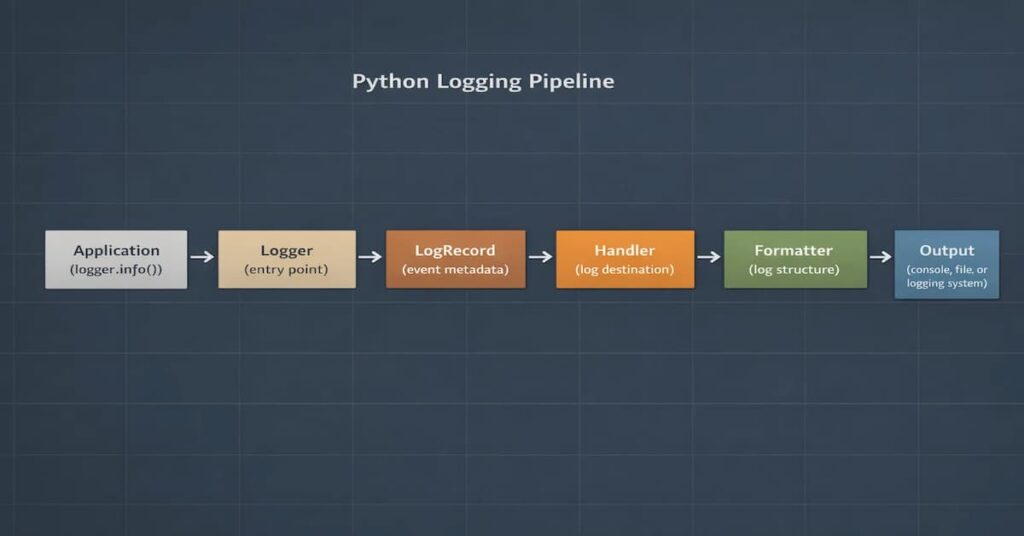
Here’s what each part does:
- Logger: This is like the entry point where the code generates log messages.
- LogRecord: A structured object that stores metadata like timestamp, level, and message.
- Handler: Decides where the log should go (console, file, or external system).
- Formatter: Controls how the log message is displayed.
- Output: The final destination where the log is written or shipped.
Once you understand this flow, debugging logging behavior becomes much easier.
Logger Hierarchy and Propagation
Python loggers follow a hierarchical structure based on their names. Child loggers inherit configuration from their parents unless configured otherwise.
Some important behaviors to remember:
- Loggers propagate messages to parent loggers by default.
- If both parent and child loggers have handlers attached, duplicate logs can occur.
- The root logger sits at the top of the hierarchy and affects all loggers in the application.
- Relying heavily on the root logger can introduce unexpected global behavior.
Python Log Levels Explained
Log levels in Python logging are used to categorize messages, each message indicating severity. When you assign a severity to a log entry, you’re making a statement about urgency, impact, and required response. In small systems, that distinction may feel unnecessary. In production infrastructure, it becomes decisive.
Built-in Log Levels
| Log Level | Typical Use Case | Recommended in Production |
| DEBUG | Provides diagnostic information that is critical during development | No |
| INFO | Normal operational events such as service startup or completed tasks | Yes |
| WARNING | When something unexpected but recoverable situations | Yes |
| ERROR | Failed operations that require investigation | Yes |
| CRITICAL | Severe failures threatening system stability | Rare |
Each log level communicates the severity of an event.
- DEBUG: Detailed diagnostic information mainly used during development.
- INFO: Normal operational events such as service startup or completed tasks.
- WARNING: Unexpected situations that do not break the system but may require attention.
- ERROR: Failed operations that require investigation.
- CRITICAL: Severe failures that threaten system stability.
In most production systems, applications run with INFO or WARNING as the default log level.
Practical Examples of Level Control
You can control verbosity at both the logger level and the handler level.
import logging

logger = logging.getLogger("service")
logger.setLevel(logging.INFO)

console = logging.StreamHandler()
console.setLevel(logging.DEBUG)

file_handler = logging.FileHandler("service.log")
file_handler.setLevel(logging.ERROR)

logger.addHandler(console)
logger.addHandler(file_handler)
In this setup, DEBUG logs may appear in the console when enabled, but only ERROR and above persist to file. The logger defines a baseline. Handlers refine it. Together, they shape the signal that leaves the system.
Done correctly, log levels become a filtering architecture, not just numeric constants. And in production environments, that architecture determines whether your logs clarify incidents or complicate them.
Python Logging Configuration for Production
Quick Production Logging Setup (dictConfig in Production)
In most real systems, logging configuration should live in one place and be initialized when the application starts. This avoids scattered handlers, duplicate logs, and inconsistent formats across modules.
A common production setup uses dictConfig() to define loggers, handlers, and formatters in a single configuration block.
Example:
import logging

import logging.config

import os

LOG_LEVEL = os.getenv("LOG_LEVEL", "INFO")

LOGGING = {

    "version": 1,

    "disable_existing_loggers": False,

    "formatters": {

        "standard": {

            "format": "%(asctime)s %(levelname)s %(name)s %(message)s"

        }

    },

    "handlers": {

        "console": {

            "class": "logging.StreamHandler",

            "formatter": "standard",

            "level": LOG_LEVEL

        }

    },

    "root": {

        "handlers": ["console"],

        "level": LOG_LEVEL

    }

}

logging.config.dictConfig(LOGGING)

logger = logging.getLogger(__name__)

logger.info("Logging initialized")This setup defines the entire logging configuration in one place. The formatter controls how log messages appear, the handler decides where they are written, and the logger defines the minimum severity level. Using environment variables for the log level makes it easy to adjust verbosity without modifying the code.
Environment-Based Configuration
Using environment variables makes it easier to adjust log levels across environments without changing application code.
LOG_LEVEL = os.getenv("LOG_LEVEL", "INFO")Logging Exceptions and Errors
Exceptions should be logged with enough detail to make debugging possible. In most cases, that means capturing the traceback instead of only logging the error message.
Logging Exceptions Properly
When an exception is raised, the stack trace is not optional context. It is the context. The logging module already provides structured ways to capture it. Engineers should lean on those primitives instead of building their own.
- Using logger.exception(): In practice, logger.exception() belongs inside an except block. The method inspects the current exception state, embeds the traceback into the log entry, and emits it at ERROR by default.
- Using exc_info=True: There are cases where you want to decide the log level yourself. In that situation, adding exc_info=True to calls such as logger.error() or logger.warning() will include the active traceback in the log entry.
Handling Uncaught Exceptions
Utilize global hooks to capture any unexpected crashes
import sys

def handle_exception(exc_type, exc_value, exc_traceback):

logger.critical("Uncaught exception", exc_info=(exc_type, exc_value, exc_traceback))

sys.excepthook = handle_exceptionIt is also important to log startup failures before the application initializes fully.
Python Logging Performance and Asynchronous Logging
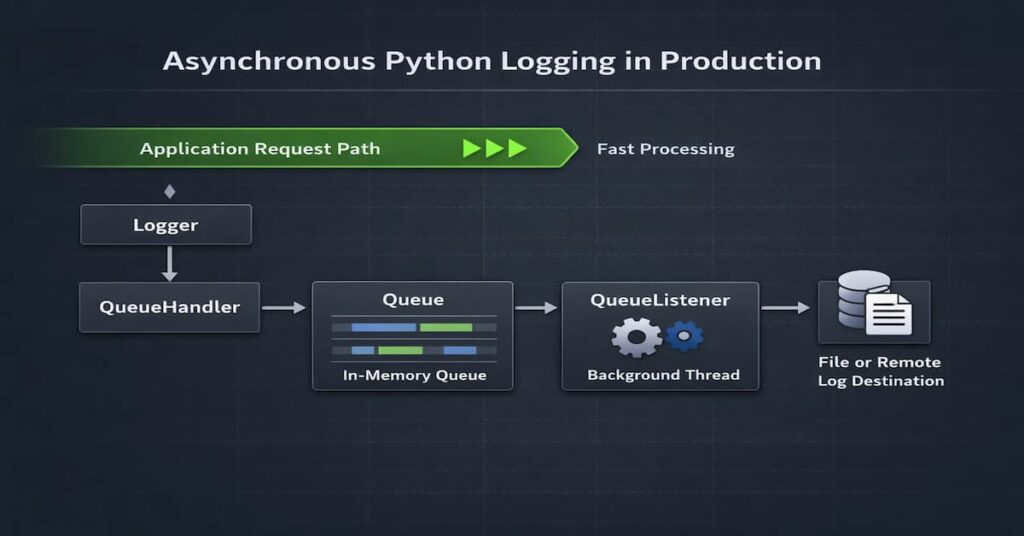
Once an application starts serving real traffic, logging can quietly become part of the performance equation. As developers, when we fail to handle disk writes and network calls carefully, it results in delays. Therefore, it is best practice to configure logging properly and prevent it from interfering with request handling or slowing down the application.
Performance Costs of Logging
Most logging overhead usually comes from a few common sources:
- Blocking file I/O: It is recommended not to write logs directly to disk, because the application thread will wait for the write to finish, causing delays.
- Network logging latency: If logs are sent to external systems over the network, slow or unreachable endpoints can introduce extra delays.
- Excessive log volume: Leaving DEBUG logs enabled in production can generate massive log volumes, which increases storage usage and slows down log searches.
Using QueueHandler and QueueListener
The fundamental optimization strategy is simple: separate log creation from log writing.
Python’s QueueHandler and QueueListener exist for this reason. They introduce a buffer between your request path and the I/O boundary.
- Decoupling log emission: Instead of writing directly to disk or over the network, the application thread pushes the log record into an in-memory queue. That operation is fast. The request continues almost immediately. No disk wait. No network round trip.
- Background processing: A dedicated listener thread consumes messages from the queue and performs the expensive work: formatting, JSON serialization, file writes, and remote shipping. Heavy operations move off the hot path. This alone can stabilize latency under load.
- Minimizing request latency impact: The practical effect is visible in high-throughput systems. With synchronous logging, request latency includes I/O cost. With QueueHandler, that cost is amortized and largely removed from the request lifecycle. For APIs operating at thousands of requests per second, this difference can determine whether tail latency remains predictable.
Asynchronous logging does not eliminate cost. It redistributes it. That distinction matters.
Common Python Logging Mistakes
A lot of logging issues in Python applications do not come from missing tools. They usually come from small configuration choices that seem harmless at first, then become problematic once the application grows or traffic increases. Here are some of the most common mistakes teams run into.
- Duplicate logs: This usually happens when both a child logger and its parent logger have handlers attached while propagation is still enabled. The same log record ends up getting processed twice, so you see duplicate log lines, and dashboards become noisy very quickly.
- Misusing the root logger: The root logger is convenient, which is why people use it early on, but this can introduce a hidden global behavior. So in the event that you make configuration changes in one part of the application, there is a higher likelihood it unexpectedly affects every module that writes logs.
- Blocking file handlers in request paths: Writing logs directly to disk during request processing can slow things down under load. It may not be obvious in development, but in production those extra file writes can add latency to the critical path.
- Logging secrets and sensitive payloads: Logging raw request bodies, tokens, passwords, or authorization headers is risky. Once that data reaches a centralized logging system, it becomes a security and compliance problem instead of a debugging shortcut.
- Hardcoding DEBUG in production: DEBUG logs are helpful when you’re troubleshooting locally. But they are usually far too noisy for production. Leave them enabled, and the log volume grows quickly. Storage costs increase, searches get cluttered, and internal application details may end up in logs where they don’t belong.
Real-World Python Logging Failures and Lessons
Real-world logging issues usually come from configuration mistakes rather than missing tools. Common examples include duplicate log messages, noisy DEBUG output in production, and performance issues caused by poor handler choices.
Real Production Scenario 1: Duplicate Logs Due to propagation=True
- What happened
A backend API emitted the same log line multiple times, which created noisy dashboards and misleading alerts. - Why it happened
A child logger had its own handler attached but propagate=True remained enabled. As a result, each LogRecord traveled upward to the parent logger, which also had a handler. The same message was processed more than once. - How to fix it
Either disable propagation on the child logger (propagate = False) or centralize handlers at the root and remove child-level handlers. Do one or the other. Not both. - What best practice prevents it
Define a single logging configuration entry point (often via dictConfig()), attach handlers deliberately, and document logger hierarchy behavior. Attach handlers deliberately and document how your logger hierarchy behaves. Propagation should be treated as a design decision. Not something you leave at the default and forget about.
Real Production Scenario 2: DEBUG Logs Accidentally Enabled in Production
- What happened
After the usual deployment, a production service suddenly started writing verbose DEBUG logs. At first nothing seemed wrong. Then disk usage spiked. Log ingestion costs began climbing as well. - Why it happened
The log level was hardcoded and development settings leaked into production. - How to fix it
Control log levels via environment variables. Keep logging settings separate per environment and wire them into your deployment process. - What best practice prevents it
Treat log level as infrastructure, and add release checks so DEBUG does not reach production by mistake.
Logging in Modern Python Web Frameworks
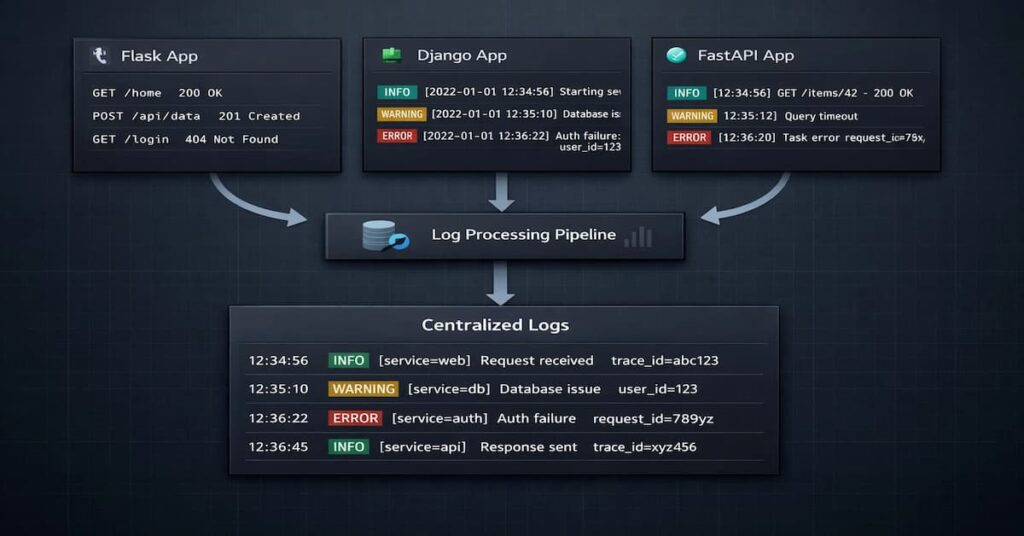
When a Python application runs inside a web framework, logging becomes a bit more layered. Components such as the middleware, the application servers, and background worker processes can all produce logs. In order to achieve consistency, you should ensure the logging configuration stays centralized.
Logging in Flask
How to configure logging
- Configure logging before creating the Flask app using app.logger. Flask attaches a default handler to app.logger if no configuration exists. Setting logging first helps avoid unexpected handlers and duplicate logs.
- Do not rely on defaults but rather utilize Use dictConfig()
- Ensure you configure the werkzeug logger intentionally
- If running containerized environments standardize stdout logging
Common mistakes
- Attaching additional handlers to app.logger without disabling propagation
- Configuring logging after the first request is served
- Ignoring Gunicorn-level logging configuration
- Leaving debug-level logs active in production
Logging in Django
How to configure logging
- Define the LOGGING dictionary in settings.py
- Create separate handlers for application and framework logs
- Use module-level loggers inside apps follow the getLogger(__name__) pattern
- Leverage environment-specific settings modules
Common mistakes
- Extending Django’s default logging instead of replacing it
- Enabling SQL query logging in production
- Letting the root logger handle everything
- Logging every 404 request at error level
Logging in FastAPI
How to configure logging
- Configure logging before launching the ASGI server
- Align the uvicorn logger with application loggers
- Adopt structured logging early
Common Mistakes
- Duplicate log entries from overlapping logger hierarchies
- Synchronous logging inside async-heavy endpoints
- Background tasks that log nowhere
- Missing correlation or request identifiers
Logging in Docker and Kubernetes Environments
Logging works a little differently in containers. Instead of writing logs to local files, applications usually send logs to stdout so the platform can capture them automatically.
A few good practices:
- Write logs to stdout or stderr
- Do not store logs inside the container filesystem
- Collect logs across services using centralized logging systems
- Configure log rotation so logs do not fill up disk space
Structured Logging in Python and Observability Integration
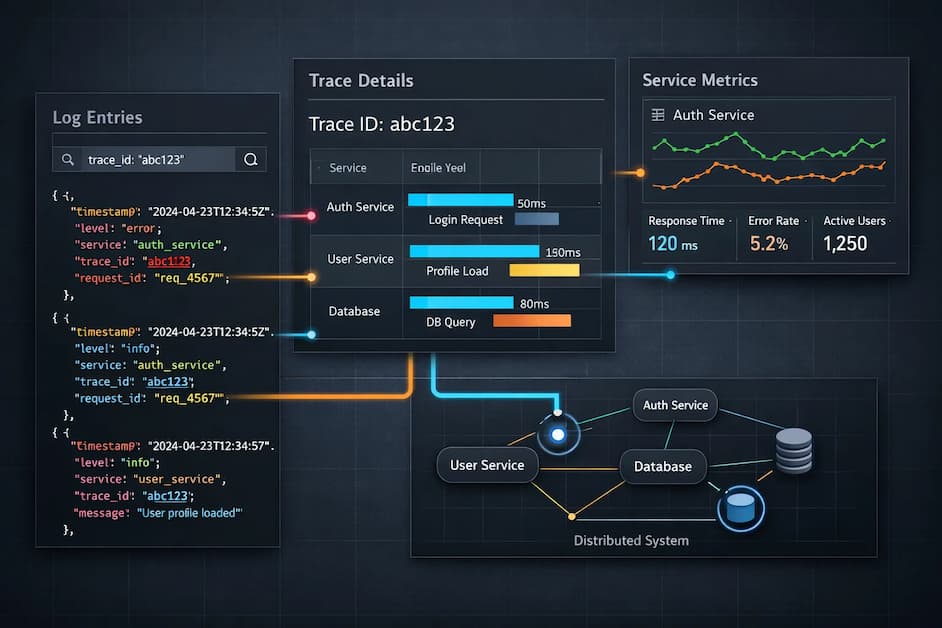
Structured logging makes logs easier to search, filter, and correlate across services. Instead of treating logs as plain text, modern systems treat them as structured events with fields that can be indexed and queried.
Below are the core elements that make that integration reliable and scalable.
- JSON structured logs: Structured logs are usually written as JSON. Therefore, it is easier to query fields like timestamp, level, service name, and trace ID easier to parse and query.
- Log ingestion into Elasticsearch/OpenSearch: It is always a lot easier to search and analyze logsonce they are shipped into systems like Elasticsearch or OpenSearch.
- Correlating logs with trace IDs: Trace IDs help connect logs across multiple services. Without them, each service log tends to look isolated.
- Role of OpenTelemetry: With this tool, you get the ability toattach shared context such as trace IDs, span IDs, and service names to log records automatically.
Python Logging Best Practices for Production Systems
Good logging doesn’t happen by accident. It’s the result of many small decisions, such as how you name loggers, which levels you choose, and how handlers are wired. None of them seem critical in isolation. Over time, though, they shape how observable your system really is.
- Use module-level loggers: It will ensure that the logger names are predictable and make the hierarchy easier to manage.
- Use JSON in distributed systems: when logs are structured, it is easier to search and correlate.
- Never log secrets: Passwords, tokens, and personal data should always be removed or redacted.
- Use QueueHandler for high throughput: It reduces blocking I/O in request paths.
- Set correct log levels per environment: Development and production should not use the same verbosity.
- Avoid root logger: This can result in unexpected global behavior.
- Use dictConfig for production: Centralized configuration keeps handlers and formatters consistent.
- Avoid DEBUG in production: It creates noise and increases storage costs.
- Standardize log formats: Consistent timestamps and fields improve correlation.
- Attach contextual metadata: Request IDs and service names make logs easier to follow.
- Test logging configuration: Logging should be reviewed like any other production behavior.
Security and Compliance Considerations in Logging
Modern regulatory requirements affect telemetry data. This is because telemetry might contain sensitive information such as personal details. Regulatory bodies like the GDPR require that these sensitive details stay in the EU region.
GDPR and Personal Data Exposure
If your logs contain personal information like names and emails, then you are handling personal details. So in regions with strict data laws like the GDPR, it is required that you follow the compliance requirements, such as implementing data protection measures.
Under GDPR and similar data protection regulations:
- You must have a lawful basis for storing it
- You must limit log retention
- You must protect access
- You may be required to delete it upon request.
Audit Logging Requirements
We should note that there is a difference between audit logs, structured logging in Python and observability integration application logs. Application logs always showcase the runtime behavior of the system, while audit logs capture the security-relevant actions.
Keep in mind that audit logs capture:
- Authentication events
- Permission changes
- Administrative actions
- Financial transactions
Audit logs should be:
- Append-only
- Tamper-resistant
- Clearly separated from debug logs
- Retained according to policy
You should not mix the audit logs with the usual debug logs. As we have seen, they serve different purposes, and so it would be prudent to have different storage guarantees.
Redaction Strategies
This is arguably a safe default. In this case, you don’t need to log the full object, but only the specific fields. You should also execute the allow-listing over the deny-listing.
This is an acceptable practice:
logger.info("Order created", extra={"order_id": order.id})If sensitive fields appear, take the following measures:
- Strip Authorization headers
- Remove passwords from payloads
- Drop tokens before logging
Masking Patterns
If there are certain fields which might appear, then mask them as shown below
Authorization: Bearer ********
Credit Card: **** **** **** 1234
Email: j***@example.com
Ensure that masking is consistent, and automate it whenever possible. It is also unwise to rely on developers to remember to remove the sensitive fields.
Implement:
- Logging filters
- Middleware sanitization
- Centralized log processors that enforce masking rules
Immutability and Integrity
Logs should not be silently editable. Once written, they should remain unchanged.
If logs can be altered after creation, several problems appear:
- Attack trails may disappear
- Forensic investigations become unreliable
Practical safeguards:
- Ship logs immediately to centralized systems
- Restrict write access to log storage
- Use append-only storage when required
- Separate application roles from log administration roles
In high-security environments, log integrity is as important as application uptime.
Why Logs Alone Are Not Enough in Production
In small applications, reading log files manually may be enough to diagnose problems. In modern production systems, however, applications run across containers, services, and cloud infrastructure.
When incidents occur, engineers often need more context than a single log entry. They need to understand which request triggered the error, how long the request took, and which dependencies were involved.
This is why logs are often combined with metrics and traces in modern observability platforms.
Improving Python Logging Workflows with CubeAPM
In production, logs rarely tell the full story on their own. When something breaks, engineers usually need more than a single log line. They want to see what the system was doing around that moment. That’s where observability platforms come in.
CubeAPM helps bring logs, metrics, and traces into the same place. Instead of reading logs in isolation, you can look at them alongside request traces and infrastructure signals. The result is a lot more context when you’re trying to understand what happened.
Say a request fails. With CubeAPM, you can start with the log entry and then move straight to the trace behind it. From there you can see which service handled the request, where latency appeared, and which dependency might be involved.
In practice, this lets teams:
- Connect Python logs to the traces behind each request
- Jump from a log line to the full request flow
- Spot slow services or failing dependencies faster
- Analyze logs, metrics, and traces without switching tools
Instead of treating logs as isolated messages, CubeAPM helps turn them into part of a larger investigation workflow.
Conclusion
Python logging is infrastructure, not a debugging tool. The way you configure levels, handlers, formatting, and context directly affects reliability, performance, and security.
In production systems, small logging decisions compound. Duplicate logs, blocking I/O, excessive verbosity, or leaked sensitive data quickly become operational problems.
Structured logging, centralized configuration, and environment-aware controls turn logs into usable signals instead of noise. When designed intentionally, logs integrate cleanly with metrics and traces and support faster incident response.
Logging is part of your architecture. Treat it deliberately.
Disclaimer: The information in this article reflects the latest details available at the time of publication and may change as technologies and products evolve.
FAQs
1. What is Python logging used for?
Python logging isn’t just for debugging. It tells you what’s happening inside your application while it’s running. Every request, every job, and every exception log captures it. In development, they help you trace execution paths. In production, they’re your eyes when things break at 2 a.m.
2. What are the different log levels in Python?
ython has five main levels: DEBUG, INFO, WARNING, ERROR, CRITICAL.
DEBUG: deep, verbose details. Mostly local. Not for production.
INFO: routine events like startup, job success, and configs loaded.
WARNING: something odd but recoverable.
ERROR: failed operations needing attention.
CRITICAL: major system failures.
Levels are operational, not just cosmetic. They control filtering, alerting, and storage. Overuse of ERROR floods alerts. Leaving DEBUG on in production floods storage. Pick levels intentionally.
3. How do I configure logging for production safely?
Keep it centralized. Avoid random configuration in modules. Environment-based control is key. Use dictConfig. Keep formatting consistent. Avoid logging secrets.
mport logging
import logging.config
import os
LOG_LEVEL = os.getenv(“LOG_LEVEL”, “INFO”)
LOGGING = {
“version”: 1,
“disable_existing_loggers”: False,
“formatters”: {
“standard”: {“format”: “%(asctime)s %(levelname)s %(name)s %(message)s”}
},
“handlers”: {
“console”: {“class”: “logging.StreamHandler”, “formatter”: “standard”, “level”: LOG_LEVEL}
},
“root”: {“handlers”: [“console”], “level”: LOG_LEVEL},
}
logging.config.dictConfig(LOGGING)
logger = logging.getLogger(__name__)
Simple. Predictable. Configurable per environment. No surprises.
4. What is structured logging in Python?
Structured logging = logs as data. JSON, usually. Not free text. Fields matter: timestamp, level, service, trace_id.
Centralized systems read fields, not prose. Searching trace_id=abc123 works if it’s a field. Not if it’s buried in a string.
Structured logs make correlation across services easier. Each service emits consistent fields. Queries are precise. Debugging
5. How do I stop duplicate log messages?
Duplicates come from hierarchy issues. Python loggers propagate by default. Child + root handlers = duplicate output.
Fix: attach handlers in one place. Disable propagation when needed.
import logging
logger = logging.getLogger(“app.module”)
logger.setLevel(logging.INFO)
logger.propagate = False
if not logger.handlers:
handler = logging.StreamHandler()
formatter = logging.Formatter(“%(asctime)s %(levelname)s %(name)s %(message)s”)
handler.setFormatter(formatter)
logger.addHandler(handler)
Inspect your loggers first. Most duplicates are structural, not random.