






SolarWinds Loggly has been a popular cloud log management tool for over a decade, but its pricing structure and feature limitations are pushing teams toward alternatives. Loggly’s entry tier starts at $79/month with strict data caps and retention limits that make cost forecasting difficult as log volume scales. Beyond pricing, teams report frustration with limited query flexibility, no trace correlation, and a SaaS-only architecture that rules out data residency compliance.
This guide covers Loggly’s full pricing structure, what each plan includes, hidden costs that appear after signup, and how Loggly compares to alternatives across cost, deployment model, and observability depth. If you need log management that integrates with APM, runs on your infrastructure, or scales without surprise overages, this review breaks down exactly where Loggly fits and where it falls short.
What Is Loggly?
Loggly is a cloud-based log management platform owned by SolarWinds. It collects, aggregates, and analyzes log data from servers, applications, containers, and cloud services in real time. Loggly was built to simplify centralized logging for teams that need fast search, alerting, and visualization without managing their own log infrastructure.
The platform works by ingesting log streams via agents like Fluentd, Logstash, or syslog, then indexing that data for search and analysis. Loggly provides a web UI for querying logs, building dashboards, and setting up threshold-based alerts. It integrates with popular monitoring and incident response tools including Slack, PagerDuty, and Datadog.
Loggly’s strength has historically been ease of setup and a focused product scope. It does not attempt to be a full observability platform; no distributed tracing, no infrastructure monitoring, no real user monitoring. It is logs only, positioned for teams that need a managed log aggregation layer without the complexity of the ELK stack or the cost of enterprise APM platforms.
However, this focused scope becomes a limitation as teams mature. Without trace correlation or infrastructure context, troubleshooting production incidents often requires switching between Loggly and separate APM or infra monitoring tools. And because Loggly is SaaS only with no on-premises or VPC deployment option, it cannot meet data residency or HIPAA requirements without a BAA.
Loggly Pricing Plans Explained
Loggly offers four pricing tiers: Lite (free), Standard ($79/month), Pro ($159/month), and Enterprise (starting at $279/month). All plans are billed annually, and monthly billing is available at a higher rate. Pricing is based on daily ingestion volume and retention period, not user seats.
Lite Plan (Free Tier)
The Lite plan is free with strict limits designed for testing or very small workloads. It includes 200 MB/day ingestion, 7 day retention, and 5 users. There is no alerting, no API access, and no integrations beyond basic syslog. This tier works for local development or proof of concept testing but not for production logging.
Standard Plan ($79/Month)
The Standard plan starts at $79/month billed annually and is positioned for small teams. It includes 1 GB/day ingestion, 15 day retention, 10 users, and email alerting. Custom parsing, API access, and integrations with Slack and PagerDuty are included at this tier.
For a team ingesting 1 GB/day consistently, this plan provides 30 GB/month of log storage for $79. That works out to roughly $2.63/GB when amortized across retention and ingestion.
The catch: if your daily ingestion exceeds 1 GB even once, you either lose data or need to upgrade to the next tier. There is no burst allowance or overage billing. Teams report that this strict daily cap creates a forced upgrade dynamic where a single traffic spike pushes you to Pro tier pricing.
Pro Plan ($159/Month)
The Pro plan starts at $159/month billed annually and includes 5 GB/day ingestion, 30-day retention, and unlimited users. This tier adds SSO, role-based access control, and longer retention compared to Standard.
At 5 GB/day for $159/month, the effective rate is roughly $1.06/GB across retention and ingestion. This tier works for mid-size teams with predictable log volume, but scaling beyond 5 GB/day requires an Enterprise plan or a custom quote.
Enterprise Plan (Starting at $279/Month)
The Enterprise plan starts at $279/month and is fully custom beyond that base price. It includes higher ingestion limits (10 GB/day minimum, scalable beyond that), longer retention options (up to 3 months by default, extendable with add-ons), dedicated support, and SLA guarantees.
Pricing for Enterprise is not publicly disclosed beyond the $279 starting point. Teams report quotes ranging from $500 to $2,000/month depending on ingestion volume, retention, and support tier. SolarWinds sales typically price Enterprise based on a negotiated daily ingestion cap rather than a flexible usage-based model.
What Loggly Pricing Does Not Include
Loggly’s advertised pricing excludes several common costs:
Data egress fees: Loggly runs on AWS, and while ingestion is included in the plan price, exporting large volumes of logs via API or integrations may incur AWS egress charges passed through to you. These are not itemized in Loggly’s pricing page.
Retention beyond plan limits: Standard retention is 15 to 30 days depending on tier. Extending retention to 90 days or more requires an add-on fee negotiated separately.
Advanced parsing and field extraction: While custom parsing is included in Standard and above, complex multi-line parsing or high cardinality field indexing can hit performance limits that require architecture changes or plan upgrades.
Integration seat costs: If you integrate Loggly with a tool like PagerDuty or Datadog, those platforms may charge per integration or per alert. Loggly itself does not charge for integrations, but the downstream tool costs are real.
This estimate models a production-ready setup with predictable daily ingestion. Actual costs will vary based on traffic spikes, retention needs, and support tier.
Loggly Features: What You Get at Each Tier
Loggly’s feature set is log-centric with no APM, tracing, or infrastructure monitoring included. Here is what each tier provides.
Log Ingestion and Indexing
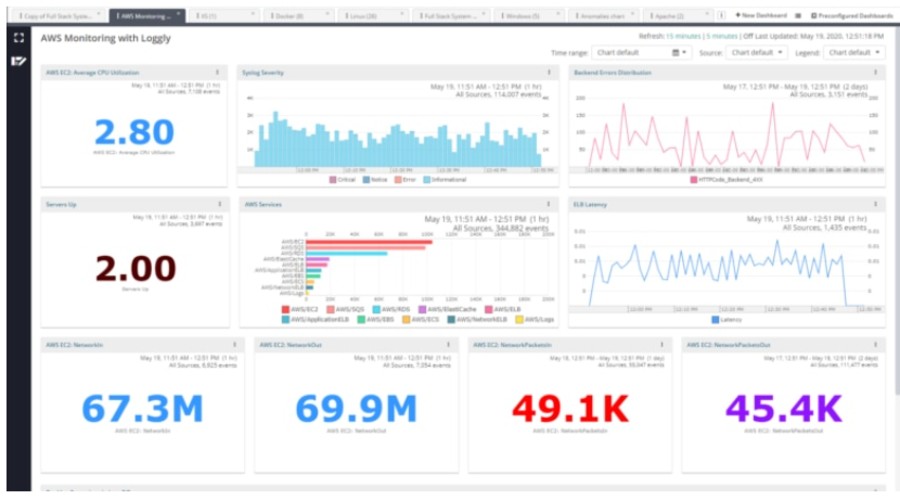
All paid tiers support ingestion via syslog, HTTP/S, agents (Fluentd, Logstash, rsyslog), and cloud service integrations (AWS CloudWatch, Azure Monitor, GCP Logs). Logs are automatically indexed on arrival with field extraction for common formats like JSON, Apache, and Nginx logs.
Loggly does not offer sampling or tiered indexing. Every log ingested counts toward your daily cap and is indexed at the same rate. This simplifies billing but increases cost compared to platforms that let you archive raw logs cheaply and index selectively.
Search and Query Interface
Loggly provides a web UI for full-text search and field-based filtering. The query language is simpler than Elasticsearch or Splunk SPL but less flexible. You cannot write complex multi-step queries, correlate across multiple log sources in a single query, or join logs with traces or metrics.
Search performance is generally fast for recent data (last 7 days) but slows noticeably when querying older retention periods or high cardinality fields. Teams report that searches spanning 30 days of logs at 5 GB/day ingestion can take 10 to 20 seconds to return results.
Dashboards and Visualizations
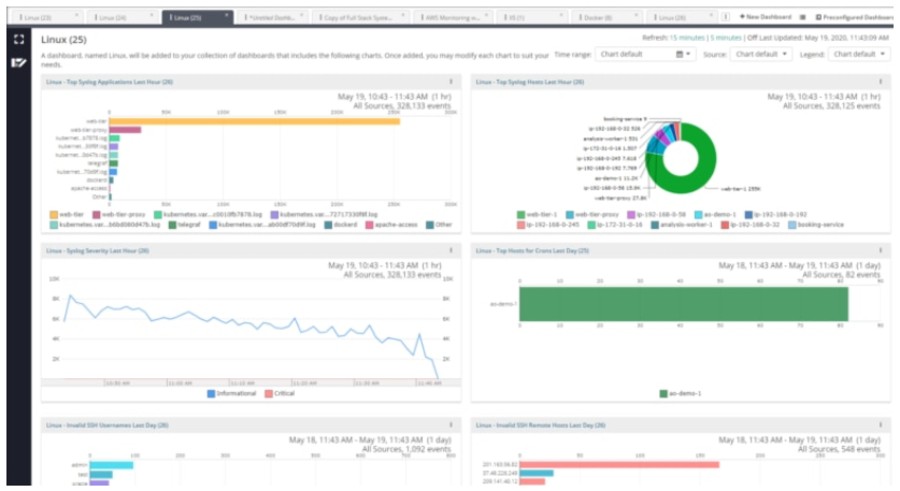
Loggly includes basic dashboarding with charts, tables, and time series graphs. Dashboards are built using saved searches and can display log volume trends, error rates, or specific field distributions.
However, dashboards are not interactive. You cannot drill down from a chart into raw logs without opening a new search. And you cannot overlay logs with metrics or traces from other tools, which limits root cause workflows compared to unified observability platforms.
Alerting
Alerting is available in the Standard tier and above. You can create threshold-based alerts that trigger when log volume, specific error messages, or field values cross a defined limit. Alerts can route to email, Slack, PagerDuty, or webhooks.
Loggly does not include anomaly detection or AI-based alerting. Every alert requires a manually defined threshold, which works for known failure modes but misses novel issues that do not fit predefined rules.
Integrations
Loggly integrates with common DevOps tools including Slack, PagerDuty, Jira, and Datadog. These integrations allow you to route alerts or link log searches to incidents.
The integration ecosystem is narrower than Datadog (700+ integrations) or Elastic (hundreds of plugins). If you need to correlate logs with a less common tool or build custom integrations, Loggly’s API is available but requires manual development.
Data Residency and Compliance
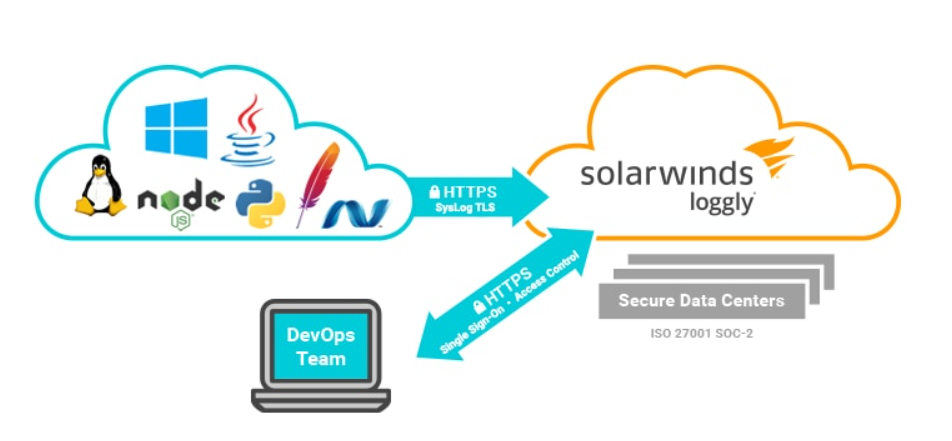
Loggly is SaaS only and runs on AWS infrastructure in the United States. There is no EU data residency option, no on-premises deployment, and no VPC-hosted option. For teams with GDPR, HIPAA, or CCPA requirements, this limits usability unless you can negotiate a BAA with SolarWinds and accept US-based storage.
Loggly does not publish SOC 2 or ISO 27001 certification details publicly. Teams requiring formal compliance attestation should verify current certifications directly with SolarWinds before committing.
Loggly User Experience: What Teams Like and Dislike
Loggly’s ease of setup and focused log management scope are its main strengths. The pain points that drive teams to alternatives are cost unpredictability, lack of trace correlation, and limited query flexibility.
What Teams Like About Loggly
Setup speed is consistently praised. Teams report going from signup to ingesting logs in under 30 minutes using standard agents like Fluentd or syslog. The UI is clean and does not require training to navigate.
Low operational overhead is another benefit. Because Loggly is fully managed, there is no infrastructure to maintain, no Elasticsearch cluster to tune, and no storage scaling to manage. For small teams without dedicated SRE resources, this reduces complexity.
What Teams Dislike About Loggly
Cost unpredictability is the most common complaint. The strict daily ingestion caps mean that a single traffic spike can force an immediate plan upgrade. One Reddit user documented their Loggly bill jumping from $79 to $279/month after a single day of elevated log volume during a marketing campaign.
No trace correlation is a functional gap that becomes painful in microservices environments. Troubleshooting a slow API request requires manually correlating timestamp ranges across Loggly logs and a separate APM tool. Platforms like Honeycomb and CubeAPM link logs and traces automatically, cutting investigation time in half.
Limited retention and query performance at higher volumes also appear in reviews. Teams ingesting 10+ GB/day report slow searches and retention costs that require aggressive log pruning or migration to a more scalable platform.
Pricing is based on publicly available information as of April 2026. Enterprise discounts, custom contracts, and negotiated rates are not reflected here.
Loggly vs Alternatives: How It Compares on Cost and Features
Loggly competes with cloud log platforms like Better Stack and Coralogix, unified observability platforms like Datadog and New Relic, and self hosted options like Grafana Loki and CubeAPM.
Loggly vs Better Stack
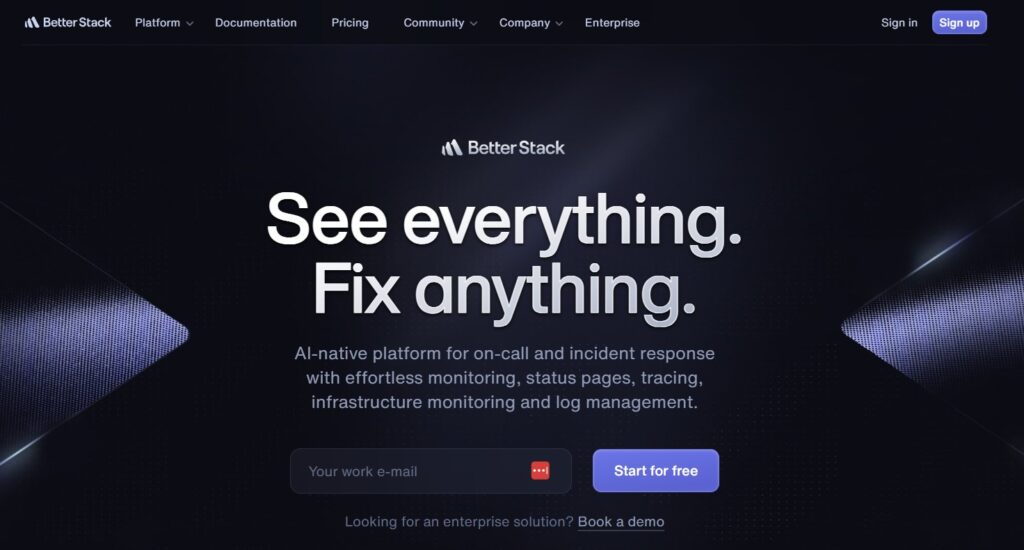
Better Stack offers a similar cloud log management experience with a more modern UI and better query performance. Pricing starts at $29/month for 1 GB/day with longer retention (30 days at entry tier vs Loggly’s 15 days). Better Stack also includes incident management and status pages bundled into the same product, which Loggly does not.
Better Stack is faster to set up and has better developer ergonomics, but like Loggly, it is logs only with no APM or trace correlation. For teams that only need log aggregation and alerting, Better Stack is a cheaper and more polished alternative to Loggly.
Loggly vs Datadog
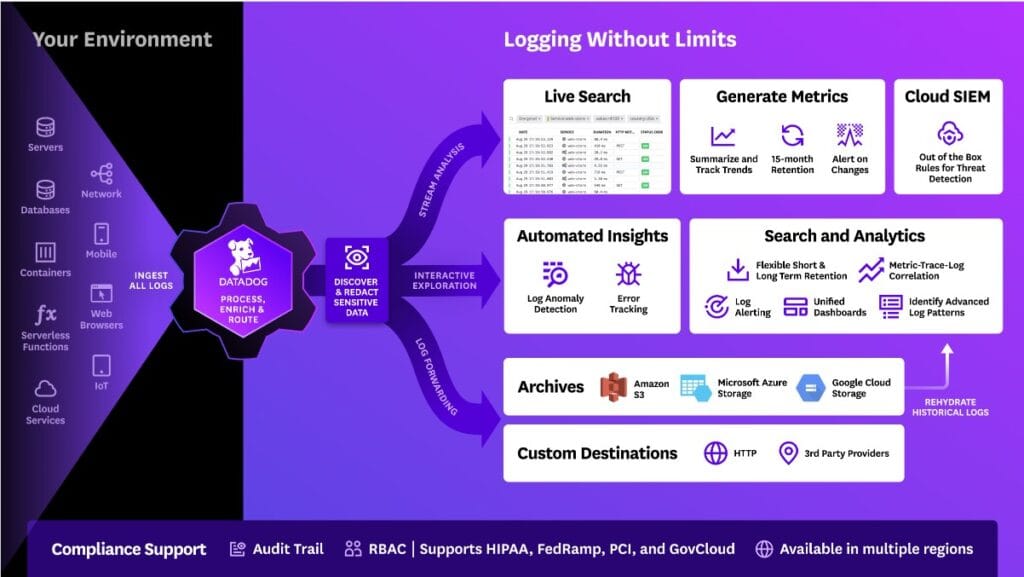
Datadog includes log management as one module in a full observability platform. Datadog charges $0.10/GB ingested plus $1.70 per million events indexed, which makes direct price comparison difficult. For a team ingesting 5 GB/day with 30% indexing, Datadog log costs would run roughly $270/month before APM, infrastructure monitoring, or RUM charges.
Datadog’s advantage is unified telemetry. Logs, traces, metrics, and infrastructure data are correlated automatically. The disadvantage is cost at scale. Datadog pricing compounds quickly as you add hosts, users, and modules. Teams report monthly bills exceeding $10,000 for mid-size production workloads.
Loggly vs Grafana Loki
Grafana Loki is an open-source log aggregation system designed to integrate with Prometheus and Grafana. It is free to self-host, but requires you to manage infrastructure, storage, and retention yourself.
For teams already running Grafana for metrics, Loki adds log correlation with minimal operational overhead. The tradeoff is that you own the infrastructure cost and maintenance burden. A typical Loki deployment on AWS for 5 GB/day ingestion might cost $300 to $500/month in EC2, S3, and egress fees, plus engineering time for setup and ongoing management.
Loki works well for teams with strong DevOps capabilities. For teams without dedicated SRE resources, the operational overhead makes Loggly or a managed alternative more practical.
Loggly vs CubeAPM
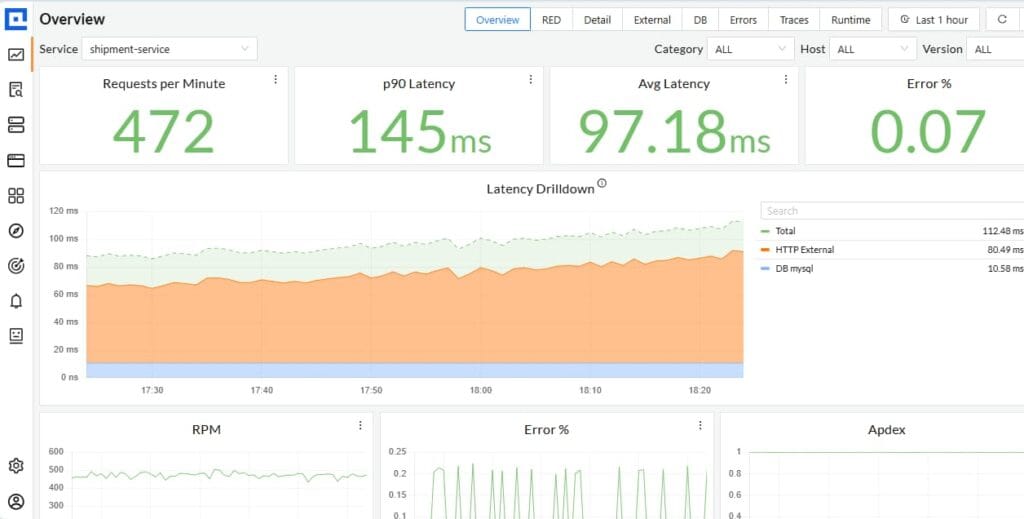
CubeAPM offers unified log management, APM, distributed tracing, and infrastructure monitoring in a single self-hosted platform. Unlike Loggly, CubeAPM runs inside your VPC or on-premises, which eliminates data egress costs and meets data residency requirements by default.
CubeAPM pricing is $0.20/GB for all telemetry types (logs, traces, metrics) with unlimited retention included. For a team ingesting 5 GB/day of logs, CubeAPM would cost roughly $300/month compared to Loggly’s $159/month Pro tier. The difference is that CubeAPM includes APM and trace correlation at that price, while Loggly requires a separate APM tool.
CubeAPM is best for teams that need full observability inside their own infrastructure. If you only need logs and prefer SaaS simplicity, Loggly or Better Stack are easier. If you need logs plus APM with data control, CubeAPM delivers better value and eliminates tool sprawl.
How to Migrate from Loggly to an Alternative
Migrating off Loggly requires redirecting log ingestion to a new platform and recreating dashboards, alerts, and integrations. The process typically takes one to two weeks depending on log volume and dashboard complexity.
Step 1: Choose a Replacement Platform
Decide whether you need logs only or full observability. If logs only, Better Stack or Grafana Loki are straightforward replacements. If you need APM and trace correlation, evaluate CubeAPM, Datadog, or New Relic. Use each platform’s trial period to test ingestion, search performance, and dashboard workflows with real production data before committing.
Step 2: Set Up Parallel Ingestion
Before cutting over entirely, run both Loggly and the new platform in parallel for one to two weeks. Configure your log agents (Fluentd, Logstash, or rsyslog) to send logs to both destinations simultaneously. This lets you validate that the new platform captures all log sources correctly and that retention and indexing behavior match expectations.
Step 3: Recreate Dashboards and Alerts
Export your Loggly saved searches and alert definitions. Most platforms do not offer direct import from Loggly, so you will need to manually recreate each dashboard and alert using the new platform’s query language. This is a good opportunity to prune unused dashboards and simplify alert thresholds based on what actually fired in production.
Step 4: Migrate Integrations
Update your Slack, PagerDuty, and Jira integrations to route alerts from the new platform instead of Loggly. Test each integration with a controlled alert to confirm routing and notification formatting work as expected.
Step 5: Decommission Loggly
Once the new platform is stable and all dashboards, alerts, and integrations are verified, stop sending logs to Loggly. Keep the Loggly account active for one additional billing cycle to retain access to historical logs during the overlap period, then cancel the subscription.
This estimate models a specific workload profile. Your actual costs will vary based on data volume, retention period, and feature usage.
Disclaimer
The information in this article reflects the latest details available at the time of publication and may change as technologies and products evolve. Features, pricing, and plan limits can change over time. Always verify the latest information directly with the vendor before making purchasing or deployment decisions. This review is based on CubeAPM’s independent research and analysis and does not constitute an official audit or endorsement. This article is intended for informational purposes only and is not meant to disparage any individual, company, or product. We encourage readers to verify current details directly with the relevant providers before making any decisions.
Frequently Asked Questions
How much does Loggly cost per month?
Loggly pricing starts at $79/month for the Standard plan with 1 GB/day ingestion and 15 day retention. Pro tier costs $159/month for 5 GB/day and 30 day retention. Enterprise pricing starts at $279/month and scales based on custom ingestion limits.
Does Loggly support on premises deployment?
No. Loggly is SaaS only and runs on AWS infrastructure in the United States. There is no on premises or VPC hosted option. For data residency or HIPAA compliance, consider alternatives like CubeAPM or self hosted Grafana Loki.
Can Loggly correlate logs with distributed traces?
No. Loggly is a log management tool only. It does not include APM or distributed tracing. To correlate logs with traces, you need a separate APM platform or a unified observability tool like CubeAPM or Datadog.
What happens if I exceed my daily ingestion limit in Loggly?
Loggly does not allow burst overages. If you exceed your plan’s daily ingestion cap, you either lose data or must upgrade to a higher tier immediately. This strict limit is a common pain point for teams with variable log volume.
Is Loggly good for small teams?
Yes, for log only use cases. Loggly is easy to set up and requires no infrastructure management. However, the strict ingestion caps and lack of trace correlation make it less suitable as teams scale or adopt microservices.
How does Loggly pricing compare to Better Stack?
Better Stack starts at $29/month for 1 GB/day with 30 day retention compared to Loggly’s $79/month for 1 GB/day with 15 day retention. Better Stack is cheaper and includes incident management features Loggly does not offer.
Does Loggly offer a free trial?
Yes. Loggly offers a free Lite plan with 200 MB/day ingestion and 7 day retention. All paid plans include a 30 day trial with full feature access at the tier you choose.