









Logging in Go has changed because current production systems need logs to be structured telemetry instead of just free-form text. For a long time, Go programmers added logging to their programs using the standard log package or well-known third-party libraries like logrus and zap. These tools worked well on their own, but they never made a single, standard structured logging system available in the Go standard library itself.
Go 1.21 introduced log/slog, bringing structured logging directly into the standard library. With slog, logs can include consistent key-value fields that observability tools can read automatically. That makes logs much easier to search and filter, and it gives teams a clearer view of how applications behave across distributed systems.
Understanding slog starts with understanding why structured logging matters in production. In this article, we look at how slog fits into Kubernetes deployments, observability architecture, and OpenTelemetry pipelines.
What Is Structured Logging and Why It Matters in Production
Structured logging is when logs are sent as structured data instead of free-form text. This lets machines automatically parse, index, and analyze logs. Structured logs work as a telemetry signal with metrics and traces in modern observability architectures. They give you contextual, high-fidelity information that makes it easy to quickly look into an incident and find out what caused it.
Unstructured vs Structured Logs
Before looking at structured logging in detail, it helps to understand how it differs from traditional logging approaches used in many applications.
| Aspect | Unstructured Logs | Structured Logs |
| Format | Plain text messages written in a free-form way | Key-value pairs or JSON fields |
| Machine parsing | Difficult, requires regex or custom parsing | Automatically parsed by log ingestion systems |
| Querying | Full-text search across log messages | Field-based queries (e.g., service=”auth”) |
| Consistency | Often inconsistent across services | Standardized fields across applications |
| Observability correlation | Hard to correlate with metrics and traces | Easily correlated using fields like trace_id |
| Scalability | Becomes difficult to manage at large volumes | Designed for large-scale observability pipelines |
Structured logs are easier to index, filter, and correlate across services, which is why they work better in production observability pipelines.
Why Observability Systems Require Structured Logs
- Machine Parsing and Indexing: Structured logs use predictable fields, which lets observability platforms parse, index, and analyze events automatically without custom parsing rules.
- Filtering and High-Cardinality Querying: Provides an avenue for engineers to query specific files like service, latency, user_id, or error_code directly, which is much faster and more efficient than scanning raw text logs.
- Correlation with Traces and Metrics: Structured logs can carry fields like trace_id, making it easier to connect logs with traces and metrics across the same request path.
- Faster Incident Investigation: Because engineers can filter logs by exact fields instead of reading raw lines manually, they can isolate failures faster and reduce incident resolution time.
Where Logging Fits in the MELT Model
Modern observability relies on four core telemetry signals:
- Metrics track system behavior over time, such as latency, throughput, and error rates.
- Events capture important changes, for example, deployments or configuration updates.
- Traces follow a request as it moves across services in a distributed system.
- Logs highlight what the application was doing at that moment. In other words, it shows the application’s runtime behavior.
Understanding Go’s log/slog Package
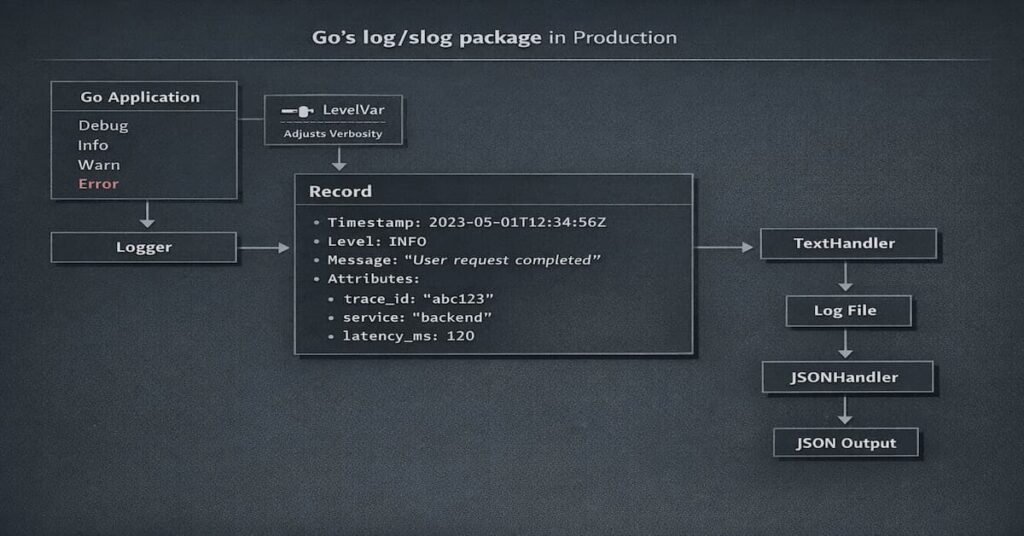
The log/slog package brings structured logging directly into the Go standard library. That means developers no longer have to depend entirely on third-party libraries to produce structured logs in a consistent way.
One of the useful things about slog is that it separates the logging API from how logs are formatted and where they are sent. In practice, that makes it easier to plug into observability pipelines, especially in cloud-native environments.
Core Components of Slog
- Logger: The primary interface used to emit log events such as Info, Debug, Warn, and Error.
- Handler: In your code, handlers are responsible for formatting and exporting log records. Handlers control output format, destination, and log level filtering.
- Record: Structured log entry. It holds the main parts of the log, like the timestamp, level, message, and any extra attributes.
- Attr: A key-value pair attached to a log entry. Attributes store contextual fields such as trace_id, service, or latency_ms.
Built-In Handlers
- TextHandler prints logs in a human-friendly text format, which makes it especially useful during debugging. You can scan the logs quickly without having to dig through structured JSON.
- JSONHandler formats logs as structured JSON objects. This is more useful in production because observability tools like Elasticsearch, OpenSearch, Loki, Datadog, and CubeAPM can automatically read, parse, and index the fields.
Log Levels and Filtering
- Debug is for detailed diagnostic information during development or troubleshooting. It is helpful when you need deep visibility, but it usually creates too much noise for everyday production use.
- Info is for normal events that show the application is doing what it should. Things like a service starting, a request completing, or a scheduled job running all fit here.
- Warn means something is not quite right, but the application is still working. Maybe a limit is getting close, or something unexpected happened that has not caused a failure yet.
- Error is for failures. Use it when an operation does not complete successfully or when part of the application breaks and needs attention.
- LevelVar lets you change the active log level while the application is running. That is useful when you want more or less detail without rebuilding or restarting your logger.
Getting Started with Logging in Go with Slog
Getting started with slog is straightforward. You create a logger, choose a handler, and start emitting structured fields.
Basic Logger Setup
package main

import (
"log/slog"
"os"
)

func main() {
handler := slog.NewJSONHandler(os.Stdout, &slog.HandlerOptions{
Level: slog.LevelInfo,
})
logger := slog.New(handler)

logger.Info("service started", "service", "checkout-api")
}This sets up a JSON logger that writes to stdout with Info as the default level. That is a solid production default, especially for containerized apps.
Logging Structured Fields
Example:
logger.Info("payment processed",
"order_id", "12345",
"amount", 49.99,
"currency", "USD",
)This log includes structured fields like order_id, amount, and currency, which makes payment events much easier to search and debug later.
Switching Between Text and JSON Output
TextHandler is easier to read locally. JSONHandler is the better default in production because log pipelines can parse it cleanly.
devHandler := slog.NewTextHandler(os.Stdout, nil)
prodHandler := slog.NewJSONHandler(os.Stdout, nil)Environment-Based Log Level Configuration
var level = new(slog.LevelVar)
level.Set(slog.LevelInfo)

handler := slog.NewJSONHandler(os.Stdout, &slog.HandlerOptions{
Level: level,
})Use Debug in development, then switch to Info or Warn in production to keep log volume under control. If needed, LevelVar lets you raise verbosity during an incident without redeploying.
Anatomy of a Production-Ready Slog Log Entry
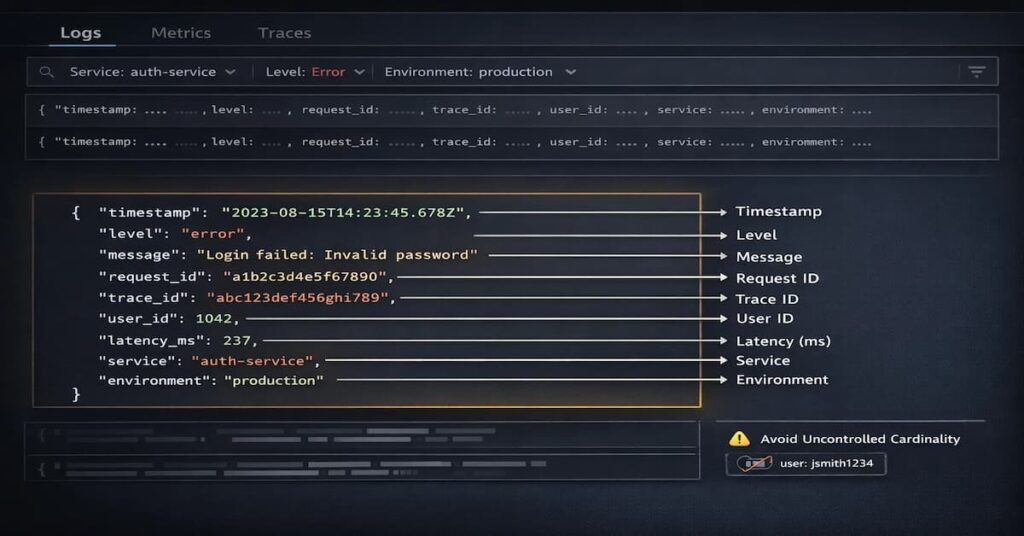
Production-ready logs must include standardized fields and structured context attributes. Standard Fields
- Timestamp shows exactly when a log event happened, which helps you line it up with related metrics and traces during troubleshooting.
- Level indicates the severity of the log event and enables filtering by severity. Observability platforms use log levels to trigger alerts and dashboards.
- Message describes the event in plain language. Keep it short and avoid repeating information that already exists in structured fields.
Structured Context Fields
- Request ID: The request ID is what makes each incoming request unique and lets you connect logs from the same service.
- Trace ID is for distributed tracing; the trace ID connects logs from different services. Engineers can use trace IDs to track a request across many services.
- User ID shows which user made the request. It can be useful for debugging and understanding user activity, but it should be handled carefully so you do not create privacy or compliance issues.
- Latency shows how long a request takes to complete. This helps teams spot performance problems, investigate slowdowns, and understand what is happening in each request beyond what metrics alone can show.
- Service Name This tells you which service generated the log. It is important in multi-service environments because it makes it easier to group data correctly, search across services, and build clearer dashboards and queries.
- Environment helps highlight where the log came from; it can be from development, staging, or production. It helps prevent mix-ups when you are investigating issues across different environments.
Designing a Consistent Log Schema
- Naming Conventions: Use consistent field names across services. Most teams follow simple conventions such as lowercase snake_case keys because they work well with observability platforms and log indexing systems.
- Cross-Service Field Alignment: Every service should stick to the same field names for common attributes, trace_id, service, and latency_ms. If one service calls it something different, queries break. Dashboards don’t line up.
- Avoiding Uncontrolled Cardinality: The idea is simple: some log fields create too many unique values. Full URLs, request IDs buried in payloads, or highly dynamic payload data can quickly blow up the number of distinct log entries. When that happens, storage costs rise, queries slow down, and the logs become harder to use.
Schema Versioning and Change Management
Structured log schemas should be treated like contracts. When fields change unexpectedly, dashboards, alerts, or ingestion pipelines can break.
One practical approach is introducing a schema_version field. This allows teams to evolve logging formats gradually without disrupting existing queries or observability workflows.
Contextual Logging Patterns in Go Applications
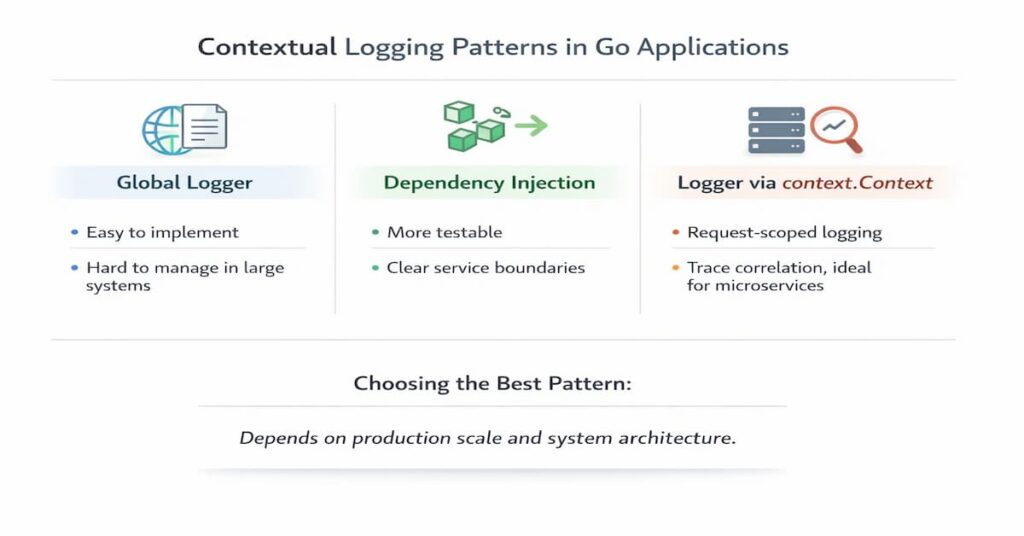
Contextual logging is about how loggers move through your code. How you pass them around affects more than just logging; it changes how easy the code is to test, maintain, and monitor in production.
Global Logger Pattern
Pros
- Very easy to set up and use
- Developers can log from anywhere without passing dependencies
- Works fine for small applications and simple services
Cons
- Dependencies become hidden, which makes testing harder
- Request-specific fields like trace_id are difficult to attach consistently
- Large codebases can become tightly coupled to a global logger
Dependency Injection Pattern
Pros
- Makes logging explicit and easier to test
- Services receive the logger they depend on, improving code clarity
- Works well in larger applications with clear service boundaries
Cons
- Requires passing the logger through constructors or function parameters
- Adds a little more setup compared to global loggers
- Can feel verbose in very small projects
Logger via context.Context
Context-Based Logger Example
func WithLogger(ctx context.Context, logger *slog.Logger) context.Context {
return context.WithValue(ctx, "logger", logger)
}

func LoggerFromContext(ctx context.Context) *slog.Logger {
if l, ok := ctx.Value("logger").(*slog.Logger); ok {
return l
}
return slog.Default()
}Context-based logging makes it possible to log requests and automatically connect traces. Passing loggers through context makes sure that each request has its own contextual logger with trace IDs and request IDs.
Advanced Slog Features for Production Systems
Slog has advanced features that let you filter, redact, group, and configure things while they’re running. These features are necessary for logging systems that are ready for production.
Custom Handlers
Custom Redaction Handler Example
type RedactHandler struct {
h slog.Handler
}

func (r RedactHandler) Handle(ctx context.Context, rec slog.Record) error {
rec.Attrs(func(a slog.Attr) bool {
if a.Key == "password" {
a.Value = slog.StringValue("[REDACTED]")
}
return true
})
return r.h.Handle(ctx, rec)
}Custom handlers enable filtering, transformation, and redaction of sensitive fields. Redaction is mandatory for fields such as passwords, tokens, and PII to meet security and compliance requirements
Attribute Grouping and Nested Fields
logger.Info("request completed",
slog.Group("http",
"method", "GET",
"status", 200,
),
)Attribute grouping organizes related fields into nested structures, improving JSON readability and query ergonomics. Grouping fields like HTTP metadata reduces clutter and enables hierarchical queries.
Dynamic Log Levels at Runtime
Dynamic log levels let engineers make logs more detailed during incidents without having to redeploy services. This feature is very important for debugging in real time in production environments.
Performance Considerations
In high-throughput services, logging overhead usually comes from allocations, repeated attribute construction, and unnecessary string formatting. Be keen on fields; ensure they are small and consistent. Reuse common attributes where possible, and pass structured values directly instead of turning everything into strings first. That helps reduce wasted CPU and memory without making the logs less useful.
Logging for Observability: Correlating Logs with Traces and Metrics
Logs only tell part of the story on their own. To understand what actually happened, they need to be connected to traces and metrics. Once that context is in place, it becomes much easier to follow a request across services and find the real source of a failure.
Injecting Trace and Span IDs
Use OpenTelemetry context propagation to attach trace and span IDs to logs. That makes it possible to connect individual log events to the request path that produced them.
Using OpenTelemetry with Slog
Slog works well with OpenTelemetry-based pipelines because structured logs can carry the same request context used in traces. This makes logs far more useful during troubleshooting, especially in distributed systems.
Observability Tool Compatibility
Because slog emits structured logs, it works well with most modern observability platforms.
Logs can be written as JSON and forwarded through collectors such as Fluent Bit or the OpenTelemetry Collector before reaching the observability backend.
In practice, slog logs are commonly ingested by platforms such as:
- Elasticsearch
- OpenSearch
- Loki
- Datadog ingestion pipelines
- CubeAPM
As long as logs follow a consistent schema, these platforms can index fields automatically and make them searchable for troubleshooting.
Why Logs Without Context Fail During Incidents
Message-only logs can’t tell you important things like who started an event, which request caused an error, or which service failed. Without context, logs make engineers have to put together events by hand, which greatly increases MTTR.
Managing Log Volume and Cost in Production
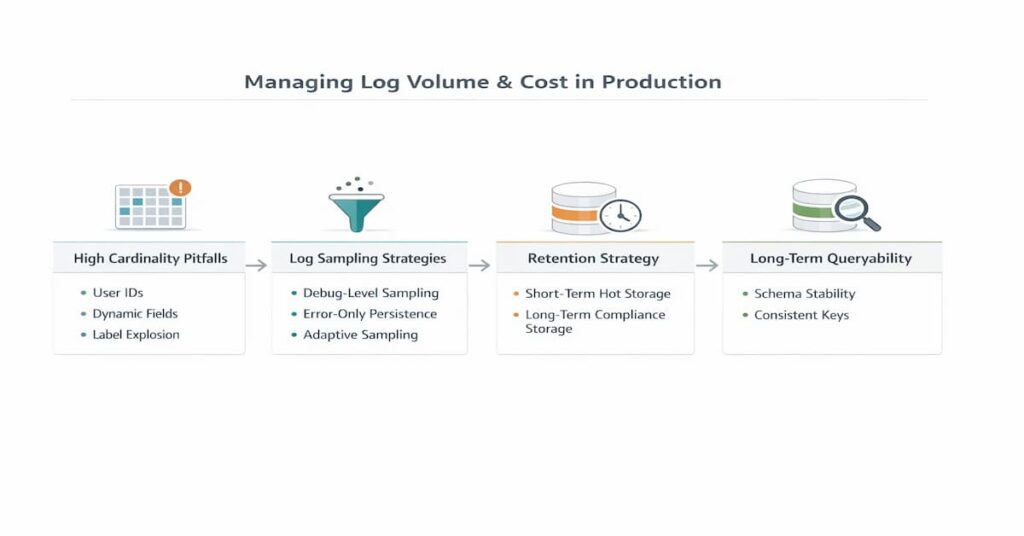
Logging volume and cost management are critical in large-scale systems. Structured logs can generate massive data volumes, so governance strategies are required.
High Cardinality Pitfalls
Avoid logging user IDs, request bodies, and dynamic payloads as indexed fields because they explode index cardinality. High cardinality increases storage cost, query latency, and ingestion overhead.
Log Sampling Strategies
Sample Debug logs to reduce volume, persist Error logs for reliability, and use adaptive sampling in high-traffic systems. Sampling balances observability and cost.
Retention Strategy Design
Logs should be kept in hot storage for 7 to 30 days for debugging and in cold storage for compliance and audits. Retention policies keep you in compliance while lowering storage costs.
Designing Logs for Long-Term Queryability
When schemas stay stable, indexing is cheaper, and queries don’t turn into a mess.
Having version control and governance in place keeps you from accidentally breaking things. It also ensures you can look back at historical logs without surprises.
Why Structured Logging Affects Elasticsearch Cost
Structured logs work well with Elasticsearch, but poorly designed fields can make it expensive. If applications keep emitting new fields dynamically, the index mapping grows quickly and shards become larger.
High-cardinality fields like user IDs or request IDs can also slow things down because the system has to track many unique values.
Over time this leads to slower queries and higher storage costs. Keeping schemas stable and limiting dynamic fields helps Elasticsearch stay fast and predictable.
Logging with Slog in Docker and Kubernetes
Logging to stdout
Kubernetes collects logs from container streams, so containers must log to both stdout and stderr. Logging to stdout makes sure that Fluent Bit, OpenTelemetry Collector, and CubeAPM ingestion pipelines can all work with the same data.
Avoiding File Writes
Writing logs to files inside containers usually causes friction. It complicates aggregation, consumes disk space, and doesn’t fit well with short‑lived containers that can disappear at any time.
In most container setups, it’s better to let logs go to stdout and allow the platform to handle collection. Keeping files inside the container tends to create more problems than it solves.
Aggregation Patterns
Tools like Fluent Bit, Vector, the OpenTelemetry Collector, or CubeAPM are what teams usually use to collect logs. They grab data from containers, sometimes enrich it, and forward it to whatever observability backend you’re using.
It’s not magic; they just make it easier to handle large volumes of logs consistently across multiple services.
Schema Consistency Across Pods
All pods must send out the same structured schemas so that dashboards and queries can work across pods. For multi-replica microservices and environments that automatically scale, schema consistency is very important.
Migrating to Slog from log, logrus, or zap
Migration Strategy Overview
Slog makes structured logging in Go easier to use by providing a standard library solution. This also makes it less likely that you’ll be stuck with a single vendor. Migration makes ecosystems more aligned and makes dependencies less complicated.
Incremental Adoption
Wrap slog with adapters, replace logrus or zap gradually, and enforce schema contracts during migration. Incremental migration reduces risk and avoids breaking observability pipelines.
Common Migration Mistakes
When you mix structured and printf logs, you get schemas that don’t match up and ingestion pipelines that don’t work. Inconsistent naming of keys makes it harder to connect services and makes operations more complicated.
When slog is not Enough
slog works well for most Go services, but some workloads still benefit from lower-level logging libraries like zap.
This usually comes up in very high-volume pipelines pushing 100k+ logs per second, ultra-low-latency telemetry collectors, or edge and embedded systems with tight CPU and memory limits. In cases like these, even small allocation costs matter, so it is worth benchmarking slog against tools like zap under real workload conditions.
In these environments, benchmarking Slog against alternatives like Zap under real workload conditions is recommended.
Slog vs Zap vs Logrus: Opinionated Comparison
- Performance philosophy: zap is built for raw speed and very low allocation overhead. slog takes a different approach. It is meant to bring structured logging into the Go standard library, with a handler design that is flexible enough for different setups. logrus is easier to pick up, but because it leans more on reflection, it tends to slow down sooner in high-throughput workloads.
- Allocation behavior: zap keeps allocations very low by using strongly typed field constructors and a logging path designed for efficiency. slog adds a little more overhead because log attributes move through handlers before they are written out. That extra work is usually small, but it gives you more flexibility. logrus is heavier here, since it depends more on reflection and interface conversions.
- Ecosystem maturity: zap and logrus have been around longer, so they have a more established ecosystem of integrations and examples. slog has a different advantage. Since it is part of the Go standard library, it fits naturally into modern Go services and works especially well in cloud-native setups built around tools like OpenTelemetry and Kubernetes.
slog is enough for most microservices and API workloads; slog is more than fast enough. You get solid performance, more consistent structured logging, and easier integration with observability pipelines.
zap is better in extremely high-throughput systems, especially telemetry collectors, ingestion pipelines, or services that push huge volumes of logs every second. In those cases, squeezing out every bit of performance matters.
| Scenario | Best Choice | Why |
| You want structured logging in a modern Go service | slog | Standard library, simple structured logging |
| High-performance services with strict latency requirements | zap | Designed for speed with minimal allocations and very fast structured logging |
| Legacy projects already using the library | logrus | Mature ecosystem and familiar API, though slower than newer libraries |
| Cloud-native systems using OpenTelemetry | slog | Works naturally with structured logs and modern telemetry pipelines |
| Applications generating extremely high log volumes | zap | Optimized for performance and low memory overhead |
Production Checklist Before Shipping Slog
Before rolling structured logging into production, a few guardrails should already be in place. These rules prevent schema drift, broken dashboards, and runaway logging costs.
- Never mix printf-style logs with structured fields. Once logs become structured telemetry, consistency matters.
- Always inject trace_id and span_id automatically so logs can be correlated with distributed traces during incidents.
- Do not log PII or sensitive data unless deterministic redaction is applied before the log leaves the application.
- Validate your log schema in CI. Changes to field names or structure should never silently break ingestion pipelines.
- Load test your log volume before enabling Debug logging in production. High log throughput can quickly increase storage and ingestion costs.
- Ensure every service emits the same core fields, such as service, environment, trace_id, and latency_ms. Consistent schemas make cross-service queries and dashboards reliable.
Real-World Incident Example: Debugging a Checkout Latency Spike
What Metrics Reveal
Prometheus metrics showed that the time it took to check out went from 120 ms to 2.8 seconds, which meant that performance had dropped significantly. The error rates stayed low, which means the system was slow but not completely broken.
What Structured Logs Reveal
Structured logs showed that payment gateway calls went from 200 ms to 2.5 seconds and that 40% of transactions had to be tried again. Logs also showed that services were taking longer to do TLS handshakes and retry attempts.
How Trace Correlation Narrows Root Cause
Trace correlation made the pattern easier to spot. It showed retries bouncing across three services, which kept pushing latency higher. The real problem turned out to be an expired TLS certificate that forced renegotiation on every request.
Why Schema Discipline Accelerates Resolution
Consistent trace_id, latency_ms, and service fields allowed engineers to isolate the failure in 12 minutes instead of hours. Schema discipline enabled automated queries and dashboards that pinpointed the failing component.
Platform Considerations for Structured Logging
Logs must be in the exact format that the ingestion system expects, or they could break or get lost. When you change the schema, it can take longer and cost more to index in Elasticsearch or OpenSearch because you have to reprocess old data. For logs from different services to make sense, traces need to be sent along in the same way every time. CubeAPM and other tools help by keeping schemas stable, connecting logs correctly, and avoiding extra costs. This makes it easier to see what’s going on in the system.
Consistency across services matters as well. Trace context must propagate with every request so logs from different services can still be correlated during investigations. When schemas drift or trace metadata is missing, debugging becomes significantly harder.
These issues show up fast during real incidents. They are not just technical annoyances. They affect operations directly. In one production outage, for example, error budget burn rose by 18%, and checkout conversion dropped by 7% because engineers needed more time to trace the failure across services.
Platforms like CubeAPM help reduce that friction. They do it by keeping schemas consistent, linking logs and traces automatically, and making large distributed systems easier to manage during incidents.
CubeAPM and Structured Logging in Modern Observability
Structured logs become far more useful when they are correlated with metrics and distributed traces. Observability platforms like CubeAPM ingest logs alongside telemetry signals such as metrics and traces, allowing engineers to move quickly from a log event to the related service behavior. Because slog emits structured fields consistently, it integrates well with OpenTelemetry pipelines and Kubernetes logging infrastructure. This makes it easier to ship logs into observability platforms without relying on fragile parsing rules or custom ingestion pipelines.
Conclusion: Slog as the Foundation of Modern Go Observability
Slog makes structured logging in Go more consistent and lays the groundwork for modern observability architectures. It has high production value because of more than just syntax; it also has disciplined schema design, trace correlation, and cost governance. Observability does not mean sending out logs. It is making engineering logs on purpose as structured telemetry signals. At CubeAPM, we suggest using slog as the default Go logging foundation and making sure it works with OpenTelemetry pipelines and Kubernetes-native observability architectures.
Disclaimer: The information in this article reflects the latest details available at the time of publication and may change as technologies and products evolve.
FAQs
1. Is slog suitable for high-throughput production microservices?
Yes. Slog works well for most microservices running in Kubernetes or cloud environments. Its structured logging integrates naturally with observability pipelines like OpenTelemetry and Elasticsearch.
If your service generates extremely high log volume, it’s still a good idea to benchmark logging under your real traffic profile before replacing libraries like zap in performance-sensitive services.
2. How does slog compare to zap in performance and structured logging design?
Zap is built with performance first in mind. It uses zero-allocation logging paths and strongly typed fields to keep overhead as low as possible. slog takes a different route. It focuses more on standardization and flexibility, using a handler-based design built into the Go standard library.
3. How do you correlate slog logs with OpenTelemetry traces?
Use OpenTelemetry context propagation to add IDs for spans and traces to slog attributes. Set up the OpenTelemetry Collector so that it sends logs and traces to the same backend for correlation. To make automated correlation and distributed debugging possible, use the same field names, like trace_id and span_id, across all services. Correlation only works when all services are forced to propagate traces.
4. What are the most common production mistakes when adopting slog?
Some of the most common mistakes are mixing printf-style logs with structured fields, not adding trace IDs, logging sensitive data without redacting it, having cardinality fields that aren’t controlled, and having schemas that aren’t the same across services. These mistakes can break pipelines, increase storage costs, and slow incident response. Teams should follow clear logging rules to prevent this.
5. How should you design a structured log schema in Go for long-term observability?
Make sure that field names in your design schemas stay the same. Don’t use indexed fields with a lot of values, and make sure to include required context fields like service, environment, trace_id, and latency. Also, make sure that all teams can see the schema contracts. You should treat log schemas like APIs because breaking schema consistency makes ingestion more expensive and slows down incident response. Schema governance is necessary for scalable observability.