










Flaky tests produce inconsistent results across runs without code changes, passing sometimes and failing other times on the same codebase. They erode trust in automation, waste engineering time on false alarm investigations, and block CI/CD pipelines. According to Google Research, 16% of test failures in their systems turned out to be flaky rather than actual bugs. That pattern holds across most engineering teams: flaky tests create noise that drowns out real signals.
This guide walks through how to detect flaky tests systematically, diagnose their root causes, and implement fixes that restore reliability to your test suite. You will learn detection strategies that work across JUnit, pytest, TestNG, and Playwright, practical troubleshooting steps for timing issues and environment instability, and how to track flaky test rates as a team metric.
Prerequisites
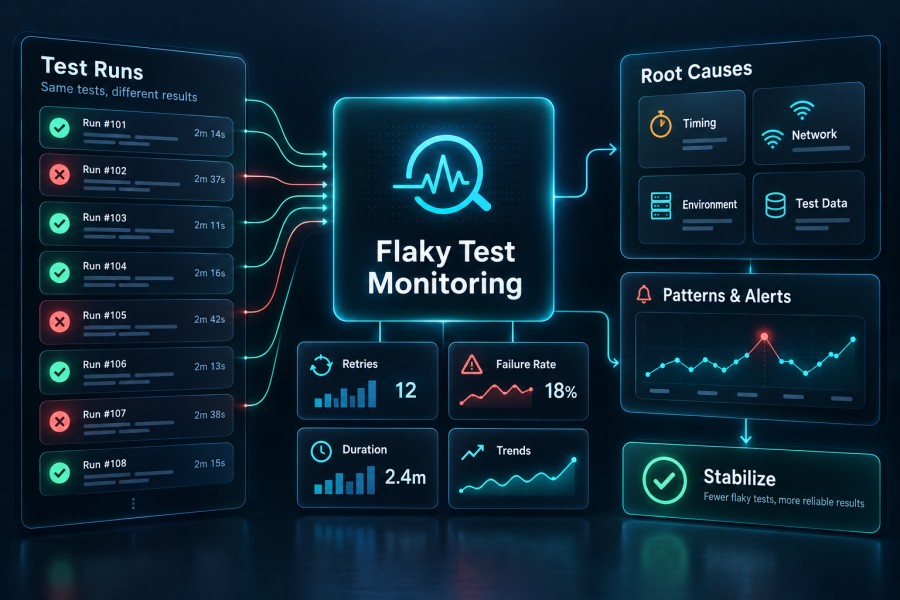
Before implementing flaky test detection and monitoring, ensure you have:
- A CI/CD pipeline running automated tests on every commit or pull request
- A test framework that supports rerun capabilities (JUnit 5, pytest, TestNG, Playwright, or Cypress)
- Access to historical test execution logs and results
- Monitoring infrastructure to track test metrics over time (tools like infrastructure monitoring platforms can help)
- Team consensus on defining what constitutes a flaky test in your context
Step 1: Establish a Baseline for Flaky Test Detection
Start by defining what flaky means for your team. A test that fails once every 100 runs is different from one that fails every other run. Most teams use a threshold: any test that shows inconsistent results in the last 10 to 20 runs without code changes qualifies as flaky.
Instrument your CI pipeline to capture every test result with metadata: test name, result (pass/fail), execution time, commit SHA, branch, and timestamp. Store this data in a structured format (database, logs, or CI artifact storage) so you can query historical patterns.
Create a simple script that queries the last 20 runs of each test and flags any test with both passes and fails in that window:
import sqlite3
def detect_flaky_tests(db_path, run_count=20):
    conn = sqlite3.connect(db_path)
    cursor = conn.cursor()

    query = """
    SELECT test_name,
           COUNT(DISTINCT result) as result_variety,
           COUNT(*) as total_runs
    FROM test_results
    WHERE run_id IN (
        SELECT run_id FROM test_results
        ORDER BY timestamp DESC
        LIMIT ?
    )
    GROUP BY test_name
    HAVING result_variety > 1
    """

    cursor.execute(query, (run_count,))
    flaky_tests = cursor.fetchall()

    for test_name, variety, runs in flaky_tests:
        print(f"Flaky test detected: {test_name} ({runs} runs, {variety} different outcomes)")

    conn.close()
return flaky_testsThis baseline detection catches obvious flakes. Run it daily as part of a scheduled job and publish results to a dashboard or Slack channel. Teams that make flaky test rates visible see 40% to 60% reductions in flakiness within the first quarter because visibility drives accountability.
Step 2: Implement Automatic Test Reruns in CI
Configure your test framework to automatically rerun failed tests in the same build. This surfaces flakes immediately: if a test passes on the second or third attempt without code changes, it is flaky by definition.
For JUnit 5 with Maven, add the Surefire plugin with rerun configuration:
<plugin>
    <groupId>org.apache.maven.plugins</groupId>
    <artifactId>maven-surefire-plugin</artifactId>
    <version>3.0.0</version>
    <configuration>
        <rerunFailingTestsCount>2</rerunFailingTestsCount>
    </configuration>
</plugin>For pytest, install and configure pytest-rerunfailures:
pip install pytest-rerunfailures
pytest --reruns 2 --reruns-delay 1For Playwright, configure retries in the test configuration:
export default {
  retries: 2,
  use: {
    screenshot: 'only-on-failure',
    video: 'retain-on-failure',
  },
};After adding reruns, modify your CI pipeline to log every rerun attempt. Treat any test that passes only after a rerun as flaky and flag it in your build output. A typical pattern:
pytest --reruns 2 --json-report --json-report-file=test_results.json
python analyze_reruns.py test_results.jsonThe analysis script parses the JSON report, identifies tests that required reruns, and posts those to a flaky test tracker (Jira, GitHub Issues, or a dedicated flakiness dashboard).
Step 3: Correlate Flaky Tests with Build Metadata
Flaky tests often correlate with specific conditions: time of day, CI runner type, parallel execution, or external dependency health. Enrich your test result data with context: which runner executed the test, what time it ran, whether it ran in parallel, and what external services were reachable.
Add environment metadata to each test result record:
test_result:
  test_name: "test_user_checkout"
  result: "fail"
  timestamp: "2026-06-15T14:32:10Z"
  commit_sha: "a3f2c8b"
  runner_id: "ci-runner-03"
  parallel: true
  external_service_latency:
    payment_api: 250ms
inventory_api: 180msQuery this enriched data to find patterns. Example: if test_user_checkout fails 80% of the time on ci-runner-03 but only 5% on other runners, the runner itself may have network issues or insufficient resources.
Use a SQL query like this to surface correlations:
SELECT runner_id,
       COUNT(CASE WHEN result = 'fail' THEN 1 END) * 100.0 / COUNT(*) as fail_rate
FROM test_results
WHERE test_name = 'test_user_checkout'
GROUP BY runner_id
ORDER BY fail_rate DESC;Document findings in a shared wiki or test health dashboard. Teams that track correlations can isolate environmental causes 50% faster than teams analyzing failures case by case.
Step 4: Root Cause Analysis for Common Flaky Test Patterns
Most flaky tests fall into five categories. Diagnose which pattern applies, then apply the corresponding fix.
Timing and synchronization issues: Tests that interact with UI elements, APIs, or databases often fail when an element is not ready. A hardcoded sleep(2) works on a fast developer machine but fails in a slower CI environment.
Fix: Replace fixed waits with explicit waits that poll for a condition:
from selenium.webdriver.support.ui import WebDriverWait
from selenium.webdriver.support import expected_conditions as EC
# Bad: sleep(5)
# Good:
WebDriverWait(driver, 10).until(
    EC.presence_of_element_located((By.ID, "submit-button"))
)External dependency failures: Tests that call live APIs, third-party services, or shared test databases inherit the variability of those systems. A flaky external service makes your test flaky.
Fix: Mock external dependencies or use contract testing. For API calls, replace real HTTP requests with responses from recorded fixtures:
import responses
@responses.activate
def test_payment_processing():
    responses.add(
        responses.POST,
        'https://payment-api.example.com/charge',
        json={'status': 'success', 'transaction_id': '12345'},
        status=200
    )

    result = process_payment(amount=100)
assert result['status'] == 'success'Race conditions and concurrency: Tests that run in parallel and share state (database records, files, environment variables) produce outcomes that vary by execution order.
Fix: Isolate test data. Each test creates and cleans up its own data. Use unique identifiers per test run:
import uuid
def test_user_creation():
    unique_email = f"test_{uuid.uuid4()}@example.com"
    user = create_user(email=unique_email)
    assert user.email == unique_email
cleanup_user(user.id)Non-deterministic test data: Tests using random values, timestamps, or data that changes between runs cannot guarantee consistent outcomes.
Fix: Use fixed, deterministic data. Replace datetime.now() with a frozen timestamp. Replace random.randint() with a seeded generator or fixed values:
from datetime import datetime
from unittest.mock import patch
@patch('app.utils.datetime')
def test_expiry_logic(mock_datetime):
    mock_datetime.now.return_value = datetime(2026, 6, 15, 12, 0, 0)
    result = check_expiry(created_at=datetime(2026, 6, 14, 12, 0, 0))
assert result == TrueEnvironment instability: Differences in available memory, disk space, network latency, or software versions between CI runs cause inconsistent behavior.
Fix: Use containerized test environments with fixed resource limits. A Docker Compose setup ensures identical conditions:
version: '3.8'
services:
  test-runner:
    image: python:3.11
    environment:
      - DATABASE_URL=postgres://testdb:5432/test
    depends_on:
      - testdb
    volumes:
      - ./tests:/tests
    command: pytest /tests
  testdb:
    image: postgres:15
    environment:
      POSTGRES_DB: test
      POSTGRES_USER: test
POSTGRES_PASSWORD: testStep 5: Build a Flaky Test Dashboard
Make flaky test metrics visible to the entire team. Track three core metrics:
- Flaky test count: Total number of tests flagged as flaky in the last 30 days
- Flaky test rate: Percentage of all tests that are flaky
- Time wasted on flakes: Estimated engineering hours spent investigating false failures
Use your CI tool’s API or custom scripts to collect data and push it to a monitoring dashboard. CubeAPM can track test failures as error events, correlate them with infrastructure metrics, and surface patterns across test runs.
Example script to calculate flaky test rate:
import requests
def calculate_flaky_rate(api_url, days=30):
    response = requests.get(f"{api_url}/test_results?days={days}")
    results = response.json()

    total_tests = len(set(r['test_name'] for r in results))
    flaky_tests = len(set(
        r['test_name'] for r in results
        if r['is_flaky'] == True
    ))

    flaky_rate = (flaky_tests / total_tests) * 100 if total_tests > 0 else 0

    print(f"Total tests: {total_tests}")
    print(f"Flaky tests: {flaky_tests}")
    print(f"Flaky rate: {flaky_rate:.2f}%")

return flaky_rateDisplay this metric on a shared dashboard visible during standups. Teams that track flaky test rate as a first class metric reduce flakiness 45% faster than teams that rely on ad hoc awareness.
Step 6: Quarantine and Track Flaky Tests
Once you identify a flaky test, quarantine it: remove it from the main test suite temporarily so it does not block builds while you investigate and fix the root cause.
Use test framework annotations to mark tests as flaky and skip them in CI:
import pytest
@pytest.mark.skip(reason="Flaky test - investigating timing issue")
def test_checkout_flow():
    # Test code here
passFor JUnit, use @Disabled with a clear reason:
@Disabled("Flaky - fails intermittently on CI runner 03")
@Test
public void testCheckoutFlow() {
    // Test code
}Create a tracking ticket for every quarantined test with:
- Test name and file path
- Failure pattern and rerun history
- Suspected root cause
- Assigned owner
- Target fix date
Run quarantined tests in a separate nightly build that does not gate deployments. Monitor whether they stabilize. If a test passes consistently for 20 consecutive runs, reintroduce it to the main suite.
Step 7: Prevent Future Flakiness with Test Design Standards
Establish team standards that prevent flaky tests from being introduced in the first place.
No hardcoded waits: Ban sleep() or fixed delays in test code. Use explicit waits that check for specific conditions.
Isolate test data: Every test creates and destroys its own data. No shared fixtures that persist across tests.
Mock external dependencies: Never call live third-party APIs, payment gateways, or external services in unit or integration tests. Use mocks, stubs, or contract tests.
Deterministic inputs: No random data, no system timestamps, no reliance on external state that varies between runs. Use fixed test data or seeded randomness.
Containerized environments: Run tests in containers with fixed resource limits and software versions. No reliance on the host machine state.
Add these rules to your team’s test writing guide and enforce them in code review. Prevent flaky tests from merging by running new tests 10 times in CI before approving the pull request. If a test fails even once in those 10 runs, block the merge and investigate.
Troubleshooting Common Issues
Issue: Test reruns are slowing down the CI pipeline significantly.
Solution: Limit reruns to 2 attempts maximum. If a test fails twice, treat it as a genuine failure and investigate immediately rather than rerunning indefinitely. Configure parallel test execution to offset the time cost of reruns.
Issue: Flaky test detection flags too many tests, overwhelming the team.
Solution: Tighten the detection threshold. Instead of flagging any test with mixed results in the last 20 runs, require at least 3 failures out of 20 to qualify as flaky. Prioritize fixing the top 10 most frequently failing flaky tests first rather than trying to fix everything at once.
Issue: Quarantined tests never get fixed and accumulate over time.
Solution: Set a hard limit: no more than 10 quarantined tests at any time. When the limit is reached, the team must fix at least one quarantined test before quarantining another. Assign an owner to every quarantined test and set a 2 week resolution deadline. If a test cannot be fixed in 2 weeks, delete it permanently rather than leaving it in limbo.
Issue: External API calls cause flakiness but cannot be mocked due to complex authentication or state.
Solution: Use a dedicated test instance of the external service if the vendor provides one. If not, implement a lightweight proxy that records real API responses during initial test runs, then replays those recorded responses in subsequent runs. Tools like VCR for Ruby or vcrpy for Python automate this pattern.
Issue: Tests pass locally but fail in CI due to environment differences.
Solution: Use Docker to replicate the CI environment locally. Developers run tests inside the same container image used in CI, eliminating environment drift. Add a Makefile target that runs tests in Docker:
test-ci:
docker-compose -f docker-compose.test.yml up --abort-on-container-exitFlaky tests are a symptom of deeper test design or environment issues. Addressing the root cause improves the entire test suite, not just the flaky tests themselves.
Conclusion
Flaky test monitoring requires three components: systematic detection through reruns and historical analysis, disciplined root cause investigation targeting timing issues and external dependencies, and prevention through test design standards and environment isolation. Teams that make flaky test rate a visible metric and prioritize stabilization work reduce flakiness by 40% to 60% within three months. Tools like synthetic monitoring platforms complement test suite reliability by proactively checking production behavior, while real user monitoring captures issues that slip past even stable automated tests.
Disclaimer: The information in this article reflects the latest details available at the time of publication and may change as technologies and products evolve. Features, pricing, and plan limits can change over time. Always verify the latest information directly with the vendor before making purchasing or deployment decisions.
Frequently Asked Questions
How do you identify flaky tests in a large test suite?
Run every test multiple times (10 to 20 runs) and flag any test that shows both passes and fails without code changes. Automate this with CI pipeline scripts that log every result and query for inconsistent patterns. Tools like Buildkite Test Analytics or custom dashboards make this visible across the team.
What causes flaky tests in Selenium or Playwright?
Most Selenium and Playwright flakiness comes from timing issues where tests interact with elements before they are fully loaded. Replace hardcoded waits with explicit waits that check for element visibility or interactivity. Network latency, browser version differences, and race conditions in JavaScript execution also cause flakes in browser automation.
How do you fix flaky tests in a CI/CD pipeline?
Implement automatic test reruns to surface flakes immediately, correlate failures with build metadata to find environmental patterns, replace fixed waits with explicit condition checks, mock external dependencies, and containerize test environments to eliminate variability. Quarantine persistently flaky tests and track them until fixed.
Should you rerun flaky tests or fix them?
Rerunning without fixing is a bandaid that masks the problem. Use reruns as a detection mechanism to identify flakes, but always investigate and fix the root cause. Persistent reruns waste CI time and erode trust in the test suite. Fix timing issues, stabilize dependencies, and improve test isolation instead of rerunning indefinitely.
How do you handle flaky tests in Rest Assured or API testing?
API test flakiness usually stems from external service variability, network timeouts, or race conditions in asynchronous operations. Mock external API responses using tools like WireMock or MockServer, add retry logic with exponential backoff for network calls, and ensure tests create isolated data that does not conflict with parallel runs.
What is a good flaky test rate for a healthy test suite?
Most healthy test suites maintain a flaky test rate below 2%, meaning fewer than 2 out of every 100 tests show inconsistent results. Teams with rates above 5% see significant productivity loss from false alarm investigations. Track this metric weekly and prioritize stabilization work when the rate exceeds your threshold.
How often should you run flaky test detection?
Run detection daily as part of a scheduled CI job. Analyze the last 20 test runs for each test and flag new flakes immediately. Weekly reviews of the flaky test dashboard help teams prioritize fixes and track progress. Real time alerting when a new flake appears prevents flaky tests from accumulating unnoticed.