









In early stages, Express.js applications perform well. But when traffic grows, performance issues, such as latency spikes, partial failures, and errors, start appearing. It becomes harder to diagnose these issues.
Traditional monitoring tools don’t clearly explain Express.js behavior, such as async execution, layered middleware, and downstream dependencies. A single request may cross multiple async boundaries, trigger several external calls, or follow a different execution path.
This guide explains how to monitor Express.js applications correctly in production.
Why Monitoring Express.js Is Different from Monitoring Node.js
Monitoring Express.js follows a different monitoring approach from that of Node.js. Node.js metrics describe process health. Express.js monitoring explains request behavior. In production systems, those are not the same thing.
As systems scale, most operational questions concern why specific requests behave in a particular way.
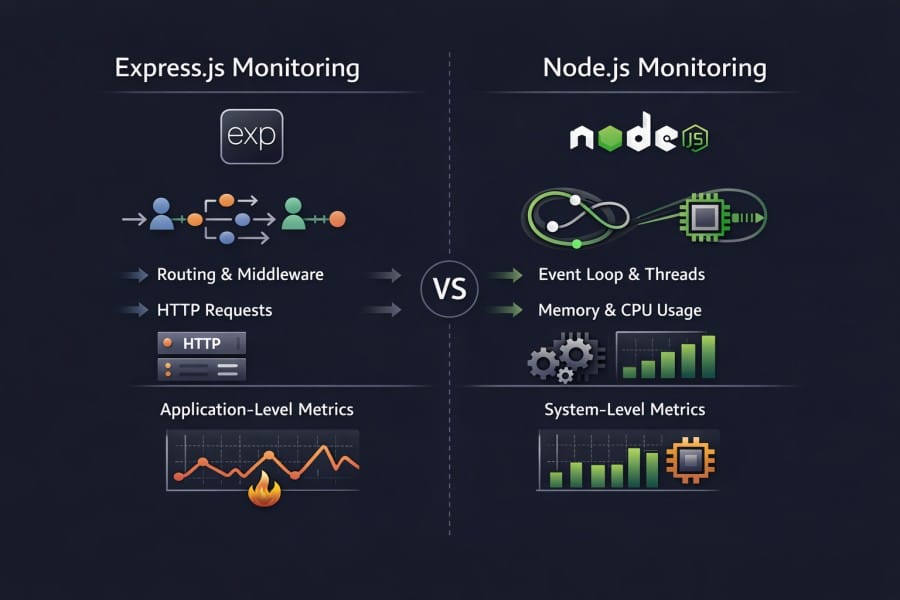
Why Node.js runtime metrics alone are insufficient
Node.js runtime metrics focus on the state of the process. They help in capacity planning and stability checks, but they don’t explain user-facing behavior.
Runtime metrics can tell:
- CPU and memory usage of the process
- Event loop delay and garbage collection pressure
- Whether the service is alive, degraded, or crashing
Runtime metrics can’t tell:
- Which route caused a latency spike
- Whether slowness came from middleware, handler logic, or a downstream service
- Why only a subset of requests failed while the process remained healthy
In large-scale systems, many failures occur even though infrastructure and runtime metrics appear normal. The reason is root cause lives at the application layer, not in resource exhaustion.
For Express.js applications, this gap becomes obvious during incidents. The process looks stable, but users still experience slow or broken requests.
How Express.js introduces request lifecycle, middleware chains, and routing complexity
Express.js defines how requests are handled on top of the Node.js runtime. Despite offering structure and flexibility, this layer introduces complexity. Runtime metrics can’t observe this.
A request passes through:
- Multiple middleware with ordered execution
- Asynchronous handlers that span multiple event loop ticks
- Conditional routing logic that changes execution paths
- Error-handling flows
Two requests processed by the same Node.js process can follow entirely different execution paths.
- From the runtime’s perspective, both requests consume CPU and memory.
- From the user’s perspective, one may complete instantly while the other fails or times out.
This is why Express.js monitoring must be request-aware.
Why most production issues surface at the Express layer, not the runtime layer
In real-world systems, many production issues are triggered by application behavior and not runtime instability. Common failure patterns include:
- An unexpected latency due to a newly added middleware
- Blocking logic inside a handler that only executes for certain inputs
- N+1 queries that grow with request size, not traffic volume
- Downstream service latency that propagates through request chains
Configuration changes are a major cause of production incidents. These changes happen at the Express.js layer. Here, request flows, dependency calls, and error handling converge.
Runtime metrics indicate that a process is running and is stable. On the other hand, Express.js monitoring shows if users are getting correct and timely responses. It also tells how the service behaves under real user traffic.
How Requests Flow Through an Express.js Application
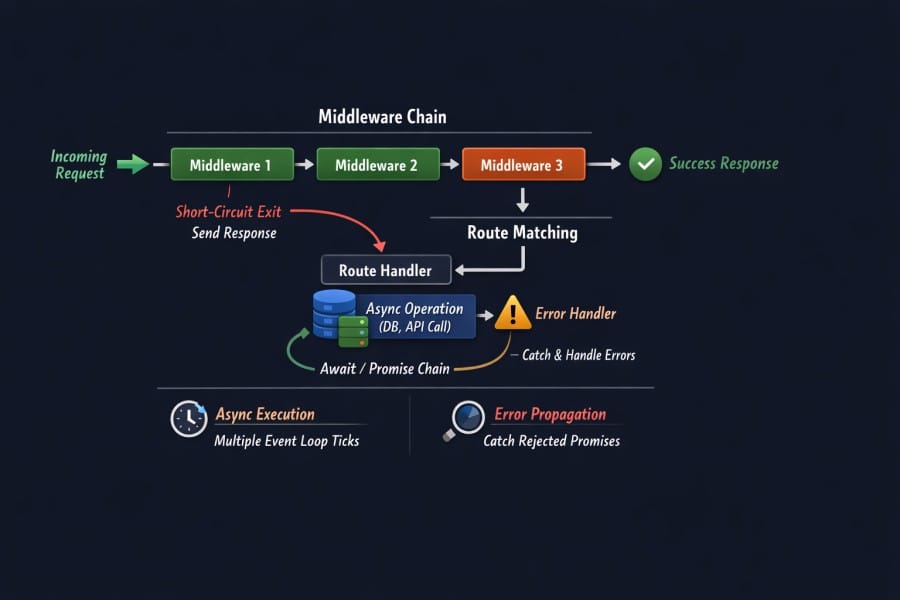
Understanding how Express.js processes requests is the foundation for effective observability. Express.js builds on top of the Node.js runtime. It defines middleware chains, routing logic, and async execution flows.
Middleware Execution Order and Short-Circuiting
Express.js middleware functions run in the order they are defined. This sequence determines how requests are transformed and when they exit the pipeline.
Key characteristics:
- Middleware is additive; each function can modify the request/response
- A middleware can short-circuit the flow by sending a response early
- Errors thrown in middleware propagate to error handlers
For two requests with the same URL, the actual path through middleware may differ. Understanding this flow is essential for observability because timing and error patterns depend on where the execution spends time.
Async Handlers, Promises, and Error Propagation
Asynchronous execution is essential to Node.js and Express.js. Handlers use promises or async/await for database, cache, or third-party calls.
Important implications:
- Async operations can span multiple event loop ticks
- Errors may be thrown deep inside a promise chain
- Express’s error propagation mechanism must be respected to catch issues correctly
Express passes rejected promises to error handlers only if the async function is used correctly. This requires careful error handling design, or observability signals may miss critical context when failures happen deep within asynchronous logic.
This is why request-level tracing is important. It lets you see the complete async path rather than isolated metrics about resource usage. For this reason, Node.js tools measure error rates and response times.
Route Matching, Response Lifecycle, and Early Exits
Express routes are matched based on defined URL patterns and HTTP methods. Route definitions often use parameters and wildcards.
Key points:
- Route matching complexity affects where execution time is spent
- Some routes may short-circuit before reaching handlers
- Conditional logic inside handlers creates divergent execution paths
Because of this, the same process may handle different requests very differently in terms of duration, dependencies called, and data access patterns. Observable systems must account for these divergent paths.
Why Understanding This Flow Matters for Monitoring
Express.js request handling defines how latency, errors, and downstream behavior surface in production. Understanding the flow is important for these reasons:
- Accurate latency attribution: Understanding middleware order and handler execution helps locate exactly where time is spent within a request. You don’t have to rely on aggregated response times.
- Correct error attribution and root cause analysis: Knowing how errors propagate through async handlers and middleware ensures failures are correlated to the correct execution path.
- Preserved async context across requests: Express.js requests cross multiple async boundaries, and understanding request flow is essential to maintain context across promises, callbacks, and downstream calls.
- Meaningful route-level visibility: Routes often follow different execution paths due to routing logic and early exits. Understanding request flow allows monitoring to reflect actual user impact.
- Effective tracing and faster incident response: Traces help you isolate slow middleware, blocking handlers, or failing dependencies during incidents.
- Reduced noise and better signal quality: Understanding request flow helps distinguish real user-facing issues from benign runtime fluctuations. This reduces false positives and alert fatigue.
- Scalable observability design: Monitoring strategies built around request flow scale more reliably as applications grow in traffic, service count, and execution complexity.
A report says that up to 40% of failures in web applications are due to software errors. Organizations with inadequate monitoring strategies often miss these signals until after user impact is visible.
What It Means to Monitor Express.js in Production
Monitoring Express.js in production requires you to understand how real requests behave under real traffic. For this, you need better visibility into request execution.
What questions Express.js monitoring must answer during incidents
- Which routes are impacted: Identifying whether failures are isolated to specific endpoints or request types
- Where latency is introduced: Determining whether delays come from middleware, handler logic, or downstream dependencies
- Why failures are selective: Explaining why only certain requests, inputs, or tenants are affected
- What changed: Correlating request behavior with recent deploys, config changes, or dependency updates
Difference between runtime monitoring and request-level monitoring
Runtime monitoring and request-level monitoring serve different purposes.
Runtime monitoring focuses on:
- Process health: CPU usage, memory consumption, garbage collection
- Stability signals: Event loop delay, crashes, restarts
- Capacity indicators: Whether the service is under resource pressure
These signals explain whether the service can run, but not how users experience it.
Request-level monitoring focuses on:
- End-to-end request latency: Measured per route and execution path
- Error attribution: Errors tied to specific middleware, handlers, or dependencies
- Downstream behavior: Calls made during request execution and their impact
- Variance across requests: Differences hidden by averages and aggregates
For Express.js applications, request-level monitoring explains partial failures and how they affected users even though the process appears healthy.
Why dashboards alone are insufficient for Express.js workloads
Dashboards are effective for detecting that something has changed, but not for explaining why requests are slow or failing in Express.js applications.
- Aggregated metrics hide outliers: Averages and percentiles can mask slow or failing requests that affect only a small subset of users
- Route-level behavior is flattened: Different routes and middleware paths are often collapsed into a single service-level view
- Async execution obscures causality: Dashboards show that latency increased, but not how time was spent across async middleware and handlers
- Partial failures go unnoticed: Many Express.js incidents affect specific inputs or routes while global error rates remain normal
- High-cardinality context is suppressed: Request IDs, parameters, and user context are often dropped to keep dashboards usable.
- Dashboards surface symptoms, not causes: They signal that something is wrong, but cannot explain what changed in request execution.
How to Monitor Express.js Requests Effectively
Effective Express.js monitoring starts with treating each request as the unit of analysis. In production, performance issues, errors, and regressions surface through request behavior. Monitoring must, therefore, be built around how a request moves through middleware, handlers, and dependencies under real traffic.
At this level, the goal is clarity on what must be observed to make production behavior explainable.
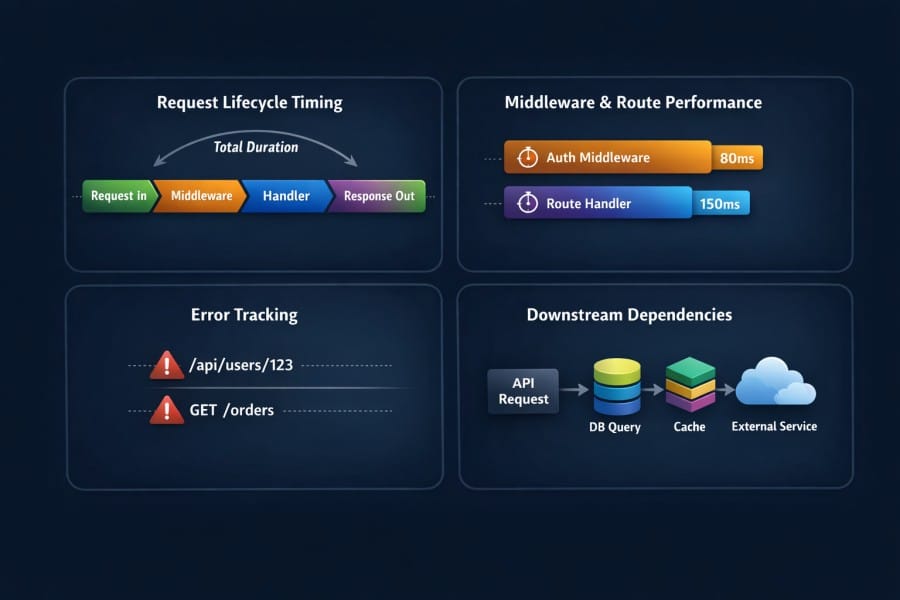
- Capturing end-to-end request lifecycle timing: Measure the full duration of a request from ingress to response, including time spent in middleware, handlers, and asynchronous operations. This way, latency can be attributed to specific execution stages rather than averaged at the service level.
- Monitoring middleware execution and route handlers: Observe how long individual middleware functions and route handlers take to execute. The reason is that small delays in shared middleware compound into significant latency across many requests.
- Tracking errors at the request and route level: Associate errors with the exact request path, route, and execution context in which they occur, instead of relying on global error counts that hide selective or input-specific failures.
- Correlating incoming requests with downstream calls: Link each incoming request to the database queries, cache lookups, and external service calls it triggers. This helps you see how downstream latency or failures propagate back to users.
Key Signals to Monitor in Express.js Applications
Effective Express.js monitoring depends on choosing signals that explain request behavior under real traffic. These signals must reveal how users experience the system and show when the Node.js runtime begins to constrain request execution.
Both request-level signals and selected runtime signals are required to form a complete picture.
Request-level signals
Request-level signals describe how individual requests behave as they move through middleware, handlers, and dependencies. These are the primary signals used during incidents and performance investigations.
- Latency distributions per route (not averages): Track p50, p95, and p99 latency per route to expose slow paths that averages hide, even when only a small percentage of requests are impacted.
- Error rates by middleware and handler: Attribute errors to the exact middleware or handler where they occur. It helps distinguish application logic failures from downstream or infrastructure-related issues.
- Throughput under load: Measure requests per second per route to understand how traffic patterns change during spikes and how increased load correlates with latency and error behavior.
These signals answer whether users are affected, which requests are impacted, and how widespread the issue is.
Node.js signals that matter in Express workloads
Node.js runtime signals provide context for request-level behavior. In Express.js applications, only a subset of runtime metrics directly influences request performance.
- Event loop delay during request spikes: Monitor event loop lag to detect when synchronous or CPU-heavy work is delaying request execution, even if overall CPU usage appears acceptable.
- Memory growth with concurrent requests: Track heap usage as concurrency increases to identify leaks or unbounded allocations that surface only under sustained traffic.
- GC behavior under sustained traffic: Observe garbage collection frequency and pause time to understand when memory pressure begins to introduce latency into request handling.
These runtime signals explain why request-level signals degrade when traffic increases.
Distributed Tracing: The Backbone of Express.js Monitoring
Distributed tracing provides the execution context that metrics and logs may not. In Express.js applications, where requests cross middleware, async boundaries, and external services, tracing is what makes request behavior explainable in production.
Without tracing, teams can detect that something is slow. With tracing, they can see why it is slow.
Why tracing is essential for Express.js, not optional
Express.js applications rely heavily on asynchronous execution and composition. A single request goes through multiple middleware functions, handlers, and downstream calls.
Tracing is essential because it:
- Preserves request context across async boundaries
- Shows the full execution path of a request
- Makes partial failures and selective latency visible
In modern Express.js workloads, request behavior cannot be reliably inferred from metrics alone. Tracing helps you understand the cause.
Context propagation across async middleware
Express.js request execution frequently crosses promises, async functions, and callbacks. Each boundary risks losing the request context if it is not explicitly preserved.
Effective tracing ensures:
- Middleware timing is attributed to the correct request
- Errors thrown deep in async chains remain linked to their origin
- Parallel async operations are correctly associated with the parent request
Without proper context propagation, traces fragment and lose explanatory value, especially under concurrency.
Tracing downstream calls from Express handlers
Most Express.js handlers interact with external systems such as databases, caches, queues, and third-party APIs. These calls often dominate request latency.
Tracing downstream calls allows teams to:
- See which dependencies were called during a request
- Measure time spent waiting on each dependency
- Identify cascading latency caused by slow or failing services
This visibility is critical when downstream systems are the source of user-facing issues, even though the Express.js process itself appears healthy.
Why metrics show that requests are slow, but traces show why
Metrics answer high-level questions about system behavior. Traces explain individual request behavior.
Metrics can show:
- That latency increased
- That error rates rose
- That throughput changed
Traces can show:
- Which middleware or handler introduced latency
- Which downstream call stalled or failed
- How execution paths differed between fast and slow requests
In Express.js monitoring, metrics are for detection. Tracing is for explanation. Both are necessary, but tracing is what makes incidents diagnosable under real production conditions.
Common Mistakes When Monitoring Express.js
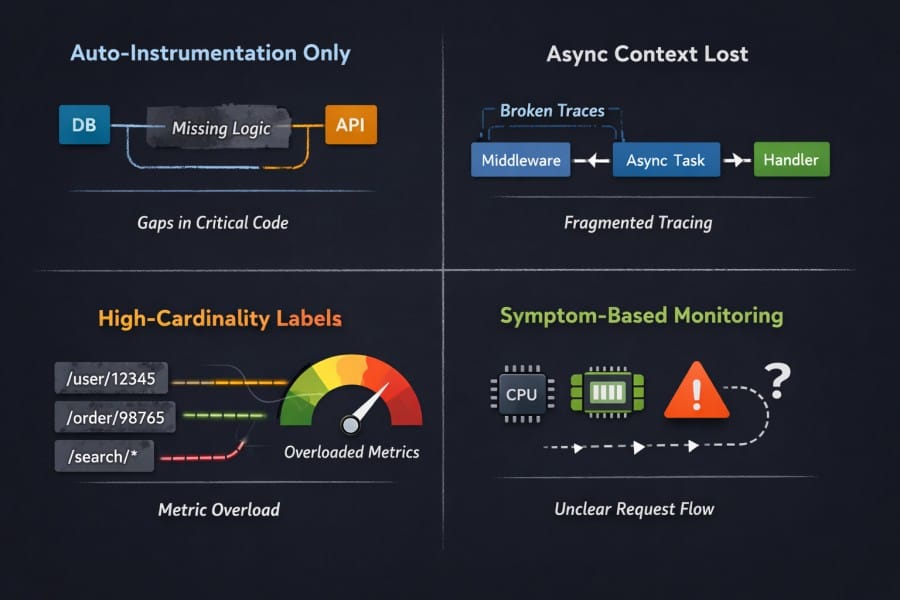
Many Express.js observability issues are caused by incorrect assumptions about what is being monitored. These mistakes often remain invisible until traffic increases or incidents occur. Avoiding them requires understanding how Express.js actually executes requests in production.
- Relying only on auto-instrumentation: Automatic instrumentation provides a baseline, but it often misses custom middleware logic, internal async boundaries, and business-critical code paths where latency and errors actually originate.
- Losing async context across middleware: Failing to preserve context across async and promise boundaries causes traces to fragment, making it impossible to follow a request end-to-end under concurrency.
- High-cardinality routes and labels: Unbounded route parameters and labels can overwhelm metrics systems, leading teams to drop the very dimensions needed to debug request-specific issues.
- Monitoring symptoms instead of request flow: Focusing on CPU, memory, or error counts alone detects that something is wrong, but does not explain how a request moved through middleware, handlers, and dependencies to produce user impact.
Sampling and Performance Overhead in Express.js Monitoring
Sampling in Express.js is not about reducing data volume, but about preserving high-value request context during peak load and incidents.
As Express.js applications scale, collecting full telemetry for every request becomes impractical. Traffic growth increases data volume, system overhead, and cost. Sampling is the mechanism that balances visibility with performance and sustainability.
Understanding how sampling behaves under load is critical for reliable monitoring.
Why sampling becomes necessary as traffic grows
High-traffic Express.js services generate telemetry proportional to request volume. At scale, this quickly exceeds what systems can ingest, store, and query in real time.
Sampling becomes necessary because:
- Collecting full traces for every request introduces CPU and memory overhead
- Telemetry pipelines cannot absorb peak traffic without backpressure
- Storage and query costs grow faster than application traffic
Without sampling, monitoring systems themselves can become a source of instability.
Request-level sampling trade-offs
Sampling decisions affect what data is available during debugging. Poor sampling strategies can hide the very requests that matter most.
Key trade-offs include:
- Sampling fewer requests reduces overhead but increases blind spots
- Uniform sampling treats healthy and failing requests equally
- Late sampling decisions preserve context but add processing cost
In Express.js workloads, request-level behavior varies widely. Sampling strategies must account for this variability to remain useful.
Impact of sampling on debugging during incidents
Incidents often trigger traffic spikes, retries, and error amplification. These conditions increase telemetry volume precisely when visibility is most critical.
During incidents:
- Sampling rates often increase unintentionally due to volume pressure
- Critical slow or failing requests may be dropped
- Traces become incomplete or unavailable when teams need them most
This is why many post-incident reviews cite missing traces as a blocker to fast root cause analysis.
Why trace loss often happens at peak load
Trace loss emerges from backpressure across instrumentation, ingestion, and storage layers. Common causes include:
- Instrumentation overhead competing with request execution
- Ingestion pipelines throttling under sustained load
- Memory pressure leading to dropped spans
In Express.js environments, peak load is when async execution paths are most complex and most fragile. Monitoring strategies must be designed to retain high-value traces under these conditions.
As for sampling, it’s a reliability mechanism. When designed correctly, it preserves visibility when systems are under the most stress.
Express.js Performance Issues You Can’t Debug with Metrics Alone
Many Express.js performance problems affect specific request paths and only become visible when request execution is examined in detail. Metrics can indicate the issue, but can’t explain the reason behind it.
- Slow middleware chains: Middleware executes sequentially, and small delays in shared middleware accumulate across every request, creating latency that appears evenly distributed in metrics but is only visible when broken down by execution order.
- Blocking logic inside handlers: Synchronous computation or blocking I/O inside a handler can stall the event loop for a subset of requests, increasing tail latency without necessarily causing sustained CPU saturation.
- N+1 downstream calls: Handlers that issue repeated database or API calls per request scale poorly with request size, leading to exponential latency growth that metrics alone cannot attribute to a specific code path.
- Cascading latency from external services: Slow or failing downstream dependencies can propagate delays through retries and timeouts, causing intermittent request slowness even when the Express.js process remains healthy.
How to Monitor Express.js During Production Incidents
Effective Express.js monitoring starts with treating each request as the unit of analysis.
Production incidents change system behavior in ways that steady-state monitoring does not capture. Traffic spikes, retries, and partial failures stress both the application and the monitoring pipeline at the same time.
Effective Express.js monitoring during incidents focuses on preserving request visibility when conditions are worst.
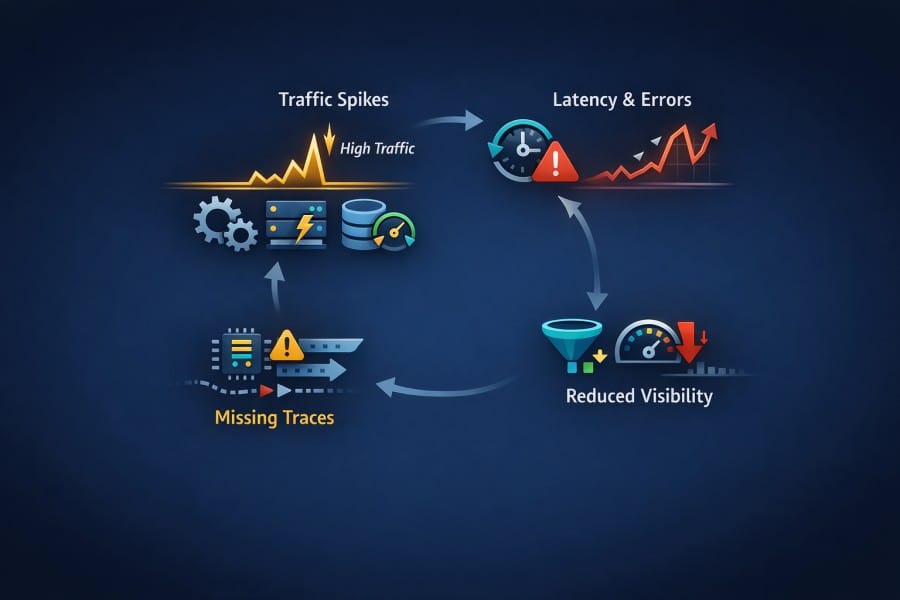
What breaks first under traffic spikes
Traffic spikes amplify existing weaknesses in request handling and dependencies. Common early failure points include:
- Middleware that performs synchronous or CPU-heavy work
- Downstream services that cannot absorb burst traffic
- Shared resources, such as connection pools reaching limits
These failures often appear first as increased tail latency on specific routes rather than global outages.
Why error rates and latency rise together
In Express.js applications, latency and errors are tightly coupled under load. This happens because:
- Slow downstream calls increase request duration and timeout risk
- Retries and backpressure amplify execution time per request
- Timeouts convert latency into user-visible errors
As a result, rising latency is often an early indicator of impending error spikes, not a separate symptom.
Why traces often go missing during outages
Trace loss during incidents is a common and well-documented failure mode. Typical causes include:
- Instrumentation overhead competing with request execution
- Telemetry buffers filling faster than they can be flushed
- Ingestion systems throttling or dropping data under load
When trace loss occurs, teams lose the ability to reconstruct request paths precisely when visibility matters most.
How monitoring systems behave under stress
Monitoring systems are subject to the same load dynamics as the applications they observe. Under stress, monitoring systems may:
- Increase aggregation to remain responsive
- Drop high-cardinality dimensions to reduce pressure
- Degrade query performance during active incidents
This is why incident-ready Express.js monitoring prioritizes request-level fidelity and graceful degradation. The goal is reliable insight into the most critical request paths while systems are under pressure.
Choosing an Express.js Monitoring Strategy
Choosing a monitoring strategy for Express.js is a design decision that determines what you can explain during incidents, what breaks under load, and how visibility changes as the system evolves.
In-process vs sidecar instrumentation
Instrumentation can either run inside the Express.js process or operate alongside it.
- In-process instrumentation observes request execution directly. It has access to middleware ordering, async context, and handler execution paths. This makes it well-suited for understanding how individual requests behave.
- Sidecar or external approaches reduce coupling to application code, but they often lose execution detail. Async boundaries, internal middleware timing, and request-specific context are harder to reconstruct when instrumentation sits outside the process.
For Express.js workloads, loss of request context is usually more damaging than tighter coupling, especially during incident analysis.
Metrics-first vs tracing-first approaches
Metrics and traces answer different questions, and strategy determines which signal drives investigation.
- Metrics-first approaches work well for detection. They surface trends, regressions, and capacity issues quickly. They are efficient and scalable, but they summarize behavior.
- Tracing-first approaches focus on explanation. They preserve request paths, execution timing, and dependency interactions. This makes them more effective when failures are selective, intermittent, or input-dependent.
As Express.js applications grow, performance issues increasingly appear in tail latency and partial failures. In these cases, traces become the primary source of truth, with metrics serving as supporting signals.
Trade-offs between overhead and visibility
All monitoring introduces overhead. The trade-off is where it appears and under what conditions. Higher visibility increases CPU, memory, and I/O usage inside the application. But:
- Aggressive sampling reduces overhead but risks dropping the most valuable data during incidents.
- Poorly placed instrumentation amplifies overhead exactly when traffic spikes.
For Express.js systems, overhead decisions should be evaluated under peak and failure conditions. Strategies that look acceptable at average load often fail during incidents.
What changes as traffic and complexity increase
Monitoring requirements change as systems evolve.
- Middleware chains lengthen and become harder to reason about
- Request paths diverge based on inputs, tenants, and feature flags
- Downstream dependencies multiply and fail independently
- Strategies built around coarse metrics and static dashboards struggle under these conditions
Visibility must shift toward request-centric data that remains reliable as execution paths and traffic patterns become more complex. An effective Express.js monitoring strategy aligns visibility with how requests actually execute in production.
How Express.js Monitoring Evolves with Scale
Express.js monitoring requirements change as applications grow in traffic, complexity, and operational criticality. What works at low volume often becomes insufficient once request paths multiply and incidents become more frequent.
Small applications
At a small scale, Express.js applications typically have simple request paths and limited concurrency. Monitoring focuses on basic correctness and early detection rather than deep analysis.
- Basic request visibility: High-level request timing and error tracking are usually sufficient because execution paths are short and easy to reason about.
- Minimal sampling concerns: Traffic volume is low enough that most requests can be observed without meaningful overhead, making sampling largely unnecessary.
At this stage, monitoring is primarily about confidence that the application behaves as expected.
Medium applications
As applications grow, request handling becomes more layered and traffic patterns more variable. Monitoring needs to adapt to increasing complexity.
- Middleware complexity: Additional middleware for authentication, validation, and feature logic introduces multiple execution paths that affect latency and error behavior differently.
- Growing trace volume and overhead: Increased traffic and deeper request paths raise telemetry volume, making overhead and ingestion limits more visible.
At this scale, request-level tracing becomes essential for explaining performance regressions and partial failures.
Large applications
In large-scale Express.js systems, monitoring is tightly coupled to incident response and reliability engineering.
- Incident-driven debugging: Monitoring is used primarily to explain production incidents, not just to detect them. Traces become critical for reconstructing request behavior under failure conditions.
- Sampling, cost, and reliability trade-offs: High traffic forces deliberate sampling decisions, and monitoring strategies must balance visibility, system overhead, and trace reliability during peak load.
At this stage, Express.js monitoring becomes a core part of how the system is operated and improved over time.
Where CubeAPM Fits in an Express.js Monitoring Strategy
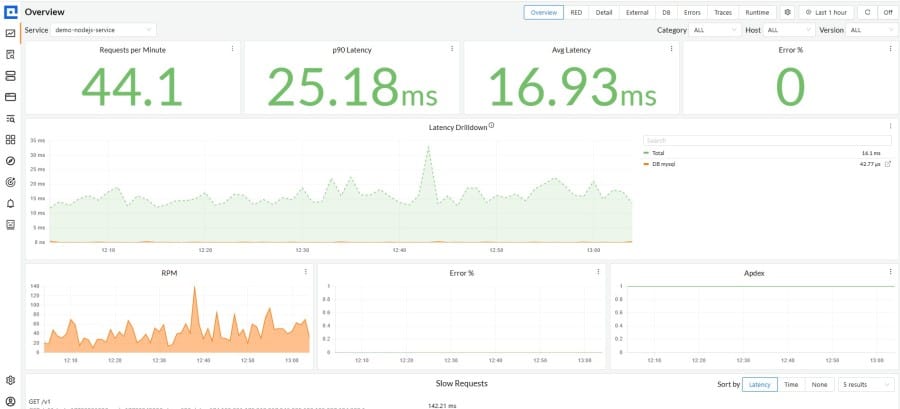
Some teams reach for platforms such as CubeAPM when Express.js monitoring requirements move beyond basic request visibility and into concerns like predictable cost control, sampling governance, and ownership of telemetry infrastructure.
In high-traffic Express.js environments, keeping telemetry processing closer to the application can improve trace reliability during incidents and allow teams to make deliberate decisions about sampling and retention. This becomes more relevant as request volume, service complexity, and observability data continue to grow.
How Express.js Monitoring Fits into a Broader Observability Strategy
Express.js monitoring does not exist in isolation. It sits within a larger observability strategy that spans the runtime, services, and user-facing behavior. Understanding how these layers relate helps teams avoid overlap, gaps, and misplaced expectations.
Relationship to Node.js APM
Node.js APM focuses on the health and behavior of the runtime. It provides the baseline signals needed to operate the platform safely.
- Node.js APM captures process-level metrics such as CPU usage, memory consumption, event loop delay, and garbage collection behavior.
- These signals explain whether the runtime is under stress or approaching capacity limits.
- Express.js monitoring builds on this by explaining how that runtime behavior affects individual requests and routes.
- When Node.js APM shows stress, Express.js monitoring explains which requests are responsible and why.
Relationship to service-level observability
Service-level observability looks at systems as interconnected services rather than individual processes or frameworks.
- It focuses on service-to-service latency, error propagation, and dependency health.
- Service-level signals help identify which service is contributing to an incident in a distributed system.
- Express.js monitoring operates within a service and explains how incoming requests are handled before and after service boundaries.
- When service-level observability identifies a problematic service, Express.js monitoring explains what is happening inside that service.
The two layers are complementary. Service-level observability narrows the scope. Express.js monitoring provides the internal execution context.
Why Express.js monitoring is a specialization, not a replacement
Express.js monitoring is designed to answer framework-specific questions. It is not a substitute for broader observability layers.
- It specializes in request lifecycle visibility, middleware execution, and handler-level behavior.
- It does not replace runtime monitoring, capacity planning, or cross-service dependency analysis.
- It becomes most valuable when general observability signals are insufficient to explain partial failures or tail latency.
- Its role increases as request paths become more complex and user impact becomes harder to infer from aggregate metrics.
Key Takeaways
- Monitoring Express.js is about request lifecycle visibility: Effective monitoring focuses on how requests move through middleware, handlers, and dependencies in production, rather than which dashboards or platforms are used.
- Runtime metrics explain health; Express.js monitoring explains user impact: CPU, memory, and event loop metrics show whether the process is stable, but request-level visibility explains why users experience latency or errors.
- Tracing is essential for async Express workloads: Asynchronous execution and dependency calls make it impossible to understand request behavior without end-to-end traces that preserve context.
- Poor Express.js observability shows up first during incidents: Gaps in request-level visibility are often invisible in steady state and only become obvious when traffic spikes, failures cascade, and fast explanations are required.
Conclusion
Monitoring Express.js effectively requires focusing on request behavior rather than process health alone. Runtime metrics are necessary, but they cannot explain how middleware, handlers, and async dependencies shape user experience in production.
As applications scale, request paths become more complex and failures more selective. Distributed tracing and request-level signals are essential for understanding why latency and errors occur meaningfully.
Teams evaluating their Express.js observability should assess whether their current approach explains real request behavior during incidents, not just whether services appear healthy.
Disclaimer: The information in this article reflects the latest details available at the time of publication and may change as technologies and products evolve.
FAQs
1. What is the difference between Express.js APM and general application monitoring?
Express.js APM focuses specifically on how HTTP requests move through middleware, route handlers, and async logic inside an Express application. General application monitoring often stops at runtime or infrastructure metrics and cannot explain why individual routes or requests behave differently under load.
2. Does Express.js APM work for monoliths, or only for microservices?
Express.js APM is useful for both. In monoliths, it helps identify slow middleware, blocking handlers, and inefficient request paths. In microservices, it adds request-level clarity inside each service, complementing service-to-service observability.
3. How much performance overhead does Express.js APM introduce?
All APM introduces some overhead due to instrumentation and data collection. In practice, well-designed Express.js APM systems balance overhead with visibility through selective instrumentation and sampling, keeping impact manageable even at higher traffic levels.
4. Can Express.js APM help with debugging intermittent or user-specific issues?
Yes. Express.js APM is particularly effective for intermittent issues because it captures request-level execution paths. This makes it possible to analyze slow or failing requests that only affect certain inputs, routes, or users, which aggregated metrics often miss.
5. How should teams evaluate pricing models for Express.js APM tools?
Teams should look for pricing models that remain predictable and simple as traffic grows, rather than ones that fluctuate heavily with spikes or require multiple usage dimensions to estimate cost. Predictability matters most during incidents, when telemetry volume often increases unexpectedly.