








LLM API costs operate nothing like traditional cloud infrastructure. A single API call can cost anywhere from $0.0001 to $0.50 depending on the model, input length, output length, whether you are sending images or audio, and whether the context crosses the 128k token threshold where pricing tiers change. That is per request. Now add multi-provider routing where your app might use OpenAI for chat, Anthropic for analysis, and a smaller model for classification. Each provider has different pricing structures, different token counting methods, and different billing cycles. The result: engineering teams have no idea what they are spending until the invoice arrives.
This guide covers how to build an AI spend management system that tracks LLM API costs at the request level, allocates spend across teams and customers, and enforces budgets before runaway bills hit your infrastructure.
Prerequisites
Before implementing AI cost tracking, you need:
- Production LLM traffic flowing through a gateway or proxy layer: direct provider calls bypass cost instrumentation
- Access to provider billing exports: AWS Cost and Usage Reports, Azure Cost Management, GCP Billing Export, or provider-specific dashboards
- A time series database or log aggregation system: to store per-request cost data with metadata (customer, team, feature, model, tokens)
- Budget thresholds defined per customer, team, or virtual key: these become your enforcement layer
- OpenTelemetry or equivalent instrumentation: to correlate LLM calls with application traces and logs
For teams running LLM workloads at scale, an infrastructure monitoring platform that tracks both application performance and cost signals helps connect spend to actual usage patterns.
Step 1: Route All LLM Traffic Through an Instrumentation Layer
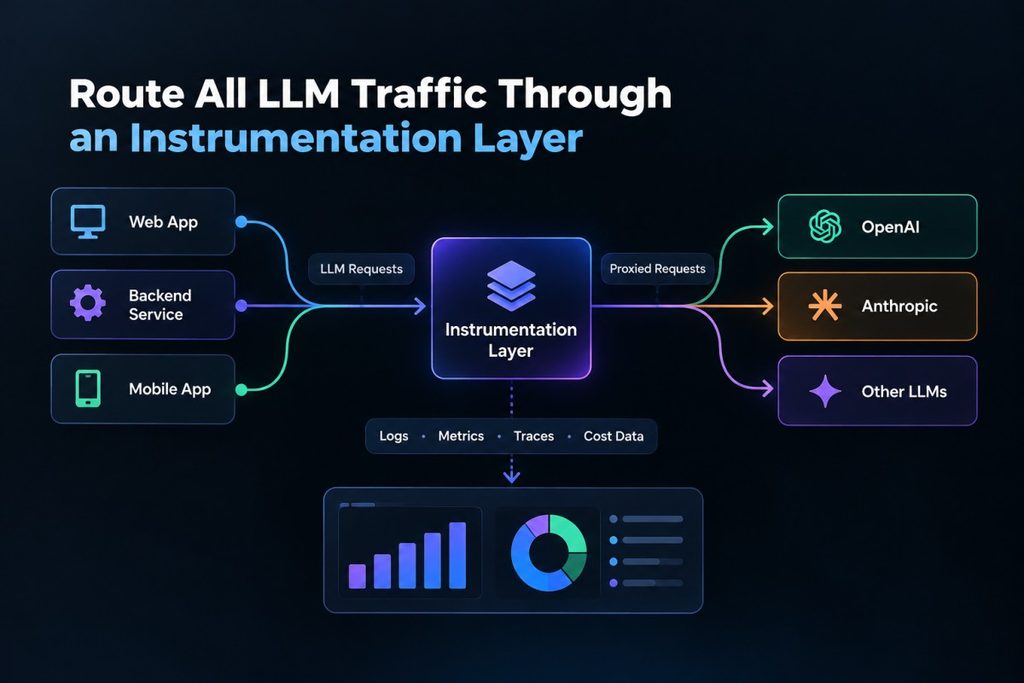
Direct API calls to OpenAI, Anthropic, or Bedrock bypass any cost tracking infrastructure. The first step is routing every LLM request through a gateway or proxy that logs the call before forwarding it to the provider.
This instrumentation layer captures:
- Provider and model used (e.g.,
openai/gpt-4,anthropic/claude-3-opus) - Input tokens, output tokens, total tokens
- Request metadata: customer ID, team ID, feature flag, environment
- Latency and status code (success or error)
- Timestamp
For teams using multiple providers, the gateway also handles model routing, fallback logic, and caching. Tools like Bifrost, LiteLLM, or Portkey handle this routing layer. CubeAPM’s error tracking integrates with OpenTelemetry to surface LLM failures alongside application traces, making it easier to debug issues that impact both performance and cost.
Example of a minimal gateway setup using a proxy in Go:
func proxyLLMRequest(req *http.Request) (*http.Response, error) {
    startTime := time.Now()

    // Extract metadata from headers or request body
    customerID := req.Header.Get("X-Customer-ID")
    teamID := req.Header.Get("X-Team-ID")

    // Forward request to actual provider
    resp, err := http.DefaultClient.Do(req)

    // Log usage and cost
    logLLMUsage(customerID, teamID, req, resp, time.Since(startTime))

    return resp, err
}Every request now generates a cost signal that can be aggregated, allocated, and queried.
Step 2: Build a Model Pricing Catalog
Provider pricing changes frequently. OpenAI dropped GPT-3.5 Turbo pricing by 50% in 2024. Anthropic introduced tiered pricing for Claude 3.5 Sonnet depending on whether the context exceeds 128k tokens. Bedrock pricing varies by region.
A model pricing catalog is a maintained reference of current pricing for every model across all providers. This catalog gets synced periodically (daily or on startup) and loaded into memory for fast lookups during cost calculation.
The catalog should cover:
- Text models: token-based pricing (input tokens, output tokens, cached tokens)
- Image models: per-image costs with tiered pricing for high-token contexts
- Audio models: token-based and duration-based pricing for speech synthesis and transcription
- Embeddings: character-based or token-based pricing
Example pricing catalog structure:
models:
  - provider: openai
    model: gpt-4-turbo
    input_price_per_1k: 0.01
    output_price_per_1k: 0.03
    context_limit: 128000
  - provider: anthropic
    model: claude-3-opus
    input_price_per_1k: 0.015
    output_price_per_1k: 0.075
context_limit: 200000When a request comes through the gateway, the catalog is queried to calculate cost based on the model used and tokens consumed.
Step 3: Calculate Per-Request Cost with Modality-Aware Logic
Cost calculation is not a simple token multiplication. Different modalities require different logic.
Text models: Multiply input tokens by input price, output tokens by output price, and add any cached token savings.
Image models: Add per-image cost, then apply tiered pricing if the context exceeds a threshold.
Audio models: Calculate based on duration (seconds) or tokens depending on the provider.
Embeddings: Some providers charge per character, others per token.
Example cost calculation for a text model:
func calculateTextCost(model string, inputTokens, outputTokens int) float64 {
    pricing := modelCatalog.Get(model)
    inputCost := float64(inputTokens) / 1000.0 * pricing.InputPrice
    outputCost := float64(outputTokens) / 1000.0 * pricing.OutputPrice
    return inputCost + outputCost
}For cache-aware cost tracking, cached tokens should be priced at zero (direct cache hit) or at embedding generation cost only (semantic cache hit). This distinction matters when calculating ROI of caching infrastructure.
Step 4: Allocate Costs Across Customers, Teams, and Features
Per-request cost data is not useful until it is allocated to the entities that created the cost. This is where the ownership layer connects usage to accountability.
Budget hierarchies typically follow four levels:
- Customer: Total spend per customer account
- Team: Spend per internal team within a customer
- Virtual Key: Spend per API key (useful for per-feature or per-environment budgets)
- Provider Config: Total spend on a specific provider (useful for cost optimization)
Each budget has a max_limit, a reset_duration (daily, weekly, monthly), and tracks current_usage in real time.
Example budget enforcement logic:
func checkBudget(customerID string, cost float64) error {
    budget := budgetStore.Get(customerID)
    if budget.CurrentUsage + cost > budget.MaxLimit {
        return fmt.Errorf("budget exceeded for customer %s", customerID)
    }
    budget.CurrentUsage += cost
    budgetStore.Update(budget)
    return nil
}When current_usage hits max_limit, requests are rejected. No surprises on the invoice.
Step 5: Store Per-Request Cost Data in a Queryable Log Store
Every request that passes through the gateway gets logged with full cost data. The log store should capture:
- Provider and model used
- Input tokens, output tokens, total tokens
- Calculated cost (input cost, output cost, total cost)
- Latency and status
- Customer ID, team ID, feature ID
- Timestamps
This data is queried for cost attribution and chargeback. A typical query might be: “Show all requests to OpenAI that cost more than $0.10 in the last hour.”
Example log entry:
{
  "timestamp": "2026-06-15T14:32:01Z",
  "provider": "openai",
  "model": "gpt-4-turbo",
  "input_tokens": 1500,
  "output_tokens": 800,
  "total_tokens": 2300,
  "input_cost": 0.015,
  "output_cost": 0.024,
  "total_cost": 0.039,
  "latency_ms": 1200,
  "status": "success",
  "customer_id": "cust-abc123",
  "team_id": "team-xyz"
}Teams using centralized log management platforms like CubeAPM can correlate LLM cost data with application traces and infrastructure metrics to understand how AI spend impacts overall system performance.
Step 6: Reconcile Calculated Costs with Provider Billing
Calculated costs from the gateway are estimates. Actual provider billing can differ due to rounding, cached tokens, failed requests, or billing adjustments.
Reconciliation compares calculated costs against actual provider invoices. The process:
- Export provider billing data (AWS CUR, Azure Cost Management, GCP Billing Export)
- Aggregate calculated costs for the same time period
- Compare totals and identify discrepancies
- Adjust rate cards or allocation logic if needed
For teams using multiple providers, reconciliation is done per provider. Discrepancies above 5% warrant investigation.
Step 7: Set Real-Time Budget Alerts and Enforcement Rules
Budget visibility is not enough. Teams need real-time alerts when usage hits predefined thresholds and automatic enforcement when hard caps are reached.
Budget alerts typically fire at:
- 50% of budget consumed
- 75% of budget consumed
- 90% of budget consumed
- 100% of budget consumed (hard cap enforced)
Alerts are sent via Slack, email, or webhooks. When a hard cap is hit, requests are rejected with a 429 status code.
Example alert configuration:
budgets:
  - customer_id: cust-abc123
    max_limit: 500
    reset_duration: monthly
    alerts:
      - threshold: 50
        channel: slack
      - threshold: 90
        channel: pagerduty
enforcement: hard_capThis prevents runaway workloads from creating surprise bills.
Step 8: Optimize Costs with Model Routing and Caching
Once cost tracking is in place, optimization becomes possible. The two most effective levers are model routing and caching.
Model routing: Route requests to cheaper models when possible. For example, use GPT-3.5 Turbo for simple queries and GPT-4 for complex ones. Some teams report 40% cost reduction from intelligent routing.
Caching: Cache responses for repeated queries. A direct cache hit costs zero. A semantic cache hit costs only the embedding generation, not the full model inference. Teams using semantic caching report a 60–80% reduction in API calls.
For teams running Kubernetes workloads, CubeAPM provides unified visibility into LLM costs, application performance, and infrastructure resource consumption, making it easier to correlate cost spikes with traffic patterns or deployment changes.
Troubleshooting Common Issues
Issue: Calculated costs do not match provider invoices
Cause: Rounding differences, cached tokens not accounted for, or failed requests still billed by provider.
Fix: Review failed requests in the log store. Check if cached tokens are priced correctly. Adjust rate cards to match actual billing.
Issue: Budget alerts firing too frequently
Cause: Budget thresholds set too low or usage patterns more variable than expected.
Fix: Increase budget limits or adjust alert thresholds. Use daily budgets for volatile workloads instead of monthly.
Issue: Cost attribution unclear for shared infrastructure
Cause: Requests not tagged with customer ID, team ID, or feature ID.
Fix: Enforce metadata tagging at the gateway layer. Reject requests without required metadata fields.
Issue: High latency after adding cost tracking
Cause: Cost calculation or logging blocking the request path.
Fix: Move cost calculation and logging to an asynchronous queue. Calculate cost after the response is returned to the user.
AI spend management is an operational discipline, not a one-time setup. Costs will grow as usage grows. The systems described here make that growth predictable and controllable.
Disclaimer: The information in this article reflects the latest details available at the time of publication and may change as technologies and products evolve. Features, pricing, and plan limits can change over time. Always verify the latest information directly with the vendor before making purchasing or deployment decisions.
Frequently Asked Questions
How do you track AI costs in production?
Track AI costs by routing all LLM requests through a gateway that logs provider, model, tokens, and metadata per request, then calculate cost using a maintained pricing catalog and aggregate by customer, team, or feature.
What is the difference between AI cost visibility and AI cost tracking?
AI cost visibility shows where spend is appearing across models and infrastructure. AI cost tracking connects every dollar spent to specific requests, workflows, features, and customers with granular attribution.
What tools track and optimize LLM API costs for production applications?
Tools like Bifrost, LiteLLM, and Portkey provide LLM gateway functionality with cost tracking. CubeAPM integrates LLM cost data with application traces and infrastructure metrics for unified observability.
How does AI API pricing work?
AI API pricing is consumption-based, charging per token (input and output separately), per image, per second of audio, or per character for embeddings. Pricing varies by model, provider, and context length.
What is a budget hierarchy in AI spend management?
A budget hierarchy allocates spending limits at multiple levels: customer, team, virtual key, and provider. Each level has a max limit, reset duration, and tracks current usage with enforcement when limits are hit.
How do you reconcile calculated LLM costs with provider billing?
Reconcile by exporting provider billing data, aggregating calculated costs for the same period, comparing totals, and adjusting rate cards or allocation logic if discrepancies exceed 5%.
What is smart sampling in AI cost tracking?
Smart sampling retains high-value traces (errors, high latency, unusual patterns) while sampling routine traffic, reducing storage costs without losing critical cost signals for debugging or chargeback.