










Slow incident response is expensive. Google’s DORA research continues to treat time to restore service as one of the core software delivery performance metrics, and distributed tracing is one of the main observability signals teams use to understand latency, failed requests, and cross-service dependencies.
Grafana Tempo is Grafana Labs’ open source distributed tracing backend. Its main appeal is cost-efficient trace storage: Tempo is designed to operate with object storage rather than a heavy trace-indexing database, and it integrates closely with Grafana, Prometheus, Mimir, and Loki.
In this guide, we’ll break down what Grafana Tempo is, how self-hosted Tempo and Grafana Cloud Traces are priced in 2026, what drives real-world cost, what users say about Grafana Cloud/Grafana Labs, and how Tempo compares with alternatives such as CubeAPM, Jaeger, Zipkin, Honeycomb, New Relic, and Datadog.
What Is Grafana Tempo?
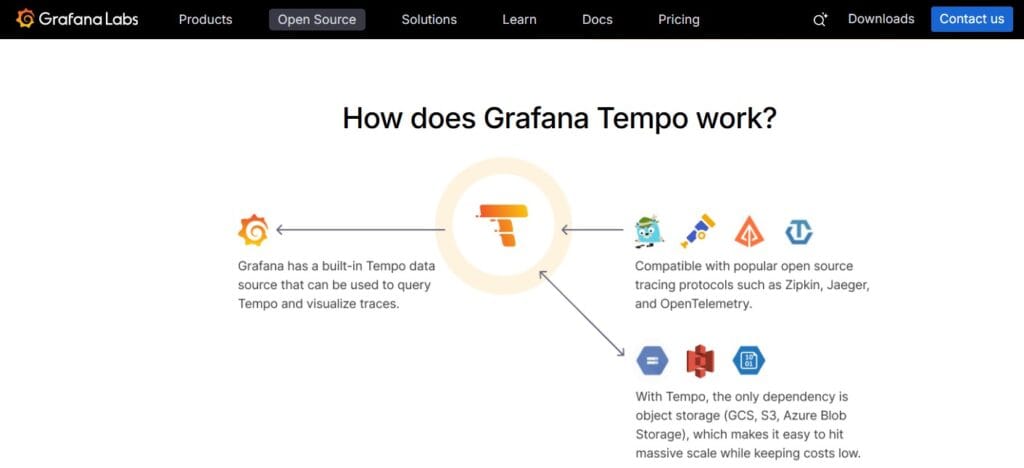
Grafana Tempo is an open source, high-scale distributed tracing backend built by Grafana Labs. Grafana describes Tempo as cost-efficient because it requires only object storage to operate, and it is deeply integrated with Grafana, Mimir, Prometheus, and Loki.
Tempo can ingest common tracing protocols, including OpenTelemetry, Jaeger, and Zipkin. This makes it useful for teams standardizing on OpenTelemetry while still needing compatibility with older tracing formats.
The key architectural difference is that Tempo does not rely on Cassandra, Elasticsearch, or another traditional trace-indexing database as a hard dependency. Instead, it uses object storage and Grafana-native trace exploration workflows, including TraceQL, to retrieve and analyze traces.
How Grafana Tempo Works
Tempo has a microservices-based architecture. Its write and read paths are split across components that ingest trace spans, organize span data, write trace blocks to object storage, and retrieve traces through trace ID lookups or TraceQL queries.
The main Tempo components include:
| Component | What it does |
| Distributor | Receives incoming spans and forwards them into the write path. |
| Ingester / block-builder | Buffers and prepares trace data before it is written to object storage. |
| Compactor | Merges smaller blocks into more efficient blocks for storage and query performance. |
| Query frontend | Splits and coordinates queries across the read path. |
| Querier | Retrieves trace data from storage by trace ID or TraceQL search. |
Tempo 3.0, released in June 2026, introduced a newer architecture for scale and lower storage cost. Grafana says Tempo 3.0 decouples reads and writes, removes the old replication factor 3 requirement, and stores one copy of trace data instead of three by default.
Tempo 3.0 also moved TraceQL metrics to general availability, allowing teams to build dashboards directly from trace data using metrics queries. Grafana’s release notes note that alerting on TraceQL metrics is still experimental.
Key Features of Grafana Tempo
TraceQL is Tempo’s query language for selecting and analyzing traces. Grafana introduced TraceQL in Tempo 2.0, describing it as a query language modeled on PromQL and LogQL that helps teams interactively extract insights from trace data.
TraceQL lets teams filter traces by span attributes, duration, status, structure, and relationships. This matters because older Tempo workflows were more trace-ID-first, while TraceQL gives teams more flexible ways to search trace data inside Grafana.
Tempo is designed to require only object storage to operate. This is the core reason Tempo is often positioned as a cost-efficient tracing backend compared with tracing systems that depend on heavier storage or indexing layers.
For self-hosted users, object storage can mean Amazon S3, Google Cloud Storage, Azure Blob Storage, or another compatible backend. The trade-off is that the team still needs to manage storage policies, retention, compaction, query performance, and the Tempo services themselves.
Tempo can generate metrics from traces through the metrics-generator. Tempo 3.0 also made TraceQL metrics generally available, which means teams can create dashboards directly from trace data using metrics queries instead of always relying on precomputed metrics.
This is useful for teams that want service-level visibility, latency metrics, request/error/duration views, and dashboards derived from tracing data.
Tempo is built to work inside the Grafana ecosystem. Grafana says Tempo is deeply integrated with Grafana, Prometheus, Mimir, and Loki, which makes it especially attractive for teams already using the LGTM stack.
This also defines Tempo’s scope. Tempo is not trying to replace Loki for logs or Prometheus/Mimir for metrics. It is the tracing backend in a broader Grafana observability stack.
Tempo supports common open source tracing protocols, including OpenTelemetry, Jaeger, and Zipkin.
That matters for migration. A team can adopt Tempo without necessarily rewriting every tracing pipeline at once, especially if it already uses OpenTelemetry collectors or common tracing formats.
Three Ways to Use Grafana Tempo
Grafana Tempo can be used in three main ways:
| Option | What it is | Who manages it |
| Grafana Tempo OSS | Open source tracing backend | You install and operate it |
| Grafana Cloud Traces | Managed Tempo inside Grafana Cloud | Grafana Labs manages it |
| Grafana Enterprise Traces | Enterprise tracing option for self-managed environments | Customer-managed with Grafana enterprise licensing/support |
Grafana Tempo Pricing in 2026
Grafana Tempo OSS has no software license fee. You can download and run it yourself, but you still pay for object storage, compute, networking, Kubernetes operations, upgrades, and engineering time.
Grafana Cloud Traces is the managed version. Grafana’s public pricing page lists Free, Pro, and Enterprise options. The Free tier includes 50 GB per month and 14-day retention. The Pro tier is pay-as-you-go above the Free tier, with pricing shown as $0.05/GB to process, $0.40/GB to write, and $0.10/GB to retain.
| Plan | Price | What’s included |
| Free | $0 | 50 GB traces/month, 14-day retention, community support |
| Pro | $19/month platform fee + usage | 50 GB/month included, then $0.05/GB process, $0.40/GB write, and $0.10/GB retain |
| Enterprise | Custom | Minimum $25,000/year commit, custom retention, premium support, and enterprise terms |
Disclaimer: Pricing is based on Grafana’s public pricing page as checked on July 1, 2026. Grafana can change pricing, packaging, retention, support, and included entitlements, so buyers should confirm the current pricing page before making a decision.
What Does Grafana Tempo Really Cost?
⚠️ Disclaimer
The scenarios below are directional editorial estimates, not official Grafana quotes. Grafana Tempo OSS is free to run as software, but self-hosted cost depends on object storage, compute, networking, Kubernetes operations, upgrades, and engineering time. Grafana Cloud Traces pricing is usage-based and can change based on processed GB, written GB, retained GB, retention period, discounts, Enterprise terms, and how much trace data is sampled or dropped before ingestion.
Grafana Cloud Traces pricing is different from full-stack observability pricing. It is mainly trace-volume based. Grafana’s public pricing page lists 50 GB of traces included, then Pro usage at $0.05/GB processed, $0.40/GB written, and $0.10/GB retained, plus a $19/month platform fee. That means a simple planning model is roughly $0.55/GB above the included 50 GB, assuming the same amount of data is processed, written, and retained.
Grafana Tempo OSS has no software license fee. The real cost is the infrastructure and operational work needed to run Tempo yourself. Tempo is designed to be cost-efficient because it requires only object storage to operate, but self-hosting still means you own storage, compute, scaling, upgrades, compaction, query performance, and on-call responsibility.
Pricing Assumptions Used in These Scenarios
These scenarios use trace-volume assumptions that fit Grafana Tempo’s pricing model. They do not use host count as the main pricing driver because Grafana Cloud Traces is not priced per host.
| Scenario | Grafana Tempo pricing anchor | Grafana Cloud Traces estimate | CubeAPM estimate |
| Small team | ~360 GB traces/month | ~$190/month | ~$522/month |
| Growing team | ~1.8 TB traces/month | ~$982/month | ~$919/month |
| Mid-market team | ~9 TB traces/month | ~$4,942/month | ~$4,594/month |
📌 Important Note
Grafana Tempo is tracing-only. CubeAPM is a full-stack observability platform covering logs, metrics, traces, infrastructure monitoring, APM, RUM, synthetics, and error tracking. So the comparison is not “trace backend vs trace backend.” It is better read as Grafana Cloud Traces for tracing only versus CubeAPM for broader full-stack observability. CubeAPM lists pricing at $0.15/GB ingested, with no hidden host-based fees.
Workload Assumptions Used for Grafana Tempo Estimates
| Team size | Infrastructure context | Telemetry context | Grafana Tempo usage assumption | Estimated Grafana Cloud Traces cost |
| Small team | ~10 hosts | ~1.1 TB/month total telemetry | ~360 GB traces/month | ~$190/month |
| Growing team | ~50 hosts | ~5.4 TB/month total telemetry | ~1.8 TB traces/month | ~$982/month |
| Mid-market team | ~250 hosts | ~27 TB/month total telemetry | ~9 TB traces/month | ~$4,942/month |
The total telemetry volume is included only for comparison with full-stack observability platforms. For Grafana Tempo, the relevant pricing input is trace volume, not logs, metrics, RUM sessions, or host count.
Scenario 1: Small Team, ~360 GB Traces per Month
Situation
A small production team runs around 10 hosts and produces roughly 1.1 TB of monthly telemetry across logs, metrics, and traces. For this scenario, we assume about 360 GB/month is trace data sent to Grafana Cloud Traces.
This type of team may already use Grafana dashboards, Prometheus metrics, and Loki logs, then add Tempo for distributed tracing. The main cost driver is how much trace data is processed, written, and retained.
Why teams at this stage consider Grafana Tempo
Teams at this stage consider Tempo because the OSS version is free, the architecture is object-storage-first, and Grafana Cloud Traces has a low entry point for managed tracing. It is especially attractive when the team already uses Grafana and wants traces inside the same workflow.
Estimated profile
| Configuration | Detail |
| Infrastructure context | ~10 hosts |
| Total telemetry context | ~1.1 TB/month |
| Trace volume assumption | ~360 GB/month |
| Grafana option modeled | Grafana Cloud Traces Pro |
| Pricing basis | $19/month platform fee + trace usage above 50 GB |
Estimated monthly cost
Disclaimer: This estimate uses Grafana Cloud Traces public Pro pricing as a planning anchor. It assumes 360 GB of traces are processed, written, and retained, with the first 50 GB included.
| Component | Assumption | Monthly cost |
| Platform fee | Grafana Cloud Pro platform fee | $19 |
| Included traces | First 50 GB/month | $0 |
| Billable traces | 310 GB × $0.55/GB | ~$171 |
| Estimated total | 360 GB traces/month | ~$190/month |
CubeAPM cost comparison
| Platform | Pricing basis | Estimated monthly cost |
| Grafana Cloud Traces | ~360 GB traces/month only | ~$190/month |
| CubeAPM | ~1.1 TB/month full-stack telemetry estimate | ~$522/month |
What this scenario shows
For a small team that only needs managed tracing, Grafana Cloud Traces is cheaper than a full-stack observability platform because it is only covering traces. CubeAPM costs more in this scenario, but it covers a broader set of signals, including logs, metrics, traces, infrastructure, RUM, synthetics, dashboards, and error tracking. The right comparison depends on whether the team needs only tracing or a unified observability backend.
Scenario 2: Growing Team, ~1.8 TB Traces per Month
Situation
A growing SaaS team runs around 50 hosts and produces roughly 5.4 TB of monthly telemetry. For this scenario, we assume about 1.8 TB/month is trace data.
At this stage, the team likely has more services, more customer traffic, more OpenTelemetry instrumentation, and more need for trace-based debugging. Trace volume grows quickly if the team keeps high-cardinality attributes, long traces, or limited sampling.
Why teams at this stage consider Grafana Tempo
Grafana Tempo is attractive here because it can store high trace volumes without requiring teams to operate Elasticsearch or Cassandra for tracing. Tempo 3.0 also introduced a new architecture that decouples reads and writes, removes the old RF3 requirement, and stores one copy of trace data instead of three by default, which improves the storage-cost story.
Estimated profile
| Configuration | Detail |
| Infrastructure context | ~50 hosts |
| Total telemetry context | ~5.4 TB/month |
| Trace volume assumption | ~1.8 TB/month |
| Grafana option modeled | Grafana Cloud Traces Pro |
| Pricing basis | $19/month platform fee + trace usage above 50 GB |
Estimated monthly cost
Disclaimer: This estimate assumes 1.8 TB equals 1,800 GB for simple planning. It uses Grafana Cloud Traces public Pro rates and assumes processed, written, and retained GB are the same.
| Component | Assumption | Monthly cost |
| Platform fee | Grafana Cloud Pro platform fee | $19 |
| Included traces | First 50 GB/month | $0 |
| Billable traces | 1,750 GB × $0.55/GB | ~$963 |
| Estimated total | 1.8 TB traces/month | ~$982/month |
CubeAPM cost comparison
| Platform | Pricing basis | Estimated monthly cost |
| Grafana Cloud Traces | ~1.8 TB traces/month only | ~$982/month |
| CubeAPM | ~5.4 TB/month full-stack telemetry estimate | ~$919/month |
| Difference | Calculation | Result |
| Estimated savings with CubeAPM | $982 – $919 | ~$63/month |
| Percentage savings | $63 ÷ $982 | ~6% lower |
What this scenario shows
This is where the comparison becomes more interesting. Grafana Cloud Traces is still only covering tracing, but at 1.8 TB of traces per month, its managed trace bill approaches the cost of CubeAPM’s broader full-stack estimate. CubeAPM becomes more attractive if the team wants one backend for logs, metrics, traces, infrastructure, RUM, synthetics, and APM instead of using Tempo alongside Grafana, Loki, Prometheus, Mimir, and other components.
Scenario 3: Mid-Market Team, ~9 TB Traces per Month
Situation
A mid-market team runs around 250 hosts and produces roughly 27 TB of monthly telemetry. For this scenario, we assume about 9 TB/month is trace data.
At this scale, trace volume can become a serious cost and operations issue. Teams may need better sampling, retention policies, query controls, tenant limits, and storage governance. Self-hosted Tempo can reduce vendor usage fees, but it also requires more platform engineering ownership.
Why teams at this stage consider Grafana Tempo
Grafana Tempo is attractive at mid-market scale because its object-storage-first design can be more cost-efficient than database-backed tracing systems. It is also a natural fit for organizations already standardized on Grafana dashboards, Prometheus or Mimir metrics, and Loki logs. Tempo 3.0’s newer architecture is specifically positioned around scale, lower storage cost, and independent read/write scaling.
Estimated profile
| Configuration | Detail |
| Infrastructure context | ~250 hosts |
| Total telemetry context | ~27 TB/month |
| Trace volume assumption | ~9 TB/month |
| Grafana option modeled | Grafana Cloud Traces Pro |
| Pricing basis | $19/month platform fee + trace usage above 50 GB |
Estimated monthly cost
Disclaimer: This estimate uses Grafana Cloud Traces public Pro pricing. In practice, a team at this size may negotiate Enterprise pricing, custom retention, volume discounts, or a committed contract.
| Component | Assumption | Monthly cost |
| Platform fee | Grafana Cloud Pro platform fee | $19 |
| Included traces | First 50 GB/month | $0 |
| Billable traces | 8,950 GB × $0.55/GB | ~$4,923 |
| Estimated total | 9 TB traces/month | ~$4,942/month |
CubeAPM cost comparison
| Platform | Pricing basis | Estimated monthly cost |
| Grafana Cloud Traces | ~9 TB traces/month only | ~$4,942/month |
| CubeAPM | ~27 TB/month full-stack telemetry estimate | ~$4,594/month |
| Difference | Calculation | Result |
| Estimated savings with CubeAPM | $4,942 – $4,594 | ~$348/month |
| Percentage savings | $348 ÷ $4,942 | ~7% lower |
What this scenario shows
At mid-market scale, Grafana Cloud Traces can become expensive even though it covers only tracing. CubeAPM is slightly lower in this estimate while covering the broader observability stack. However, self-hosted Tempo may still be cheaper on paper if the team already has strong Kubernetes, object storage, and SRE capacity. The real decision is whether the team wants to operate the Grafana LGTM stack itself, pay Grafana Cloud for managed tracing, or use a single self-hosted managed platform for all telemetry signals.
Summary: Grafana Tempo vs CubeAPM Estimated Monthly Cost
Disclaimer: These are directional planning estimates, not official quotes. Grafana Cloud Traces costs can change with retention, sampling, Enterprise discounts, processed/written/retained volume differences, and contract terms. CubeAPM estimates are full-stack observability estimates, so they include more than tracing.
| Team profile | Grafana Cloud Traces estimate | CubeAPM estimate | Monthly difference | Percentage difference |
| Small team | ~$190/month | ~$522/month | CubeAPM ~$332 higher | ~175% higher |
| Growing team | ~$982/month | ~$919/month | CubeAPM ~$63 lower | ~6% lower |
| Mid-market team | ~$4,942/month | ~$4,594/month | CubeAPM ~$348 lower | ~7% lower |
What Drives Grafana Tempo Cost?
Trace volume is the biggest managed-cost driver. Grafana Cloud Traces bills based on processed, written, and retained GB after the included allowance. More spans, larger span attributes, longer traces, and higher sampling rates can all increase the bill.
Sampling directly affects how much trace data reaches Tempo. Head-based sampling, tail-based sampling, attribute filtering, and OpenTelemetry Collector pipelines can reduce trace volume before it becomes billable or stored.
Grafana Cloud Traces Free includes 14-day retention, while Pro includes usage-based pricing above the Free tier. Buyers should confirm retention limits and extended retention terms directly on Grafana’s pricing page.
For self-hosted Tempo, object storage is usually the largest infrastructure cost. Tempo 3.0 helps by removing the old RF3 storage requirement, but storage class, retention period, replication, and query patterns still matter.
Tempo is not only a storage bill. Large teams still need enough distributor, ingester/block-builder, compactor, querier, and query-frontend capacity to handle ingestion and search.
Self-hosted Tempo avoids managed-service usage fees, but someone still has to run it. Platform teams need to handle upgrades, scaling, observability of Tempo itself, tenant limits, retention policies, alerts, and incident response for the tracing backend.
Grafana Tempo Reviews: What Users and Analysts Say
Grafana Tempo itself is a backend component, so it does not have the same volume of standalone review-platform coverage as a full observability product. For buyer research, the closest public review source is Grafana Cloud, because Grafana Cloud is the managed platform that includes Grafana Cloud Traces.
| Review source | Product/listing | Rating shown publicly | Review count |
| Gartner Peer Insights | Grafana Cloud | 4.6/5 | 435 ratings |
Gartner Peer Insights lists Grafana Cloud at 4.6 out of 5 from 435 ratings. This rating applies to Grafana Cloud as a broader platform, not Grafana Tempo alone.
Thoughtworks’ Technology Radar placed Grafana Tempo in the “Trial” ring in April 2025, describing it as a high-scale distributed tracing backend worth trying on projects that can absorb adoption risk. The Radar also highlighted Tempo’s Parquet block format, TraceQL, and Grafana Alloy for trace collection.
What users like
Grafana users commonly value the platform’s dashboarding and visualization experience. This is relevant to Tempo because traces are explored through Grafana rather than a separate tracing-only UI.
Tempo fits naturally with Grafana, Loki, Prometheus, and Mimir. Grafana’s own documentation describes Tempo as deeply integrated with those tools, which is a major reason teams already standardized on Grafana consider it.
Tempo’s object-storage-first design is one of its main advantages. It lets teams store traces without operating a dedicated trace-indexing database as a hard dependency.
TraceQL gives teams a purpose-built query language for trace data, while Tempo 3.0 made TraceQL metrics generally available for building dashboards directly from traces.
What users criticize
⚠️ Disclaimer
These themes reflect common concerns around Grafana/Grafana Cloud and self-hosted tracing stacks. They should not be treated as universal limitations of Grafana Tempo in every environment.
Grafana Tempo is powerful, but teams still need to understand OpenTelemetry instrumentation, collectors, sampling, retention, TraceQL, and Grafana trace exploration workflows.
Self-hosted Tempo avoids software license fees, but it still requires operational ownership. Teams need to manage Kubernetes resources, object storage, query performance, upgrades, scaling, and alerts.
Tempo is not a complete observability platform by itself. Teams usually pair it with Loki for logs and Prometheus or Mimir for metrics. That is a strength for composable Grafana users, but it can add complexity for teams that want one bundled backend.
Grafana Tempo Alternatives: How It Compares to Competitors
Grafana Tempo vs CubeAPM
Grafana Tempo is a tracing backend. CubeAPM is a self-hosted, vendor-managed observability platform that covers logs, metrics, traces, infrastructure monitoring, APM, RUM, synthetics, dashboards, and error tracking. CubeAPM is stronger for teams that want OpenTelemetry-native full-stack observability in their own cloud without operating separate Grafana, Loki, Mimir, and Tempo components. CubeAPM lists pricing at $0.15/GB ingested and says it has no hidden host-based fees.
| Category | Grafana Tempo | CubeAPM |
| Core scope | Distributed tracing backend | Full-stack observability |
| Deployment | OSS self-hosted or Grafana Cloud Traces | Self-hosted, vendor-managed |
| Pricing model | Free OSS or trace GB-based cloud pricing | $0.15/GB ingested |
| Signals covered | Traces only | Logs, metrics, traces, APM, infra, RUM, synthetics |
| Best for | Grafana teams needing low-cost tracing | Teams wanting one managed self-hosted observability backend |
CubeAPM is not a drop-in replacement for Tempo if the only requirement is a free tracing backend. It is a better alternative when the team wants to avoid stitching together and operating a full LGTM stack across separate components.
Grafana Tempo vs Jaeger
Jaeger is one of the closest open source alternatives to Grafana Tempo. It is a distributed tracing system with mature support for trace collection, service dependency analysis, and trace search. Jaeger requires a persistent storage backend, and its documentation lists Cassandra, Elasticsearch, and OpenSearch as primary supported distributed storage backends.
| Category | Grafana Tempo | Jaeger |
| Core scope | Distributed tracing backend | Distributed tracing system |
| Storage model | Object-storage-first | Cassandra, Elasticsearch, OpenSearch, Badger, memory |
| Query approach | TraceQL and Grafana Explore | Jaeger UI search and indexed storage |
| Operations profile | Object storage + Tempo services | Stateful storage backend + Jaeger services |
| Best for | Grafana/LGTM teams at high trace volume | Teams wanting mature indexed trace search |
Jaeger may be better when teams want more traditional indexed trace search and are comfortable operating a supported storage backend. Tempo is usually more attractive when object-storage cost efficiency and Grafana ecosystem integration matter more.
Grafana Tempo vs Zipkin
Zipkin is a lightweight open source distributed tracing system. It helps collect timing data needed to troubleshoot latency problems in service architectures, and its core project describes both collection and lookup of trace data as main features.
| Category | Grafana Tempo | Zipkin |
| Core scope | High-scale tracing backend | Lightweight distributed tracing |
| Storage model | Object storage | In-memory, Cassandra, Elasticsearch, and other storage options |
| Query experience | Grafana Explore + TraceQL | Zipkin UI |
| Ecosystem fit | Grafana, Prometheus, Loki, OpenTelemetry | Simpler tracing setups and legacy Zipkin users |
| Best for | Teams scaling tracing inside Grafana | Teams needing simple tracing with lower complexity |
Zipkin is still useful for simple tracing use cases, especially when teams want something lightweight. Tempo is stronger when trace volume is larger, Grafana is already in place, and the team wants modern TraceQL-based analysis.
Grafana Tempo vs Honeycomb
Honeycomb is not a tracing backend in the same narrow sense as Tempo. It is a SaaS observability platform built around high-cardinality event analysis, debugging, OpenTelemetry data, and production investigation.
| Category | Grafana Tempo | Honeycomb |
| Core scope | Tracing backend | SaaS observability platform |
| Deployment | OSS self-hosted or Grafana Cloud | SaaS |
| Pricing model | Free OSS or trace GB-based cloud pricing | Usage-based SaaS pricing |
| Query style | TraceQL for traces | High-cardinality event analysis |
| Best for | Teams needing trace storage in Grafana | Teams focused on exploratory debugging |
Honeycomb is stronger when teams want a managed SaaS platform for high-cardinality investigation and production debugging. Tempo is stronger when teams want open source trace storage, Grafana-native workflows, and the option to self-host.
Grafana Tempo vs New Relic
New Relic is a broader SaaS observability platform, not just a tracing backend. It covers APM, infrastructure monitoring, logs, browser monitoring, synthetics, errors, dashboards, and alerts. New Relic’s public pricing page lists 100 GB/month free for original data ingest and $0.40/GB beyond the free 100 GB limit on Standard and Pro.
| Category | Grafana Tempo | New Relic |
| Core scope | Tracing backend | Full-stack SaaS observability |
| Deployment | OSS self-hosted or Grafana Cloud | SaaS |
| Pricing model | Free OSS or trace GB-based cloud pricing | Data ingest + user pricing |
| Logs and metrics | Requires Grafana/Loki/Mimir/Prometheus | Native platform coverage |
| Best for | Grafana teams needing tracing | Teams wanting broad SaaS observability |
New Relic is easier to evaluate when the team wants one SaaS platform across many observability signals. Tempo is stronger when the team already runs Grafana and wants tracing without adopting a full SaaS observability suite.
Grafana Tempo vs Datadog
Datadog is a full-stack SaaS observability platform with infrastructure monitoring, APM, logs, RUM, synthetics, dashboards, security products, and many integrations. Grafana Tempo is much narrower: it is focused on tracing and is usually paired with Grafana, Loki, Prometheus, or Mimir for a full observability stack.
| Category | Grafana Tempo | Datadog |
| Core scope | Distributed tracing backend | Full-stack SaaS observability |
| Deployment | OSS self-hosted or Grafana Cloud | SaaS |
| Pricing model | Free OSS or trace GB-based cloud pricing | Modular per-host, per-GB, per-session pricing |
| Ecosystem | Grafana/LGTM | Datadog-native platform |
| Best for | Teams building around open standards | Teams wanting a broad managed SaaS suite |
Datadog is stronger when teams want a single commercial SaaS platform with many packaged observability modules. Tempo is stronger when teams want open source tracing, Grafana-native workflows, and more control over backend architecture.
Summary: Grafana Tempo Alternatives
| Alternative | Best fit | Main trade-off vs Tempo |
| CubeAPM | Full-stack self-hosted observability | Broader platform, not a tracing-only backend |
| Jaeger | Mature open source tracing with indexed search | Requires operating storage backends |
| Zipkin | Lightweight distributed tracing | Less modern for large Grafana-native setups |
| Honeycomb | SaaS high-cardinality debugging | SaaS platform, not self-hosted Tempo-style backend |
| New Relic | Full-stack SaaS observability | Broader pricing model with ingest/users |
| Datadog | Enterprise SaaS observability suite | Modular pricing can become complex |
Is Grafana Tempo the Right Choice?
Grafana Tempo works best for
- Teams already using Grafana, Prometheus, and Loki that want tracing to fit the same ecosystem.
- Teams that want high-volume trace retention without operating Elasticsearch or Cassandra as the required trace storage layer.
- Platform teams that need shared tracing infrastructure across multiple product teams.
- Teams comfortable running Kubernetes and object storage, or teams willing to use Grafana Cloud Traces for the managed version.
Grafana Tempo may not be the right fit for
- Teams that want a single observability backend for logs, metrics, traces, RUM, synthetics, and infrastructure monitoring without assembling multiple components.
- Teams that want rich exploratory search without learning TraceQL or using Grafana’s trace exploration workflows.
- Teams without in-house SRE/Kubernetes capacity, unless they choose Grafana Cloud Traces or Grafana Enterprise Traces.
- Teams that prefer a commercial observability platform with one bundled support, billing, and retention model across all telemetry signals.
Conclusion
Grafana Tempo is a strong tracing backend because it solves a real cost problem: storing traces at scale can become expensive when every span is indexed in a heavy database backend. Tempo’s object-storage-first design keeps the architecture lean, and Tempo 3.0 improves the cost story further by making the new architecture default and removing the old RF3 storage requirement.
The pricing story is straightforward. Self-hosted Tempo has no software license fee, but infrastructure and operations are still real costs. Grafana Cloud Traces starts with a free 50 GB/month tier, then Pro adds usage-based process, write, and retain charges above the free allowance.
The main trade-off is scope. Tempo is excellent for tracing, especially inside the Grafana ecosystem, but it is not a complete observability platform by itself. Teams should compare not only trace pricing, but also the cost and effort of running the full stack around it: Grafana, Loki, Prometheus or Mimir, OpenTelemetry collectors, object storage, dashboards, alerts, and ongoing SRE ownership.
Disclaimer: Pricing, packaging, retention, included entitlements, and support terms can change. This article reflects publicly available Grafana pricing and documentation checked on July 1, 2026. Always confirm current terms directly with Grafana Labs before buying.
FAQs
1. Is Grafana Tempo free?
Yes. Grafana Tempo OSS is free to download and run as open source software. You still pay for the infrastructure and engineering time needed to operate it.
2. How much does Grafana Cloud Traces cost?
Grafana Cloud Traces Free includes 50 GB/month and 14-day retention. Pro usage is listed at $0.05/GB process, $0.40/GB write, and $0.10/GB retain above the included allowance.
3. What is the difference between Grafana Tempo and Jaeger?
Tempo is object-storage-first and uses TraceQL/Grafana workflows for trace search. Jaeger is a distributed tracing system that commonly uses persistent storage backends such as Cassandra, Elasticsearch, or OpenSearch.
4. Does Grafana Tempo need a database?
No traditional tracing database is required as a hard dependency. Grafana describes Tempo as requiring only object storage to operate.
5. What are the best Grafana Tempo alternatives?
The closest open source tracing alternatives are Jaeger and Zipkin. CubeAPM is a stronger alternative when the requirement is broader self-hosted observability, not just tracing. Honeycomb, New Relic, and Datadog are worth comparing when the team wants SaaS observability instead of a tracing-only backend.
6. Is TraceQL free to use?
Yes. TraceQL is part of Grafana Tempo. TraceQL metrics became generally available in Tempo 3.0, though alerting on TraceQL metrics is still experimental.