









AWS Lambda removes server management from the equation but introduces a new set of observability challenges that do not exist in traditional infrastructure monitoring. Functions are ephemeral: each invocation spins up an execution environment, runs for milliseconds to minutes, and disappears. You cannot SSH into a Lambda function. You cannot attach a debugger in production. If a function silently times out, fails to deliver to its destination, or quietly drops events from an async queue, the only way to know is through the telemetry you collect before the execution environment is gone.
Traditional monitoring built around long-running processes does not translate. A server-level CPU metric tells you nothing about why a specific Lambda invocation took 12 seconds. Memory usage at the host level does not tell you which function exhausted its configured memory limit. And with distributed serverless architectures, a single user-facing request can touch a Lambda function, an SQS queue, a DynamoDB table, and another Lambda function, all within 200ms, with no single system seeing the full picture without distributed tracing.
This guide covers what to track for AWS Lambda observability, how to collect it, and how to set up alerts.
Key Takeaways
- Lambda’s Throttles metric is separate from Errors; a heavily throttled function looks healthy on error rate dashboards unless you specifically monitor the throttle count.
- AsyncEventsDropped and DeadLetterErrors are the most critical async monitoring signals; silent event drops produce no errors and are invisible without these metrics.
- InitDuration (cold start time) is not a standalone CloudWatch metric; it appears only in REPORT log lines and must be extracted via CloudWatch Logs Insights queries.
- From August 1, 2025, the Lambda INIT phase is billed for all function types including ZIP-based managed runtimes, making cold start monitoring a cost concern in addition to a performance one.
- Lambda sends all metrics to CloudWatch automatically at 1-minute intervals with no additional charge and no additional permissions required.
- Lambda Insights (system-level per-invocation metrics) is supported only on Amazon Linux 2 and Amazon Linux 2023 runtimes; requires both the extension layer and CloudWatchLambdaInsightsExecutionRolePolicy on the execution role.
- ADOT Lambda Layer ARNs are region and architecture specific; find current ARNs at aws-otel.github.io/docs/getting-started/lambda.
What Makes Lambda Observability Different
Invocations are stateless and ephemeral. Each Lambda invocation runs in an isolated execution environment that may or may not be reused. The function starts, runs, and returns. If it errors, the next invocation may run in a fresh environment with no memory of the failure. Aggregating behavior across invocations is only possible through the telemetry that Lambda emits to CloudWatch between invocations.
Cold starts are a distinct failure mode and now a billing factor. When Lambda spins up a new execution environment (rather than reusing a warm one), it runs initialization code before the handler. This Init Duration adds latency that does not appear in the Duration metric; it is tracked separately. From August 1, 2025, AWS standardized billing for the INIT phase across all Lambda function configurations. Previously, for ZIP-based managed runtimes, the INIT phase was unbilled. It is now included in billed duration for all runtime types and packaging modes, making cold start monitoring a cost concern in addition to a performance one.
Silent failures are common. A Lambda function invoked asynchronously that throws an error does not return the error to the caller. Lambda retries it, and if retries are exhausted, drops the event or sends it to a dead-letter queue. Without monitoring AsyncEventsDropped and DeadLetterErrors, these failures are completely invisible.
Throttling is not an error. Lambda does not count throttled invocations in the Errors metric. Throttles are tracked in a separate Throttles metric. A function that is heavily throttled looks healthy on error rate dashboards unless you specifically monitor the throttle count.
The Three Signal Types for Lambda Observability
1. Metrics
Lambda automatically sends metrics to CloudWatch after each invocation at no additional cost and with no additional permissions required. Lambda sends metric data to CloudWatch in 1-minute intervals. All metric names below are from the official AWS Lambda Developer Guide.
Invocation metrics
| Metric | Type | Description |
| Invocations | Sum | Number of times function code is invoked, including successful invocations and function errors. Throttled invocations are not counted. Equals the number of billed requests. |
| Errors | Sum | Invocations that resulted in a function error, including unhandled exceptions and Lambda runtime errors such as timeouts. Throttled invocations are not counted as errors. |
| Throttles | Sum | Invocation requests rejected because no concurrency was available. Returns TooManyRequestsException to synchronous callers. Not counted in Errors or Invocations. |
| DeadLetterErrors | Sum | Times Lambda failed to send an event to a configured dead-letter queue. Indicates DLQ misconfiguration or resource limits. |
| DestinationDeliveryFailures | Sum | Times Lambda failed to send an event to a configured destination for async invocations and supported event source mappings. |
| RecursiveInvocationsDropped | Sum | Times Lambda stopped invocation because it detected an infinite recursive loop (default detection threshold: ~16 recursive calls in a chain). |
For Lambda Managed Instances, four granular sub-metrics of Throttles are also emitted: CPUThrottles, MemoryThrottles, DiskThrottles, and ConcurrencyThrottles, each identifying the specific resource constraint causing the throttle.
Performance metrics
| Metric | Type | Description |
| Duration | Average / p99 | Time in milliseconds from function code start to return. Does not include Init (cold start) time. Since August 1, 2025, billed duration includes Init Duration for all function types. Supports percentile statistics (p50, p95, p99). |
| PostRuntimeExtensionsDuration | Sum | Time the runtime spends running Lambda extensions after function code completes. High values indicate extension overhead. |
| IteratorAge | Max | For DynamoDB, Kinesis, and DocumentDB event sources: age in milliseconds of the last record in the event batch. Measures lag between when the stream received the record and when Lambda processed it. |
| OffsetLag | Max | For Kafka (MSK and self-managed): difference in offset between the last record written to a topic and the last record processed. Measures consumer lag at topic level. |
Concurrency metrics
| Metric | Type | Description |
| ConcurrentExecutions | Max | Number of function instances processing events simultaneously. When this reaches the regional concurrency limit or the function’s reserved concurrency, Lambda throttles. |
| ProvisionedConcurrencyUtilization | Average | For functions with provisioned concurrency: ratio of provisioned instances in use. High values indicate provisioned concurrency may be undersized. |
| UnreservedConcurrentExecutions | Max | Concurrent executions drawing from the unreserved regional pool. Watch this approaching the unreserved pool limit. |
Asynchronous invocation metrics
| Metric | Type | Description |
| AsyncEventsReceived | Sum | Events successfully queued for async processing. A mismatch between this and Invocations indicates queue backlog or dropped events. |
| AsyncEventAge | Max | Time in milliseconds between when Lambda queued an async event and when the function was invoked to process it. A growing value indicates throttling or backlog. |
| AsyncEventsDropped | Sum | Events dropped without being processed. Occurs when max event age or retry attempts are exhausted, or when reserved concurrency is set to 0. |
Init duration (cold start): CloudWatch Logs Insights
Lambda does not emit InitDuration as a standalone CloudWatch metric in the AWS/Lambda namespace. It appears in the REPORT log line for each invocation that involved a cold start. Extract it with a CloudWatch Logs Insights query:
filter @type = "REPORT"

| parse @message "Init Duration: * ms" as initDuration

| filter ispresent(initDuration)

| stats

    avg(initDuration) as avg_cold_start_ms,

    max(initDuration) as max_cold_start_ms,

    count() as cold_start_count

by bin(5m)To find the slowest invocations overall:
filter @type = "REPORT"

| parse @message "Duration: * ms" as duration

| sort duration desc

| limit 20To get a per-function breakdown of invocations, average duration, and cold start frequency:
filter @type = "REPORT"

| stats

    sum(@billedDuration) / 1000 as billed_sec,

    avg(@duration) as avg_duration_ms,

    count(@requestId) as invocations,

    sum(@initDuration > 0) as cold_starts

  by @functionName

| sort invocations desc2. Structured Logs
Lambda automatically streams stdout and stderr to CloudWatch Logs with no additional configuration. Every function gets a log group at /aws/lambda/<FunctionName>. A new log stream is created for each execution environment instance.
Lambda emits a REPORT line at the end of every invocation containing duration, billed duration, memory used, and init duration if a cold start occurred. Since August 2025, the REPORT line for billed functions now includes the init duration in the billed duration:
REPORT RequestId: abc123 Duration: 347.12 ms Billed Duration: 698 ms

Memory Size: 256 MB Max Memory Used: 89 MB Init Duration: 350.88 msFor application-level observability, write structured JSON logs from your function handler. Structured logs are automatically parsed by CloudWatch Logs Insights, enabling field-level filtering and aggregation. Example in Python:
import json

import logging

logger = logging.getLogger()

logger.setLevel(logging.INFO)

def handler(event, context):

    logger.info(json.dumps({

        "message": "processing order",

        "order_id": event.get("order_id"),

        "function_name": context.function_name,

        "request_id": context.aws_request_id,

}))Important: A successful Lambda invocation returns HTTP 200 even if your handler throws an exception. Errors thrown by your function code increment the Errors metric only if the exception propagates out of the handler unhandled. Always let exceptions propagate rather than catching them silently, or the Errors metric will not reflect function failures.
3. Distributed Traces
Distributed tracing connects a Lambda invocation to every downstream service call it made, including DynamoDB, SQS, SNS, API Gateway, HTTP endpoints, and other AWS Lambda functions. Without traces, a slow API response requires checking CloudWatch Logs for every function in the call chain separately.
Option A: AWS X-Ray (native)
Enable active tracing on each Lambda function via the console (Configuration → Monitoring and operations tools → Active tracing) or via the CLI:
aws lambda update-function-configuration \

  --function-name my-function \

--tracing-config Mode=ActiveX-Ray requires the AWSXRayDaemonWriteAccess IAM policy on the function’s execution role. Add the AWS X-Ray SDK to your function code to instrument downstream AWS SDK calls automatically.
Option B: AWS Distro for OpenTelemetry (ADOT) Lambda Layer
ADOT provides auto-instrumentation for Lambda without code changes. It packages an OTel SDK and a stripped-down OTel Collector inside a Lambda Layer. The ADOT Lambda Layer ARN is region and architecture specific; find the current ARN for your runtime at aws-otel.github.io/docs/getting-started/lambda.
Once the layer is added, set the following environment variables:
For Python:
AWS_LAMBDA_EXEC_WRAPPER = /opt/otel-instrumentFor Node.js (v18+ supported):
AWS_LAMBDA_EXEC_WRAPPER = /opt/otel-handlerBy default, ADOT exports traces to AWS X-Ray. To send traces to a different OTLP backend (including CubeAPM), set:
OPENTELEMETRY_COLLECTOR_CONFIG_URI = s3://<bucket>/<config>.yamlAnd configure the collector YAML to use the otlp exporter pointing at your backend endpoint.
Note on Java Lambda cold starts and ADOT: The OTel Java auto-instrumentation agent has a notable impact on Lambda cold start time, which is now billed since August 2025. AWS recommends using it alongside Provisioned Concurrency for latency-sensitive Java functions, or selectively enabling only the instrumentations your function actually uses via
OTEL_INSTRUMENTATION_COMMON_DEFAULT_ENABLED=false alongside

OTEL_INSTRUMENTATION_<NAME>_ENABLED=true for specific librariesStep 1: Enable CloudWatch Lambda Insights
CloudWatch Lambda Insights extends standard Lambda metrics with system-level performance data. It collects CPU time, memory usage, disk I/O, and network I/O per invocation, and provides diagnostic information about cold starts and Lambda worker shutdowns.
Important: Lambda Insights is supported only on Lambda runtimes that use Amazon Linux 2 and Amazon Linux 2023. Amazon Linux 1-based runtimes are not supported from extension version 1.0.317.0 onwards.
Enabling Lambda Insights requires two steps: adding the Lambda Insights extension layer and adding the CloudWatchLambdaInsightsExecutionRolePolicy IAM policy to the function’s execution role. The layer ARN is region, architecture, and version specific. Find the current ARN for your region and architecture.
# Step 1: Add the Lambda Insights layer (replace ARN with the current version for your region/arch)

# Example for x86-64 us-east-1 with version 1.0.404.0

aws lambda update-function-configuration \

  --function-name my-function \

  --layers arn:aws:lambda:us-east-1:580247275435:layer:LambdaInsightsExtension:56


# Step 2: Add the required IAM policy to the function's execution role

aws iam attach-role-policy \

  --role-name my-function-execution-role \

--policy-arn arn:aws:iam::aws:policy/CloudWatchLambdaInsightsExecutionRolePolicyLambda Insights data appears in the /aws/lambda-insights log group and in a dedicated CloudWatch Lambda Insights dashboard per function.
Step 2: Set Up CloudWatch Alarms for Lambda
| Alarm | Metric | Condition | Severity |
| High error rate | Errors / Invocations | Error rate > 1% over 5 min | Warning |
| Any errors (critical functions) | Errors | Sum > 0 over 1 min | Critical |
| Throttling | Throttles | Sum > 0 over 5 min | Warning |
| High duration | Duration | p99 > 80% of configured timeout | Warning |
| Async event backlog | AsyncEventAge | Max > 60,000 ms (60 sec) | Warning |
| Dropped async events | AsyncEventsDropped | Sum > 0 over 5 min | Critical |
| DLQ failures | DeadLetterErrors | Sum > 0 over 5 min | Critical |
| Concurrency limit approached | ConcurrentExecutions | Max > 80% of reserved concurrency | Warning |
| Stream consumer lag | IteratorAge or OffsetLag | Max > your SLO threshold | Warning |
Step 3: Monitor AWS Lambda with CubeAPM
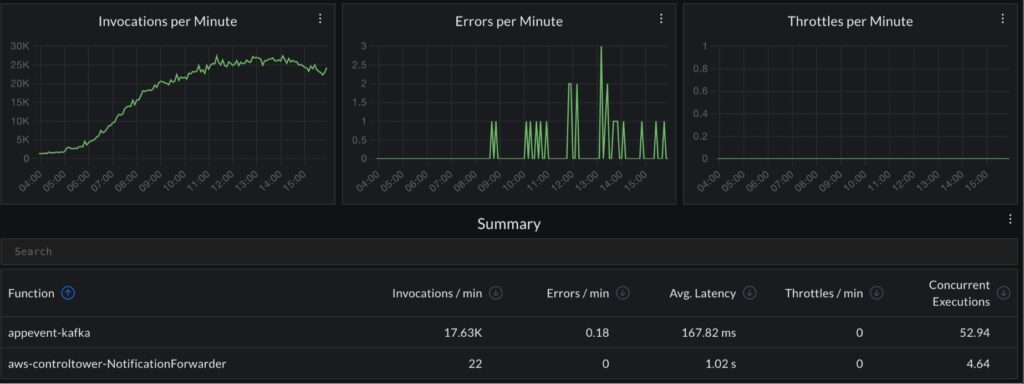
CubeAPM connects to your AWS account and collects Lambda CloudWatch metrics, ingests structured logs via log forwarding, and receives distributed traces from ADOT-instrumented Lambda functions over OTLP. Because CubeAPM runs inside your own infrastructure, Lambda telemetry never leaves your cloud.
Correlating CloudWatch metrics (invocations, errors, throttles, duration), structured application logs, and ADOT-sourced distributed traces in one interface eliminates the context switching between CloudWatch metrics, CloudWatch Logs Insights, and X-Ray that makes Lambda incident investigation slow.
What CubeAPM monitors for Lambda:
- Invocation count, error rate, throttle count, and duration (average and p99) per function
- Cold start frequency and init duration extracted from REPORT log lines
- Async event backlog age (AsyncEventAge) and dropped event count (AsyncEventsDropped)
- Dead-letter queue delivery failures (DeadLetterErrors)
- Concurrent executions approaching regional or reserved concurrency limits
- Structured application logs from /aws/lambda/<FunctionName> log groups
- Distributed traces from ADOT-instrumented functions via OTLP, correlated with CloudWatch metrics and logs
Key alerts to configure for Lambda in CubeAPM:
| Alert | Condition | Severity |
| Error rate spike | Errors / Invocations > 1% for 5 min | Warning |
| Any async events dropped | AsyncEventsDropped > 0 | Critical |
| DLQ delivery failure | DeadLetterErrors > 0 | Critical |
| Throttling | Throttles > 0 for 5 min | Warning |
| High p99 duration | Duration p99 > 80% of timeout | Warning |
| Async event age growing | AsyncEventAge > 60s | Warning |
| Concurrency limit approached | ConcurrentExecutions > 80% of limit | Warning |
Read the docs to configure AWS Lambda monitoring and log ingestion.
Summary
Lambda observability requires monitoring four distinct failure modes that standard server monitoring never encounters: throttling (invisible to error rate dashboards), silent async event drops, cold start latency (now also a billing factor since August 2025), and stream consumer lag.
| Signal | Collection method | Key data |
| Invocation metrics | CloudWatch (automatic, no charge) | Invocations, Errors, Throttles, DeadLetterErrors, AsyncEventsDropped |
| Performance metrics | CloudWatch (automatic) | Duration (p99), IteratorAge, OffsetLag, PostRuntimeExtensionsDuration |
| Concurrency metrics | CloudWatch (automatic) | ConcurrentExecutions, ProvisionedConcurrencyUtilization |
| Cold start data | CloudWatch Logs Insights (REPORT lines) | Init duration, invocation duration, memory used |
| Structured logs | CloudWatch Logs (automatic) | Application events, errors, request context |
| Distributed traces | ADOT Lambda Layer or AWS X-Ray | End-to-end request path across Lambda, DynamoDB, SQS, API Gateway |
| System-level metrics | CloudWatch Lambda Insights extension | CPU time, memory, disk I/O per invocation (AL2 and AL2023 runtimes only) |
Disclaimer: All Lambda CloudWatch metric names sourced from the official AWS Lambda Developer Guide at docs.aws.amazon.com/lambda/latest/dg/monitoring-metrics-types.html, verified June 2026. Lambda sends metrics to CloudWatch at 1-minute intervals with no additional charge. InitDuration is not a standalone CloudWatch metric; it appears in REPORT log lines. From August 1, 2025, the Lambda INIT phase is billed for all function configurations including ZIP-based managed runtimes (source: aws.amazon.com/blogs/compute/aws-lambda-standardizes-billing-for-init-phase). Lambda Insights is supported only on Amazon Linux 2 and Amazon Linux 2023 runtimes; requires both the extension layer (ARN is region and version specific — see docs.aws.amazon.com/AmazonCloudWatch/latest/monitoring/Lambda-Insights-extension-versions.html) and the CloudWatchLambdaInsightsExecutionRolePolicy IAM policy on the execution role. ADOT Lambda Layer ARNs are region and architecture specific; current ARNs at aws-otel.github.io/docs/getting-started/lambda. CubeAPM: $0.15/GB, no per-function or per-invocation fees.
Also read:
Observability for Docker Containers: What to Track and How
What Are the Best Grafana Alternatives for Kubernetes Dashboards?