










Docker containers are ephemeral by design. A container can be created, run, and destroyed in seconds. Multiple containers on the same host share CPU, memory, network, and disk I/O resources without fixed boundaries. A single misbehaving container can saturate disk I/O or exhaust memory on a shared host before any alert fires. Understanding what is happening inside a running container, why a stopped container exited, and whether a set of containers is degrading collectively requires purpose-built observability, not just host-level monitoring.
This guide covers the three signal types you need for Docker container observability (metrics, logs, traces), which specific metrics matter and why, how to collect them using the OpenTelemetry Collector Docker Stats receiver and cAdvisor, how to collect container logs, and how to set up alerts with CubeAPM.
Key Takeaways
- Docker container observability requires three signal types working together: metrics for resource pressure, logs for application-level events, and distributed traces for request-level cause analysis.
- The OTel Collector docker_stats receiver is the standard collection path for OTel-based Docker monitoring; it requires access to the Docker socket and should be used with a socket proxy for production security.
- container.cpu.utilization and container.cpu.throttling.throttled_time are separate metrics; a container can have low CPU utilization but high throttle time if it is hitting its CPU limit.
- Always configure memory limits on production containers; without them, container.memory.percent is calculated against total host RAM and produces misleading values.
- container.cpu.percent was removed in OTel Collector Contrib v0.89.0; use container.cpu.utilization in all current deployments.
- cAdvisor image registry changed from gcr.io/cadvisor/cadvisor to ghcr.io/google/cadvisor from v0.53.0; current stable is v0.55.1.
- The Docker daemon Prometheus endpoint (port 9323) requires both “metrics-addr” and “experimental”: true in daemon.json and is still marked experimental.
Monitoring vs. Observability for Containers
Monitoring and observability are related but different. Monitoring means watching predefined metrics and alerting when they cross a threshold: CPU above 90%, container restarted. Observability means being able to answer questions you did not think to ask in advance: which specific request caused the memory spike on the checkout container at 14:32, and was it correlated with a slow database query in a downstream container?
Containers make this distinction important because their failure modes are often non-obvious. A container can restart repeatedly due to an OOM kill that does not appear in application logs. A container can run at 100% CPU throttle for minutes while its CPU utilization metric looks low, because throttle time and CPU usage are different measurements. A container that shares a network bridge can drop packets silently without any application-level error appearing in logs.
Full container observability requires all three signal types working together: metrics to see resource pressure, logs to see what the application reported, and distributed traces to see which specific request paths caused the pressure.
What to Track: The Three Signal Types
1. Container Metrics
Container metrics come in four categories. All metric names below are from the OpenTelemetry semantic conventions for the Docker Stats receiver (opentelemetry-collector-contrib, dockerstatsreceiver), the standard collection path for OTel-based Docker monitoring.
CPU metrics
| Metric | Description | Why it matters |
| container.cpu.utilization | CPU usage as a fraction of allocated CPU | Primary CPU health signal; high sustained values indicate CPU pressure |
| container.cpu.usage.total | Cumulative CPU nanoseconds used | Use rate() over this to derive CPU usage rate |
| container.cpu.throttling.throttled_time | Cumulative time the container was CPU-throttled | Critical: a container can have low CPU utilization but high throttle time if it is hitting its CPU limit |
Note: container.cpu.percent was the older metric name emitted by the docker_stats receiver. It was deprecated in favor of container.cpu.utilization from v0.88.0 of the OTel Collector Contrib and removed in v0.89.0. Use container.cpu.utilization in all current deployments.
CPU throttling is the most commonly missed CPU signal. A container configured with a CPU limit can exhaust its quota in a burst, causing all processes inside to pause even though aggregate CPU utilization looks fine. Monitoring throttle time alongside utilization is required for accurate CPU health assessment.
Memory metrics
| Metric | Description | Why it matters |
| container.memory.usage.total | Total memory used by the container in bytes | Track growth trends |
| container.memory.percent | Memory as a percentage of the container’s memory limit | Most actionable; alert when this approaches 100% |
| container.memory.usage.limit | The memory limit configured for the container | Divide usage.total by this to compute utilization |
| container.memory.rss | Resident Set Size: memory actually held in RAM | High RSS approaching the limit precedes OOM kills |
If no explicit memory limit is set, container.memory.percent is calculated against total host RAM and produces very small, misleading percentages. Always configure memory limits on production containers both for security and for meaningful memory observability.
Network I/O metrics
| Metric | Description | Why it matters |
| container.network.io.usage.rx_bytes | Bytes received per network interface | Monitor traffic volume and growth |
| container.network.io.usage.tx_bytes | Bytes transmitted per network interface | Monitor outbound traffic |
| container.network.io.usage.rx_dropped | Received packets dropped | Dropped packets indicate network saturation or misconfiguration |
| container.network.io.usage.tx_dropped | Transmitted packets dropped | Rising drop rates precede connection timeouts |
Block I/O metrics
| Metric | Description | Why it matters |
| container.blockio.io_service_bytes_recursive | Bytes read and written per block device | High block I/O from one container can saturate shared storage for all containers on the host |
2. Container Logs
Container logs are the primary source of application-level error information. Docker collects stdout and stderr from every running container and makes them available via the Docker daemon log driver. The most common log collection approach for OTel-based pipelines is the OTel Collector filelog receiver, which tails the Docker log files directly from disk.
Key things to track in container logs:
- OOM kill events: Docker logs an OOM kill in the kernel log when a container is killed for exceeding its memory limit. The container’s own stdout/stderr will not contain this event. Monitor docker events (type container, action oom) alongside log ingestion.
- Restart loops: A container that exits immediately and restarts repeatedly produces a spike in docker events (type container, action die followed by start). Track container exit events and restart counts.
- Application errors and stack traces: Containers that write structured JSON logs to stdout get indexed fields for free when logs are collected via the filelog receiver, making search and aggregation significantly faster than unstructured text.
3. Distributed Traces
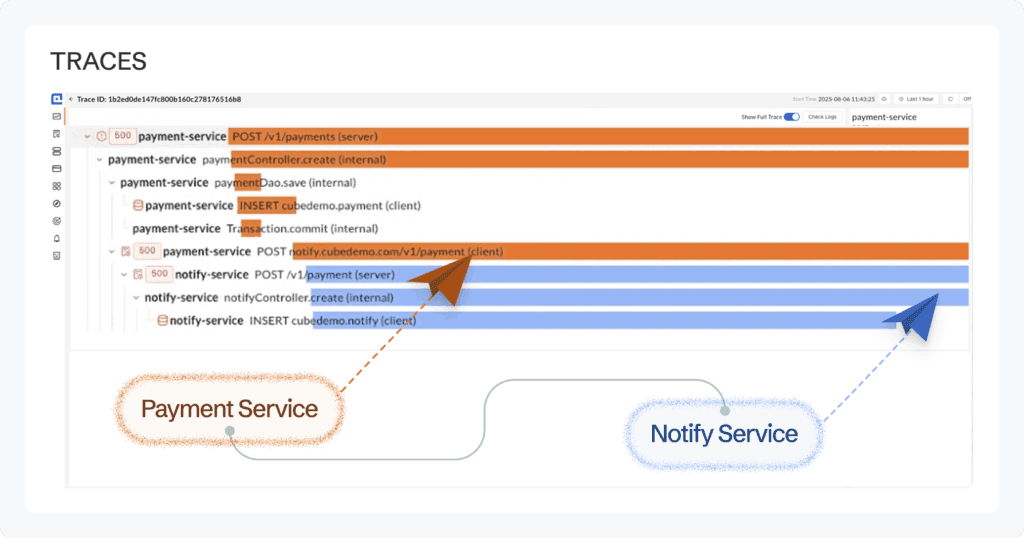
Distributed traces connect a user-facing request to every container call it touched on the way through the system. Without traces, a slow API response requires investigating each service’s logs separately to find which container introduced the latency. With traces, the flame graph shows exactly which container and which operation was slow, along with the full request context.
Traces are collected by instrumenting container applications with OpenTelemetry SDKs. The OTel Collector, deployed as a container alongside your workloads, receives trace spans from all instrumented containers via OTLP and exports them to your observability backend. Container-level metadata (container name, image, host) is attached to traces automatically via the resourcedetection processor.
Step 1: Collect Container Metrics with the OTel Collector Docker Stats Receiver
The OTel Collector Docker Stats receiver queries the Docker daemon’s container stats API at a configurable interval (default 10 seconds) and emits standardized metrics for all running containers. It is part of the opentelemetry-collector-contrib distribution only; the core distribution does not include it.
Deploy the OTel Collector as a container alongside your workloads using Docker Compose. Pin to a specific version rather than latest for production:
# docker-compose.yml

services:

  otel-collector:

    image: otel/opentelemetry-collector-contrib:0.145.0

    volumes:

      - ./otel-collector-config.yaml:/etc/otelcol-contrib/config.yaml

      - /var/run/docker.sock:/var/run/docker.sock:ro

    ports:

      - "4317:4317"   # OTLP gRPC receiver

      - "4318:4318"   # OTLP HTTP receiver

restart: unless-stoppedConfigure the Docker Stats receiver in otel-collector-config.yaml:
receivers:

  docker_stats:

    endpoint: unix:///var/run/docker.sock

    collection_interval: 15s

    timeout: 10s

    metrics:

      container.cpu.utilization:

        enabled: true

      container.memory.usage.total:

        enabled: true

      container.memory.usage.limit:

        enabled: true

      container.memory.percent:

        enabled: true

      container.memory.rss:

        enabled: true

      container.network.io.usage.rx_bytes:

        enabled: true

      container.network.io.usage.tx_bytes:

        enabled: true

      container.network.io.usage.rx_dropped:

        enabled: true

      container.network.io.usage.tx_dropped:

        enabled: true

      container.blockio.io_service_bytes_recursive:

        enabled: true

processors:

  batch:

    timeout: 10s

    send_batch_size: 200

  memory_limiter:

    check_interval: 5s

    limit_mib: 256

    spike_limit_mib: 64

  resourcedetection:

    detectors: [env, system, docker]

    timeout: 5s

exporters:

  otlp:

    endpoint: "your-cubeapm-instance:4317"

    tls:

      insecure: true   # set to false with TLS in production

service:

  pipelines:

    metrics:

      receivers: [docker_stats]

      processors: [memory_limiter, resourcedetection, batch]

exporters: [otlp]The resourcedetection processor attaches host-level attributes (hostname, OS) to all container metrics automatically. The memory_limiter processor prevents the collector from consuming excessive host memory.
Security note: The Docker Stats receiver needs read access to the Docker socket. The official OTel Collector Contrib documentation recommends using a Docker socket proxy (such as Tecnativa’s docker-socket-proxy) that restricts accessible API endpoints to read-only stats endpoints, rather than mounting the raw socket. Running the receiver in an isolated collector instance that only exports data (no OTLP or Zipkin inbound ports exposed) further reduces the attack surface on the privileged container.
Step 2: Collect Container Metrics with cAdvisor (Prometheus path)
cAdvisor (Container Advisor, maintained by Google) provides container-level metrics in Prometheus format for teams with existing Prometheus-based stacks. From v0.53.0 onwards, the official image moved from gcr.io/cadvisor/cadvisor to ghcr.io/google/cadvisor. The current stable release is v0.55.1.
# docker-compose.yml

services:

  cadvisor:

    image: ghcr.io/google/cadvisor:v0.55.1

    privileged: true

    ports:

      - "8080:8080"

    devices:

      - /dev/kmsg

    volumes:

      - /:/rootfs:ro

      - /var/run:/var/run:ro

      - /sys:/sys:ro

      - /var/lib/docker/:/var/lib/docker:ro

      - /dev/disk/:/dev/disk:ro

restart: unless-stoppedcAdvisor exposes its metrics at http://<host>:8080/metrics. Add it as a Prometheus scrape target:
# prometheus.yml

scrape_configs:

  - job_name: 'cadvisor'

    static_configs:

- targets: ['cadvisor:8080']Key cAdvisor Prometheus metric names:
| cAdvisor Metric | Description |
| container_cpu_usage_seconds_total | Cumulative CPU usage; use rate() to derive per-second rate |
| container_cpu_cfs_throttled_seconds_total | Cumulative CPU throttle time |
| container_memory_working_set_bytes | Memory actually in use excluding file cache; most accurate memory signal |
| container_memory_limit_bytes | Configured memory limit |
| container_network_receive_bytes_total | Bytes received |
| container_network_transmit_bytes_total | Bytes transmitted |
| container_fs_reads_bytes_total | Bytes read from filesystem |
| container_fs_writes_bytes_total | Bytes written to filesystem |
Step 3: Collect Container Logs
The OTel Collector filelog receiver tails Docker log files directly from disk. Docker writes container logs to /var/lib/docker/containers/<container-id>/<container-id>-json.log when using the json-file log driver, which is the default.
receivers:

  filelog:

    include:

      - /var/lib/docker/containers/*/*.log

    operators:

      - type: json_parser

        timestamp:

          parse_from: attributes.time

          layout: "%Y-%m-%dT%H:%M:%S.%LZ"

      - type: move

        from: attributes.log

        to: body

      - type: move

        from: attributes.stream

        to: attributes["log.iostream"]

    resource:

host.name: "${env:HOSTNAME}"This configuration parses Docker’s JSON log format, extracts the log body, timestamp, and stream (stdout/stderr), and attaches the hostname as a resource attribute. The filelog receiver sends logs through the same OTel pipeline as metrics and traces.
Step 4: Enable the Docker Daemon Prometheus Endpoint
The Docker daemon exposes daemon-level metrics via a built-in Prometheus endpoint on port 9323. This feature is still marked experimental in Docker and requires both “metrics-addr” and “experimental”: true in /etc/docker/daemon.json:
{

  "metrics-addr": "127.0.0.1:9323",

  "experimental": true

}

Restart the Docker daemon after making this change. Add it as a Prometheus scrape target:

scrape_configs:

  - job_name: 'docker-daemon'

    static_configs:

- targets: ['localhost:9323']Key daemon metrics: engine_daemon_container_states_containers (count by state: running, paused, stopped) and engine_daemon_network_actions_seconds_total (network operation latency).
Note: Because the experimental flag is required, these metrics and their names are subject to change. Do not build critical alerting on daemon metrics alone; use them for supplementary visibility.
Step 5: Set Meaningful Alert Thresholds
| Alert | Condition | Severity |
| High memory pressure | container.memory.percent > 85% sustained > 5 min | Warning |
| Imminent OOM | container.memory.percent > 95% | Critical |
| CPU throttling | Throttled periods > 25% of total CPU periods over 10 min | Warning |
| High CPU utilization | container.cpu.utilization > 0.9 sustained > 5 min | Warning |
| Container restart loop | Container restarted > 3 times in 10 minutes | Critical |
| Network packet drops | rx_dropped or tx_dropped rate > 50/second | Warning |
| High block I/O | blockio.io_service_bytes_recursive write rate > 100 MB/s | Warning |
Step 6: Monitor Docker Containers with CubeAPM
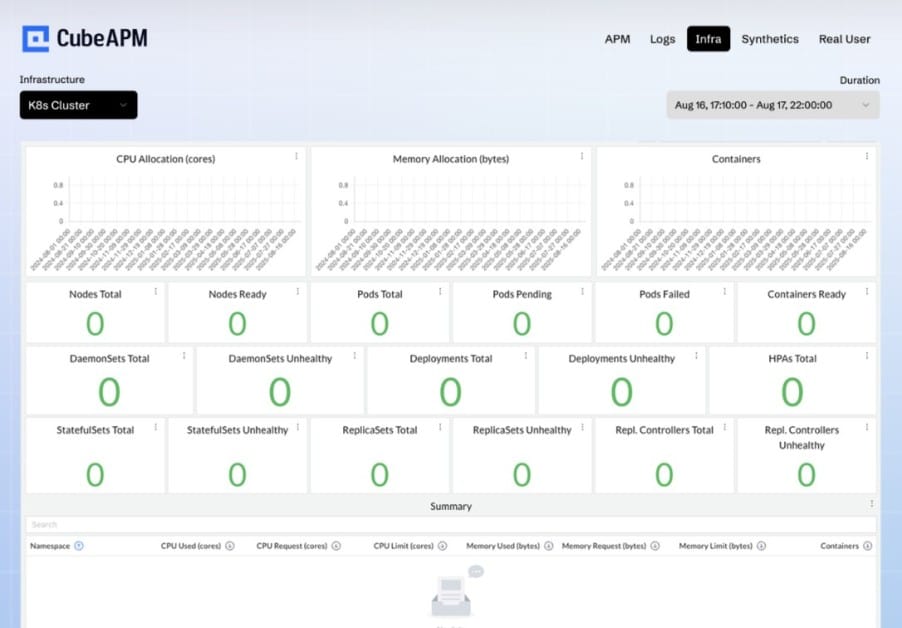
CubeAPM connects to the OpenTelemetry Collector OTLP endpoint and ingests all three signal types (container metrics, logs, and distributed traces) from Docker environments in one place. Because CubeAPM runs inside your own infrastructure, container telemetry never leaves your cloud.
Pointing the OTel Collector’s OTLP exporter at your CubeAPM instance is all the setup required. CubeAPM then provides correlated dashboards and alerting across container metrics, application traces, and logs in a single interface, without the need for separate Prometheus, Loki, and Tempo deployments alongside your containers.
What CubeAPM monitors for Docker:
- Per-container CPU utilization and CPU throttling rate
- Per-container memory usage, memory pressure percentage, and RSS
- Per-container network receive/transmit bytes and dropped packet counts
- Block I/O bytes read and written per container
- Container logs ingested via OTel filelog receiver
- Distributed traces from OTel-instrumented containerized applications, correlated with container infrastructure metrics
- Host-level metrics from the resourcedetection processor (CPU, memory, disk, network)
Key alerts to configure in CubeAPM:
| Alert | Condition | Severity |
| Memory pressure | container.memory.percent > 85% for 5 min | Warning |
| Imminent OOM | container.memory.percent > 95% | Critical |
| CPU throttling | Throttled period ratio > 25% | Warning |
| Container restart loop | Restart count > 3 in 10 min | Critical |
| Network drops | Drop rate > 50 packets/sec | Warning |
| Log error rate spike | Error-level log rate > 10x baseline | Warning |
Summary
Docker container observability requires all three signal types to be useful in production. Metrics alone tell you a container is under memory pressure. Logs tell you what the application reported. Traces show you which specific request path caused the pressure.
| Signal | Collection method | Key data |
| Container metrics | OTel Collector docker_stats receiver or cAdvisor | CPU utilization, CPU throttle time, memory percent, network drops, block I/O |
| Container logs | OTel filelog receiver (Docker json-file log driver) | stdout/stderr from all containers, OOM kill events via docker events |
| Distributed traces | OTel SDK instrumentation in container applications | Request latency, error rate, downstream service call breakdown |
| Daemon metrics | Docker daemon Prometheus endpoint (port 9323, experimental) | Running/paused/stopped container counts, daemon health |
Disclaimer: All OTel Docker Stats receiver metric names verified from the official opentelemetry-collector-contrib dockerstatsreceiver README on GitHub as of June 2026. container.cpu.percent was removed in OTel Collector Contrib v0.89.0; use container.cpu.utilization. cAdvisor image registry changed from gcr.io/cadvisor/cadvisor to ghcr.io/google/cadvisor from v0.53.0; current stable release is v0.55.1 (source: github.com/google/cadvisor/releases). Docker daemon Prometheus endpoint (port 9323) requires both “metrics-addr” and “experimental”: true in daemon.json and is still marked experimental; metric names are subject to change (source: Docker Engine documentation). OTel Collector Contrib version 0.145.0 used as the pinned example. CubeAPM: $0.15/GB, no per-container or per-host fees.
Also read:
What Are the Best Grafana Alternatives for Kubernetes Dashboards?