










Azure Functions has built-in integration with Azure Application Insights and surfaces execution telemetry without any custom instrumentation code. Every function invocation produces a request record, every unhandled exception produces an exception record, and every dependency call (HTTP, Service Bus, Event Hubs, SQL, Cosmos DB) produces a dependency record.
The challenge is not getting the data. It is configuring the right log levels, avoiding sampling gaps, and writing the right queries to surface failures and slow executions quickly.
Key Takeaways
- Application Insights is the primary monitoring tool for Azure Functions. It is integrated at the platform level and collects requests, exceptions, dependencies, traces, and performance counters automatically for runtime 4.x.
- The recommended telemetry exporter for new and existing function apps is the Azure Monitor OpenTelemetry Exporter. The classic Application Insights SDK will not receive new feature updates. OpenTelemetry is not supported for C# in-process apps. Support for the C# in-process model ends November 10, 2026; teams should plan migration to the isolated worker model.
- Support for Azure Functions runtime 1.x ends September 14, 2026. Migrate to runtime 4.x for continued support.
- Function executions are stored in the requests table in Application Insights. Failed executions have success == false. Setting the Host.Results log category to Error in host.json prevents successful executions from appearing in that table, creating gaps in monitoring.
- Application Insights sampling is enabled by default. At high execution volumes, sampling can cause exceptions and failures to be under-represented. Exclude Request and Exception types from sampling for production function apps.
- FunctionExecutionCount and FunctionExecutionUnits are platform metrics available via Azure Monitor without Application Insights. FunctionExecutionCount is not supported for Premium and Dedicated plan apps running on Linux.
- Performance counters are not automatically collected when function apps run on Linux.
What Application Insights Captures Automatically
When Application Insights is connected to a function app running on runtime 4.x, the following telemetry is collected without any code changes:
| Data type | Application Insights table | What it captures |
| Function invocations | requests | Start time, duration, success/failure, trigger type, function name |
| Unhandled exceptions | exceptions | Exception type, message, stack trace, linked to the triggering invocation |
| Dependency calls | dependencies | Outbound HTTP calls, Service Bus, Event Hubs, SQL via SqlClient, Cosmos DB, Azure Storage |
| Application logs | traces | Log output from ILogger, context.log, logging module at configured log level |
| Performance counters | performanceCounters | CPU, memory, request rate (Windows hosting only) |
| Live metrics | Live Metrics Stream | Near real-time invocation counts, failure rates, dependency latencies (sampled) |
Dependencies (HTTP, Service Bus, Event Hubs, SQL) are only automatically collected on runtime 4.x, not on 1.x.
Step 1: Enable and Verify Application Insights Integration
Application Insights integration is typically enabled when the function app is created. Verify it is connected by checking for the APPLICATIONINSIGHTS_CONNECTION_STRING application setting in your function app’s Configuration section.
The connection string approach is required for sovereign cloud regions (Azure Government, Azure China). The instrumentation key (APPINSIGHTS_INSTRUMENTATIONKEY) still works in public cloud but the connection string is the recommended approach for all new deployments. The Azure Monitor OpenTelemetry Exporter does not support the instrumentation key at all and requires the connection string.
Enable Application Insights if it is not already connected:
az functionapp config appsettings set \

  --name myFunctionApp \

  --resource-group myResourceGroup \

--settings "APPLICATIONINSIGHTS_CONNECTION_STRING=InstrumentationKey=<key>;IngestionEndpoint=https://eastus-8.in.applicationinsights.azure.com/"Step 2: Configure host.json Log Levels
The host.json file controls which log categories are sent to Application Insights and at what level. Getting this configuration wrong is the most common cause of missing or excessive monitoring data.
{

  "version": "2.0",

  "logging": {

    "applicationInsights": {

      "samplingSettings": {

        "isEnabled": true,

        "maxTelemetryItemsPerSecond": 20,

        "excludedTypes": "Request;Exception"

      }

    },

    "logLevel": {

      "default": "Warning",

      "Host.Results": "Information",

      "Host.Aggregator": "Information",

      "Function": "Information",

      "Function.MyFunctionName": "Information",

      "Function.MyFunctionName.User": "Information"

    }

  }

}Critical configuration note: If you set Host.Results to Error or higher, Application Insights only receives telemetry for failed function executions. Successful executions disappear from the requests table, breaking success rate calculations and execution count dashboards. Keep Host.Results at Information for production monitoring.
Log category reference for Azure Functions:
| Category | What it controls |
| Host.Results | Function execution results (request records) in the requests table |
| Host.Aggregator | Aggregated function execution counts and durations |
| Host.Startup | Function host startup events |
| Function | All function-specific logs (applies to all functions) |
| Function.{FunctionName} | Logs for a specific named function |
| Function.{FunctionName}.User | Logs your function code writes via ILogger or equivalent |
| Host.Triggers.DurableTask | Durable Functions orchestration tracking events |
Step 3: Query Executions and Errors in Application Insights
Run these queries from the Azure portal under your Application Insights resource Logs section.
Execution count and failure rate over time
requests

| where timestamp > ago(24h)

| where cloud_RoleName == "MyFunctionApp"

| summarize

    total = count(),

    failed = countif(success == false),

    success_rate = round(100.0 * countif(success == true) / count(), 2)

    by bin(timestamp, 5m), name

| order by timestamp descFailed executions with details
requests

| where timestamp > ago(24h)

| where success == false

| project timestamp, name, duration, resultCode, operation_Id

| order by timestamp descExceptions linked to function executions
exceptions

| where timestamp > ago(24h)

| project timestamp, type, outerMessage, operation_Id, cloud_RoleName

| order by timestamp desc

Join exceptions to their triggering invocations using operation_Id:

requests

| where timestamp > ago(24h)

| where success == false

| join kind=leftouter (

    exceptions

    | where timestamp > ago(24h)

    | project operation_Id, exceptionType = type, exceptionMessage = outerMessage

) on operation_Id

| project timestamp, name, duration, exceptionType, exceptionMessage

| order by timestamp descSlowest executions (p95 and p99 by function name)
requests

| where timestamp > ago(24h)

| summarize

    p50 = percentile(duration, 50),

    p95 = percentile(duration, 95),

    p99 = percentile(duration, 99),

    count = count()

    by name

| order by p99 descDependency failures
dependencies

| where timestamp > ago(24h)

| where success == false

| project timestamp, name, target, duration, resultCode, operation_Id

| order by timestamp descCustom application logs at Warning level and above
traces

| where timestamp > ago(24h)

| where severityLevel >= 2

| project timestamp, message, severityLevel, operation_Id, cloud_RoleName

| order by timestamp descStep 4: Platform Metrics for Function Apps
Azure Monitor surfaces platform-level metrics for function apps that are useful for alerting and capacity monitoring without requiring Application Insights queries.
| Metric | REST API name | What it measures | Notes |
| Function Execution Count | FunctionExecutionCount | Total number of function executions | Not supported for Premium and Dedicated plans running on Linux |
| Function Execution Units | FunctionExecutionUnits | Memory-time product used per execution (MB-milliseconds) | Used for Consumption plan billing estimation |
| Http 5xx | Http5xx | Count of HTTP 5xx responses from HTTP-triggered functions | Useful for HTTP trigger error rate alerting |
| Requests | Requests | Total HTTP requests received | HTTP-triggered functions only |
| Average Response Time | AverageResponseTime | Average HTTP response time in seconds | HTTP-triggered functions only |
| Memory Working Set | MemoryWorkingSet | Current memory use | App Service and Premium plans |
| Instance Count | InstanceCount | Number of active instances | Consumption and Elastic Premium plans |
For Flex Consumption plan apps, additional metrics are available: OnDemandFunctionExecutionCount, OnDemandFunctionExecutionUnits, AlwaysReadyFunctionExecutionCount, and AlwaysReadyFunctionExecutionUnits.
Step 5: Configure Alerts
Alert on HTTP errors
az monitor metrics alert create \

  --name "AzureFunctions-Failures" \

  --resource-group myResourceGroup \

  --scopes "/subscriptions/{sub-id}/resourceGroups/myResourceGroup/providers/Microsoft.Web/sites/myFunctionApp" \

  --condition "total Http5xx > 0" \

  --window-size 5m \

  --evaluation-frequency 1m \

  --severity 2 \

--action "/subscriptions/{sub-id}/resourceGroups/myResourceGroup/providers/microsoft.insights/actionGroups/myActionGroup"Log alert on exception spikes
az monitor scheduled-query create \

  --name "AzureFunctions-ExceptionSpike" \

  --resource-group myResourceGroup \

  --scopes "/subscriptions/{sub-id}/resourceGroups/myResourceGroup/providers/microsoft.insights/components/myAppInsights" \

  --condition "count > 10" \

  --condition-query "exceptions | where timestamp > ago(5m) | where cloud_RoleName == 'myFunctionApp' | count" \

  --evaluation-frequency "PT5M" \

  --window-size "PT5M" \

  --severity 2 \

--action-groups "/subscriptions/{sub-id}/resourceGroups/myResourceGroup/providers/microsoft.insights/actionGroups/myActionGroup"Step 6: Tune Sampling to Avoid Missing Failures
Application Insights sampling is enabled by default. The recommended approach for production function apps is to exclude exceptions and failed requests from sampling, so every failure is captured regardless of volume:
{

  "version": "2.0",

  "logging": {

    "applicationInsights": {

      "samplingSettings": {

        "isEnabled": true,

        "maxTelemetryItemsPerSecond": 20,

        "excludedTypes": "Request;Exception;Trace"

      }

    }

  }

}The excludedTypes field accepts a semicolon-separated list. Including Request and Exception ensures every execution result and every exception reaches Application Insights regardless of execution volume.
Step 7: Live Metrics Stream for Real-Time Debugging
Live Metrics Stream provides a near real-time view of function invocations, failure rates, and dependency calls. It is the recommended approach for real-time monitoring of functions running on multiple instances or on Linux in a Consumption plan. Access it from your Application Insights resource under Investigate > Live Metrics.
Live Metrics uses sampled data and is designed for real-time observation, not for accurate aggregate counting. Use it for active debugging sessions, not for SLO reporting.
Step 8: Enable OpenTelemetry Export
For runtime 4.x function apps, two approaches are available for OpenTelemetry-based export. OpenTelemetry is not supported for C# in-process apps (end of support: November 10, 2026; plan migration to the isolated worker model).
Approach A: telemetryMode in host.json (simpler, any OTLP backend)
Set “telemetryMode”: “openTelemetry” in host.json to switch the Functions host to output telemetry using OTel standards. This enables export to both Application Insights and any OTLP-compatible backend:
{

  "version": "2.0",

  "telemetryMode": "openTelemetry"

}Configure the export destination via app settings:
# Export to Application Insights via Azure Monitor Exporter

APPLICATIONINSIGHTS_CONNECTION_STRING=<your_connection_string>

# Or export directly to any OTLP-compatible backend

OTEL_EXPORTER_OTLP_ENDPOINT=http://otel-collector:4318

OTEL_EXPORTER_OTLP_HEADERS=<optional_auth_headers>Approach B: SDK setup in isolated worker model (.NET)
For .NET isolated worker functions requiring more granular control:
using Azure.Monitor.OpenTelemetry.AspNetCore;

var host = new HostBuilder()

    .ConfigureFunctionsWorkerDefaults()

    .ConfigureServices(services =>

    {

        services.AddOpenTelemetry().UseAzureMonitor();

    })

    .Build();

host.Run();UseAzureMonitor() reads APPLICATIONINSIGHTS_CONNECTION_STRING from app settings automatically.
Step 9: Monitoring Durable Functions
Durable Functions produce additional tracking events beyond standard function invocations. Configure verbosity in host.json:
{

  "version": "2.0",

  "logging": {

    "logLevel": {

      "Host.Triggers.DurableTask": "Information"

    }

  }

}Query orchestration history for a specific instance:
traces

| where timestamp > ago(24h)

| where customDimensions.Category == "Host.Triggers.DurableTask"

| where customDimensions.prop__instanceId == "YOUR_INSTANCE_ID"

| project timestamp, message, customDimensions

| order by timestamp ascSetting Host.Triggers.DurableTask to Warning reduces tracking event volume to exceptional situations only. For full trace-level orchestration replay events, set logReplayEvents to true in host.json under the durableTask section.
Common Setup Problems
| Problem | Likely cause | Fix |
| Successful executions not appearing in requests table | Host.Results set to Error in host.json | Set Host.Results to Information to capture all execution results |
| Exception counts look too low | Sampling is dropping exception records | Add Exception to excludedTypes in samplingSettings in host.json |
| No dependency telemetry | Running on runtime 1.x or C# in-process with classic SDK | Dependency tracking requires runtime 4.x. Runtime 1.x reaches end of support September 14, 2026. C# in-process reaches end of support November 10, 2026 |
| Performance counters not appearing | Function app runs on Linux | Performance counters are only collected on Windows hosting |
| Application Insights daily data cap hit | High-volume function app with default sampling settings | Tune maxTelemetryItemsPerSecond and exclude high-volume trace categories |
| OpenTelemetry export not working on C# in-process | OTel is not supported for the in-process model | Migrate to the isolated worker model. End of support for in-process is November 10, 2026 |
| Live Metrics not showing data | Application Insights not connected or firewall blocking the endpoint | Verify APPLICATIONINSIGHTS_CONNECTION_STRING is set and outbound connectivity to Application Insights endpoints is allowed |
When Application Insights Is Not the Whole Picture
Application Insights tells you that a function failed and shows the exception. It shows the outbound dependency call that failed. What it does not show is how that function fits into the end-to-end distributed request that triggered it, whether a downstream service slowdown is causing cascading failures across multiple functions, or how the failure correlates with infrastructure events at the same time.
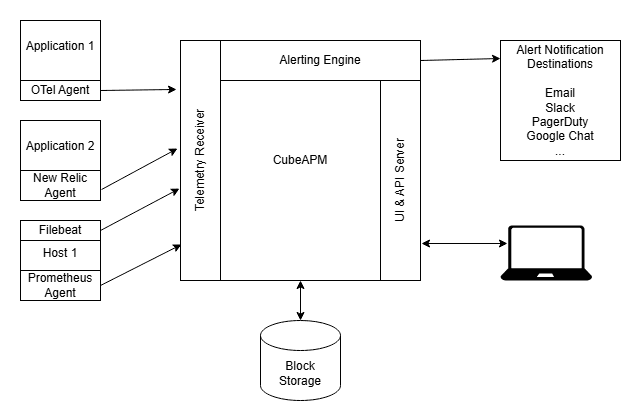
CubeAPM accepts OTLP directly from Azure Functions via the telemetryMode: openTelemetry setting in host.json and the OTEL_EXPORTER_OTLP_ENDPOINT app setting, with no additional SDK code required. It correlates function execution traces with traces from the services that called them and the services they called, giving you the full end-to-end picture. When an Azure Function fails because a downstream database call timed out, CubeAPM shows the full chain: the trigger, the function execution, the outbound call, and the database-level event. It runs self-hosted inside your own infrastructure at $0.15/GB ingestion with no per-user fees, so your telemetry data never leaves your environment.
Summary
Monitoring Azure Functions requires three layers working together: Application Insights for per-execution telemetry, exceptions, and dependency tracking; platform metrics for execution counts, error rates, and scale behavior; and host.json configuration to control log levels, sampling, and what data flows to Application Insights. Keep Host.Results at Information, so all executions are captured, and exclude exceptions from sampling, so every failure is recorded. For teams on C# in-process (end of support November 10, 2026) or runtime 1.x (end of support September 14, 2026), plan migration to the isolated worker model on runtime 4.x to unlock OpenTelemetry support and continued platform updates.
| Signal | Where it lives | Key detail |
| Function execution results | requests table in Application Insights | Requires Host.Results at Information |
| Exceptions | exceptions table in Application Insights | Linked to executions via operation_Id. Exclude from sampling |
| Dependency calls | dependencies table in Application Insights | HTTP, Service Bus, Event Hubs, SQL, Cosmos DB. Runtime 4.x only |
| Application logs | traces table in Application Insights | Controlled by log level per category in host.json |
| Execution count | FunctionExecutionCount platform metric | Not available for Premium/Dedicated on Linux |
| Real-time view | Live Metrics Stream | Sampled. Use for active debugging, not SLO reporting |
| OpenTelemetry export | “telemetryMode”: “openTelemetry” in host.json | Routes to Application Insights or any OTLP backend. Not supported for C# in-process |
| Durable Functions | traces table, Host.Triggers.DurableTask category | Configure log level per verbosity requirement |
Disclaimer: Application Insights integration behavior, log category names, sampling configuration, OpenTelemetry exporter recommendation, C# in-process OTel limitation and end-of-support date (November 10, 2026), runtime 1.x end-of-support date (September 14, 2026), telemetryMode host.json configuration, performance counter Linux exclusion, platform metric names and plan-specific availability, and Durable Functions log configuration are verified against Microsoft Learn official documentation including learn.microsoft.com/en-us/azure/azure-functions/functions-monitoring (last modified April 13, 2026), learn.microsoft.com/en-us/azure/azure-functions/functions-dotnet-class-library, and learn.microsoft.com/en-us/azure/azure-functions/monitor-functions-reference as of May 2026.
Also read:
How to Monitor Azure Virtual Machines: CPU, Memory, and Disk
How to Monitor Azure SQL Database Performance and Deadlocks
What is the Difference Between MariaDB and MySQL Monitoring?