










Offset and consumer lag in Kafka are related but measure different things. Confusing them leads to misreading monitoring dashboards and building incorrect alerts.
Offset is a position and a sequential integer identifier assigned to every record written to a Kafka partition. Offsets are immutable and partition-scoped – partition 0 has its own offset sequence starting at 0, independent of partition 1’s sequence. An offset identifies a specific record’s location within a partition, nothing more.
Consumer lag is a derived measurement. It is the gap between where a consumer group currently is and where the end of the partition is. Specifically, it is the difference between the log-end offset (the offset of the next message to be written) and the consumer group’s committed offset (the offset of the last message the consumer has processed and confirmed).
Consumer lag = Log-end offset – Committed offset
A consumer with zero lag is fully caught up. A consumer with a non-zero lag has that many unprocessed records ahead of it in the partition. Let’s compare consumer lag vs offset in Kafka.
Key Takeaways
- Offset is a position. Consumer lag is a gap. An offset by itself tells you nothing about whether a consumer is keeping up – it is just a location within a partition
- Lag is always calculated per partition, per consumer group. A topic with 12 partitions has 12 individual lag values per consumer group. Total lag is the sum of all partition lags
- Committed offset and current position are not the same thing. A consumer fetches records and advances its current position immediately, but only persists the committed offset when it explicitly commits. Lag is calculated against the committed offset, not the current position
- Consumer lag measured in offsets (number of records) is not the same as consumer lag measured in time (how old the oldest unprocessed record is). A lag of 1,000 records on a slow-moving topic may represent hours of delay. A lag of 1,000 records on a high-throughput topic may represent seconds
- records-lag-max from the Java consumer client, which is the highest per-partition lag across all partitions assigned to that consumer instance – useful for per-consumer alerting
- A consumer that has never committed an offset will show lag equal to the full partition depth from the starting position
The Four Offset Concepts You Need to Know
Kafka uses the term “offset” in four distinct contexts that are easy to conflate:
1. Log-end offset (LEO): The offset of the next message to be written to a partition. If a partition has 1,000 records with offsets 0 through 999, the log-end offset is 1,000. This is what producers advance when they write new records.
2. Current position (fetch position): The offset of the next record the consumer will receive in the next poll() call. This advances automatically every time the consumer receives messages. It is ahead of or equal to the committed offset. The Kafka consumer JavaDoc describes this as “the offset of the next record that will be given out – it will be one larger than the highest offset the consumer has seen in that partition.”
3. Committed offset: The last offset that has been explicitly stored – either in the __consumer_offsets internal topic (for group-based consumers) or externally. If the consumer process restarts, it resumes from the committed offset, not the current position. Any records fetched but not committed are reprocessed. Lag is calculated against this value.
4. Consumer group offset: The committed offset stored for a specific consumer group, topic, and partition combination. This is what kafka-consumer-groups.sh –describe shows in the CURRENT-OFFSET column. Multiple consumer groups reading the same topic maintain independent offsets – one group being behind does not affect another.
The Exact Lag Formula
Lag (per partition) = Log-end offset – Consumer group committed offset
Total lag (per topic) = Sum of per-partition lags across all partitions
Example from kafka-consumer-groups.sh --describe:
GROUP TOPIC PARTITION CURRENT-OFFSET LOG-END-OFFSET LAG
my-consumer-grp my-topic 0 48163 48221 58
my-consumer-grp my-topic 1 91212 91278 66
my-consumer-grp my-topic 2 47854 47893 39
In this example:
- Partition 0: consumer has processed through offset 48162, the partition has 48221 records, lag is 58
- Partition 1: consumer has processed through offset 91211, lag is 66
- Partition 2: consumer has processed through offset 47853, lag is 39
- Total lag for this topic and consumer group: 58 + 66 + 39 = 163 records
Lag in Offsets vs Lag in Time
A lag of 1,000 records means different things depending on the topic’s write rate.
On a topic receiving 10,000 messages per second, 1,000 records of lag represent 100 milliseconds of delay. On a topic receiving 1 message per hour, 1,000 records of lag represent more than 41 days of delay.
This is why time-based lag monitoring is often more useful than offset-based lag monitoring for SLA compliance. Several tools compute time-based lag by looking at the timestamp of the oldest unprocessed record rather than counting records.
Burrow (LinkedIn’s open-source Kafka consumer lag monitoring tool) evaluates lag as a trend over time rather than a point-in-time count, which avoids false alarms during expected catch-up periods after a consumer restart.
Kafka-lag-exporter (a Prometheus-compatible exporter) exposes both offset-based and time-based lag metrics.
How to Check Consumer Lag
Using the Kafka CLI:
# List all consumer groups

kafka-consumer-groups.sh \

  --bootstrap-server broker:9092 \

  --list

# Describe a specific consumer group's lag

kafka-consumer-groups.sh \

  --bootstrap-server broker:9092 \

  --describe \

--group your-consumer-groupThe output shows CURRENT-OFFSET (committed offset), LOG-END-OFFSET, and LAG per partition.
Using the Admin API (programmatic):
AdminClient adminClient = AdminClient.create(props);

// List consumer group offsets (committed positions)

Map<TopicPartition, OffsetAndMetadata> offsets = adminClient

    .listConsumerGroupOffsets("your-consumer-group")

    .partitionsToOffsetAndMetadata()

    .get();

// Get log-end offsets

Map<TopicPartition, ListOffsetsResult.ListOffsetsResultInfo> endOffsets = adminClient

    .listOffsets(offsetsRequest)

    .all()

    .get();

// Lag = end offset - committed offset per partitionUsing the Java consumer client metric records-lag-max:
The Java consumer client exposes a records-lag-max metric via JMX under the MBean:
kafka.consumer:type=consumer-fetch-manager-metrics,client-id=<client-id>
This metric reports the maximum lag across all partitions currently assigned to that consumer instance. It is updated on every poll() call and reflects the current position, not the committed offset – so it can read zero even when the committed offset is behind, if the consumer has fetched but not yet committed.
Common Misconceptions
- Zero committed offset means no messages consumed: Not necessarily. If a consumer uses auto.offset.reset=earliest and has never committed, it has consumed records but has no committed offset stored. The lag will be reported as the total partition depth from the earliest offset. This is normal behavior for a new consumer group that has not yet committed.
- High lag always means the consumer is broken: Not always. Consumer lag can grow during expected periods: a consumer restart and replay, a planned maintenance window, or a traffic spike above the normal sustained rate. The trend matters more than the absolute value. A lag that is growing continuously is more concerning than a lag that spikes and then recovers.
- Consumer lag is per topic: Lag is per partition per consumer group. A topic with 20 partitions has 20 independent lag values per consumer group. You need to monitor all partitions – a single stuck partition with growing lag while others are healthy is a real failure mode that aggregate lag numbers hide.
- Low records-lag-max from the Java consumer means everything is fine: records-lag-max reflects the current fetch position, not the committed offset. If your consumer is processing records but committing offsets infrequently (or has enable.auto.commit=false and is not committing), the committed lag visible to kafka-consumer-groups.sh can be much higher than what records-lag-max reports. Always check committed lag via the Admin API or CLI alongside client-side metrics.
- Offset lag and consumer lag are the same thing: Confluent’s documentation distinguishes these precisely: offset lag is purely the arithmetic difference between log-end offset and committed offset (measured in record count). Consumer lag is a broader concept that includes both offset lag and consumer latency (time since the last record was fetched). The consumer-lag-offset JMX MBean measures offset lag only.
Monitoring Consumer Lag with Prometheus
The most widely used Prometheus-compatible exporter for Kafka consumer lag is kafka_exporter (by danielqsj), which queries Kafka’s Admin API and exposes per-group, per-topic, per-partition lag metrics in Prometheus exposition format.
Key metrics exposed by kafka_exporter:
| Metric | What it measures |
kafka_consumergroup_lag | Per-partition lag in offsets for each consumer group |
kafka_consumergroup_current_offset | Committed offset per partition per consumer group |
kafka_topic_partition_current_offset | Log-end offset per partition |
kafka_topic_partition_oldest_offset | Earliest available offset per partition (for retention monitoring) |
kafka_topic_partitions | Number of partitions per topic |
Alert on continuously growing lag:
# Alert when lag has grown over the last 10 minutes

kafka_consumergroup_lag > 0

  and (kafka_consumergroup_lag

- kafka_consumergroup_lag offset 10m) > 0Alert when lag exceeds a threshold:
# Alert when any partition lag exceeds 10,000 records

kafka_consumergroup_lag > 10000Alert on lag rate of growth:
# Alert when lag is growing faster than 1,000 records per minute

rate(kafka_consumergroup_lag[5m]) > 1000/60Note on kafka-lag-exporter: The seglo/kafka-lag-exporter project (a Scala/Akka application) uses different metric names and also estimates time-based latency in addition to offset lag. It is a useful complement to kafka_exporter when you need lag measured in seconds rather than record count. The two tools can be run alongside each other.
Your Lag Alarm Fired. Which Consumer Code Is Responsible?
kafka_consumergroup_lag tells you that a consumer group is behind. It does not tell you which processing step within the consumer application is slow, which downstream service call the consumer is waiting on, or whether the lag is caused by slow processing, frequent rebalances, or commit failures.
When consumer lag climbs on a monitored topic, the debugging path through Kafka tooling alone is: check lag per partition, check whether all partitions are lagging equally or one is stuck, check consumer group membership for rebalance activity. None of this connects to the application logic inside the consumer.
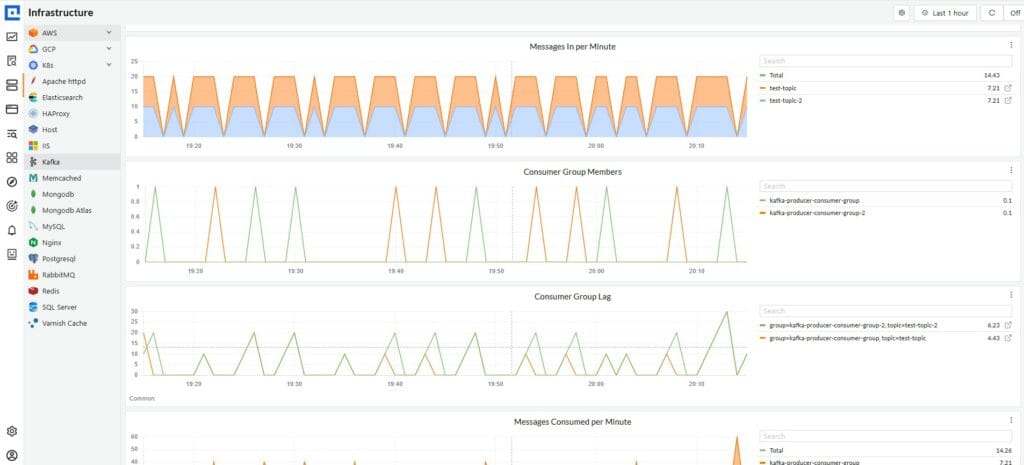
CubeAPM instruments your Kafka consumer application via OpenTelemetry and captures each message processing cycle as a span in the full distributed trace – including the downstream database calls, HTTP requests, and service dependencies the consumer makes while processing each record. When consumer lag climbs, the trace in CubeAPM shows whether the bottleneck is within the consumer’s own processing logic, a slow downstream database query, a rate-limited external API, or a consumer that is rebalancing frequently due to processing timeouts. The lag metric identifies that consumers are falling behind. The trace identifies where in the application they are losing time. Self-hosted inside your own infrastructure, no data leaves your environment.
Summary
| Concept | What it is | How it changes |
| Offset | A position within a partition (integer, immutable) | Only increases as records are written |
| Current position | The offset the consumer will read next after the last poll() | Advances on every successful poll() |
| Committed offset | The last offset durably stored for the consumer group | Advances only when commitSync() or commitAsync() is called, or auto-commit fires |
| Log-end offset | The offset of the next record to be written to the partition | Advances as producers write new records |
| Consumer lag | Log-end offset minus committed offset, per partition | Grows when producers write faster than consumers commit; shrinks as consumers catch up |
A consumer at zero lag has its committed offset equal to the log-end offset on every assigned partition. Monitoring lag by partition rather than as a topic aggregate is essential – a single stuck partition is a real failure that total lag numbers can mask.
Disclaimer: Metric names, CLI commands, and monitoring configurations are for guidance only – verify against current Apache Kafka documentation and your Kafka distribution’s documentation before applying to production. Behavior around offset commit, lag calculation, and consumer group coordination may vary between Kafka versions. CubeAPM references reflect genuine use cases; evaluate all tools against your own requirements.
Also read:
How to Monitor ActiveMQ Queues and Consumers