










Node.js APM is critical due to increased adoption. In fact, the Node.js Foundation reported that 58% of IoT developers were using Node.js with Docker, with 39% using it for backend development. Node.js now powers high-traffic APIs, real-time applications, and large-scale microservice architectures that handle unpredictable loads.
With this wide adoption, it is critical to get it right with Node.js monitoring. Node.js doesn’t behave like a classic backend. Most work runs through a single event loop. Everything is async. Concurrency is high by default. Because of that, performance problems usually don’t show up where people expect them to.
Slowdowns in event-driven and microservice-heavy systems are rarely the result of a single obvious bottleneck. They emerge from async backlogs, uneven dependencies, and timing edge cases that are hard to diagnose with basic monitoring alone. It is therefore essential to correlate all telemetry to get to the root cause of issues.
This guide focuses on how Node.js behaves in real production environments. It covers the signals that matter, the trade-offs teams face at scale, and how tooling choices affect cost, visibility, and incident response.
What Is Node.js APM
Node.js APM
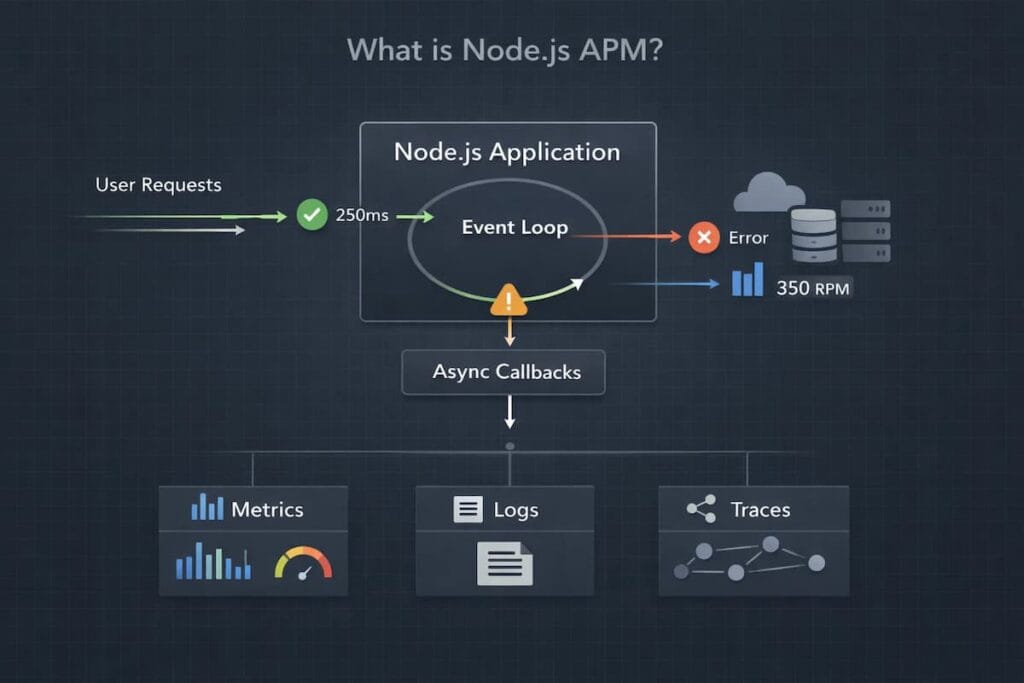
Node.js APM focuses on understanding how real requests behave while the app is running. It shows how execution time, async work, database calls, and external services combine to create latency or errors that users feel. You can see where time is spent and where things slow down.
Node.js APM works at the execution level. It follows requests through the event loop, middleware, async boundaries, databases, and downstream services. That’s what makes it useful, especially when CPU and memory charts look fine but users are still waiting.
What Node.js APM is not
It is not infrastructure monitoring alone
CPU, memory, disc, and container metrics tell you whether the host is healthy, but they say nothing about how a specific request moved through the event loop, which async path stalled, or why only a slice of traffic degraded while everything else looked fine.
It is not log-only debugging
Logs give fragments. They show errors and messages, but they rarely reconstruct the full execution path of a slow request in an async-heavy Node.js application, especially once concurrency and fan-out increase.
It is not uptime or synthetic checks
Knowing your service is “up” does not explain why users are waiting, why latency spikes come and go, or why failures only happen under certain traffic patterns.
Why Node.js Performance Issues Are Hard to Debug
The performance problems of Node.js are not easily predictable. Applications may appear healthy while users experience slow responses or timeouts. Understanding where things go wrong requires looking beyond surface-level metrics.
- Asynchronous execution and loss of execution context: Node.js largely relies on asynchronous code. In scenarios where requests are traversed with the help of callbacks, promises, and asynchronous functions, the execution context can be lost. This complicates the ability to pursue single requests to completion, particularly those in larger systems.
- Event loop phases and how long-running tasks block progress: Every Node.js work is implemented through the event loop. When one task takes too long, it holds up other work. This process tends to cause spikes of latency, although nothing may seem broken at first.
- CPU spikes in a single-threaded runtime: Node.js runs application code on a single thread. A brief CPU spike caused by inefficient code can delay every other request. Under load, small issues quickly turn into noticeable slowdowns.
- Memory leaks and garbage-collection pauses: Memory problems in Node.js usually grow over time. Leaks cause more frequent garbage collection as they increase heap amounts. These can cause unpredictable latency that is difficult to trace back to the source.
- Why many Node.js issues only surface under real production traffic: Local and staging environments are hardly a representation of real usage patterns. High concurrency, uneven traffic and slow dependencies show problems that never occur during testing. This phenomenon is why many Node.js performance issues only become apparent in production.
Core Signals for Effective Node.js Observability (MELT)
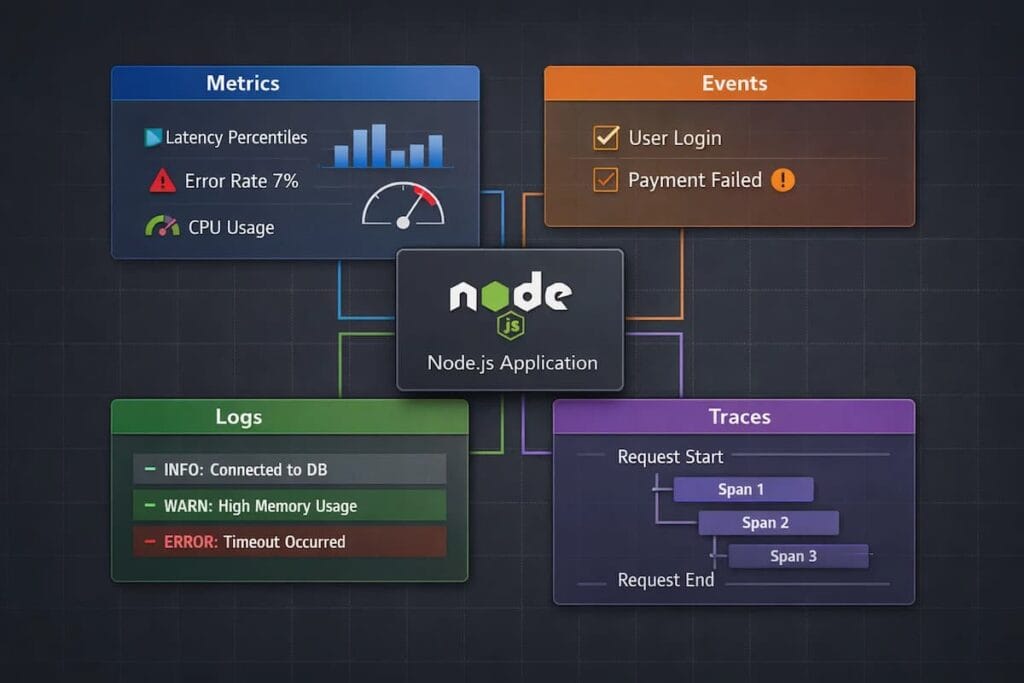
To understand how a Node.js application behaves in production, you need more than one signal. No single data point provides a complete picture. This is the reason why contemporary observability depends on four primary signals: metrics, events, logs, and traces, sometimes called MELT.
Metrics
Metrics provide a continuous view of how a Node.js application and its runtime behave under load. They help teams understand capacity limits, performance degradation, and early signs of stress before errors become visible to users.
- Event loop lag and utilization: Event loop lag indicates how long the event loop is blocked and unable to process new work. Sustained lag or high utilization usually signals CPU pressure, excessive synchronous work, or poorly behaving dependencies, all of which directly affect request latency.
- Request throughput (RPS): Requests per second reflects incoming demand and traffic patterns. Tracking throughput alongside latency and errors helps teams distinguish between load-related issues and regressions caused by code or configuration changes.
- CPU, heap, and memory usage: CPU usage shows how much processing capacity the application is consuming, while heap and memory usage reveal allocation pressure. In Node.js, rising heap usage or memory growth without release often precedes garbage collection spikes or out-of-memory failures.
- Garbage collection behavior: Garbage collection metrics expose pause times, frequency, and memory churn. Frequent or long GC pauses can introduce latency spikes and uneven performance, especially under sustained load or inefficient memory usage patterns.
Events
Events provide point-in-time context for why system behavior changed. In Node.js environments, they often explain sudden shifts in latency, error rates, or throughput that metrics alone cannot attribute to a specific cause.
- Deployments: Deployments introduce new code paths, dependency versions, and runtime behavior. Recording deploy times and versions allows teams to quickly test whether an incident correlates with a release.
- Configuration changes: Small configuration updates can have an outsized impact, especially around timeouts, connection pools, cache behavior, and feature toggles. Capturing these changes as events prevents “mystery regressions” during investigations.
- Feature flags: Feature flag rollouts can change execution paths in production without a deployment. Tracking flag state changes helps teams link performance issues to specific features, cohorts, or rollout percentages.
Logs
Logs provide an in-depth description of what occurs within the application.
- Structured JSON logs: Structured logs are simpler to search, filter and analyze. They also are compatible with new observability tools.
- Contextual correlation with requests: When logs are linked to request IDs or trace IDs, debugging becomes much faster.
Traces
Traces show how requests flow through your system. In Node.js, this is often where the real answers live.
- Distributed tracing across async boundaries: Traces follow requests through promises, callbacks, and async functions. This visibility is critical in asynchronous codebases.
- Service-to-service latency breakdown: Traces reveal which service or dependency is slowing things down. They make bottlenecks visible instead of hidden.
Node.js APM Architecture: How Instrumentation Actually Works
Any Node.js APM system is based on instrumentation. This is the process whereby monitoring tools can monitor what the application does at runtime. The concept of instrumentation aids teams in making superior decisions regarding visibility, overhead, and reliability in production.
Auto-instrumentation vs manual instrumentation
The auto-instrumentation is done by adding an agent to the application. Here, the agent automatically identifies supporting libraries while gathering telemetry with minimal or no code modifications. Manual instrumentation, on the other hand, is a method that forces developers to include tracing or metrics into the code itself.
How Node.js agents hook into application components
Node.js APM heavily relies on two things: runtime hooks and module patching. This helps in monitoring app behavior. The hooks intercept key operations as the application runs, allowing them to collect data without changing business logic.
This is how Node.js hooks in:
- HTTP servers: Agents wrap incoming and outgoing HTTP requests. This makes it possible to track request lifecycles, measure latency, and capture errors at the entry point of the application.
- Frameworks (Express, Fastify, NestJS): Popular models are applied at the middleware or routing layer. This enables the APM tools to learn request routing, handler execution, and response timing.
- Databases, queues, and external APIs: The agents are connected to database drivers, message queues, and HTTP clients. This displays slow queries, messages, and dependency latency.
Performance overhead in high-throughput systems
Well-designed agents keep overhead low by doing minimal work on the request path. Most processing happens asynchronously or out of band.
The real cost driver isn’t instrumentation itself. It’s how much data you choose to keep. High-throughput Node.js services generate massive trace volume, which is why sampling strategy matters more than raw agent efficiency.
OpenTelemetry and Node.js: The Modern Standard
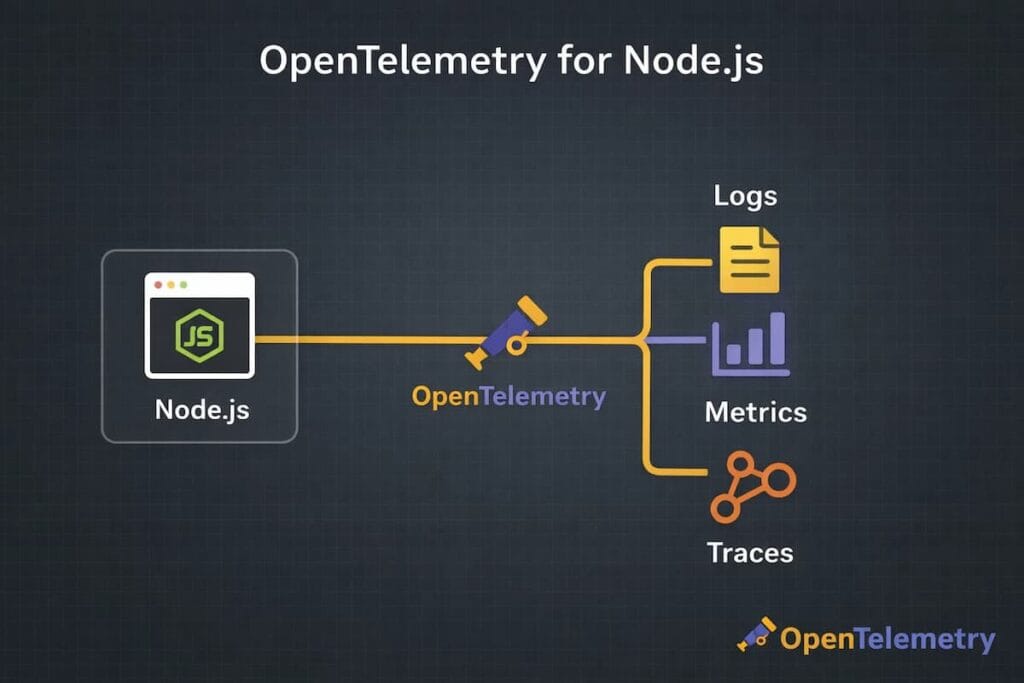
As Node.js systems grow more distributed, teams need a consistent way to collect observability data. OpenTelemetry bridges that gap. It has become the common method of instrumenting contemporary apps without binding groups to one vendor or tool.
Why OpenTelemetry matters for Node.js observability
Node.js applications rarely work in isolation. They rely heavily on external services and run through layers of asynchronous code, which makes it hard to see what’s really happening once traffic hits the system. You can actually see how a request moves across async code, where it slows down, and where it fails. Once there is that level of insight, tracking latency and catching errors stops feeling like guesswork.
Major reasons as to why modern teams prefer OpenTelemetry native APM tools include:
- Vendor-neutral instrumentation and portability: One of the biggest advantages of OpenTelemetry is that it doesn’t tie teams to a single vendor. Teams instrument their Node.js application once, and from there they’re free to send that data to other backends. In practice, this means one can switch tools later without having to rip out and redo everything that’s already built.
- Metrics, traces, and logs from a single SDK: OpenTelemetry provides a unified SDK for emitting metrics, traces, and logs. That doesn’t mean everything becomes magically correlated, but it gives you a consistent foundation to do so. For Node.js teams, this simplifies instrumentation, reduces agent sprawl, and avoids running separate libraries with different performance characteristics and lifecycle behaviors.
When OpenTelemetry is sufficient and when teams still need a full APM platform
OpenTelemetry is enough when you only need to emit and export telemetry. If you’re comfortable building your own pipelines, storage, querying, and alerting, it is an ideal option.
Teams usually add a full APM platform when they need more than raw data: intelligent sampling, cost control, long-term retention, fast query performance, and workflows that support real incident response. OpenTelemetry produces the signals, but it doesn’t decide what to keep, how long to keep it, or how usable it is under pressure.
That’s where platforms built on top of OpenTelemetry tend to come in, not to replace it, but to make it operational at scale.
Sampling and Cost Control in Node.js APM
Node.js applications can produce a huge amount of observability data. Under real traffic, every request may generate metrics, logs, and traces. Without control, this volume grows fast and becomes expensive to store and process.
Why Node.js services generate high trace volume
Node.js is built for concurrency. A single service can handle thousands of requests at once, all moving through the event loop. Each request often triggers multiple async functions and external calls, and every step can emit trace data. At scale, that quickly adds up, even for relatively small services. This creates many spans per request and quickly increases trace volume.
Head-based vs tail-based sampling in Node.js contexts
Sampling defines which traces are kept and which are dropped. The major difference between the two sampling approaches is:
- Head-based sampling: Head-based sampling decides early. The trace is either kept or dropped at the start of the request. It is cheap, predictable, and easy to operate. Many Node.js teams use it by default to keep costs under control.
- Tail-based sampling: Waits until the request finishes. It samples based on outcomes like errors, latency, or specific attributes. This fits Node.js workloads better, especially for intermittent async failures.
Trade-offs between visibility, overhead, and cost
When it comes to visibility, overhead, and cost, there’s always a trade-off. Collecting more data can give you a clearer picture, but it also drives up costs and slows things down. On the other hand, using less data keeps expenses and runtime low, yet it leaves gaps in what you can actually observe. The trick is finding a balance. And that is sampling intelligently, so you don’t over-optimize for just one factor at the expense of the others.
Why poor sampling creates blind spots during incidents
Bad sampling looks fine until something breaks. Alerts fire, users complain, but traces don’t explain the behavior. The important requests were never captured.
Teams then raise sampling rates mid-incident and hope the issue happens again. Sometimes it does. Often it doesn’t.
That lost time is the real cost of poor sampling. Not the invoice. The minutes spent debugging without evidence, when every decision matters.
Performance Bottlenecks Unique to Node.js
Node.js is incredibly powerful. However, given that it’s single-threaded and has an event-driven design, this results in some unique performance challenges. Often, issues pop up in ways that traditional monitoring just can’t catch.
Here are common pitfalls for Node.js apps:
Event loop blocking from synchronous code
Node.js runs most application logic on a single event loop. Synchronous operation, including File system calls and JSON parsing on large payload blocks that loop. Consequently, blocking the event loop results in latency spikes across the entire service. Throughput drops even though CPU and memory may look fine. Often, this is the sole reason Node.js performance issues do not appear in infrastructure metrics but affect users immediately.
Slow database calls and external dependencies
Most Node.js apps spend more time waiting than computing. Database queries, HTTP calls, and message queues dominate request time. The problem isn’t just slow dependencies. It’s variability. A few slow queries or a degraded third-party API can tie up the event loop with pending promises, increasing response times for unrelated requests. Without request-level visibility, these stalls look random and are hard to pin down.
Memory leaks in long-running processes
Node.js services are often designed to run for weeks or months. Small memory leaks add up over time. Retained references, unbounded caches, event listeners that are never cleaned up, and closure-related leaks are common causes.
As memory usage grows, garbage collection runs more frequently and takes longer. Latency becomes spiky before the process ever crashes. Many teams only notice the issue after restarts that “mysteriously” fix performance.
Cascading latency across microservices
Node.js services are frequently used as API gateways or orchestration layers. A single request fans out to multiple downstream services.
When one dependency slows down, its latency propagates. Timeouts stack. Retries amplify load. What started as a small delay in one service becomes a system-wide slowdown.
Node.js APM in Production: A Real-World Incident Scenario
Node.js incidents usually start with something subtly wrong. More often, everything looks healthy at the infrastructure level while users complain about slow or failing requests. This is where production APM matters, because the failure usually lives inside async execution paths, not CPU charts or host metrics.
- High-concurrency Node.js API under load: A Node.js API is handling thousands of concurrent requests. Traffic looks normal. No deploys. No config changes. On paper, the system should be fine. The service fans out on every request. The system performs database calls, cache lookups, and utilises a few third-party APIs. Under steady load, this usually works.
- Downstream dependency slowdown triggers latency spike: A slow database query or third-party API can cascade, causing requests to wait longer.
- Event loop lag increases despite stable CPU metrics: Often, CPU memory might look normal. This gives a false impression that the system is healthy. Meanwhile, the event loop starts lagging, slowing request processing.
- Traces reveal async bottlenecks that metrics alone could not explain: Metrics show high latency, but not where the time is going. Traces expose the slow async paths, the exact dependency causing the delay, and how it propagates through the request.
Why APM shortens MTTR compared to logs or metrics alone
By combining metrics, logs, events, and traces, APM gives a complete picture of the system. Teams can detect and resolve issues faster, minimizing downtime and user impact.
Node.js APM vs Traditional Monitoring
Traditional monitoring shows whether a system is running. Node.js APM shows whether the application is actually working for users. As traffic grows, this difference becomes critical.
The following points show where traditional monitoring falls short for Node.js applications and how APM fills those gaps:
Why CPU and memory metrics are insufficient
CPU and memory metrics describe the state of the host, not the experience of the request. In Node.js, many performance problems happen inside the event loop or async execution path. A slow database call, blocked callback, or large promise backlog can increase latency even when CPU usage stays low and memory appears stable. From a traditional monitoring dashboard, everything looks healthy, but users still experience slow responses.
Difference between infrastructure health and application behavior
Infrastructure health answers basic questions. Is the service running? Is the host overloaded? Is the container alive?. Traditional monitoring answers whether the service is up and whether the host or container is overloaded. It treats all requests as undifferentiated load.
Node.js APM focuses on application behavior and shows how individual routes and requests perform. It explains where time is spent inside the application and which dependencies introduce latency. This makes it possible to diagnose slow endpoints even when the infrastructure itself appears healthy.
Importance of request-level visibility in async systems
Traditional monitoring aggregates metrics across the entire service, which hides the path of individual requests. In async Node.js systems, work is spread across callbacks, promises, queues, and services, making cause and effect hard to trace. Node.js APM provides request-level visibility that connects these steps into a single flow. This reveals where a request waits, where it slows down, and where it fails, instead of forcing teams to infer behavior from high-level metrics.
Comparing Popular Node.js APM Tools
Most Node.js APM tools solve the same core problems, but they behave very differently once traffic grows and incidents get messy. The real differences show up around pricing mechanics, sampling control, and how much visibility you retain under load.
Datadog APM
Datadog is a widely used SaaS platform that offers deep ecosystem integrations and powerful dashboards. It is the best at providing the teams with a cross-service, cross-metrics, and cross-trace view.
- Strengths: Broad ecosystem, strong dashboards, and fast anomaly detection across services.
- Trade-offs: Usage-based pricing can become unpredictable at Node.js scale.
- Best for: Fast-scaling, SaaS-first teams that want quick insights with minimal setup.
New Relic APM
New Relic offers mature APM workflows and strong support for mixed environments. It handles traditional applications and modern Node.js services reasonably well, which appeals to organizations in transition.
- Strengths: Mature APM workflows with good support for mixed legacy and modern stacks.
- Trade-offs: Expensive pricing and retention limits force visibility trade-offs as data grows.
- Best for: Enterprises running both legacy systems and Node.js services.
CubeAPM (Self-Hosted / BYOC Node.js APM)
CubeAPM offers self-hosted and bring-your-own-collector (BYOC) deployments. It focuses on predictable costs, sample control and complete ownership of data, suiting teams that are focused on transparency and operational control.
- Positioning: Self-hosted and BYOC Node.js APM designed for full control.
- Focus: Sampling flexibility, predictable costs, and complete data ownership.
- Best for: Cost-sensitive or regulated environments where teams cannot rely on SaaS-only solutions.
How CubeAPM Handles Node.js Observability
CubeAPM approaches Node.js APM from an application-first perspective rather than infrastructure metrics alone. Node.js services are instrumented using OpenTelemetry-native tracing, allowing async execution paths, external dependencies, and event-loop behavior to be observed at the request level.
Because CubeAPM supports self-hosted and BYOC deployments, Node.js telemetry remains within the customer’s environment. This lets teams decide what to sample and how long to keep data without depending on a black-box backend. The payoff? Clear visibility during traffic spikes and tricky incidents, where async delays and slow dependencies really matter.
Teams that embrace this approach usually treat observability as part of their platform, not just some external SaaS tool.
How to Choose the Right Node.js APM Approach
Choosing a Node.js APM isn’t all about picking a tool. Attention should focus on cost, visibility, and how flexible your system can be. Different teams have varying needs. What may be effective for one team may not be effective for the other.
The following are the aspects that do count:
- Deployment model: SaaS vs self-hosted vs BYOC: SaaS tools are easy to start with and need little setup. Self-hosted or BYOC gives more control over infrastructure and data but takes more operational effort. It’s the classic trade-off: convenience versus ownership.
- Cost predictability at scale: Node.js apps can churn out huge amounts of telemetry. Usage-based pricing can spike unexpectedly as traffic grows. Know how costs behave under peak load, not just on average.
- Sampling flexibility: Sampling decides what data you keep and what you drop. Flexible sampling lets you see more during incidents without permanently raising costs. Rigid sampling can leave blind spots right when you need data most.
- Data ownership and compliance: Some teams need observability data to stay on their own systems. Compliance, data residency, and security policies can heavily influence APM decisions
- Startup vs scale-up vs enterprise considerations: Startups usually require speed and simplicity. Scale-ups focus on cost control and reliability as they grow. Enterprises care about governance, compliance, and long-term consistency across teams.
Practical Node.js APM Setup
Setting up Node.js APM can be simple. You don’t need to track everything; just the signals that actually matter. It’s to capture the right signals without slowing your system down. Think visibility first, control second, and confidence last, making sure observability actually helps.
- Instrument the Node.js application (agent or OpenTelemetry): Begin by adding instrumentation to your app. In this case, you can use a vendor agent or OpenTelemetry. Whatever works best for your setup is fine.
- Define service-level objectives (SLOs): Don’t just watch raw latency. Ask yourself what “good” really looks like for your users. That way, you have a clear baseline for alerts and decisions.
- Alert on user impact, not raw metrics: Real issues result from alerts and not noise. The fact that it uses a lot of CPU or memory is not necessarily an indicator that it has an effect on the users. Pay attention to factors such as request speed, error rates, and poor user experiences.
- Validate overhead and sampling behavior: Observability should never become a bottleneck. Measure the performance impact of instrumentation and confirm that sampling behaves as expected under load.
Node.js APM Best Practices for Production
Running Node.js in production feels very different from running it locally or in staging. Traffic is unpredictable. Failures are messy. Small issues can ripple out and affect users fast. This is exactly where smart APM practices make a difference. The goal isn’t more data; it’s the right data, used the right way.
- Always correlate traces with logs: Traces show where time is spent. Logs show what actually happened at each step. When they’re connected, debugging becomes faster and more precise.
- Avoid uncontrolled high-cardinality metrics: Labels that grow without limits can blow up data volumes and costs. In Node.js, this often happens when request IDs or user-specific values are added to metrics. Keeping things under control protects both performance and your observability budget.
- Use sampling intentionally: Don’t just leave it as a default. Capturing everything is rarely needed and usually expensive. Good sampling keeps visibility on the important stuff without overloading the system.
- Monitor business transactions, not just endpoints: Endpoints alone don’t always show the user experience. Observing the bigger picture is what really matters.
Common Node.js APM Mistakes to Avoid
Even teams with solid tools can struggle with Node.js observability. Usually, it’s not about missing data. The real issue? Using the wrong signals or patterns that don’t match how Node.js actually works.
Some mistakes pop up again and again. Avoiding them can make your APM setup far more effective.
- Relying only on logs: Logs help, but they aren’t enough. In high-traffic systems, they get noisy fast. Without traces or metrics, logs show what happened, but rarely why performance slipped.
- Ignoring event loop metrics: The event loop sits at the center of Node.js performance. If it falls behind, everything slows down. CPU and memory can look perfectly fine while the event loop is overloaded or blocked. Without tracking event loop lag, delay, and utilization, teams miss early signs of trouble and only react once user-facing latency spikes.
- Over-instrumentation without cost controls: Capturing everything feels safe at first. Over time, it leads to high ingestion costs and unnecessary overhead. Uncontrolled instrumentation leads to massive trace volume, higher ingestion costs, and added overhead on busy services.
- Treating Node.js like a traditional threaded runtime: Node.js behaves very differently from multi-threaded servers. Applying the same monitoring assumptions hides async bottlenecks and execution delays. Observability strategies must reflect the event-driven nature of the runtime.
Monitoring vs Observability: Final Takeaway
Monitoring and observability are connected, but they’re not the same. Confusing them in modern Node.js systems often leads to blind spots during incidents.
Monitoring tells what broke
- Focuses on symptoms.
- Alerts you when CPU spikes, memory fills up, or error rates climb.
- Shows that something is wrong—but not why.
Observability explains why it broke
- Digs deeper into your system.
- Trace requests through async code.
- Highlights slow dependencies and shows where errors start.
- Turns raw alerts into real understanding.
Why modern Node.js systems require both
- Node.js apps are asynchronous, distributed, and dependency-heavy.
- Monitoring catches failures fast.
Conclusion: Building Reliable Node.js Systems at Scale
Most Node.js outages don’t hit with a bang. They sneak in. A request takes a bit longer. The event loop pauses. A service hesitates. Users notice it first, long before alerts go off. That’s why signals, instrumentation, and observability choices really matter. When they work together, issues stop feeling random. You start to spot patterns, and fixing them becomes less guesswork.
Reliable Node.js systems don’t run openly. They run on visibility. Async code and distributed services scale well, but they also hide problems that normal monitoring can’t catch. Without a clear view of the app itself, you miss where requests slow down and why users feel lag when traffic spikes.
Here’s the key: pick your Node.js APM carefully. Don’t just trust dashboards. See how clearly it shows what’s really happening, how much control you get as things scale, and whether costs stay predictable. Good visibility doesn’t just help you react. It lets you plan and fix issues calmly.
Disclaimer: The information in this article reflects the latest details available at the time of publication and may change as technologies and products evolve.
FAQs
1. Do I still need an APM if I already have logs and metrics?
Usually, yes. The symptoms can be observed in logs and metrics, but APM lets you have a glimpse at what is really going on with a request, particularly when it crosses the boundaries of asynchronous requests
2. Does Node.js APM affect performance?
It does add some overhead, but it’s typically modest and manageable with smart sampling and careful instrumentation.
3. How does OpenTelemetry fit into Node.js?
OpenTelemetry instruments Node.js frameworks, libraries, and async execution paths to generate traces, metrics, and logs in a standard format. It separates instrumentation from the backend, so teams can change vendors or deployment models without rewriting their app code.
4. How can observability costs be kept under control?
Costs are controlled by sampling data, reducing high-cardinality metrics, and setting sensible retention limits.
5. When does distributed tracing become necessary in Node.js apps?
It’s most useful once you’re dealing with microservices, third-party APIs, or complex asynchronous flows