









Log retention determines whether teams can actually investigate incidents when something goes wrong weeks or months later. In real production systems, logs often disappear long before teams realize they need them, usually during security incidents, delayed outages, or compliance reviews.
As systems scale and log volumes grow, many teams discover that default retention settings are driven more by cost pressure than operational reality. Logs that seemed inexpensive early on become costly at scale, forcing teams to shorten retention just when historical context becomes most valuable.
This guide explains how log retention really works in modern systems, the trade-offs teams face in production, and how to design retention policies that balance cost, performance, and compliance without creating blind spots.
What is Log Retention?
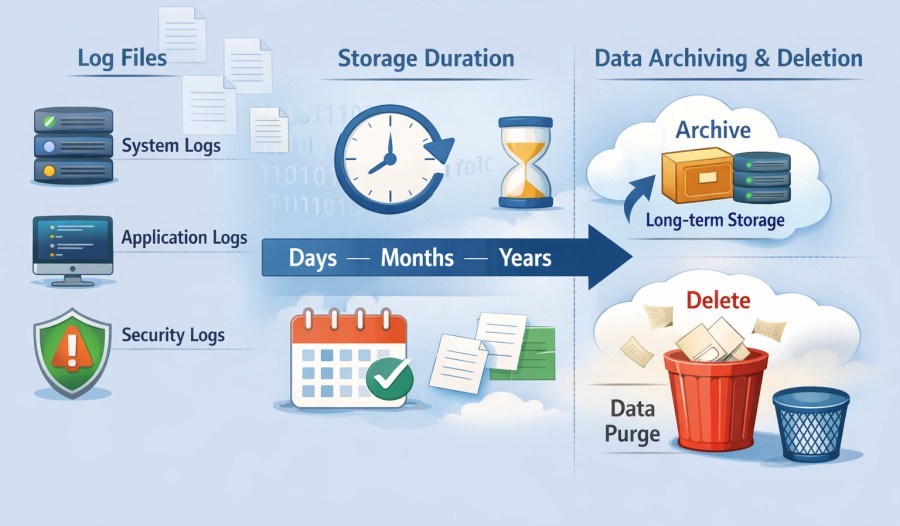
Logs are records, such as requests, errors, and system activity. Log retention decides how long those records stay available before you archive or delete them.
Here’s what the log lifecycle looks like to understand where retention fits:
- Logs are collected from applications, servers, and other systems
- Logs are stored so teams can search and analyze them
- Retention defines how long those stored logs remain accessible
- Once that time is over, logs are either archived or removed
Log Retention vs Log Storage vs Log Collection
Many confuse log retention with other log-related terms, such as log collection or log storage.
- Log retention is about time. It answers how long logs should exist.
- Log collection is about gathering logs from systems.
- Log storage is about where those logs live.
Log rotation is also different. Rotation manages log file size and prevents disks from filling up, but retention controls how much history is kept.
Most importantly, log retention is a policy decision, not a setting you turn on and forget. It affects things, such as debugging, security investigations, and compliance. When teams treat retention as an intentional choice instead of a default, logs stay useful and reliable over time.
Log Retention vs Log Archival
In log retention, you keep logs online and easy to search and query. When something breaks, when an alert fires, or when an investigation starts, engineers search for retained logs first. They are indexed, so you can access them fast and use them actively. If you can open a dashboard and run a query in seconds, you are looking at retained logs.
Log archival is different. Archived logs are stored mainly for long-term needs, such as compliance, audits, or legal records. They usually live in cheaper storage and are not meant to be searched often. Accessing archived logs often takes more time and effort. You might need to restore them before you can even read them.
Why These Two Get Confused
Many observability platforms blur the line between retention and archival. From the user’s point of view, logs look like one big pool, even though they may be stored in different layers behind the scenes. In platforms, such as Elastic and Datadog, recent logs stay indexed for used in fast search. Older logs go to cheaper storage and where queries are slower.
The important part here is understanding what you are actually getting. Retention means fast answers. Archival means long memory. Knowing the difference helps you set realistic expectations about cost, performance, and access.
Why Log Retention Matters in Modern Systems
Log retention helps teams decide whether they can actually understand what happened when something goes wrong. When logs disappear too early, answers disappear with them.
Security investigations

Have you ever lost your keys and had to retrace your steps to find them? Logs are like a trail of tiny breadcrumbs left behind after an incident occurs in your application or software.
If a hacker sneaks into a network, teams often don’t notice right away. In fact, research shows that attackers can live inside systems for months before being discovered. This delay is often called dwell time. For example, one study found that the average time an attacker goes undetected can be around 181 days. That is more than half a year of activity with no alarms raised.
Logs are a reliable way to trace what an attacker did, their entry points, and which systems they compromised. If logs are retained for only a short time, security teams are left guessing. But with good log retention, security teams can rewind time and track the attacker’s movements. They can better understand what happened and how to fix it.
Troubleshooting
Suppose a bug causes your app to crash two days after it was introduced. If your logs only keep data for a few hours, you lose the clues about how the bug began.
Longer retention allows engineers to go back to the exact sequence of events that caused a failure. This way, you can save time and reduce the stress of late-night debugging sessions.
Compliance Audits
Many laws and standards require you to provide proof of an incident and when it happened. For example, with PCI DSS, you must keep logs for at least one year so auditors can verify whether your security controls are working properly or not. If logs vanish too soon, you might fail an audit, face fines, or even end up in legal trouble. Logs become your evidence of compliance and accountability, just like keeping receipts in a business.
Business and legal disputes
Sometimes problems can go beyond security or outages. They can be legal or business disputes like agreements gone wrong, suspicious transactions, or unexplained changes in records.
Logs give you timestamps and facts that lawyers and business leaders trust. Longer log retention gives teams confidence, whether you are hunting threats, proving compliance, fixing bugs, or defending a business case. Right logs at the right time make everything smoother and less stressful.
Log Retention Policies and Components
Log Retention Policy
A log retention policy is a clear set of rules that says how long different kinds of logs should be stored before they are either archived or deleted. It is like the “keep or toss” rule for your log data.
A good policy helps teams know exactly when logs become useless and when they are still important for security, troubleshooting, or compliance. Without rules, logs can pile up forever and cost money, or disappear too soon and leave you blind when you need them.
Log Retention Periods
There is no one-size-fits-all answer for how long you should keep logs. Many teams choose simple buckets like 7 days, 30 days, 90 days, or 365 days based on how often they are looked at. But when compliance rules apply, logs often need to stay for years.
For example, healthcare systems may keep audit logs for six years under HIPAA, and financial firms may be required to keep logs for up to seven years under laws like SOX. Many organizations find that keeping logs for at least one year meets auditing needs while balancing cost.
Retention Policies for Different Logs
Different types of logs carry different values. System logs that show routine machine events might only need short retention to help debug day-to-day issues.
- Application logs that help you track bugs could be useful for a few months.
- Security and audit logs that record user access or changes often must be retained longer because they become evidence in investigations or audits.
It’s important to define these durations up front and stick to them.
Risks of Too Short or Too Long
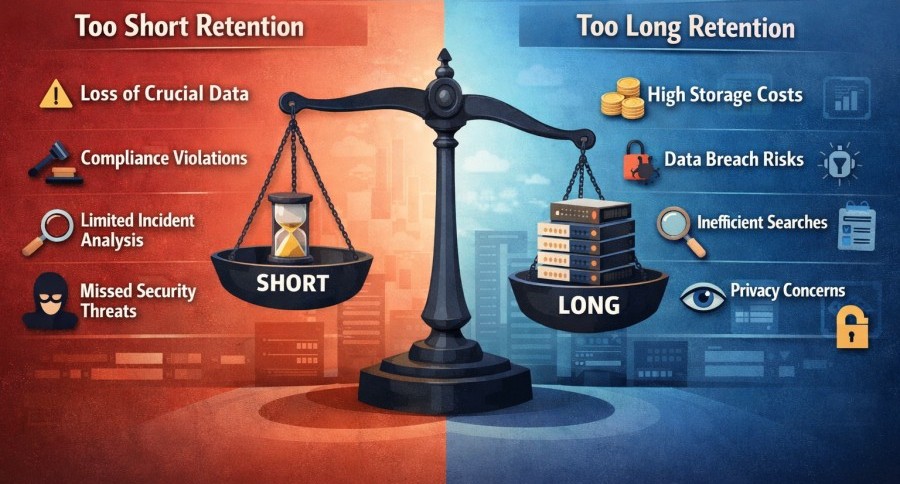
Good policies balance usefulness, cost, and legal needs so logs are there when needed and gone when they are not.
- If a policy keeps logs too short, teams can miss critical clues during security investigations or troubleshooting. No one can go back and see what went wrong when something breaks.
- Keeping logs too long can cost money, slow down searches, and carry needless risk if older logs contain sensitive data.
Factors That Determine a Log Retention Strategy
Not all teams keep logs for the same reason or the same length of time. Log retention depends on some factors that decide what is possible and what is not.
Log Volume and Cardinality
Some systems produce a small, steady flow of logs. Others create a flood of logs. High cardinality logs are a common reason retention gets tricky. These are logs that include many unique values like user IDs, request IDs, session tokens, or dynamic labels.
Here’s what happens when cardinality is high:
- Storage fills up much faster than expected
- Indexes grow large and heavy
- Searches slow down over time
A system that felt smooth at first can suddenly feel slow and expensive. Retention often gets reduced here because volume grew faster than the system could handle.
The Platform’s Cost Model
Pricing can vary with retention periods. Some platforms charge based on how much data you send in. Others offer more predictable pricing.
Ingestion-based pricing: Here, you pay for how much log data you send into the platform. Every log line counts. As traffic grows, log volume grows, and costs rise. If a spike occurs during an incident, the observability bill can spike too. And when that happens, teams need to make hard choices, such as reducing the duration of log retention. Some teams may also drop logs earlier than the usual duration or turn off detailed logging.
Flat or predictable pricing: It’s different. Here, costs can remain stable even if there is a change in the volumes of logs. Teams can keep logs for a longer duration without worrying about unexpected cost spikes.
In many teams, retention limits are set by pricing pressure instead of technical needs. Over time, this can remove valuable history that teams wish they had during incidents.
Performance

Longer retention means more data to scan and larger indexes. This can slow down searches, which is an issue during an outage.
As a result of this, dashboards become slower and it takes longer to fetch answers. With a good log retention strategy, you can change this scenario. You can keep important logs and discard non-critical ones. This helps reduce query latency and improve the performance of your dashboards and engineers.
Most log retention failures don’t show up immediately. They surface only under pressure during incidents, audits, or unexpected traffic spikes.
What Can Go Wrong with Log Retention in Real Systems
After working with many real production systems, a few log retention mistakes show up again and again. These surface mostly when something breaks, and it is already too late.
Retaining Too Little and Losing the Clues
Some teams keep logs for only a few days to save money. This works until a bug appears once a week or a month. By the time engineers start investigating, the logs are already gone.
Because of this, repeated outages may happen, and getting to the root cause becomes difficult. Logs are supposed to help you go back in time. When retention is too short, you lose that opportunity.
Costs Explode If You Retain Too Much
Many teams keep everything forever in hot storage. At first, it feels safe that nothing is deleted. But over time, observability costs start climbing quickly. Large indexes slow down searches and teams are forced to panic cut retention later. That said, keeping logs longer only helps if they are stored in the right way.
Useful Logs
Sometimes logs are retained, but they are hard to work with. Poor structure, missing fields, or no indexing can make searching painfully slow. As a result, searches may take minutes instead of seconds, and debugging becomes trial and error. Engineers may avoid logs because they are frustrating.
Logs that cannot be searched quickly might as well not exist.
Compliance Mistakes
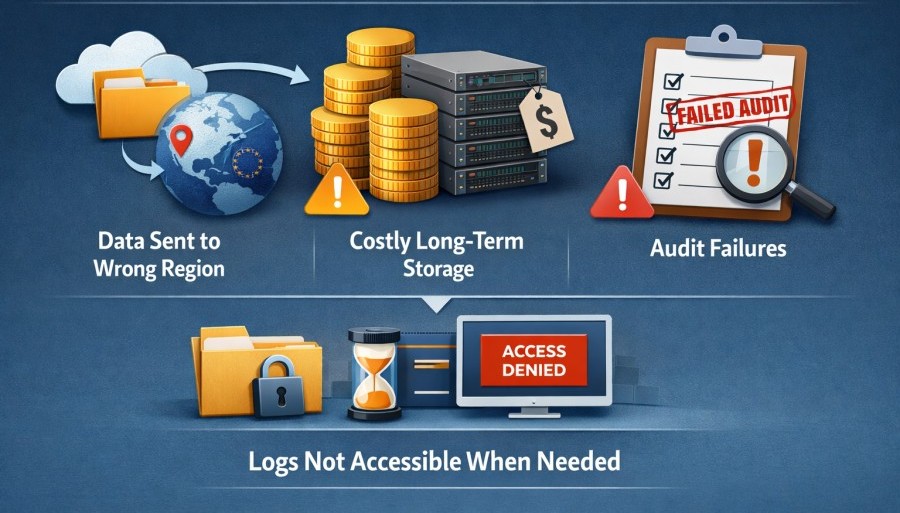
Teams can accidentally send logs outside regulated environments or store years of logs only on expensive disks. Both cause trouble, suchas:
- Violating data privacy and residency rules
- Paying far more than needed for long-term retention
- Failing audits
All of this is because logs are not accessible when you need them.
Sampling Logs the Wrong Way
Some teams try to sample logs to reduce volume. This may create blind spots. It’s not a good idea to sample logs randomly. All logs should be kept for at least some time. Long-term retention can then be handled using archival instead of hot storage.
These mistakes are common, and they are understandable. But they show why log retention needs real planning. Quick fixes won’t cut it anymore.
Log Retention and Compliance Requirements
For many teams, retention decisions are shaped as much by regulation as by engineering needs.
Compliance rules are about control. Regulators want to see that you know where your logs live, who can access them, how long they are kept, and when they are removed. When log retention is designed properly, compliance becomes a routine process instead of a stressful one.
Below is how log retention fits into the most common regulations, explained in simple and practical terms.
GDPR
GDPR allows log retention as long as there is a clear and lawful reason, such as security monitoring, fraud detection, or operational reliability.
GDPR expects a balance. You should not keep logs forever without a valid reason. That said, you should also not get rid of them if they might still be useful. You should be ready to explain why you kept logs in the first place. You should also limit access to only authorized users and keep them within approved regions. When the purpose of those logs ends, you can delete them or anonymize them safely.
HIPAA
HIPAA is very specific about log retention, and for audit logs that track how patient data is accessed. These logs must be kept for six years. The goal is accountability. If something goes wrong, investigators need to see who accessed what and when.
HIPAA also cares about protection. Logs must be secured so they cannot be altered or deleted quietly. Access should be limited, monitored, and documented. Retention alone is not enough. The logs must remain trustworthy for the full retention period.
PCI DSS
PCI DSS applies to systems that handle payment card data. It requires logs related to access and activity to be retained for at least one year. Out of that year, the most recent three months must be easy to access for analysis.
The focus here is traceability. PCI DSS wants to ensure that every access to sensitive payment data can be tracked and investigated. Retention helps teams replay events during a suspected breach instead of guessing what happened.
SOC 2 & ISO 27001
SOC 2 and ISO 27001 don’t specify the exact duration of log retention. But they ask whether your retention policy makes sense or not, and if your team follows it consistently.
SOC 2 and ISO 27001 auditors require clear documentation, proper access controls in place, and solid proof that no one can modify logs without getting detected. If you have a shorter retention period, they may accept it, but you should justify it. You also need to document it clearly and enforce it consistently in your company. If you are not consistent or don’t have proper controls and proof, you might fail an audit.
India DPDP Act
According India DPDP Act, data should be retained only as long as necessary for its purpose and protected while it exists. Logs that contain personal data must follow the same logic.
Legal holds are an important exception. If there is an investigation, dispute, or court order, logs may need to be preserved beyond normal retention limits. In these cases, deletion pauses until the hold is lifted. Good retention systems support this without breaking compliance rules.
At the end of the day, compliance-driven log retention is about being able to clearly answer simple questions when asked.
- Where are the logs
- Who can see them,
- How long are they kept and why
Log Retention in Cloud-Native and Kubernetes Environments
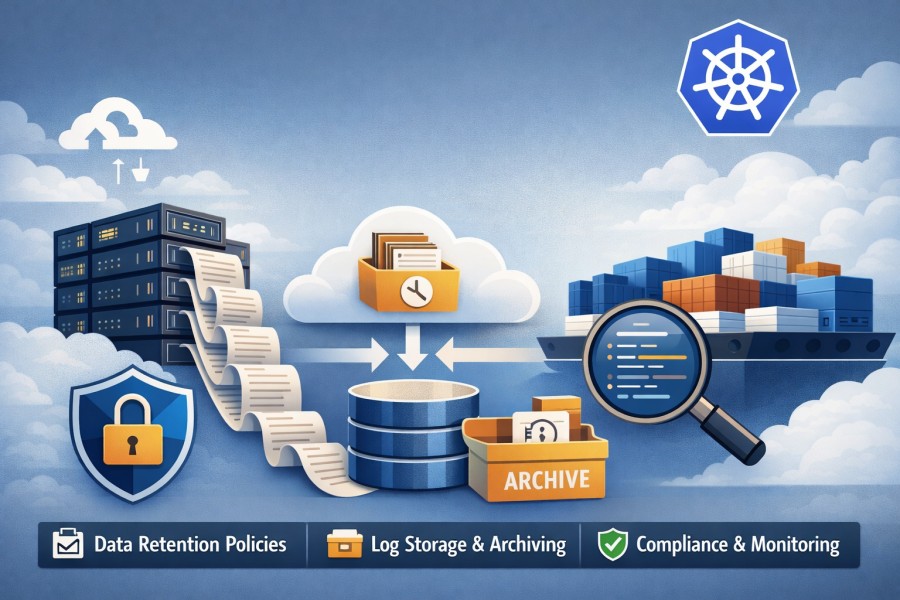
Cloud-native systems move fast, and Kubernetes moves even faster. Logs grow quickly, disappear easily, and behave very differently compared to traditional servers.
- Why log volume grows so fast: Kubernetes runs many small services instead of one big application. Each service writes its own logs. When traffic increases, Kubernetes scales up by creating more containers, and each container adds more logs. One user request can touch ten services and produce ten times more log data. This is why log volume can explode after teams move to Kubernetes.
- Short-lived Kubernetes containers: Kubernetes containers can restart or crash at any time and are easier to replace. But when these containers go away, their logs can vanish if you don’t collect them. This is common during outages, which is the worst possible time to lose logs.
- Why Retention needs a proper strategy: Log retention does not work by default in Kubernetes. It requires you to set up clear rules and automation. You must also decide how long to keep logs searchable and where to store older logs. Without a proper strategy, you may face trouble managing them.
- Standards and tools: Standards, such as OpenTelemetry help you collect logs consistently before containers disappear. Apart from collection, you must also create retention policies to decide how long those logs remain useful.
Trade-offs Teams Rarely Consider When Setting Log Retention
Log retention looks simple on paper, but in real systems, it always comes with trade-offs. These trade-offs are easy to miss at the start and painful to discover later.
- Retention vs Query Performance: Keeping logs for a long time sounds great until searches start slowing down. The more data you keep in searchable storage, the more work the system has to do when you run a query. Large indexes take longer to scan, dashboards load slowly, and simple questions take more time to answer.
- Retention vs MTTR: Mean Time to Response (MTTR) is a metric that tells how quickly you can fix a problem. With longer retention, you get more history. But your engineers must be able to search it quickly. The best way is to keep recent logs on disk, which makes it fast for your teams to search when an incident happens.
- Retention vs Productivity: Developers can use logs to understand the behavior of their code in the real world. If your retention periodis too short, you lose them too early before you can use them. In this case, developers have to guess things, run tests again, or add extra logging later. Good log retention saves them time.
- Retention vs Data Residency: Logs can have sensitive data. Because of this, many companies store their logs in a secure environment or in a specific region only. This helps them meet compliance and data residency requirements.
So, you must consider the location when storing your data to avoid compliance risks. You also need to decide which logs to store on your local disks, which ones to move to warm storage (e.g., object storage), and which ones to move into cold archives for a longer duration.
Best Practices for Designing a Log Retention Policy
A good log retention policy does not try to keep everything forever or delete everything fast. It focuses on keeping the right logs for the right amount of time.
- Segment Logs by Value: Not all logs matter equally. Some logs help developers debug issues. Others record security events or user access. Debug logs are often useful for a short time. Audit and security logs are valuable for much longer because they may be needed during investigations or audits. When teams group logs by value, retention becomes easier to manage and more meaningful.
- Define Retention by Risk: Many teams keep logs for 30 days simply because it sounds reasonable. In reality, that number is often picked without much thought. The right retention period depends on risk. How long could an issue stay hidden before it is noticed, how long might an investigation go back, and so on?
- Balance cost and retention: When pricing increases with log retention, many teams delete logs early to save money. But this way, you may lose important data, which can come in handy during investigations or making business decisions. A better way could be to decide what logs you actually need, and then choose storage options accordingly.
When Longer Log Retention Becomes a Competitive Advantage
Keeping logs longer can become a real advantage in the following scenarios:
- Incident Resolution: During an incident, longer logs (such as weeks or months) are useful for teams to look back and track patterns. This saves them the guesswork. They can use it to spot the root cause of an issue faster and fix it before users can notice.
- Post-Incident Investigation: After an incident occurs, teams try to understand how the incident happened. Long retention lets engineers replay events step by step instead of relying on memory or partial data. Post-mortems become clearer, more accurate, and more useful. That leads to fewer repeat incidents and stronger systems over time.
- Reduced Firefighting: Short retention forces teams into panic mode. When logs disappear, the context is also lost with it. So, engineers find it difficult to understand the issue. With longer retention, teams have useful data when they need it. Less firefighting means more focus on real improvements.
- Engineering Confidence: When logs are available and reliable, teams can make decisions faster and take smarter risks. This is where a thoughtful retention philosophy pays off.
How Log Retention Fits into a Complete Observability Strategy
Log retention does not live in isolation. It works best when it is planned together with metrics and traces, not treated as a separate thing.
- Logs, Metrics, and Traces Work Together: Logs tell the story in words. Metrics show trends and numbers. Traces show how a request moves through different services. Each signal answers a different question. Logs explain what happened. Metrics show when something changed. Traces help you understand where in the system the issue occurred. You need all three to understand an issue thoroughly.
- Retention Must Align Across All Signals: If metrics are kept for one year but logs only for seven days, teams lose important context. A good observability strategy aligns retention across logs, metrics, and traces. This helps teams move smoothly from detection to investigation.
- Importance in Real Systems: During incidents, engineers constantly juggle between dashboards, traces, and logs. When retention is aligned, this process becomes effortless. But when it is not, teams waste time switching tools or guessing what happened.
Example: How One Fintech Team Reworked Its Log Retention Strategy
A mid-sized fintech platform processing 5–7 million API requests per day saw log storage costs grow by over 3× in under a year as transaction volume increased. Logs were retained uniformly across services, with no distinction between compliance-critical transaction logs and low-signal debug output.
To control costs, the team initially reduced log retention from 90 days to 30 days across all services. While this cut storage spend by roughly 40%, it created operational gaps. During a delayed fraud investigation, engineers discovered that key authentication and payment logs had already expired, limiting their ability to reconstruct events.
The team then redesigned its retention policy based on log value. High-signal logs related to payments, authentication, and regulatory reporting were retained for 180–365 days, while verbose application logs were limited to 7–14 days. Compliance-required data was archived separately from real-time analytics systems.
As a result, the team reduced ongoing log storage costs by ~35% while extending retention for critical logs by up to 4×. More importantly, log retention became a deliberate design decision aligned with operational risk and compliance needs, rather than a reactive cost-cutting exercise.
Conclusion
Log retention is an engineering decision that has long-term consequences. How long logs are kept affects how quickly teams can debug issues, how smoothly audits run, and how predictable observability costs stay over time. Retaining too little creates gaps when problems show up late. Retaining too much, without structure, quietly slows systems down and drives costs up.
The real risk comes from optimizing for short-term savings. Decisions made to reduce storage today often turn into longer outages, harder investigations, or compliance headaches later. Teams can avoid traps if they consider retention early and its risks.
Disclaimer: The information in this article reflects the latest details available at the time of publication and may change as technologies and products evolve.
FAQs
1. What is log retention?
Log retention refers to how long log data is stored before it is archived or deleted. It includes not just storage duration, but also whether logs remain searchable, indexed, and accessible for investigations, audits, or troubleshooting.
2. How long should logs be retained?
There is no single correct duration for log retention. Retention periods depend on business risk, compliance requirements, and operational needs. Many teams retain logs for 30 to 90 days for troubleshooting, while security and audit logs may need to be retained for one year or longer due to regulatory requirements.
3. What is the difference between log retention and log archival?
Log retention usually means keeping logs in a searchable and queryable state for active use. Log archival refers to moving older logs to lower-cost storage where access is limited and queries are slower, often for compliance or historical reference rather than daily operations.
4. Why is log retention important for security and compliance?
Logs are critical evidence during security investigations, audits, and legal reviews. Insufficient retention can prevent teams from reconstructing incidents or proving compliance, while poorly controlled retention can create data residency, access control, and privacy risks.
5. Does longer log retention always mean higher costs?
Not necessarily. Costs depend on how logs are stored and indexed. Retaining all logs in high-performance storage can be expensive, but tiered retention strategies using hot, warm, and cold storage allow teams to meet retention requirements without high cost.