









Organizations globally are quickly adopting cloud, microservices, and distributed systems. All of this generates huge data volumes, and monitoring it can be difficult for teams using legacy monitoring tools.
Some common issues are related to high cost, data residency, management complexity, and vendor lock-ins. For example, Datadog is a leader in observability, but it might not suit all teams as its pricing is high and it only supports SaaS deployment, with no self-hosting.
To make observability affordable and flexible, teams may start looking for Datadog alternatives, such as CubeAPM. Let’s understand this in detail.
How Datadog Became the Industry Default for Observability
Datadog is an observability platform that teams can use to monitor their applications’ health and performance. It brings together metrics, logs, traces, application performance monitoring (APM), real user monitoring (RUM), and synthetics in a single, SaaS-based product. For many teams, Datadog became the first tool they turned to when production systems started to grow beyond what traditional monitoring could handle.
When teams moved to the cloud and started using microservices, their systems became more complex and visibility was reduced. Teams needed a way to understand what was happening across services without stitching together multiple tools or managing their own monitoring infrastructure. Datadog offered a platform that made it easier for companies to visualize, monitor, and track those systems.
Over time, Datadog helped define what people now think of as full-stack observability. Teams want to be able to correlate their logs, metrics, and traces in one place. Engineers learned to move from a dashboard to the exact problem without switching tools. That set the standard for observability platforms. Datadog is still widely used because it solves real problems. Its 900+ integrations reduce friction during adoption, and many teams value its fast time-to-value.
Limitations of Datadog’s Current Observability Model
Datadog is still a capable and heavily used observability platform. However, it has certain limitations that you may start noticing once your application architecture’s scale and observability requirements grow. That said, these challenges are not unique to Datadog. They reflect broader patterns seen across first-generation, SaaS-based observability platforms.
Datadog’s Cost Predictability Breaks Down at Scale
Datadog’s usage-based pricing can feel manageable at smaller scales. Teams pay per host, per gigabyte, or per event, and monthly costs appear predictable. The challenge emerges as systems grow and observability data starts scaling across multiple pricing dimensions. Using the cost model from the pricing sheet, the issue becomes clear.
- APM: Datadog charges per host per month for APM. For a midsize business, Datadog’s APM Pro is billed at $35 per host, along with additional charges for profiled hosts ($40 per host) and profiled container hosts ($2 per host). Also, Datadog charges for indexed spans after the first included million. Indexing 500 million spans per month at $1.70 per million spans becomes a significant part of the bill. As traffic grows, span volume increases faster and cost estimation becomes difficult.
- Infrastructure monitoring: Datadog charges $15 per host per month for infra monitoring, and container usage is $0.002 per-container-hour (after 5 containers/host). There’s a separate charge for custom metrics ($0.01 per metric after 100/host).
- Log management: Logs are billed twice: once for ingestion and again for indexing. In the midsize scenario, ingesting logs per month at $0.10 per GB is only part of the cost. Indexing 3.5 billion log events at $1.70 per million events adds a separate, independent charge.
When you combine these components, the total observability cost grows across hosts, containers, spans, metrics, logs, and events, each with its own pricing unit. Here’s what the cost looks like for medium-sized businesses:
| Item | Cost* for Mid-Sized Businesses |
| APM (125 x $35/host) | $4,375 |
| Profiled hosts (40 x $40/host) | $1600 |
| Profiled container hosts (100 x $2) | $200 |
| Indexed spans (500 mil x $1.70) | $850 |
| Infra hosts (200 x $15) | $3,000 |
| Container hours (1.5 mil x $0.02) | $3,000 |
| Custom metrics (300k x $0.01) | $3,000 |
| Ingested logs (10k x $0.10) | $1,000 |
| Indexed logs (3500 x $1.70) | $5,950 |
| Observability Cost | $22,975 |
| Observability data out cost (charged by cloud provider) (45k x $0.10/GB) | $4500 |
| Total Observability Cost (mid-size business) | $27,475 |
*All pricing comparisons are calculated using standardized Small/Medium/Large team profiles defined in our internal benchmarking sheet, based on fixed log, metrics, trace, and retention assumptions. Actual pricing may vary by usage, region, and plan structure. Please confirm current pricing with each vendor.
The key issue is that cost is distributed across many independent dimensions. A new service, additional trace sampling, higher log indexing, or increased metric cardinality can each increase the bill in ways that are difficult to anticipate upfront.
Platform Coupling and Long-Term Lock-In
Datadog supports modern instrumentation standards like OpenTelemetry. Teams can send OpenTelemetry metrics, traces, and logs using OTLP, either through the Datadog Agent or via the OpenTelemetry Collector with a Datadog exporter.
In day-to-day use, most teams still depend on the Datadog Agent and Datadog-specific workflows. The Agent enriches telemetry with host metadata, applies tagging conventions, and connects directly to dashboards, monitors, and alerts.
- Teams may also develop Datdog-specific habits and knowledge. Moving away may need you to set up dashboards, retrain your team, and rewrite alert logic.
- Datadog’s OpenTelemetry support is real and widely used, but it functions as a supported ingestion option rather than the platform’s native control plane.
- Many advanced features work best when data flows through Datadog’s own collection and enrichment paths.
So, teams may start using a hybrid setup: OpenTelemetry instrumentation with workflows specific to Datadog.
Mostly a SaaS Platform
Datadog is mostly available as a managed SaaS platform, which is easier to adopt. It stores and processes telemetry data in Datadog-managed systems. For many teams, this works well at first. But when priorities change, or observability data directly influences reliability, security, and cost, teams want to know where that data lives and who controls it. If observability data leaves an organization’s infrastructure, meeting data residency and access controls requirements becomes harder.
At present, Datadog’s on-premises initiatives like CloudPrem are limited in scope. It currently focuses on specific use cases, such as self-hosted log management, rather than a fully self-hosted deployment of the entire platform. Core backend services, including metrics, traces, analytics, and the unified UI, are still SaaS-based and hosted by Datadog’s cloud infrastructure.
Limited Retention
Datadog has different retention periods according to the type of telemetry data you collect. If you need higher retention, it requires extra cost or configuration. Based on Datadog’s official documentation, retention periods vary:
- Metrics: Stores metrics for up to 15 months.
- Traces (APM): By default, it stores indexed spans for 15 days. Unindexed traces are available only in short-lived live views before they expire.
- Real User Monitoring (RUM): Retains user sessions, actions, and errors for 30 days.
Default retention periods are useful for recent troubleshooting and visibility. It could feel limiting when you need to look further back. Once the retention period expires, you can no longer see patterns in performance regressions, reliability, or usage.
As systems mature, historical observability data becomes more valuable for capacity planning, long-term reliability analysis, and post-incident reviews. When retention is limited, teams must either export and archive data elsewhere or accept gaps in historical visibility.
Noisy Alerts at Scale
Datadog offers a flexible alerting system via monitors. It can trigger alerts based on metrics, logs, traces, and composite conditions. Monitors grow as your infrastructure grows. Even if there’s a small change in traffic patterns or thresholds, it can trigger too many alerts. Many of these may not require you to take action. But alert fatigue can happen due to excessive alerts.
When engineers receive too many low-value alerts, they might miss important signals or have trust issues with the alerting system. This is why you need to constantly tune and control alert noise, although Datadog provides tools for grouping, muting, and managing alerts.
Support Response Times Vary
Based on Datadog’s official support documentation, there are multiple support tiers and response times:
- Standard Support: The support is via email and chat. For critical issues, response time is within 2 hours (24×7). For lower priority cases, it’s 12-48 hours (during business hours).
- Premier Support: It’s a paid add-on and costs 8% of your monthly Datadog spend ($2,000 minimum). It includes 24×7 support via email, phone, and chat. It offers faster response targets: 30 minutes for critical and 4-12 hrs for lower priority issues.
So, if you’re on the Standard tier, you may face slower responses for non-critical issues outside business hours. But every team desires a faster and more responsive support team, as incidents may occur at any time.
What Does Modern Observability Teams Require Today?
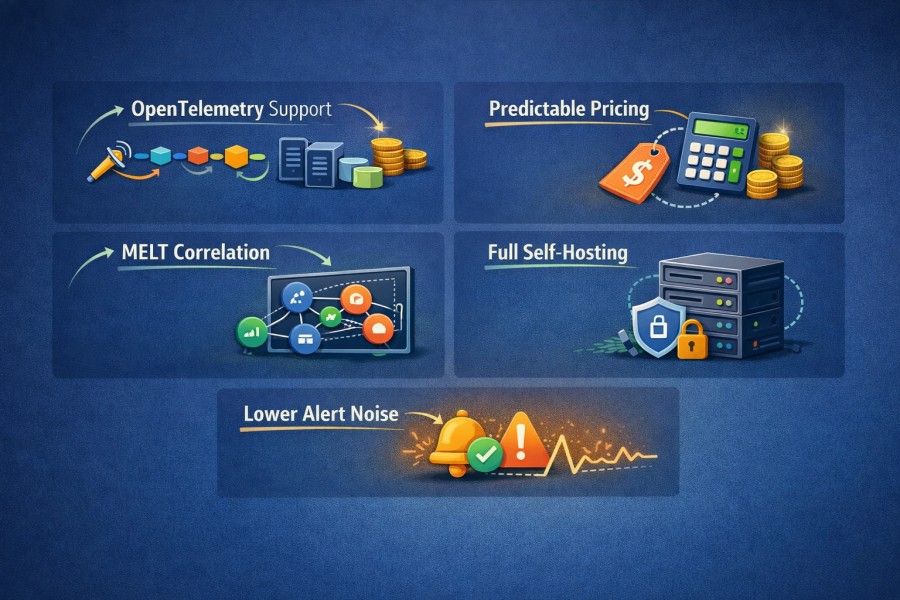
Observability influences cost, reliability, security, and even how teams work. So, modern teams have become more conscious about what they want from an observability platform.
- OpenTelemetry support: Teams want vendor-neutral instrumentation. They want to be able to easily adjust pipelines, backends, or architectures without rewriting code. OTel-first tools also make it easier to control sampling, filtering, and routing data before it reaches the backend of the observability tool.
- Predictable pricing: Teams want pricing models that they can control. Cost should not spike unexpectedly because of hidden costs, add-ons, or aggressive log indexing and trace volume changes.
- MELT correlation: Metrics, events, logs, and traces should work together effortlessly. Engineers want to quickly move from a symptom to a root cause, without jumping between tools or losing context.
- Full self-hosting: Organizations want control over data egress, retention, and residency. Options, such as self-hosting or BYOC deployments, are helpful here. It’s important for teams that want to meet security or compliance requirements, irrespective of their size.
- Lower alert noise: Low-noise alerting, clear signals, and fast root-cause analysis are important. So, the goal is fewer alerts that actually mean something, and workflows that help engineers fix issues quickly instead of adding operational friction.
In our experience working with teams running high-throughput, distributed systems, observability failures rarely happen because a tool is missing features. They happen because cost controls, sampling decisions, or data movement constraints were not considered early. These issues typically surface only after scale, during incidents, or when finance starts questioning observability spend.
How CubeAPM Fits as a Modern Datadog Alternative
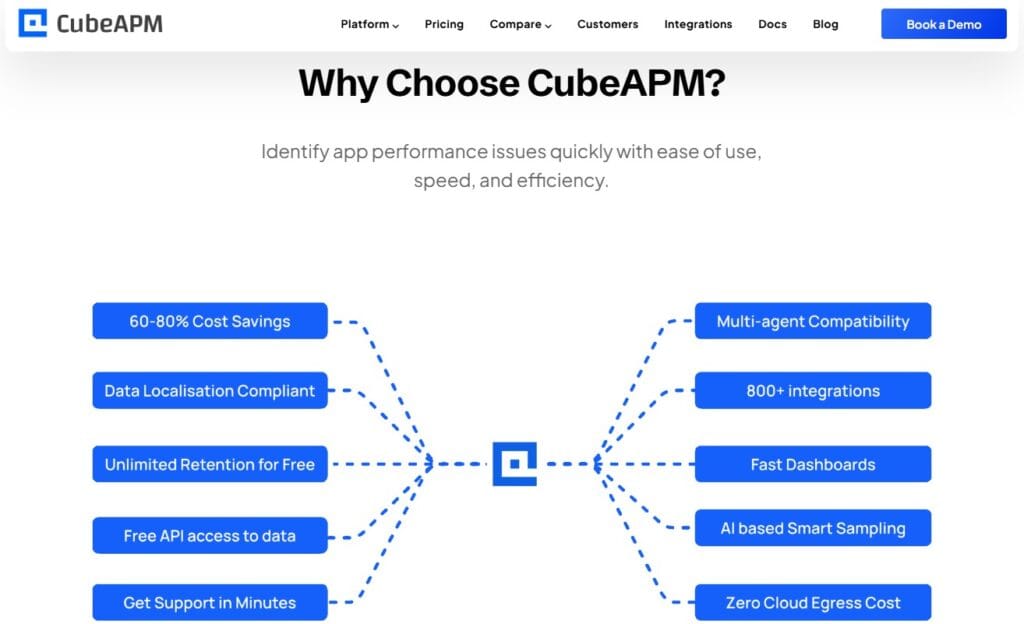
CubeAPM eases the difficulties that modern teams face now in terms of data control, flexibility, and cost predictability to teams as their requirements increase. Here is what makes CubeAPM an excellent Datadog alternative:
- Native OpenTelemetry: CubeAPM supports OpenTelemetry natively, not just as a supporting feature. It’s the primary way to collect and process telemetry. Teams can standardize on one instrumentation method across services while retaining the freedom to add data pipelines or backends over time.
- Predictable pricing: CubeAPM has a predictable, transparent, and affordable pricing of just $0.15/GB. It involves no per-host, per-user, or per-feature pricing. CubeAPM also doesn’t charge separately for data retention, support, or unnecessary add-ons. This way, you can save up to 60% in observability costs.
| Approx. cost* for teams (size) | Small (~30) | Mid-Sized (~125) | Large (~250) |
| CubeAPM | $2,080 | $7,200 | $15,200 |
| Datadog | $8,185 | $27,475 | $59,050 |
- Smart, context-based sampling: CubeAPM uses smart sampling that preserves important context while reducing unnecessary data volume. It also compresses data by 95%, so teams can save big on data storage costs. Still, they don’t lose visibility into important data useful for debugging and root-cause analysis (RCA).
- Unlimited data retention: CubeAPM supports unlimited retention, so teams can keep historical observability data for as long as they need. This is useful for analyzing long-term trends, incidents, and capacity planning.
- Zero cloud egress costs: Because CubeAPM can run inside customer-managed environments, teams avoid unexpected cloud egress fees when moving observability data out of their infrastructure. Many enterprises usually pay cloud providers around $0.10/GB or 20-30% of the total observability bill as data out cost.
- Faster turnaround times: CubeAPM offers support via Slack or WhatsApp with faster turnaround times (in minutes) involving core developers. For teams operating critical systems, timely support is a must, particularly during incidents.
- 800+ integrations: CubeAPM integrates with many cloud services, frameworks, and tools. This is helpful for teams and also saves them time on custom integrations or pipelines.
- Self-hosted (BYOC/on-prem): CubeAPM supports deployment models where teams can run the platform in their own cloud (BYOD) or on-premise infrastructure. This way, organizations can control data residency for security and compliance purposes.
- Vendor-managed: CubeAPM offers self-hosting with vendor-managed services. This eases operations for engineering teams. They can control data without running or maintaining the infrastructure.
- Quick deployment: CubeAPM is easy to deploy for all teams, and its support team is available 24×7 to help you. Teams can quickly get started with OpenTelemetry-native pipelines and simpler cost controls. This means you don’t have to spend weeks tuning agents or setting ingestion rules.
Taken together, CubeAPM fits teams that want solid observability with better visibility, cost, and control. It helps build a foundation that remains usable as systems and organizations mature.
Migration Strategies for Modern Teams
Moving observability from one platform to another may seem difficult. But CubeAPM is created with modern standards like OpenTelemetry. So, migrating from Datadog to CubeAPM gets easier. It is usually a gradual, controlled process where both systems can run alongside each other until you validate everything and are ready to switch. Here is a clear and practical way around this:
- Reuse existing instrumentation where possible: CubeAPM can receive data directly from applications already instrumented with Datadog agents or other common agents. This means you often don’t have to switch instrumentation immediately.
- Run in parallel with your current setup: During migration, you send telemetry to both Datadog and CubeAPM at the same time. This lets you compare views and alerts side by side without breaking anything in production.
- Onboard services gradually: Try not to switch all applications at once. Migrate one service one by one, starting with a low-risk service. Next, verify dashboards and alerts in CubeAPM. Now, you can onboard more services to reduce risks.
- Rebuild important dashboards: Not all dashboards or alerts are important. Rebuild only the important views to have cleaner, more focused dashboards and alerting logic.
- Keep learning: Let telemetry flow to both systems. You can explore CubeAPM at your own pace. Over time, usage shifts naturally as you become more comfortable with the new tool.
- Future visibility: Migration is about forward visibility. But many think it’s all about exporting historical data. Trying to move years of old data usually adds cost and complexity without much benefit. So, keep older data where it is and let CubeAPM start collecting fresh telemetry.
This is how you can make your migration smooth rather than a risky overhaul.
Case Study: A $65M Bill and What It Tells Us About Datadog’s Observability Costs at Scale
In 2023, Datadog’s earnings call included a remark that grabbed attention in the tech community. The company reported a large upfront bill, which analysts estimated to be around US$65 million for a single customer in one year. Many analysts connected the case to Coinbase, a cryptocurrency platform.
What were the Reasons Behind the Bill?
- High growth: In 2021, Coinbase’s usage growth increased around its IPO. It focuses more on reliability and visibility than on optimising the cost.
- High data usage and ingestion: Many observability platforms, including Datadog, charge based on hosts, custom metrics, indexed logs, and trace volume. When usage increases, the bill can grow faster.
- Costly at scale: Public conversation and threads noted that bills of tens of thousands per month can feel manageable until they become hundreds of thousands or millions. This affects budgeting and forecasting for engineering and finance teams.

What teams learned from it?
- Cost predictability matters: Teams want to predict observability cost accurately, and not to be surprised by enormous bills at year-end. In environments where telemetry grows fast, knowing how cost scales can influence architectural decisions.
- Instrumentation influences cost: Pushing very high volumes of logs, traces, or high-cardinality metrics without sampling, filtering, or data governance can accelerate cost growth.
- Teams consider alternatives when the spend crosses limits: Once costs exceed certain levels (often discussed by engineers when they hit $2–5 million per year), teams start looking for better alternatives.
Note: This example is not meant to single out Datadog, but to highlight how usage-based observability pricing can scale faster than most teams expect when telemetry volume grows rapidly.
Conclusion
As your systems and telemetry grow, the observability tool must offer clear insight into what’s happening, why it’s happening, and what it costs, without surprises.
Modern teams need an observability platform with predictable cost, control over data and deployment, and no vendor lock-ins, among others. CubeAPM’s support deep visibility with native OTel support, affordable cost, smart sampling, self-hosting, unlimited data retention, and faster, responsive support.
Book a demo with CubeAPM to experience this in real-time.
Disclaimer: The information in this article reflects the latest details available at the time of publication and may change as technologies and products evolve.
FAQs
1. What are the best Datadog alternatives for modern observability?
The best Datadog alternatives depend on what you are optimizing for. Teams often look for platforms that offer OpenTelemetry-first instrumentation, predictable pricing, and flexible deployment options such as self-hosted or BYOC. Some alternatives focus on enterprise automation, others on open standards and cost control. The right choice depends on scale, compliance needs, and how much control teams want over telemetry data.
2. Why do teams look for alternatives to Datadog?
Teams typically explore Datadog alternatives due to cost predictability challenges at scale, concerns around vendor lock-in, and the desire for more control over telemetry pipelines. As environments grow, usage-based pricing and platform coupling can make forecasting and long-term planning harder, especially for organizations with strict governance or data residency requirements.
3. Are Datadog alternatives compatible with OpenTelemetry?
Most modern Datadog alternatives are built to support OpenTelemetry, either as a first-class design principle or as a core ingestion standard. This allows teams to use vendor-neutral instrumentation and reduces dependency on proprietary SDKs. OpenTelemetry compatibility has become a baseline requirement when evaluating observability platforms.
4. Can Datadog alternatives support large-scale or enterprise environments?
Yes. Many Datadog alternatives are designed specifically for large-scale, cloud-native, and enterprise environments. These platforms often emphasize unified metrics, logs, and traces correlation, cost governance features, and flexible deployment models to support growth without introducing operational or financial surprises.
5. How should teams evaluate Datadog alternatives?
Teams should evaluate Datadog alternatives based on pricing transparency, OpenTelemetry support, deployment flexibility, data control, and ease of migration. It is also important to consider how well the platform supports a long-term observability strategy, including cost management, portability, and alignment with evolving cloud architectures.