









AWS AppSync is a fully managed GraphQL service that connects applications to multiple data sources, including DynamoDB, Lambda, Aurora Serverless, and HTTP endpoints, with a single API layer. As you scale, you need clear visibility into how your API is behaving: where latency is coming from, which resolvers are throwing errors, and how your real-time subscriptions are holding up under load.
This guide covers everything you need to set up robust AWS AppSync monitoring using native AWS tools and third-party observability platforms, so you can catch issues fast and keep your GraphQL API performing reliably.
-
AWS AppSync integrates natively with Amazon CloudWatch, emitting key metrics like
Latency,4XXError,5XXError,Requests, andTokensConsumedwithout extra configuration. - The Enhanced Metrics feature (launched February 2024) provides resolver-level, data-source-level, and operation-level granularity for pinpointing bottlenecks.
- AWS X-Ray tracing gives you end-to-end visibility across AppSync, Lambda, and DynamoDB, helping you spot slow resolvers and downstream issues.
- CloudWatch Logs supports two logging levels: request-level (overall request info) and field-level (per-resolver detail). Enable only what you need to control costs.
- CloudWatch Logs Insights lets you query logs to surface slow queries, N+1 patterns, and high-error operations in seconds.
- Real-time subscription metrics (WebSocket connections, active subscriptions, inbound/outbound messages) are available for GraphQL subscriptions.
- Third-party tools like CubeAPM can consolidate AppSync observability alongside other services in a single dashboard.
1. How AWS AppSync Monitoring Works
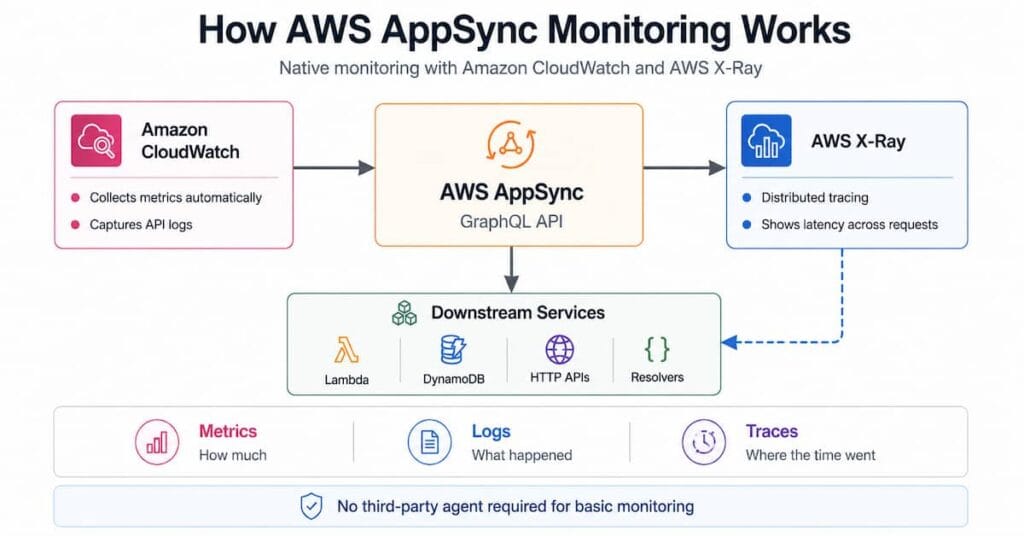
AWS AppSync integrates natively with two core AWS observability services:
- Amazon CloudWatch: Collects metrics and logs from your GraphQL API automatically.
- AWS X-Ray: Provides distributed tracing across your AppSync API and downstream services.
Together these tools cover metrics (how much), logs (what happened), and traces (where the time went). No third-party agent is required for basic monitoring.
2. Built-in CloudWatch Metrics for AWS AppSync
Out of the box, AppSync reports a set of standard metrics to CloudWatch without any configuration. You can view them in the Monitoring section of the AppSync console or directly in the CloudWatch console under the AWS/AppSync namespace.
| Metric | What it measures | Unit | Recommended statistic |
|---|---|---|---|
| 4XXError | Client-side errors (bad payload, auth issues, throttling) | Count | Sum |
| 5XXError | Server-side errors during GraphQL execution | Count | Sum |
| Latency | Time from request received to response returned | Milliseconds | Average / p99 |
| Requests | Total queries + mutations processed (by Region) | Count | Sum |
| TokensConsumed | Resource units allocated per request | Count | Sum |
| NetworkBandwidthOutAllowanceExceeded | Packets dropped due to cache bandwidth limit exceeded | Count | Sum |
| EngineCPUUtilization | Redis OSS CPU usage (cache health) | Percent | Average |
Setting Alarms on Core Metrics
A practical starting point for any production API is to create CloudWatch alarms on these four signals:
- 5XXError sum > 10 over 5 minutes: Rising server errors demand immediate investigation.
- Latency p99 > 2000ms over 5 minutes: Indicates a slow resolver or downstream bottleneck impacting your worst-performing users.
- 4XXError rate > 5% over 10 minutes: Possible auth misconfiguration or malformed requests from clients.
- TokensConsumed spike > 2x baseline: Signals unexpectedly expensive queries that could inflate costs.
3. Real-time Subscription Metrics
In November 2023, AWS added dedicated CloudWatch metrics for GraphQL subscriptions over pure WebSockets. All subscription metrics are emitted in the GraphQLAPIId dimension.
| Metric | What it measures |
|---|---|
| ConnectRequests | All WebSocket connection attempts (success + failure) |
| ConnectSuccess | Successful WebSocket connections |
| ConnectClientError | Connections rejected due to client errors or throttling |
| ConnectServerError | Connections failed due to AppSync-side issues |
| SubscribeSuccess | Subscriptions successfully registered |
| SubscribeClientError | Subscriptions rejected due to client errors |
| PublishDataMessageSuccess | Messages successfully published to subscribers |
| InboundMessageSuccess | Subscription invocations processed successfully |
| InboundMessageError | Invocations failed due to API-level errors |
| InboundMessageFailure | Invocations failed due to AppSync-side errors |
| OutboundMessages | Messages sent to clients over WebSocket (in 5 KB increments) |
| ActiveConnections | Currently active WebSocket connections |
| ActiveSubscriptions | Currently active subscriptions |
4. Enhanced Metrics for Resolver-Level Visibility
In February 2024, AWS launched 12 new optional CloudWatch metrics for AWS AppSync. Standard metrics aggregate everything at the API level. Enhanced Metrics break data down at three granular levels:
Resolver-level Metrics
Tracks GraphQL errors, request count, latency, and cache hits per resolver. Recorded by API ID and resolver name. You can enable metrics for all resolvers or only for specific ones using the metricsConfig field.
Data Source-level Metrics
Tracks request counts and errors per data source (DynamoDB table, Lambda function, HTTP endpoint, and so on). Recorded by API ID and data source name. You can choose between FULL_REQUEST_DATA_SOURCE_METRICS (all data sources) or PER_DATA_SOURCE_METRICS (only those with metricsConfig: ENABLED).
Operation-level Metrics
Tracks request counts and GraphQL errors per named operation (query, mutation, or subscription by operation name). Recorded by API ID and operation name. Set operationLevelMetricsConfig to ENABLED or DISABLED.
Important: Enhanced Metrics incur additional CloudWatch costs. Enable them selectively on critical resolvers or data sources first and expand coverage as needed.
5. Enabling CloudWatch Logs for AppSync
CloudWatch Logs gives you the actual request content and resolver execution details your metrics cannot capture alone.
How to Enable Logging
- Open the AppSync console and select your GraphQL API.
- Navigate to Settings in the left-hand panel.
- Under Logging, toggle Enable Logs to on.
- Optionally enable Include verbose content for full request detail.
- Choose a Field resolver log level: None, Error, Info, Debug, or All.
- Assign an IAM role that allows AppSync to write to CloudWatch Logs, or let the console create one automatically.
- Save your changes.
Request-level vs Field-level Logs
Request-level logs capture HTTP headers, the full GraphQL query, operation summaries, and subscription registration events. They are useful for auditing and request replay.
Field-level logs capture per-resolver detail: request and response mapping template outputs, resolver latency, and tracing IDs. They are powerful for debugging but produce significantly more data. Use the Error level in production and raise it to Debug only during active troubleshooting to manage ingestion costs.
Required IAM Policy
If you create the IAM role manually, the role needs the following policy:
{ "Version": "2012-10-17", "Statement": [{ "Effect": "Allow", "Action": [ "logs:CreateLogGroup", "logs:CreateLogStream", "logs:PutLogEvents" ], "Resource": "*" }]}6. AWS X-Ray Tracing for AppSync
AWS X-Ray lets you trace the full journey of a GraphQL request: from AppSync through Lambda resolvers, to DynamoDB and back. It highlights slow segments and failed calls with a visual service map.
Enabling X-Ray for AppSync
- In the AppSync console, open your API’s Settings.
- Under X-Ray Tracing, toggle Enable X-Ray.
- Save changes. AppSync will now emit trace segments for every request.
What X-Ray Shows You
- End-to-end latency broken down by segment: the AppSync handler, each resolver, and each downstream call.
- Failed requests with the exact segment where the failure occurred.
- A service map visualizing connections between AppSync, Lambda, DynamoDB, and other data sources.
- Correlation with CloudWatch Logs via trace IDs embedded in log entries.
Important limitation: X-Ray does not trace VTL mapping templates. For resolver template debugging, you still need CloudWatch field-level logs.
CloudWatch ServiceLens
CloudWatch ServiceLens correlates CloudWatch metrics, logs, and X-Ray traces in a single view. Use it to jump from a spike in the Latency metric to the specific X-Ray trace that caused it.
7. Querying Logs with CloudWatch Logs Insights
CloudWatch Logs Insights lets you run SQL-like queries against your AppSync logs to surface patterns that individual metrics cannot reveal.
Find Slow Operations
fields @timestamp, @message| filter @message like /Resolve field/| parse @message "duration: * ms" as duration| sort duration desc| limit 20Count 5XX Errors by Operation
filter statusCode = 500| stats count(*) as errorCount by operationName| sort errorCount descThese queries help you quickly spot which operations are responsible for the most errors or the highest latency, rather than digging through individual log streams manually.
8. CloudTrail for GraphQL Data Plane Logging
In November 2024, AWS AppSync added support for logging GraphQL data plane operations (queries, mutations, subscriptions, and connect requests) to AWS CloudTrail.
CloudTrail captures all API activities as events, including calls from the console and programmatic API calls. This is primarily a security and compliance feature that creates an immutable audit trail of who called what operation and when.
Use CloudTrail when you need to:
- Audit which IAM principals are calling your GraphQL operations.
- Investigate security incidents involving unexpected API access.
- Satisfy compliance requirements that mandate operation-level logging.
9. Building a CloudWatch Dashboard for AppSync
A well-designed CloudWatch dashboard gives your team instant visibility into API health. Include these widgets at minimum:
- Requests over time (line chart, Sum statistic)
- Latency average and p99 (line chart)
- 4XXError and 5XXError counts (bar chart, Sum statistic)
- TokensConsumed (line chart, Sum statistic)
- ActiveConnections and ActiveSubscriptions (if you use real-time subscriptions)
- EngineCPUUtilization (if you use AppSync caching)
Pin the dashboard to your team’s main operations screen and link the alarm notification to your incident management tool.
10. AWS AppSync Logging Best Practices
- Start with Error-level field logs in production. All-level logging creates a large volume of data that quickly raises CloudWatch Logs ingestion costs.
- Set log retention policies. The default retention for CloudWatch log groups is indefinite. Set a retention period (30 or 90 days is typical) to prevent storage costs from compounding.
- Use X-Ray sampling rules. At high request volumes, tracing 100% of requests is expensive. Configure sampling rules to trace a representative subset.
- Enable Enhanced Metrics selectively. Enable resolver-level metrics only on your most critical or highest-traffic resolvers to keep costs predictable.
- Add NEW logging levels (INFO and DEBUG) selectively. AWS added INFO and DEBUG field log levels in September 2024, giving you finer control over log output.
- Tag your AppSync API resources to make cost attribution easy across environments (dev, staging, production).
- Resolver-level performance tracing across your entire GraphQL schema
- Correlated logs and traces in one view (no tab switching)
- Pre-built dashboards for AppSync, Lambda, and DynamoDB
- Affordable pricing that does not penalize you for high-cardinality data
Conclusion
AWS AppSync gives you a solid observability foundation through native CloudWatch integration. Start with the standard metrics (Latency, 5XXError, 4XXError, Requests) and set alarms so your team is never surprised by a spike in production. Enable CloudWatch Logs at the Error field level, activate X-Ray for distributed tracing, and reach for Enhanced Metrics when you need to pinpoint a specific resolver or data source.
As your API grows, Logs Insights queries and a well-organized CloudWatch dashboard will save your team significant time during incident response. For teams running multiple AWS services, a unified observability platform like CubeAPM can reduce the number of consoles you need to check during an incident and give you correlated context in a single place.
Disclaimer: AWS service features, pricing, and console navigation may change after the publication of this article. Always refer to the official AWS AppSync documentation for the most current information.
FAQs
1. Does AWS AppSync send metrics to CloudWatch automatically?
Yes. AWS AppSync emits standard metrics (Latency, 4XXError, 5XXError, Requests, and TokensConsumed) to CloudWatch automatically with no additional configuration required. You can view them in the Monitoring section of the AppSync console or under the AWS/AppSync namespace in CloudWatch.
2. What are Enhanced Metrics in AWS AppSync and when should I use them?
Enhanced Metrics, introduced in February 2024, provide granular visibility at the resolver, data source, and operation level. Use them when the standard API-level metrics do not give you enough detail to isolate a latency or error issue to a specific resolver or downstream service. They carry an additional CloudWatch cost, so enable them selectively.
3. Can I trace a GraphQL request end-to-end across AppSync and Lambda?
Yes. Enable AWS X-Ray on your AppSync API and on your Lambda functions. X-Ray will produce a unified trace showing time spent in AppSync, each Lambda resolver, and any downstream DynamoDB or HTTP calls. Note that VTL mapping templates are not traced by X-Ray; use field-level CloudWatch logs for template debugging.
4. What is the difference between request-level and field-level logging in AppSync?
Request-level logs capture overall request information: HTTP headers, the full GraphQL query, operation summaries, and subscription registration events. Field-level logs capture per-resolver detail including mapping template inputs and outputs and resolver latency. Field-level logs are much more verbose and produce higher ingestion costs, so use the Error level in production and Debug only during active troubleshooting.
5. How do I monitor real-time GraphQL subscriptions in AppSync?
AppSync emits dedicated subscription metrics to CloudWatch, including ConnectRequests, ConnectSuccess, SubscribeSuccess, ActiveConnections, ActiveSubscriptions, InboundMessageSuccess, and OutboundMessages. These metrics are emitted in the GraphQLAPIId dimension. AWS added these metrics in November 2023. See the official announcement for the full list.