









Real User Monitoring (RUM) tracks performance data, such as page load timing, interactions, and client-side errors, from browsers and mobile apps.
Although modern systems run on microservices, APIs, and SPAs, most monitoring strategies still focus on backend services. You may see services are healthy and error rates are low via infrastructure dashboards, but end users still face slow loads or broken interactions.
That’s because backend metrics may not always reflect what customers actually experience. RUM, as the frontend layer of observability, complements logs, metrics, and traces. And when you connect it with distributed tracing, user experience issues are correlated with the backend root cause.
This article explains how RUM works, what to measure, and how to implement it effectively.
What Is Real User Monitoring (RUM)?
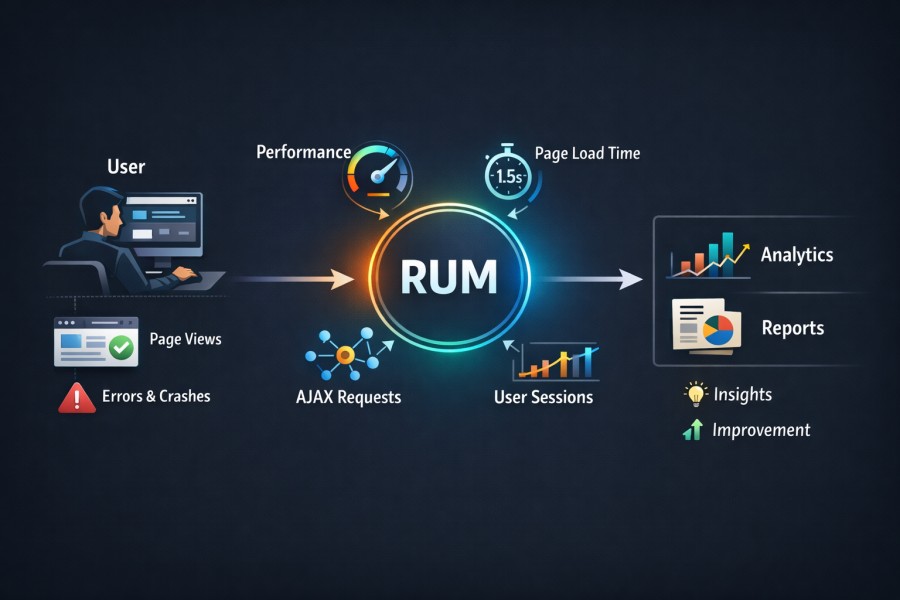
Real User Monitoring (RUM) in observability is the collection of performance, interaction, and error telemetry directly from real users’ browsers or mobile devices in production environments. It’s the frontend signal layer that shows users’ real experiences with your system and how it behaves at their end, under real network conditions, on real devices, across real geographies.
Modern systems distribute execution across CDNs, edge caches, API gateways, microservices, serverless functions, and third-party scripts. Backend metrics can look healthy while users wait four seconds for content to paint. Traces can show low service latency while the browser struggles with render-blocking JavaScript. RUM surfaces that reality.
Now, the reality is that only a few websites consistently meet recommended Core Web Vitals thresholds across LCP, CLS, and responsiveness. Even mature organizations struggle to deliver stable frontend performance at scale. That gap between backend health and user experience is where RUM operates.
RUM as Production-Grade Frontend Telemetry
RUM captures telemetry in the environment where risk actually exists, i.e., the user’s runtime. It observes:
- Page rendering performance under real bandwidth and CPU constraints
- Interaction responsiveness during actual user flows
- JavaScript runtime errors that never appear in backend logs
- Network latency as experienced from the browser
This data is high-variance by nature. Device class, browser version, regional routing, CDN edge selection, and client-side resource contention all influence it. Synthetic tests cannot reproduce that variability at scale. Frontend performance monitoring becomes meaningful only when it reflects that variance instead of smoothing it away.
How RUM Is Instrumented in Modern Systems
RUM instrumentation lives inside the application surface. On the web, a lightweight JavaScript agent initializes early in the page lifecycle. It hooks into standardized browser APIs such as:
- Navigation Timing
- Resource Timing
- Event Timing
- Long Tasks
- Core Web Vitals measurement interfaces
It records rendering milestones, interaction delays, and network request timing. It listens for uncaught exceptions and promise rejections, and tracks route transitions in single-page applications. On mobile devices, native SDKs integrate with networking layers and platform lifecycle events to capture rendering time, API latency, and crashes.
This is not heuristic scraping. It relies on standards defined by the W3C and implemented across modern browsers. Proper implementations batch and transmit telemetry asynchronously. They operate within tight overhead budgets to avoid becoming the performance problem they measure.
How RUM Differs From Analytics
RUM focuses on system behavior as experienced by real users in production. It captures performance timing, rendering delays, network calls, JavaScript errors, and browser-level issues.
Traditional web analytics and product analytics platforms focus on user behavior and engagement patterns. They track sessions, clicks, funnels, feature usage, traffic sources, and conversion flows. Their goal is to understand how users interact with the product, not how the frontend performs technically.
RUM helps you answer questions such as:
- Why did the content render slowly in a specific region?
- Which API call blocked checkout?
- Which third-party script caused layout instability?
- Which JavaScript error broke the cart submission?
Analytics platforms help you answer questions such as:
- How many users completed checkout?
- Which feature is used most often?
- Where do users drop off in the funnel?
- Which acquisition channel drives engagement?
Analytics explains what users did. RUM explains what the system did while users were trying to do it. When conversion drops, analytics identifies the behavioral impact. RUM reveals whether a performance regression, frontend error, or dependency failure caused that drop.
Teams that treat analytics as a substitute for frontend observability usually discover the difference during an incident, when dashboards show declining engagement but provide no technical explanation.
Where RUM Sits in the Observability Stack
RUM instrumentation runs inside the user’s browser or mobile application runtime. It captures telemetry at the client boundary before any request reaches your backend services. In practical terms, this means a lightweight JavaScript or SDK agent collects browser timing APIs, network activity, and runtime errors directly from the execution environment.
RUM typically captures:
- Browser performance metrics, such as First Contentful Paint (FCP), Largest Contentful Paint (LCP), Cumulative Layout Shift (CLS), Time to First Byte (TTFB), and interaction latency.
- Network timing for XHR and fetch calls, including DNS lookup, TCP connect, TLS handshake, and response duration.
- Client-side JavaScript errors, stack traces, and unhandled promise rejections.
- User interaction events, such as route changes, clicks, and session boundaries.
- Optional trace context headers (for example, W3C Trace Context) that allow frontend spans to link with backend distributed traces.
Within the broader MELT model, RUM provides:
- Metrics from the browser runtime.
- Events tied to user interactions and page lifecycle transitions.
- Logs in the form of structured client-side error records.
- Traces that begin in the browser and propagate across services.
Without RUM, observability starts at the load balancer, API gateway, or application server. That approach measures backend health but can’t explain slow rendering, blocked main threads, or third-party script delays in the browser.
With RUM, the trace can begin at the user click, pass through the CDN, API layer, services, and database, and return to the browser. This provides full request lifecycle visibility from the client to the backend. This makes RUM essential for correlating user-facing performance degradation with infrastructure-level telemetry during incident response.
What RUM Actually Measures
Serious RUM implementations go far beyond page load time. RUM tracks these:
- Stability and responsiveness: RUM helps you track the stability and responsiveness of your systems via Core Web Vitals. These metrics are Largest Contentful Paint, Interaction to Next Paint, and Cumulative Layout Shift. These are important in Google’s performance guidance and search experience signals.
- Time to First Byte: It tracks the route transition time in SPAs and dominates latency in frontend architectures.
- User interaction signals: These signals are click latency, input delay, rage click patterns, and scroll abandonment.
- JavaScript runtime failures: that never traverse backend logging pipelines.
They break down network waterfalls to reveal blocking resources, slow third-party scripts, and misconfigured caching. Taken together, this telemetry describes experience as a distributed systems outcome, not as a backend metric average.
When you integrate RUM into your observability stack, you stop assuming that healthy services imply satisfied users. You measure the boundary where perception forms and correlate that boundary with backend traces and infrastructure metrics. This helps you move from indirect inference to direct evidence.
Why RUM Matters in Modern Distributed Systems
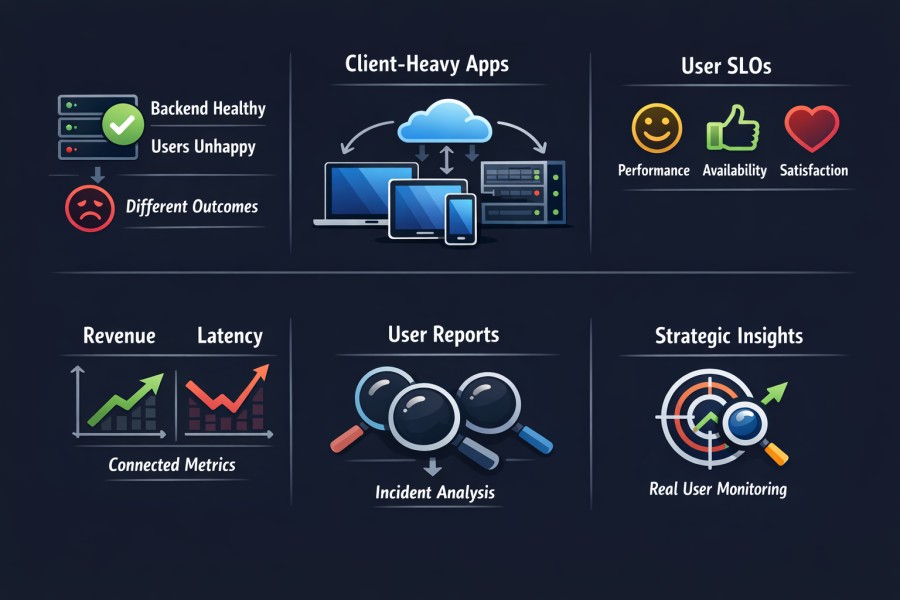
Distributed systems moved complexity outward. Ten years ago, most latency lived in the data center. Today, it lives everywhere: in the browser main thread, CDN edge selection, third-party scripts, API gateways, client-side hydration logic, and mobile radio conditions.
As applications evolved into:
- Single-page applications (SPAs) with heavy client-side rendering
- API-first backends serving multiple frontend clients
- Microservices communicating across regions
- Third-party dependencies embedded directly in user sessions
RUM has become important due to many reasons:
Backend Health No Longer Equals User Health
Backend metrics can look clean while users struggle. Service latency may average 40 milliseconds. CPU utilization may sit comfortably below thresholds. Error rates may remain low. Yet, users in a specific geography experience four-second load times because of:
- CDN misrouting
- TLS handshake delays
- Blocked the main thread from large JavaScript bundles
- Slow third-party scripts
- Mobile packet loss
Traditional backend-only monitoring cannot see this surface. Metrics aggregate behavior across time and across services. They smooth the variance and hide edge cases. Real users do not experience averages. They experience the worst-case path through your system. RUM exposes that path.
The Architectural Shift to Client-Heavy Applications
Single-page applications push rendering and routing into the browser. Hydration logic executes after the initial payload. API calls fire in parallel. Components render asynchronously. Frontend performance in microservices architectures depends on:
- API latency
- Payload size
- Client-side computation
- Resource loading order
- Browser scheduling
When latency appears in this environment, the root cause often spans multiple layers. Backend traces explain service flow. RUM shows how that flow translates into user experience. Without RUM, teams infer user impact indirectly. With RUM, they measure it directly.
SLOs Related to User-Experience
With RUM, Service Level Objectives (SLOs) align with user experience; only raw infrastructure metrics are not enough. Enterprises now define SLOs such as:
- 95% of users experience LCP < 2.5 seconds
- 99% of checkout interactions complete without frontend errors
- Page interaction latency < 200 milliseconds for key flows
These require frontend metrics. Infrastructure uptime alone cannot validate them. Google continues to emphasize Core Web Vitals as performance standards that shape search experience signals and perceived quality. Organizations that operate at scale track these metrics continuously in production.
User impact monitoring shifts the conversation from system availability to system usability. That distinction influences executive reporting and engineering priorities alike.
Revenue and Latency Move Together
Latency affects revenue in measurable ways. Multiple industry studies over the past decade have shown that increases in page load time correlate with drops in conversion rates.
In e-commerce and fintech environments, milliseconds compound at scale. When checkout slows down due to client-side rendering delays or third-party API latency, backend dashboards may remain green. But revenue dashboards don’t. RUM provides the missing link between technical performance and business outcomes. It quantifies the user-facing cost of architectural decisions.
Incident Triage From the User’s Perspective
During incidents, the first signal often comes from users. Support tickets rise. Social media complaints increase. Conversion drops. Backend monitoring may not trigger immediately. And aggregated metrics may still show within thresholds. But RUM can show issues, such as:
- JavaScript errors after deployment
- Sudden increase in route transition time
- Region-specific latency
- Interaction delays on low-end devices
These signals allow teams to answer: who is affected, where, and how severely?
RUM as a Strategic Observability Use Case
RUM use cases extend beyond troubleshooting. They support:
- Release validation under real production traffic
- Canary rollout impact measurement
- Third-party dependency evaluation
- Device and geography segmentation analysis
- Performance regression detection at the client edge
In modern distributed systems, experience emerges from the interaction between frontend execution and backend services. RUM captures that interaction boundary. Without it, observability begins after the request reaches your infrastructure. With it, observability begins where perception begins.
How Real User Monitoring (RUM) Works
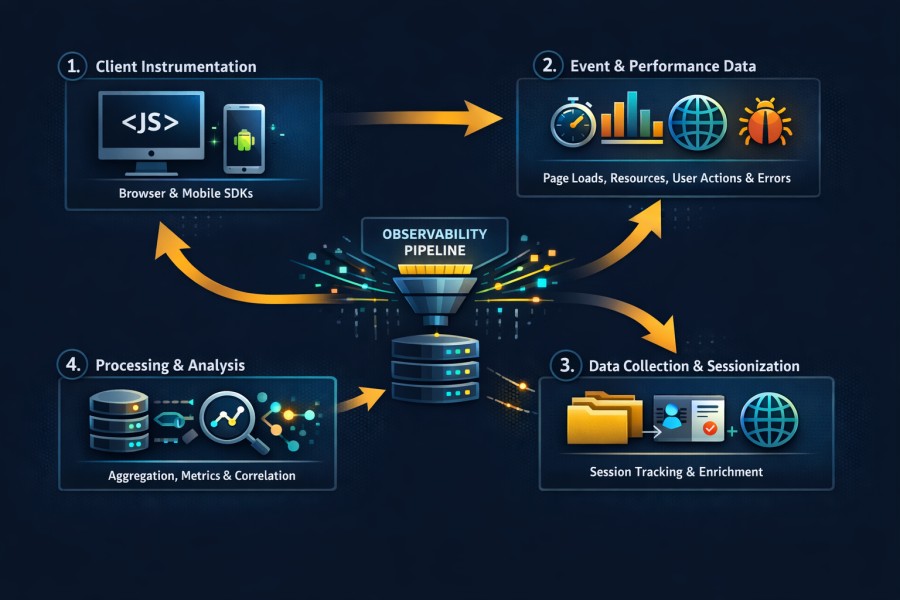
Real User Monitoring works by embedding telemetry collection directly into the client runtime, capturing structured performance and interaction data, and transporting that data into your observability pipeline for processing, correlation, and analysis. Poor instrumentation creates noise. Strong instrumentation produces high-fidelity signals that align with distributed traces and backend metrics.
This section breaks down the rum architecture from the browser to the ingestion pipeline.
Browser and Mobile Instrumentation
RUM begins at the execution boundary where users interact with your application. On the web, this usually involves injecting a lightweight JavaScript agent early in the page lifecycle. The agent initializes before meaningful rendering occurs. It attaches listeners to performance and lifecycle events. It timestamps critical milestones.
A proper rum JavaScript snippet:
- Tracks long tasks that block the main thread
- Captures navigation start and paint events
- Shows hidden exceptions and unhandled promise rejections
- Intercepts network calls made through fetch or XMLHttpRequest
- Loads asynchronously to avoid blocking the rendering
- Attaches to browser-native performance interfaces
In single-page applications, route changes are not the cause for full-page reloads. RUM agents track virtual navigation events (those that web frameworks trigger, such as React, Angular, or Vue). On mobile platforms: Native SDKs integrate with application lifecycle callbacks and networking stacks. They observe:
- Screen render duration
- API latency (from the device)
- Application crashes and exceptions
Event Capture and Performance APIs
To measure performance, RUM uses these interfaces:
- Navigation Timing API: offers detailed timestamps for the full page, such as DNS lookup, TCP handshake, TLS negotiation, and response processing.
- Resource Timing API: tracks the time each network resource takes, such as scripts, stylesheets, images, and API calls.
- Event Timing API: shows user interaction delays (e.g., input responsiveness).
- Long Tasks API: shows tasks that block the main thread for longer periods. It may happen due to heavy JavaScript execution.
- Core Web Vitals Measurement: RUM agents calculate metrics such as Largest Contentful Paint, Interaction to Next Paint, and Cumulative Layout Shift using browser-provided performance observers.
These APIs generate structured timestamps. The RUM agent converts them into telemetry events that come with contextual metadata. These agents for error events capture:
- Hidden JavaScript exceptions
- Promise rejections
- Error boundaries specific to certain web frameworks
Data Ingestion & Sessionization
Each event includes:
- A session ID
- A page or route identifier
- Timestamp
- Device attributes
- Browser version
- Operating system
When you group them into sessions, you can track a user’s journey. RUM agents generate session identifiers at runtime for route transitions and page reloads (based on configurable rules). If you set up thresholds for session duration, it may prevent indefinite tracking. Attribute enrichment often occurs in two stages.
- Client-side enrichment captures device-level attributes such as screen resolution, network type, and user agent.
- Server-side enrichment adds geo-location derived from IP, deployment version, environment tags.
Moreover, telemetry transport relies on asynchronous beacon mechanisms. The browser’s sendBeacon interface allows background transmission without blocking navigation. When unavailable, agents fall back to buffered asynchronous HTTP calls.
Batching strategies reduce network overhead. Events are aggregated locally and transmitted at certain intervals or after the session terminates. Also, ingestion pipelines must handle burst patterns. Traffic spikes during product launches or marketing campaigns can multiply telemetry volume within minutes.
Sampling and Data Flow
High-traffic applications can’t store every session at full fidelity indefinitely. That’s why RUM sampling strategies are important.
- Session-based sampling determines whether a user session is fully instrumented. Once selected, all events within that session are retained. This preserves behavioral coherence.
- Head sampling applies selection logic at session start.
- Adaptive sampling adjusts sampling rates dynamically (based on traffic volume or error frequency).
Moreover, advanced systems use:
- Dynamic sampling during traffic spikes
- Elevated sampling for error-heavy sessions
- Priority retention for high-value transactions
But if you want to control high-traffic data, you need to balance:
- Fidelity
- Storage cost
- Analytical usefulness
Aggregation pipelines compute percentile metrics, such as p75 or p95 latency, from raw events before storing them for long-term. Some architectures retain raw events for a short retention window while preserving aggregated metrics for longer horizons.
The rum architecture must integrate cleanly with backend observability systems. Trace identifiers captured in the browser propagate through API calls using W3C trace context headers. This enables direct correlation between frontend spans and backend distributed traces. Usually, data flow follows this pattern:
- Client agent captures events
- Events are batched and transmitted
- Ingestion service validates and enriches telemetry
- Processing pipeline aggregates and indexes data
- Correlation engine links sessions to traces, logs, and metrics
When designed correctly, this pipeline produces end-to-end visibility without overwhelming storage systems or distorting performance signals.
Real User Monitoring works because it treats the browser and mobile runtime as first-class components of the distributed system. It measures execution where perception forms. It transmits structured telemetry. It aligns that telemetry with backend signals. That is how RUM moves from a simple JavaScript snippet to a strategic observability layer.
Core RUM Metrics That You Should Track
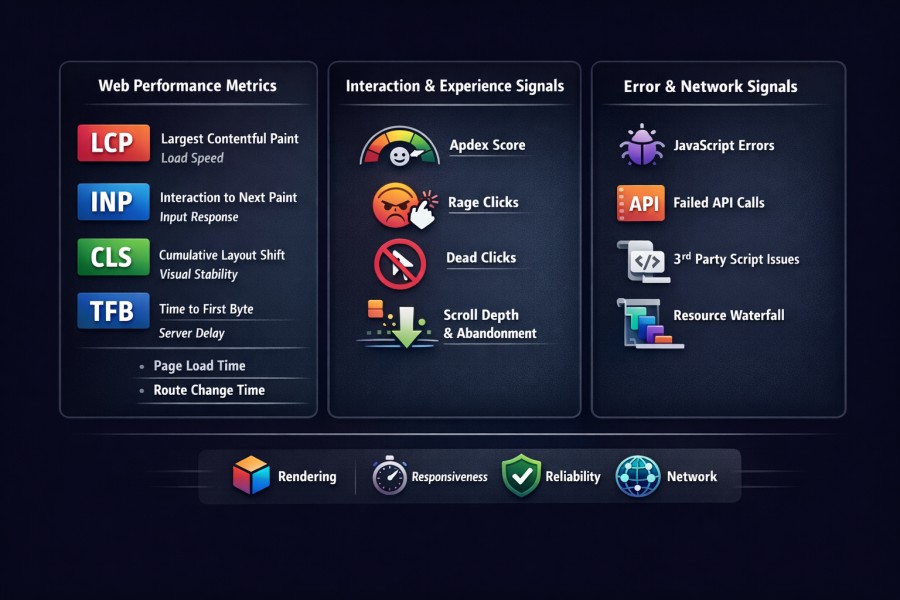
Real User Monitoring generates a large amount of telemetry. Only a subset of that telemetry drives meaningful operational decisions. Teams that track everything often understand nothing. Teams that track the right signals can detect revenue risk before it shows up in reports.
This section focuses on production-critical rum metrics. These are the signals that expose user pain, architectural weaknesses, and regression risk in distributed systems.
Web Performance Metrics
Web performance metrics help you measure rendering and responsiveness. These metrics are important to understand user perception and search visibility.
- Largest Contentful Paint (LCP): measures when the main content becomes visible, and captures perceived load speed. A backend response can complete quickly, while the browser delays rendering due to layout shifts or blocking scripts.
- Interaction to Next Paint (INP): measures responsiveness after user input. INP shows how fast an interface can react to a click, tap, or keypress in a session.
- Cumulative Layout Shift (CLS): shows how stable a system is visually. This is important because layout movement during load or interaction erodes trust and increases accidental clicks.
- Time to First Byte (TFB): measures how long the browser waits before receiving the first byte of the response. It reflects network routing, CDN edge selection, backend processing, and TLS negotiation combined.
- Page load time: measures the full document lifecycle.
- Route transition time: measures navigation inside single-page applications.
In modern SPAs, route transition often dominates perceived latency. Backend service metrics alone cannot reveal this delay. RUM metrics for web vitals provide percentile distributions (not averages). p75 latency reveals experience for the majority of users.
Interaction and Experience Signals
Rendering speed does not guarantee usability. But experience signals describe how users behave when performance degrades.
- Apdex: It classifies a request as satisfied, tolerating, or frustrated based on some rules. It indicates an app’s health.
- Rage clicks: They occur when users repeatedly click the same element. They may indicate unresponsive UI or delayed feedback.
- Dead clicks: These clicks are interactions that give no visible or significant result. They may happen due to JavaScript binding failures or blocked event handlers.
- Scroll depth and abandonment: Scroll depth tells you whether users engaged with important content or abandoned or exited the page before doing that.
If you correlate these signals with latency spikes, you may find issues with your app’s performance issues.
Error and Network Signals
Performance issues may happen due to execution failures.
- JavaScript exceptions: These exceptions could be framework-related rendering errors related to some web frameworks, undefined references, and promise rejections. These track client-side failures that can break user flows.
- Failed API calls from the browser: This may reveal instability with your app at the request level. For example, your backend has reported low error rates, but some users faced failures.
- Latency with third-party script: analytics tags, payment widgets, and ad networks execute inside your user session. RUM identifies when those dependencies block rendering or interaction.
- Resource waterfall: breakdowns reveal loading order and blocking behavior. A single large script placed early in the document can delay paint by seconds. Without browser-level timing, this root cause remains invisible.
Core web vitals rum analysis becomes meaningful when combined with these errors and network signals. Slow paint often correlates with blocked threads. Interaction delay often correlates with heavy client-side execution. Layout instability often correlates with asynchronous content injection. Together, these signals create a layered model of experience:
- Rendering stability
- Interaction responsiveness
- Execution reliability
- Network efficiency
That layered model allows teams to separate cosmetic fluctuations from structural degradation.
RUM metrics that matter are those that change engineering decisions. They inform release gates, drive rollback triggers, and influence architectural refactoring. They also expose third-party risk. Anything else is noise. When you focus on these production-critical signals, Real User Monitoring becomes a strategic observability instrument rather than a vanity dashboard.
Also, RUM breaks page load into measurable phases such as DNS lookup, TCP connection, TLS negotiation, server response time, content download, and rendering. Visualizing how much time each phase consumes makes bottlenecks easier to explain during incident reviews or performance reporting. Teams often summarize these distributions in a simple latency breakdown chart using a pie chart designer.
RUM vs Synthetic Monitoring vs APM
Comparison discussions often reduce observability to tool selection. That mindset creates blind spots. Real systems fail in layers. Detection, impact, and root cause exist at different points in the architecture. Real User Monitoring, synthetic monitoring, and APM serve different purposes. Treating them as interchangeable weakens your visibility model.
This section clarifies how they differ and how they work together.
RUM vs Synthetic Monitoring
Synthetic monitoring: executes scripted transactions from controlled locations. It validates availability and baseline performance. It detects hard failures early and provides consistent, repeatable signals.
Synthetic checks run on defined devices, network conditions, and known geographies. So, the conditions here are predictable. When you perform synthetic checks, you can find answers to questions, such as:
- Is the login endpoint reachable?
- Did checkout complete successfully?
- Has latency exceeded a defined threshold?
RUM: RUM captures performance from actual users. So, the conditions are unpredictable here. It measures:
- Variation in devices
- Differences in the browser
- Network congestion
- Interfering third-party scripts
- Routing differences geographically
For example, a synthetic test may show stable performance from Frankfurt (Germany) and Virginia (US). But some (real) users in Southeast Asia may experience degraded performance. It could be due to edge routing or regional peering issues.
RUM, on the other hand, helps you observe unpredictability in distributed systems. Here’s how they differ:
| Parameter | Real User Monitoring (RUM) | Synthetic Monitoring |
| Data Source | Real users in production | Scripted bots and controlled probes |
| Environment | Unpredictable, real-world devices and networks | Controlled environments and fixed locations |
| Primary Goal | Measure actual user experience | Validate availability and baseline performance |
| Variability | High variability across geographies, devices, and browsers | Low variability due to controlled execution |
| Geographic Coverage | Based on real user distribution | Based on configured probe locations |
| Signal Type | Experience telemetry, interaction delay, and rendering stability | Transaction success/failure, uptime checks |
| Incident Role | Quantifies user impact | Detects outages and hard failures early |
| Blind Spot | Cannot proactively test flows without user traffic | Cannot reflect real-world performance variance |
RUM vs APM
Many compare RUM vs APM as frontend vs backend monitoring. That framing captures part of the difference but not the full picture.
Application Performance Monitoring (APM): instruments services, databases, queues, and APIs. It measures:
- Service latency
- Error rates
- Throughput
- Resource utilization
- Distributed trace execution paths
APM reconstructs internal execution. It explains how a request flowed through microservices. It identifies which span consumed time and exposes infrastructure bottlenecks.
RUM: observes the user’s perception of that execution. Frontend experience includes factors that APM does not capture:
- Browser rendering delay
- Main thread blocking
- Layout instability
- Network conditions between the user and the CDN
- Client-side computation cost
A backend trace can complete in 120 milliseconds. The browser can still take 2 seconds to render meaningful content due to heavy JavaScript execution. APM alone misses that surface.
User journey latency includes more than service latency. It includes render time, hydration time, and interaction delay. Backend monitoring sees server execution. RUM sees the boundary where execution becomes perception. Frontend vs backend monitoring is more about completeness than preference.
| Dimension | Real User Monitoring (RUM) | Application Performance Monitoring (APM) |
| Observation Point | Browser or mobile runtime | Backend services and infrastructure |
| Focus Area | Frontend experience | Internal service performance |
| Metrics Captured | Rendering time, interaction delay, layout shift, JS errors | Service latency, error rate, throughput, CPU, and memory |
| Scope | User session and client execution | Service execution and request flow |
| Visibility Boundary | Begins at the user device | Begins at server entry point |
| Error Surface | Client-side exceptions and failed API calls from the browser | Server-side exceptions and failed service calls |
| Trace Integration | Can propagate trace context from the browser | Reconstructs the distributed trace across services |
| Blind Spot | Cannot directly expose backend internal bottlenecks | Cannot observe browser rendering or main thread blocking |
Why Modern Observability Requires All Three
Each layer (APM, RUM, synthetics) addresses a different question.
- Synthetic monitoring provides early detection. It validates critical flows continuously. It triggers alerts when availability drops.
- RUM quantifies user impact. It measures how many users are affected, where they are located, which devices they use, and how severe the degradation feels.
- APM and distributed tracing identify the root cause. They reconstruct service interactions and pinpoint bottlenecks inside the system.
During a production incident, the sequence often unfolds like this:
- Synthetic detects availability degradation
- RUM shows which user segments are impacted and how severely
- APM and tracing isolate the service or dependency causing the failure
Removing any layer weakens incident response.
- Synthetic alone cannot reveal client-side regression.
- RUM alone cannot explain internal service latency.
- APM alone cannot quantify user-facing impact.
Modern observability architecture integrates all three signals into a correlated model. When trace identifiers propagate from the browser through backend services, RUM and APM align into a unified request narrative. Synthetic monitoring continues to validate external availability.
Real user monitoring vs synthetic monitoring is not a decision point. RUM vs APM is not a trade-off. They form a layered detection and diagnosis system. Teams that recognize this build observability around user experience first and infrastructure second. They measure availability, impact, and root cause as distinct but connected signals. That layered model defines mature frontend and backend monitoring in distributed systems.
Correlating RUM with Distributed Tracing
RUM shows what users experience. Distributed tracing shows how the system executed. Individually, both are powerful. Together, they form end-to-end observability.
Without correlation, teams move between dashboards and guess at causality. With correlation, a slow render in the browser connects directly to the service span that caused it. That connection transforms incident response from interpretation to evidence. RUM and distributed tracing belong in the same execution narrative.
Trace Context Propagation
Modern distributed systems rely on the W3C Trace Context standard. The traceparent header carries a unique trace identifier and span identifier across service boundaries. When implemented correctly, the browser becomes the first hop in that trace.
A RUM agent can create an initial client-side span at navigation start or interaction start. That span generates or inherits a trace ID. When the browser issues an API call, the agent attaches the traceparent header to the outbound request. From that point:
- The API gateway receives the trace context
- Backend services propagate the same trace ID
- Downstream databases or external services inherit it
This mechanism connects frontend experience with backend execution. Browser span creation must be precise. It should:
- Capture navigation timing milestones
- Wrap network requests with child spans
- Associate interaction events with span context
When trace context flows from the browser into backend services, you no longer analyze frontend and backend in isolation. You analyze a single distributed request that begins with user interaction. That is how you connect frontend to backend traces without manual stitching.
Linking Frontend Sessions to Backend Spans
Trace propagation handles individual requests. Session correlation handles user journeys. A session ID groups multiple interactions under a coherent user context. Each API call within that session has the same trace ID or trace identifiers. Session-level linkage allows you to:
- Map multiple traces to one user journey
- Track repeated failures within a session
- Identify high-friction flows
Here, API gateway instrumentation helps. It works as the boundary where the client trace context enters the backend. If the gateway doesn’t rewrite headers correctly, trace breaks again. Trace ID continuity ensures that:
- The LCP span in the browser links to the API request span
- The API span links to downstream service spans
- The database span reveals query contention or locking
When implemented correctly, a single trace visualization can show:
- User navigation starts
- Network latency
- Backend service execution
- Database query time
- Response return
- Final paint timing
This alignment defines end-to-end observability.
Incident Investigation Example
Consider a production checkout system.
- Users report that checkout feels slow. Backend dashboards show stable service latency. CPU and memory remain normal. Error rates are low.
- RUM detects elevated Largest Contentful Paint during the checkout route. Distribution percentiles show degradation concentrated in one geography.
- Network timing reveals that the API response time is longer than baseline. The RUM session includes a trace ID propagated with the checkout request.
The distributed trace reveals increased latency in a downstream database span. Query execution time has doubled due to row-level locking contention. No infrastructure alert triggered because overall throughput remained within normal bounds. Only a subset of traffic experienced lock amplification.
- RUM exposed the user impact.
- Tracing exposed the execution bottleneck.
Together, they produced a complete explanation. Without correlation, teams might have optimized frontend assets unnecessarily. With correlation, they targeted the database contention directly.
Why Correlation Reduces MTTR
Mean Time to Resolution increases when teams cannot align symptoms with causes. User complaints arrive first. Engineering dashboards follow. The delay between those two signals defines operational friction. Correlation reduces that delay.
When you align user complaints with backend telemetry, you can:
- Identify which service spans correspond to degraded sessions
- Calculate how many users are affected
- Isolate specific geographies or device classes
Engineering decisions align with revenue risk, and not with abstract metrics. RUM and distributed tracing together form a causality chain from click to database. That chain enables confident decision-making under pressure.
End-to-end observability is the ability to follow a user interaction from browser event to backend span without losing context. When that continuity exists, incident response becomes disciplined. Teams stop debating which dashboard to trust. They analyze a single narrative that spans frontend perception and backend execution.
RUM Data Control: Sampling, Cost, and Privacy
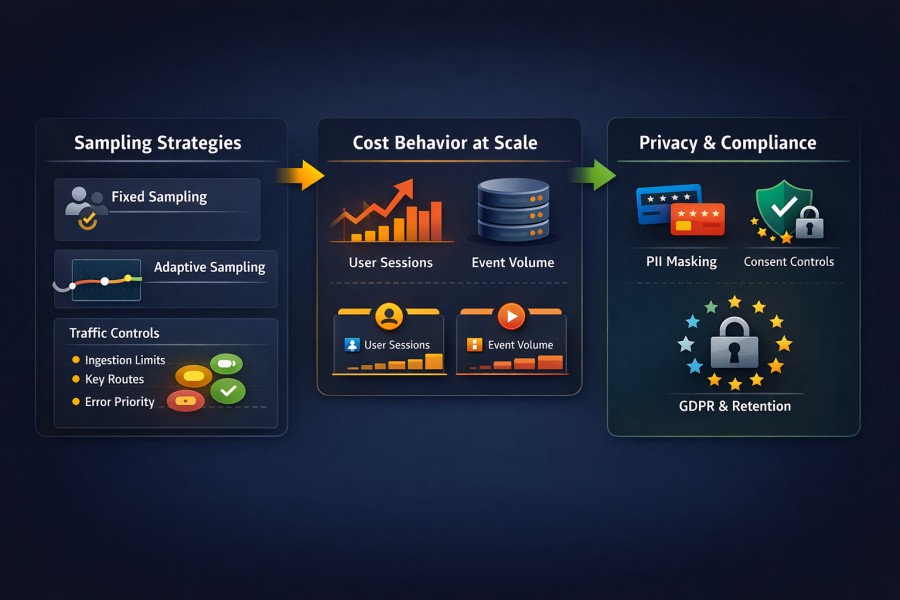
RUM gives you visibility at the edge. Governance determines whether that visibility remains sustainable. Frontend telemetry scales differently from backend metrics. Traffic patterns shift faster. Cardinality increases unpredictably. Storage pressure builds quietly until bills and compliance risks surface.
Production-grade Real User Monitoring requires disciplined control across sampling, cost modeling, and privacy enforcement.
Sampling Strategies
RUM sampling decisions shape both fidelity and stability.
- Fixed session sampling selects a defined percentage of user sessions at session start. Once selected, all telemetry from that session is captured. This preserves behavioral coherence. It prevents partial narratives.
- Session-based sampling works well because frontend issues often manifest across multiple interactions. Capturing a full journey reveals regression patterns that event-level sampling would fragment.
- Adaptive sampling dynamically adjusts sampling rates. During high traffic, ingestion rates can increase quickly within minutes. Adaptive controls reduce sample rates temporarily to protect storage and processing systems.
High-traffic safeguards include:
- Maximum ingestion rate thresholds
- Error-priority retention rules
- Elevated sampling for high-value routes (e.g., checkouts)
- Reduced sampling for static content routes
Cost Behavior at Scale
RUM cost models behave differently from those of backend telemetry.
- Per-session pricing charges are based on the number of recorded sessions.
- Per-event pricing charges are based on the volume of events ingested.
Each model carries trade-offs. RUM ingestion grows faster than expected because:
- Marketing campaigns may cause the traffic to spike suddenly
- Feature releases increase interaction frequency
- SPA route transitions generate additional navigation events
- Third-party integrations add network calls
The cardinality of frontend telemetry can be high due to attributes such as browser version, device model, screen resolution, region, feature flags, and user segmentation. Index size and query cost increase.
Similarly, session replay can multiply storage requirements significantly. Recording DOM mutations, interaction sequences, and visual state deltas produces large payload volumes. Retention periods amplify that growth. Per-session pricing models become unpredictable when traffic patterns fluctuate seasonally or during product launches. Per-event models become problematic when:
- Each change in an SPA route generates multiple performance entries
- Resource timing produces dozens of entries per page
- Error bursts create event storms
Storage and indexing trade-offs become strategic decisions:
- Retain raw events for short windows and aggregate long-term
- Store percentile summaries instead of full event streams
- Segment high-value flows for extended retention
The RUM cost model design must account for burst traffic, cardinality growth, and retention policy. Without governance, frontend telemetry can outpace backend logs in volume.
Privacy and Compliance
RUM operates at the user boundary. That position carries responsibility. PII masking should occur as close to the source as possible. Sensitive fields must never leave the client unfiltered. URL query parameters, form inputs, and user identifiers require explicit allow lists.
Field-level redaction ensures that telemetry includes performance attributes but excludes personal content. Configuration should define which DOM elements are masked before transmission. GDPR and consent considerations are an important part of data collection policies in many regions. RUM agents must:
- Align with consent management frameworks
- Disable tracking until consent is granted
- Provide mechanisms for data deletion requests
RUM Privacy GDPR compliance requires transparent data handling documentation and retention controls. Also, session replay needs additional safeguards. Visual recordings must:
- Mask input fields automatically
- Exclude password and payment fields
- Limit retention duration
- Restrict internal access through role-based controls
Rum data retention policies should align with operational needs rather than indefinite storage. Short retention windows reduce compliance exposure and cost simultaneously.
Production governance means treating frontend telemetry as regulated data. Observability platforms must enforce strict data lifecycle controls.
- Sampling protects scale.
- Cost modeling protects sustainability.
- Privacy controls protect trust.
When these three pillars align, Real User Monitoring becomes a stable production asset rather than a runaway liability.
Case Study: Diagnosing Frontend Latency in a Microservices Checkout Flow
Distributed systems degrade unevenly. This case reflects a common pattern in modern commerce platforms.
Background
The system was a high-volume e-commerce platform. Architecture included:
- A single-page application frontend
- An API gateway at the edge
- Microservices for cart, inventory, pricing, and payment
- A managed relational database cluster
- CDN acceleration for static assets
Users were globally distributed across North America, Europe, and Southeast Asia. Traffic patterns fluctuated heavily during campaigns and regional promotions. The observability stack included:
- Backend APM and distributed tracing
- Infrastructure monitoring
- Real User Monitoring embedded in the frontend
Service health dashboards consistently showed stable latency. No recent deployment had modified checkout logic.
Problem
Customer support tickets began referencing slow checkout behavior in Southeast Asia. Users described:
- Delayed rendering of the final checkout confirmation page
- Spinners persisting longer than usual
- Occasional hesitation after clicking “Place Order”
Conversion analytics showed a measurable drop in checkout completion from that region over a 48-hour window. Backend dashboards reported:
- Stable p95 service latency
- No increase in error rate
- CPU and memory are within normal operating range
- No autoscaling events
No infrastructure alerts triggered. From an internal metrics perspective, the system appeared healthy.
Investigation
RUM data provided the first concrete signal. Session-level analysis revealed:
- Elevated Time to First Byte for checkout API calls in Southeast Asia
- Increased Largest Contentful Paint on the checkout confirmation route
- No significant change in client-side JavaScript execution time
Network timing breakdown showed that DNS resolution and TLS handshake times were consistent. The delay occurred after the request reached the edge. RUM sessions included propagated trace IDs. Correlating affected sessions with distributed traces exposed a pattern.
For impacted sessions:
- The API gateway span duration increased significantly
- Downstream service spans remained stable
- Database query times did not increase
Trace visualizations showed that checkout requests originating from Southeast Asia were being routed to a North American backend cluster instead of the regional cluster intended to serve that traffic.
Cross-region network latency introduced an additional 150 to 200 milliseconds per request. Under concurrent load, this amplified the tail latency. The backend services themselves were healthy. The routing path was not.
Root Cause
The load balancer configuration at the API gateway layer contained a region-based routing rule tied to a geo-IP mapping. A recent infrastructure change updated CDN edge IP mappings. The load balancer rule did not account for the new range of addresses assigned to Southeast Asia traffic.
As a result:
- Requests from affected users were routed to a distant region
- Cross-region latency accumulated during TLS negotiation and backend communication
- Tail latency increased during peak load
Backend metrics averaged across all regions masked the issue. Only a subset of users experienced the degradation. Without RUM, this would have appeared as isolated user complaints rather than a measurable pattern.
Resolution
The routing configuration was corrected to align with updated CDN edge mappings. Within minutes of deployment:
- RUM showed normalization of Time to First Byte for affected sessions
- Largest Contentful Paint decreased by approximately 40 percent for the checkout route in that region
- p95 route transition time returned to baseline
Conversion analytics reflected recovery within the next reporting cycle. Incident response time improved because the correlation was direct:
- RUM quantified user impact and geographic scope
- Distributed tracing isolated the gateway span responsible
- Infrastructure teams focused immediately on routing rules
The issue was not a service regression. It was a traffic distribution fault visible only at the intersection of frontend perception and backend routing. This case illustrates a core principle.
Backend metrics alone describe service health. RUM combined with tracing describes system behavior as experienced by users. End-to-end observability transforms vague performance complaints into precise architectural corrections.
How CubeAPM Handles Real User Monitoring
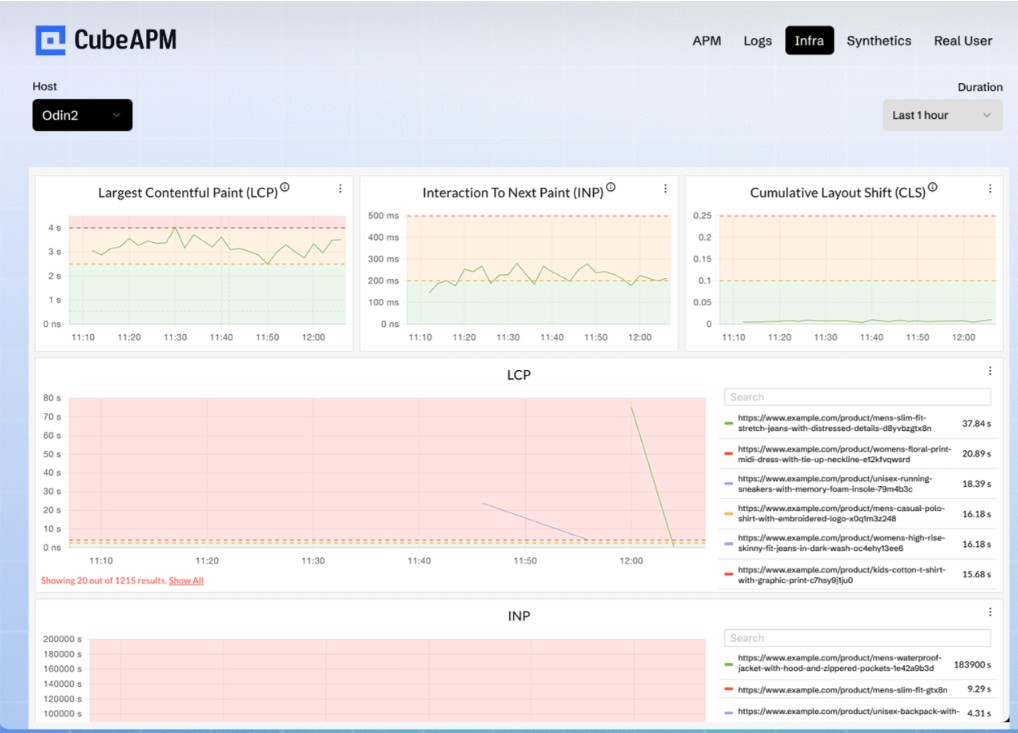
Real User Monitoring often becomes fragmented in practice. Many organizations bolt a frontend analytics-style tool onto a backend observability stack. The browser data lives in one system. Traces live in another. Logs sit elsewhere. Correlation requires manual pivoting across dashboards. That separation slows investigations and introduces data inconsistencies.
CubeAPM implements RUM as part of a unified observability pipeline rather than as a bolt-on feature.
Unified Frontend and Backend Correlation
CubeAPM treats the browser as the first span in a distributed trace. The RUM agent generates or inherits a trace identifier at navigation or interaction start. It propagates that identifier through outbound API calls using W3C trace context headers. Backend services continue the same trace without re-instrumentation. This architecture provides:
- Native trace context propagation support
- Browser spans linked directly to backend spans
- Full trace continuity from user interaction to database query
When investigating latency, teams can move from a slow Largest Contentful Paint event to the exact backend span that consumed time. There is no need to reconcile separate trace identifiers or rely on heuristic matching. Frontend telemetry becomes part of the same execution graph as backend services.
Native OpenTelemetry
CubeAPM supports OpenTelemetry natively for signal ingestion and trace propagation. Compatibility with W3C trace context ensures interoperability with modern service instrumentation. Backend services instrumented with OpenTelemetry can accept and continue browser-generated trace IDs without custom adapters.
Standardized signal ingestion allows:
- Metrics, logs, traces, and RUM events to flow into a unified pipeline
- Consistent attribute schemas across signals
- Correlated querying without cross-tool joins
This alignment prevents vendor lock-in at the instrumentation layer. Teams retain flexibility in how they instrument services while maintaining frontend-to-backend trace continuity.
Sampling and Data Control
Frontend traffic can scale unpredictably. Governance mechanisms must protect stability. CubeAPM provides session-level sampling controls that determine whether a session is captured at the start. Once selected, all associated events remain coherent.
Adaptive handling during traffic spikes allows ingestion rates to adjust dynamically. Error-heavy sessions or high-value routes can receive priority retention while background traffic is sampled more aggressively.
This approach balances:
- Diagnostic fidelity
- Infrastructure protection
- Cost predictability
Sampling decisions integrate directly with the ingestion pipeline rather than being managed in a separate frontend system.
Unified MELT Platform
CubeAPM supports full metrics, events, logs, and traces (MELT) signals. RUM sessions in CubeAPM are not isolated artifacts. They connect to:
- Distributed traces
- Backend logs
- Infrastructure and application metrics
A single investigation workflow allows teams to:
- Start from a degraded user session
- Pivot into the related trace
- Inspect service logs for error context
- Review metric anomalies for resource contention
There is no separate frontend vendor console to consult. There is no need to export trace IDs between systems. Unified pipeline architecture ensures that frontend signals participate in the same correlation engine as backend telemetry.
Deployment Model
CubeAPM operates as a self-hosted, vendor-managed platform. Organizations maintain control over data residency. Telemetry remains within approved infrastructure boundaries. This model supports compliance requirements in regulated environments.
There is no forced SaaS dependency. Teams that require strict network isolation or regional hosting constraints can deploy accordingly while retaining vendor operational support. Compliance-friendly architecture includes:
- Controlled data retention policies
- Configurable PII masking at ingestion
- Role-based access controls
RUM data remains subject to the same governance model as other observability signals.
Cost Predictability
CubeAPM has an ingestion-based pricing. Costs scale with actual data volume rather than abstract session definitions. There are no hidden multipliers tied to replay features. Because RUM flows through the same ingestion pipeline as other signals, cost visibility remains centralized. Teams can adjust sampling rates and retention policies within a single control plane.
Unified pipeline design also prevents duplicated storage across separate frontend and backend tools.
Unified Pipeline Instead of Bolt-On RUM
Many organizations add RUM as an afterthought. They end up with:
- Separate frontend dashboards
- Separate pricing models
- Separate ingestion endpoints
- Separate correlation logic
CubeAPM avoids that fragmentation.
RUM is not an external plugin. It is part of the core architecture. Browser telemetry enters the same processing system as traces and logs. Correlation occurs at ingestion time rather than through post-processing exports. This design eliminates:
- Separate frontend vendor contracts
- Manual trace stitching
- Disjoint retention policies
Full trace continuity, standardized ingestion, and unified governance allow Real User Monitoring to function as a structural component of observability rather than an isolated feature.
For organizations operating complex distributed systems, that architectural coherence reduces operational friction and shortens investigation cycles without adding additional tooling layers.
CubeAPM implements Real User Monitoring within a unified observability pipeline. Frontend user experience telemetry flows through the same ingestion, processing, and correlation system as backend metrics, logs, and traces. This helps browser-level signals to connect directly with backend service spans without requiring separate tooling, instrumentation, or integrations.
Conclusion
Real User Monitoring moves observability to where experience actually forms: the browser and device. Backend metrics and traces explain how systems execute. RUM explains how that execution feels to users under real conditions. In modern distributed architectures, that difference matters.
When RUM is correlated with distributed tracing, teams gain a complete view from click to database. They detect impact faster, diagnose root cause with confidence, and align engineering decisions with business outcomes. Observability becomes user-centered rather than infrastructure-centered.
Disclaimer: The information in this article reflects the latest details available at the time of publication and may change as technologies and products evolve.
Frequently Asked Questions (FAQs)
1. Is Real User Monitoring the same as Google Analytics?
No. Google Analytics focuses on user behavior for marketing and product insights, such as sessions, conversions, and traffic sources. Real User Monitoring focuses on technical performance data like page load time, Web Vitals, JavaScript errors, and API latency from the user’s perspective. RUM is built for engineering diagnostics, not marketing analytics.
2. Does RUM impact website performance?
Modern RUM implementations are lightweight and asynchronous. They use browser performance APIs and batched beacons to minimize overhead. When implemented correctly with sampling controls, RUM has negligible impact on page performance.
3. Can RUM work with single-page applications?
Yes. RUM tools track route changes, virtual page transitions, API calls, and interaction latency within SPAs. Instead of relying only on full page loads, they measure client-side rendering and navigation events, which are critical in modern JavaScript frameworks.
4. How does RUM integrate with OpenTelemetry?
RUM can propagate trace context using standards like the W3C traceparent header. This allows frontend spans to connect with backend traces collected through OpenTelemetry, enabling end-to-end visibility from browser interaction to downstream services.
5. Do I need RUM if I already have APM?
Yes. APM monitors backend service health and latency, but it cannot see browser-side issues such as layout shifts, client rendering delays, third-party script failures, or network variability. RUM complements APM by showing actual user impact.
6. How does RUM work in Kubernetes-based architectures?
RUM captures frontend performance data in the browser and links it to backend services running in Kubernetes through trace context propagation. When correlated with traces from pods and services, teams can map user-facing latency directly to specific microservices or infrastructure components.