









Most pod failures in Kubernetes do not start with the application itself. They start with init containers, which act as execution gates rather than helpers. With over 82% of organizations now running production workloads on Kubernetes, even small init failures can delay rollouts, cause downtime, and disrupt customer-facing services. These failures are rarely accidental. They are the result of assumptions about the filesystem that lapse during operations.
The root problem is sequential execution and blocking semantics. Init containers run one after another, and if any container fails, the application container never starts. Common patterns, config generation, dependency checks, database migrations, or permission setup expose teams to these early failures.
Init container failures are tricky. Sometimes they crash instantly; other times, they quietly stall services without an obvious reason. In one cluster, a missing config caused hours of wasted compute before anyone noticed.
What are Kubernetes Init Containers?
Kubernetes init containers are specialized containers that run sequentially before application containers in a Pod. They act as mandatory execution gates if any init container fails, the Pod never reaches Running state.
Where Init Containers Sit in the Pod Lifecycle
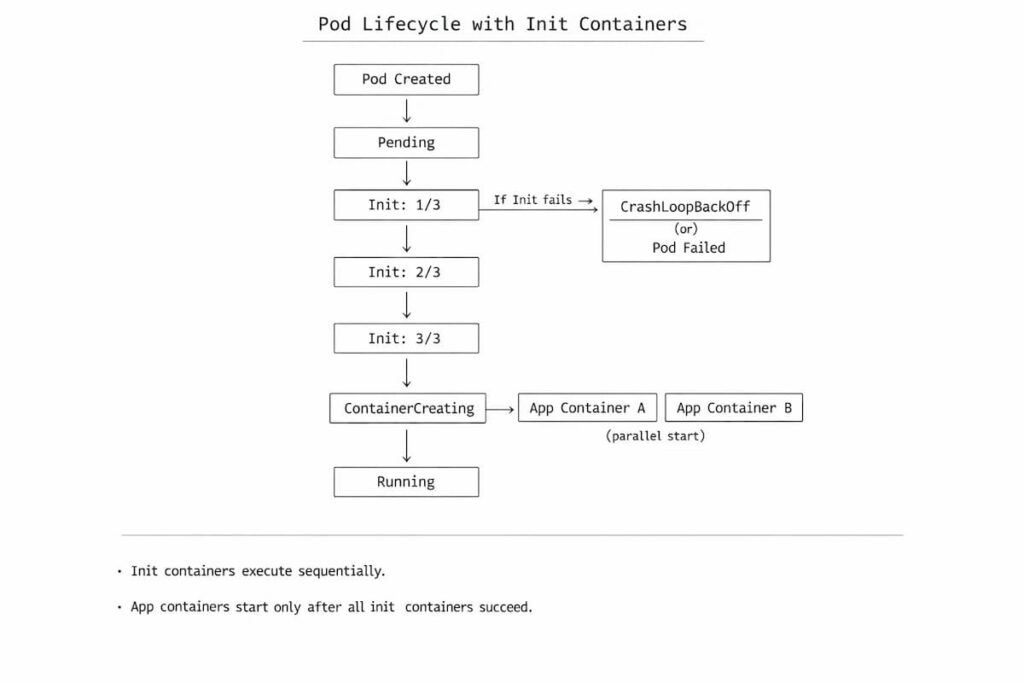
Init containers execute after a Pod is created but before any application containers are allowed to start. They are part of the Pod’s startup contract, not auxiliary helpers.
The authoritative sequence looks like this:
Pod creation → init containers (sequential) → application containers (parallel)
Pod creation → init containers → app containers
Pod creation starts with scheduling and resource allocation. From the outside, it can look like a straight path from request to execution. In practice, it rarely is.
Lifecycle authority and state transitions
From the control plane’s perspective, a Pod with init containers is still in Pending until all init containers complete. Kubernetes does not treat init containers as “optional setup.” They are mandatory gates.
You’ll typically see states like:
- Pending
- Init:0/2, Init:½
- ContainerCreating
- Running
The Init:X/Y status is not a separate lifecycle phase. It is Kubernetes exposing which init container is currently blocking the Pod while the Pod itself remains Pending.
Relationship to common Pod states
- Pending: This includes image pulls, scheduling, and all init container execution. A Pod can remain Pending forever if an init container cannot complete.
- Init:X/Y: This is Kubernetes surfacing init container progress, not a distinct lifecycle phase. It tells you exactly which init container is blocking startup.
- ContainerCreating: only shows up after every init container has finished successfully. If you never see ContainerCreating, the failure is almost certainly inside init logic or its dependencies.
- CrashLoopBackOff: The CrashLoopBackOff can happen in init containers too. When it does, Kubernetes keeps restarting the failing init container over and over, but the Pod never progresses. Application containers never start, and the Pod never reaches Running.
Why many failures never reach Running
Init container failures occur before application initialization, causing pods to stall early in the lifecycle. The system looks incomplete rather than broken, which is why these failures are often overlooked or incorrectly attributed.
Common Init Container Failure Modes
Once you understand where init containers fit into the pod lifecycle, a different problem emerges: spotting when they go wrong. That’s harder than it sounds.
Init container failures are rarely obvious. They don’t show up as clean error messages or loud alerts. More often, they look like pods that never progress, deployments that stall halfway through, or outages that happen without much explanation.
The sections that follow break down the failure patterns teams run into most often in real production environments.
Image pull failures
Init containers fail immediately if their images cannot be pulled. Image-related issues are often the first blocker. A missing tag, a broken image reference, expired registry credentials, or even node-level bandwidth limits can prevent execution before the pod ever moves forward. Nothing else gets a chance to run.
Script or command exit failures
Script and command failures come next, and they’re usually unforgiving. Init containers stop immediately when a shell script or entrypoint exits with a non-zero status. Sometimes the problem is easy to spot a missing binary or an incorrect path will stop the container immediately. Other times, it’s trickier. A subtle logic error, a failed condition, or an edge case in the startup script can quietly halt progress without obvious warnings.
Missing ConfigMaps or Secrets
Configuration dependencies create another class of issues. If an init container expects a ConfigMap or Secret that isn’t there yet, is misnamed, or hasn’t fully propagated, it will fail quickly. Because this happens before the application containers even start, these failures are easy to misinterpret at first glance.
Permission and filesystem errors
Permissions and filesystem issues round out the list. Incorrect volume ownership, read-only mounts, or overly restrictive security contexts can all cause init containers to fail while trying to write files or adjust permissions. These failures are frequent, but rarely obvious at first glance.
Dependency checks that never pass
Some init containers fail simply because they keep waiting. Dependency checks are written to block until a database, API, or downstream service becomes reachable
Network or DNS unavailability
Network and DNS issues cause a different kind of failure. Name resolution might break for a few seconds. Outbound traffic may stall under saturation. In other cases, a misconfigured CNI plugin is the root cause. Init logic that depends on stable networking tends to surface these problems early, but not always consistently
Why Init Container Failures Are Hard to See
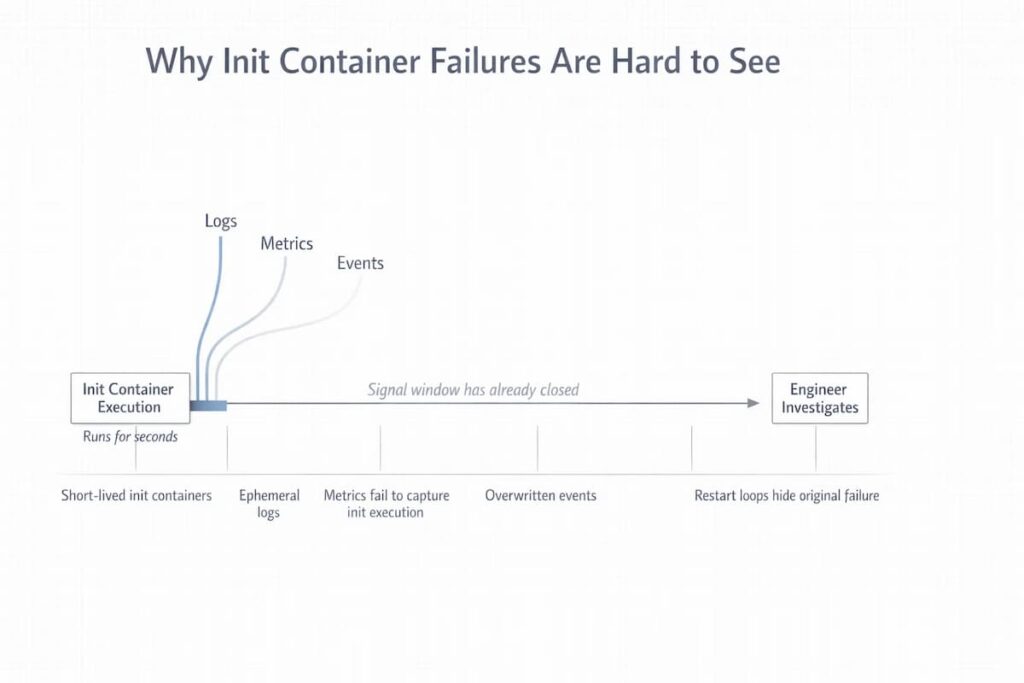
By the time engineers notice that something is off, the trail is usually cold. The signals that mattered most have already disappeared. Init containers tend to fail early, run for a very short window, and leave almost nothing behind once they exit. This creates a visibility gap. It’s not an obvious one, either. Standard Kubernetes workflows and most observability tools built around them, simply aren’t designed to capture what happens in that narrow slice of time.
Init containers are short-lived
Some init containers run for only a few seconds before exiting. If they fail during that window, there’s little opportunity to inspect what actually happened. When they fail, their execution window is so narrow that many monitoring systems never record their behavior in a meaningful way.
Logs disappear quickly
Init container logs are ephemeral. During retries or pod restarts, earlier logs are easily overwritten or lost, especially if log retention is tuned for long-running application containers rather than transient startup logic.
Metrics usually don’t capture init execution
Most metrics pipelines focus on steady-state workloads. Init containers often start and finish before scrape intervals trigger, which means failures occur without leaving behind measurable time-series data.
Events are easy to miss or overwritten
Kubernetes events can add helpful context when something goes wrong. The problem is that they don’t last. During rapid failures or restart loops, older events are quickly replaced. What remains is usually the latest symptom, not the first signal that explained why the failure started in the first place.
Restart loops hide the original failure
When an init container fails, Kubernetes does what it’s designed to do and retries it. Over and over. With each attempt, attention shifts toward the restart behavior itself. Meanwhile, the condition that caused the very first failure becomes harder to trace, and in some cases disappears entirely from view.
How Init Container Failures Manifest in Kubernetes
Init container failures are easy to miss because they don’t fail loudly. Kubernetes exposes them indirectly, through state transitions and stalled behavior. If you only look for crashes or stack traces, you miss them. The signals show up earlier, and they look unfinished rather than broken.
- Pod stuck in Init:X/Y: The pod starts, but progress stops. One init container fails, Kubernetes retries it, and the pod stays exactly where it is. No handoff happens. Nothing progresses.
- Pod never transitions to Running: The pod gets scheduled and shows up as expected, but nothing starts. No application containers. From the outside, it just sits there, doing nothing.This keeps the signal clear while sounding more like how engineers actually describe the issue.
- Repeated restarts during deployment: Rollouts make this worse. Several pods encounter the same init failure, retries accumulate, and the rollout stalls. There may be no single error to point at, just a slow, uneven rollout.
- “Application down” with no app logs: Alerts fire, traffic drops, and there are no application logs to inspect. The application never started. The failure lives entirely in pod state and events.
Infrastructure-Level Causes Behind Init Container Failures
Once pod-level symptoms are visible, it becomes tempting to focus entirely on the init container image or its startup logic. Many init failures originate outside the container boundary. They are triggered by resource pressure and infrastructure conditions on the node itself. Understanding these causes requires shifting attention from container configuration to the environment in which the container is running.
- Node CPU pressure delaying init execution: When the nodes are busy, init containers may technically start but make very little progress. CPU starves and stretches execution time.
- Memory pressure causing early OOM kills: Memories that are under pressure forces init containers to target OOM killer. They execute early, have no steady-state footprint, and often lack tuned memory limits. The result is abrupt termination with little context left behind.
- Disk pressure blocking image extraction: Disk pressure surfaces before containers ever run. Image layers fail to extract, volumes fail to mount, and init containers never reach their entrypoint. During large rollouts, this failure mode becomes increasingly common.
- Network saturation breaking dependency checks: Init containers frequently depend on outbound network access. During periods of network congestion, DNS lookups slow down, service endpoints time out, and dependency checks fail despite healthy downstream systems.
- Registry pull delays due to node-level bandwidth limits: Even when registry credentials are correct, node-level bandwidth constraints can delay or fail image pulls.
Using Infrastructure Metrics to Debug Init Container Issues
Init container failures rarely leave behind useful pod-level signals. Logs are short-lived, events are overwritten, and metrics often miss execution entirely. In these situations, node-level infrastructure metrics become the only reliable way to understand what happened. CubeAPM shift the focus away from stalled pods and toward the conditions on the node at the moment init execution began. The questions below are the ones infrastructure dashboards are uniquely positioned to answer.
Are failures isolated to a specific node?
CubeAPM makes it obvious when init container failures keep landing on the same node or within the same node pool. That pattern is important. When failures concentrate in one place, the problem is usually pressure on the node itself, not a broken init script or image.
Is memory pressure increasing during deploys?
Memory pressure rarely spikes all at once. It creeps up during rollouts as new pods are scheduled and images are pulled. With CubeAPM’s time-series views, you can see that buildup happening across nodes and line it up with the moment init containers start getting killed for memory.
Are disk usage or inode limits near eviction thresholds?
Disk and inode metrics often move slowly until they don’t. Watching disk usage and inode counts over time makes certain failures predictable. As nodes fill up, image extraction slows down, volume mounts start failing, and init containers stall before they ever run. CubeAPM shows this progression clearly enough that teams can spot the risk before Kubernetes starts evicting pods or retrying init containers.
Do init failures correlate with network spikes?
Network-related init failures almost never happen in isolation. They show up during bursts of outbound traffic, DNS delays, or packet loss. With CubeAPM’s network timelines, it becomes easier to line those spikes up with init execution and see why dependency checks suddenly stop passing.
Across all these cases, the difference is temporal context. Time-series infrastructure metrics explain why failures happen, not just when they are noticed. Infra signals surface earlier than pod failures, which is why infrastructure-first observability shortens resolution time for init container issues.
Step-by-Step Debugging Flow for Init Container Failures
Failing init containers can be surprisingly difficult to diagnose. Quick attempts to fix them, like redeploying or checking images, often don’t uncover the real cause. It helps to look at the earliest signs first. Start small, follow what the evidence shows, and let each finding guide the next step.
Check pod events first (kubectl describe)
Begin by checking pod events with kubectl describe. These events often show the first hints failed image pulls, permission issues, or mount problems, long before logs or metrics give any clear answers. Image pull issues, volume mount failures, scheduling delays, and permission errors often show up here long before logs or metrics provide anything actionable.
Inspect init container logs explicitly
Init container logs must be queried directly. Default log commands often target application containers, which may not exist. Reviewing init logs early helps confirm whether execution started and where it stopped.
Identify which node the pod is scheduled on
Knowing the node matters. Many init failures correlate with specific nodes rather than workloads. The first step is knowing exactly which node the pod landed on. Node context matters. Sometimes, just this information explains why a pod stalls or behaves unpredictably.
Correlate with node resource pressure
CPU, memory, disk, and network usage on the node all influence whether an init container completes successfully. Look at these metrics during the period when the failure happened. Even minor CPU spikes, memory pressure, or a nearly full disk can cause timeouts or kill containers without warning. These issues are subtle. They rarely show up as clear errors, but their impact is immediate.
Validate image pulls, secrets, and network reachability
At the same time, confirm the basics: can the container images be pulled without issues? Are secrets present and correct? Can the node reach the services or APIs the init container depends on? Missing or misconfigured dependencies are often overlooked, yet they account for many early failures.
Reproduce init logic outside the cluster if needed
When the node looks normal, run the init container commands outside the cluster. This often shows whether the failure comes from the container itself or the cluster environment.
Init Containers vs Sidecars: A Common Design Mistake
Init containers run a single time and finish before the application starts. Putting ongoing tasks into them is risky. Pods may hang, and small errors can quickly escalate. Sidecars handle continuous work much better, they run alongside the app without blocking startup and make pod behavior more predictable.
- Why teams overload init containers: Some teams cram multiple setup steps into one init container. The problem is, if one step fails, the whole pod waits. Figuring out what went wrong becomes slower, especially when a bunch of pods start at the same time.
- Long-running setup logic breaking init semantics: When scripts, migrations, or watchers take too long, the pod can get stuck, and other operations in the deployment may be delayed. This goes against Kubernetes’ lifecycle design and makes errors more likely to appear.
- When sidecars are the correct pattern: Anything that needs to run continuously like logging, monitoring, or dynamic updates should go in a sidecar. They run alongside the application without holding up pod startup and let init containers stick to short, one-off setup tasks.
- How misuse increases failure risk during scaling: Overloaded init containers multiply problems during rollouts. Multiple pods fail at once. Retry loops multiply. Cluster resources get strained. Small mistakes quickly become large disruptions.
Init Containers During Deployments and Scale Events
Rollouts and scale events tend to surface issues that stay hidden in quieter environments. Development clusters rarely apply the same pressure. Everything starts at once in production, and timing suddenly matters. What looks like a slow startup can actually be an early failure signal.
Why init containers fail only during rollouts
Deployments trigger many pods to initialize at the same moment. Node resources that felt abundant minutes earlier are now shared. Init logic that works when running alone may stall or exit under contention. The failure is real, even if it only appears at scale.
Dependency checks failing during autoscaling
Autoscaling changes the shape of the system while pods are starting. Services move, endpoints update, and some dependencies briefly fall out of reach. Init containers that expect a stable environment can hang or fail during this window. The check itself isn’t wrong. The timing is.
Node pressure spikes during deployments
Deployments concentrate load in short bursts. CPU spikes first, then memory and disk follow. Network traffic climbs as images pull and dependencies are contacted. Init containers are often the first to feel that pressure. Nodes under pressure can delay or terminate init containers. These failures are environmental rather than logical.
Cluster churn amplifying init instability
Clusters are rarely still during deployments. Pods get rescheduled, nodes rotate, and evictions happen mid-startup. Each disruption shifts timing just enough to matter. What starts as a minor delay can spread across the rollout.
Observability Gaps Around Init Containers
Init containers run fast and often fail before anything else starts. Monitoring tools are built for longer-lived processes. They often miss problems that appear early. Without clear signals, tracing a failure back to its real cause can become tricky. Focusing on infrastructure-level visibility makes these problems easier to spot and understand.
Init containers lack:
- Traces: Init containers run and finish so quickly that most tracing tools never see them. Because there are no spans, it’s difficult to understand the sequence of actions or identify exactly where a failure occurred.
- Long-lived metrics: Short-lived containers rarely produce persistent metrics. CPU, memory, and network usage can go entirely unrecorded while the init container executes.
- Correlated logs: Logs exist only while the container is running. When it exits or restarts any context it held disappears unless specifically saved. Without persistent links, errors remain isolated and disconnected from other system events.
Failures inferred indirectly
Init container failures rarely appear as direct errors in dashboards. Instead, teams infer them from stalled pod states, repeated restarts, missing application logs, or delayed rollouts. The actual failure often happened seconds earlier inside a short-lived container that has already exited. What remains are symptoms, not the original cause.
Debugging becomes timeline reconstruction across infra + events
Figuring out what went wrong usually requires piecing together information from multiple sources. You often have to look across infrastructure, logs, and events to see the full picture. Logs, node metrics, and pod events must be stitched together manually. The process takes time and mistakes are easy to make. Each detail matters to figure out the true cause. It’s a clear example of why having infrastructure-first visibility is so valuable for short-lived init containers.
What Good Init Container Monitoring Should Cover
Short-lived and early-starting, init containers can slip under the radar. Failures by themselves offer little insight. What really matters is context: how the container ran, what it touched, and how it fit into the environment. A good monitoring setup collects these signals and holds onto them long enough to uncover the root cause.
- Visibility into init execution duration: How long a container runs tells a story. Sometimes it’s a delay, sometimes a blocked dependency, or perhaps resource contention
- Capturing clear failure reasons: Logs and events should record exactly why a container failed. Exit codes, script errors, or configuration problems need to stay available, even after restarts.
- Correlation with:
- node pressure: Containers often fail not because of application logic, but because the underlying node is under stress. High CPU, memory exhaustion, disk pressure, or network saturation can introduce timeouts or force early termination even when the container itself is healthy.
- image pulls: Image pulls can also trip up init containers. Delays or failed pulls often stop a container in its tracks. Watching these events alongside node activity gives teams the full picture. Linking these events to pod scheduling improves root cause analysis.
- deployment events: Rollouts, scaling actions, and updates can increase contention on nodes and init containers. Understanding when these events occur makes it easier to separate infrastructure-induced failures from logical or configuration errors.
- Retention of short-lived logs
Logs from init containers must be kept long enough to investigate, even if containers restart multiple times.
Why Infrastructure-First Observability Helps With Init Containers
Often, init container failures show up first in the infrastructure, not in the pod. Nodes may strain, networks may lag, and clusters can behave unpredictably. Application-focused monitoring rarely catches these early signs. Observing node, network, and cluster metrics together makes it possible to detect issues and act before a pod goes down.
- Init failures often originate below the pod: Problems like CPU contention, memory pressure, disk limits, or network saturation can make init containers fail. These issues appear before the main application containers even start. That means pod-level logs alone often aren’t enough to find the true cause.
- Infrastructure telemetry must stay available during deploys: Nodes and clusters experience stress during rollouts. Keeping telemetry intact lets engineers understand what caused failures, rather than finding out only after pods have already stalled.
- Node-centric views expose failure patterns early: Looking at nodes directly often exposes problems sooner. Sometimes, patterns hide when you only look at the system as a whole. Sudden spikes in pressure or recurring bottlenecks can slip by unnoticed. Checking each node individually makes it easier to see whether a problem is contained or affecting the entire system. That insight allows for faster, more targeted action.
- Self-hosted / BYOC models keep visibility deterministic during incidents: Third-party monitoring can fail when networks go down or services hiccup. That creates blind spots at exactly the wrong time. Running your own telemetry or bringing your own collector keeps visibility consistent. Even under heavy cluster stress, teams can see what’s happening and respond promptly.
How CubeAPM Improves Visibility Into Init Container Failures
Init containers run before application containers and often fail silently, leaving Pods stuck in early states like Init:X/Y, Pending, or ContainerCreating without ever reaching Running. Many monitoring tools show high level events but do not expose the full execution sequence or precise failure reason.
CubeAPM correlates Pod lifecycle events with infrastructure telemetry and traces, making the init container execution order, exit codes, and error logs clearly visible. Engineers can quickly determine whether the failure is caused by image pull errors, configuration issues, resource constraints, or unavailable dependencies. By presenting these signals in a unified timeline view, CubeAPM reduces troubleshooting time and helps resolve startup blockers before they affect service availability.
Conclusion
In Kubernetes, init containers run first. Failures often appear out of nowhere. They stop before the main app even starts, leaving almost nothing behind. To debug, you need to see their role in the pod lifecycle. Spot problems early. Otherwise, small hiccups can escalate into serious outages.
Many failures trace back to the infrastructure itself. CPU spikes, memory pressure, disk limits, or network congestion can throw startup off. The application containers might not even get a chance to run. Catching these problems early saves a lot of time later. Metrics focused on individual nodes, along with time-series trends, give teams the context they need to respond proactively.
Disclaimer: The information in this article reflects the latest details available at the time of publication and may change as technologies and products evolve.
FAQs
1. What are init containers used for in Kubernetes?
Init containers exist to do setup work that must finish before your app starts. Not “nice to have” work. Mandatory stuff. Things like waiting for a database to respond, pulling config from another service, running migrations, or checking that secrets exist. If an init container does not finish successfully, Kubernetes will not even try to start the application containers.
2. When exactly do init containers run in the Pod lifecycle?
They run after the Pod is created but before any application container starts. While init containers are running, the Pod stays in Pending. You will usually see statuses like Init:1/2 instead of Running. Only after every init container exits successfully does Kubernetes move on to creating and starting the app containers.
3. Why do Pods get stuck in Pending because of init containers?
Because Kubernetes treats init containers as a hard gate. If an init container crashes, retries, or waits forever on something external, the Pod never advances. No app containers start. No readiness checks run. From the outside, it just looks like a Pod that never comes up, even though the real failure already happened during initialization.
4. Can init containers cause CrashLoopBackOff?
Yes, and this confuses a lot of people. Init containers can crash and restart just like normal containers. When that happens, the Pod stays in Pending and Kubernetes keeps retrying the init container. Since the app containers never start, it often looks like “nothing is happening,” even though the init container is crashing repeatedly.
5. How do you debug init container failures in practice?
You don’t start with dashboards. You start with the Pod.
kubectl describe pod tells you which init container is blocking startup.
Then you check logs directly from that init container. That’s usually where the real error is. Init container failures almost always show up in events and logs, not in application-level monitoring.