









AWS monitoring sounds straightforward at first. You spin up Amazon EC2, Lambda, RDS, EKS, and a few supporting services, then assume the built-in dashboards will tell you what is happening. In practice, it gets messy fast. As workloads spread across containers, serverless functions, managed databases, and APIs, it becomes much harder to see performance clearly from one place.
That is where AWS monitoring becomes more than just watching CPU or setting a few alarms. Teams need visibility across metrics, logs, traces, and infrastructure events together. Without that, it’s hard to tell what actually changed. A spike in latency on its own doesn’t explain much unless you can tie it back to logs, a failing dependency, or a specific part of the request path.
This guide breaks down how AWS monitoring works, which tools teams use, the most important metrics to watch, and the best practices that make troubleshooting easier as environments grow. It also looks at where native AWS tools help, where they fall short, and how modern observability platforms like CubeAPM fit into the picture.
What Is AWS Monitoring?
AWS monitoring is the practice of tracking the health, performance, and behavior of workloads running in Amazon Web Services. It gives teams the visibility needed to detect issues early, investigate failures, and maintain performance across infrastructure, applications, databases, containers, and serverless services.
In smaller environments, that can mean tracking a handful of metrics and setting a few alerts in Amazon CloudWatch. In larger systems, it usually goes much deeper. A single customer request might move through a load balancer, hit a containerized app, call a Lambda function, query a database, and depend on a queue or third-party API along the way. Monitoring that kind of setup takes more than a dashboard with CPU graphs.
Core AWS monitoring signals usually include:
- Metrics for resource utilization, latency, throughput, and errors
- Logs for event-level detail from applications and cloud services
- Traces for request flow across distributed systems
- Alerts for identifying and responding to abnormal conditions
How AWS Monitoring Works
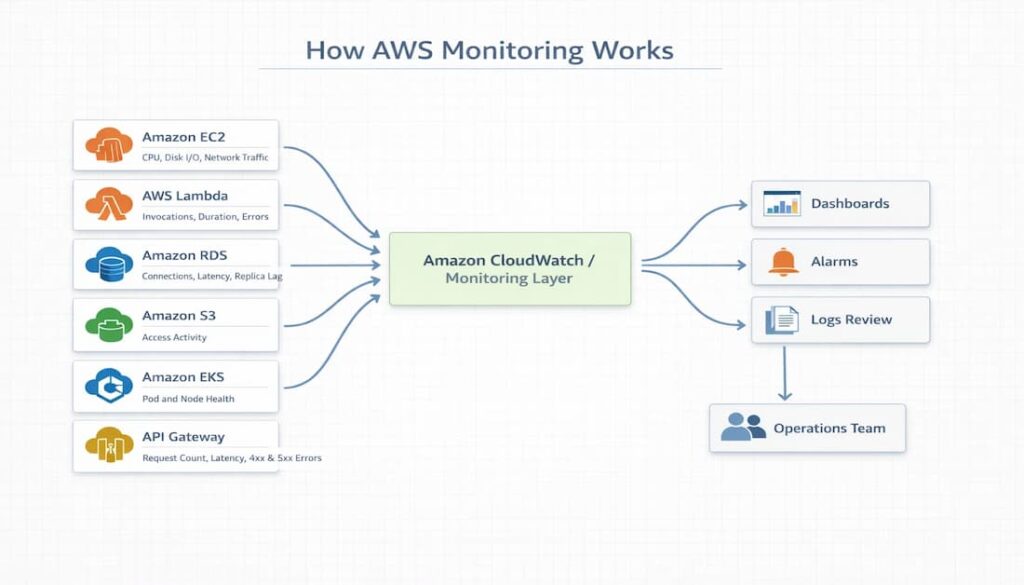
AWS monitoring works by collecting metrics and logs from AWS services and sending that data to a monitoring layer such as Amazon CloudWatch. Teams then rely on dashboards, alarms, and notifications to monitor service health and respond when performance moves outside expected thresholds.
Typical flow:
- AWS services such as EC2, RDS, Lambda, EKS, and Elastic Load Balancing produce the metrics and logs used for monitoring
- Amazon CloudWatch brings that information together in one place
- Dashboards help teams review system health and performance trends
- Alarms flag conditions that move outside expected limits
- Notifications make sure the operations team is informed and can respond quickly
The main signals collected in AWS monitoring include:
- Metrics for CPU, memory, latency, throughput, error rates, and connection counts
- Logs for application activity, system events, access records, and failure messages
- Traces for following requests across service dependencies
- Events for configuration changes, scaling actions, deployments, and other state changes
Monitoring vs Observability in AWS
Monitoring and observability support the same goal, but they solve different problems. In AWS, monitoring is mainly about watching for known issues through metrics, dashboards, and threshold-based alerts. Observability comes into play when teams need to dig deeper and understand why a problem happened across multiple services, dependencies, and request flows. Monitoring tells you something is wrong. Observability helps you work out where it started and what is driving it.
| Aspect | Monitoring in AWS | Observability in AWS |
| Primary focus | Tracking known conditions | Investigating complex system behavior |
| Main approach | Dashboards, metrics, and threshold alerts | Correlating telemetry across services |
| Typical questions answered | Is CPU too high? Did latency cross a threshold? Is the service available? | Why is latency rising? Which dependency failed? Where did the request slow down? |
| Common signals | Metrics, logs, alarms | Metrics, logs, traces, events |
| Best fit | Routine performance tracking and alerting | Troubleshooting distributed systems |
| AWS-related examples | CloudWatch dashboards, CloudWatch Alarms | OpenTelemetry, distributed tracing, root cause analysis |
Core Signals Used in AWS Monitoring
AWS monitoring depends on a few core signals to measure performance, surface issues, and track how systems are behaving. Each one shows a different part of the picture, which is why teams usually rely on them together.
Metrics
Metrics capture numerical values that reflect system performance and resource usage over time. They include signals such as CPU utilization, memory usage, request rate, latency, error rate, and database connections. In AWS, services like EC2, RDS, Lambda, and API Gateway continuously emit metrics that are used for dashboards, trend analysis, and threshold-based alerts.
Logs
This constitutes application logs, VPC Flow Logs, CloudTrail logs, and Lambda execution logs. Teams usually centralize this data in tools like CloudWatch Logs so it can be stored, searched, and reviewed through a log ingestion pipeline that pulls records from multiple sources into one place.
Traces
Traces map the path of a request as it moves through different services, making it easier to see how components interact during execution. They are especially useful in distributed environments where a single request may pass through APIs, compute services, and databases before completing.
Events
Events help explain sudden changes in system behavior. Changes can emanate from a new feature release, autoscaling activity, or configuration updates. In AWS, events are from EventBridge, CloudTrail, and Auto Scaling.
Significance of Correlating Signals
Metrics help you spot performance trends over time. Logs give you the detailed record when something goes wrong. Traces show how a request moved across services, which makes debugging much easier in distributed systems. Events add the missing context by showing what changed, whether that was a deployment, a scaling action, or a config update.
Key AWS Services Used for Monitoring
For most teams, Amazon CloudWatch is where AWS monitoring starts. It is the built-in monitoring service that helps you track metrics, collect logs, build dashboards, and set alarms across AWS resources.
Capabilities:
- Collects metrics from services such as EC2, RDS, Lambda, and EKS
- Brings logs together through CloudWatch Logs
- Let’s have teams build dashboards to watch performance trends
- Supports alarms that trigger when thresholds are crossed
Limitations:
- Metrics, logs, and other signals can still feel split across different views
- Costs can climb as log ingestion, storage, and query volume increase
AWS X-Ray
AWS X-Ray is used to trace requests as they move through an application, making it easier to see how different services interact during execution. It helps teams understand where time is being spent and where failures occur, especially in distributed systems.
Tracks:
- Request latency across services
- Service dependencies and call relationships
- Error paths and failure points
AWS CloudTrail
AWS CloudTrail keeps a record of activity across your AWS environment, especially actions taken through the AWS API. It helps teams see who made a change, when it happened, and where it came from, which makes it useful for auditing, security reviews, and understanding operational changes that may affect system behavior.
Tracks:
- API calls made across AWS services
- User and role activity, including who performed an action
- Timestamps, source IP addresses, and request details
- Configuration and operational changes
AWS Config
AWS Config helps teams keep track of how AWS resources are set up and how those configurations change over time. It is useful when you want to understand how infrastructure has changed, catch configuration drift, or check whether resources still match internal rules and policy requirements.
Tracks:
- The current configuration state of AWS resources
- Changes made to resource settings over time
- Relationships between related resources
- Compliance against defined rules and policies
Key Metrics to Monitor in AWS Environments
Infrastructure metrics
Infrastructure metrics show how the underlying compute, storage, and network resources are holding up. In AWS, that usually means tracking CPU utilization, memory usage, disk I/O, disk queue length, and network throughput on services such as Amazon EC2. Notably, infra metrics help teams spot resource bottlenecks, unusual traffic patterns, and early signs that an instance is starting to struggle.
Application metrics
Application metrics show how a workload is performing from the service side. Teams usually watch things like request rate, latency, throughput, and error rate. In AWS, these metrics are especially useful for API Gateway, Lambda, load balancers, and applications running on EC2 or EKS because they help surface slowdowns and rising failures before they turn into bigger problems.
Database metrics
Database metrics show how well backend data services are keeping up as demand changes. In Amazon RDS and similar services, teams often track CPU usage, database connections, read and write latency, disk queue depth, and replica lag. These signals make it easier to spot growing query pressure, slower storage performance, or replication starting to fall behind.
Kubernetes metrics
Kubernetes metrics help teams understand the health and stability of workloads running on Amazon EKS. Common signals include pod CPU and memory usage, node pressure, container restarts, and overall cluster behavior. They are useful for catching instability early and helping teams figure out whether the problem starts in the application, the container, or the cluster itself.
Monitoring Architecture in AWS
Native AWS Monitoring Architecture
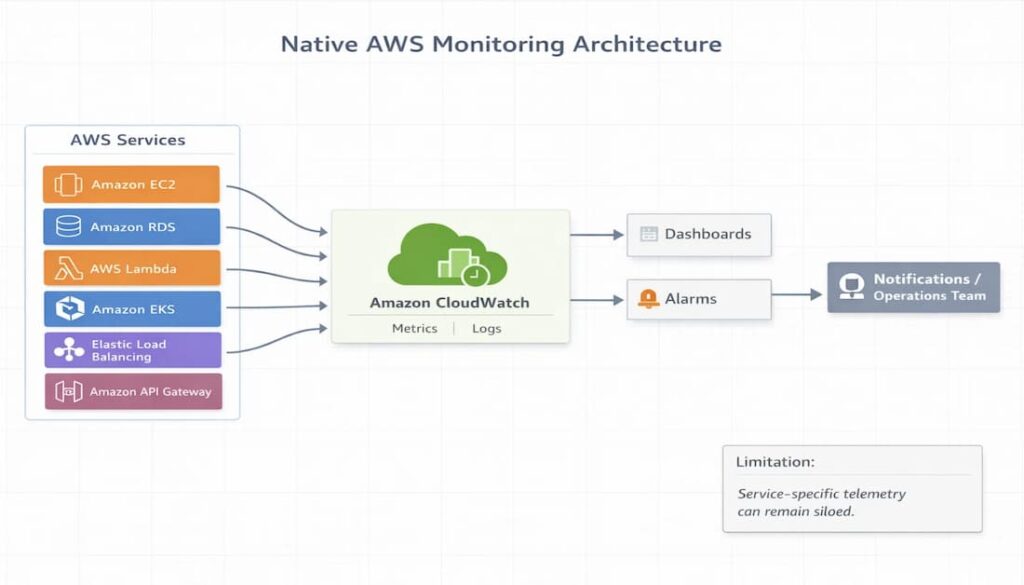
In a typical AWS setup, telemetry flows from services into CloudWatch, where it is used for dashboards and alarms.
Flow:
- AWS services generate metrics and logs
- Data is sent to Amazon CloudWatch
- Dashboards display system health and trends
- Alarms trigger when thresholds are crossed
Limitations:
- Telemetry is often tied to individual AWS services rather than a unified view
- Signals can feel fragmented across metrics, logs, and different tools
OpenTelemetry-Based Monitoring Architecture
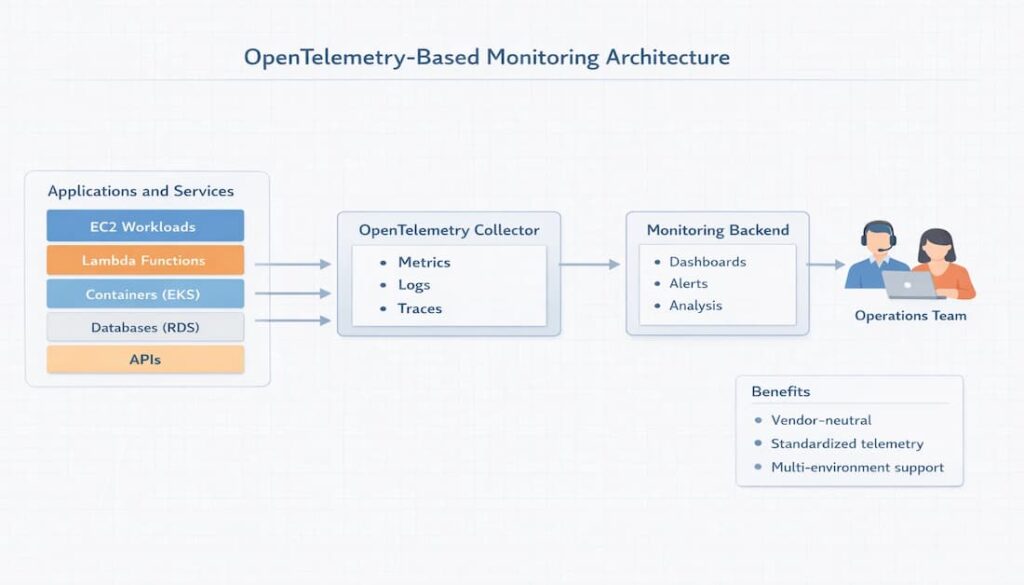
An OpenTelemetry-based setup gives teams more flexibility in how monitoring data is collected and routed.
- Applications and services generate metrics, logs, and traces.
- OpenTelemetry collectors receive and process that data.
- The telemetry is then forwarded to a monitoring backend.
- Dashboards, alerts, and analysis happen there.
Benefits:
- Vendor-neutral approach that helps avoid lock-in
- Consistent telemetry format across services and environments
- Easier to combine data from AWS and non-AWS systems
AWS Monitoring Tools
Most teams keep tabs on their AWS environments using a mix of built-in services and third-party tools, depending on how much visibility they need. The native AWS tools are perfectly adequate for basic monitoring, particularly in environments that are entirely AWS-based. However, as systems become more complex and distributed, teams frequently turn to external platforms to gain a clearer understanding across all their services and environments.
Native AWS Monitoring Tools
AWS includes several built-in services for monitoring infrastructure, applications, and account activity:
- Amazon CloudWatch for metrics, logs, dashboards, and alarms
- AWS CloudTrail for tracking API activity and account-level changes
- AWS X-Ray for tracing request flow across services
- AWS Config for tracking configuration changes and compliance
- Amazon EventBridge for capturing and routing operational events
These tools integrate closely with AWS services, which makes them easy to get started with. In practice, though, they are usually used together rather than as a single unified monitoring system.
Open-Source Monitoring Tools
Open-source tools are often used by teams that want more control over how monitoring is deployed, customized, and managed. They are especially common in Kubernetes-heavy environments and in setups where teams prefer to build their own monitoring stack rather than rely entirely on a managed platform.
Common examples include:
- Prometheus, which gathers and queries metrics.
- Grafana, used for dashboards and visualization.
- OpenTelemetry, a tool for collecting and standardizing telemetry data.
- Jaeger, employed for distributed tracing.
Third-Party AWS Monitoring Tools
Many teams add third-party tools when they need deeper visibility than native AWS services provide. This is especially common in environments that run across multiple AWS services, Kubernetes clusters, hybrid infrastructure, or more than one cloud. These platforms often make it easier to connect metrics, logs, traces, and alerts in one place.
Common examples include
- CubeAPM
- Datadog
- Dynatrace
- New Relic
- Grafana
- Prometheus
Teams usually bring in these tools when they want stronger cross-service visibility, more flexible dashboards, or broader coverage beyond AWS alone.
Best Practices for AWS Monitoring
Monitor the right metrics
Keep an eye on the right metrics. Concentrate on Service Level Indicators (SLIs) and Service Level Objectives (SLOs) that truly represent the health of your service. In the typical AWS setup, this often means closely monitoring latency, error rates, and availability. Doing so allows teams to quickly identify problems that impact users directly.
Centralize logs and metrics
Simplifies monitoring, which can be a real challenge when data is spread thin across various services and perspectives. A more unified approach to handling logs and metrics streamlines the process, making it simpler to spot patterns, troubleshoot problems, and minimize the fragmentation that can otherwise plague an environment.
Use distributed tracing
Distributed tracing helps teams follow requests across microservices and understand how different services interact during execution. This becomes especially useful in AWS setups that rely on APIs, Lambda functions, containers, and databases working together.
Automate alerts and incident response
Alerts should not stop at detection. A stronger setup connects monitoring signals to notification and response workflows so the right people know about issues quickly and can act before they escalate.
Alerting tools often include:
- CloudWatch Alarms
- PagerDuty
- Opsgenie
Monitor cost alongside performance
Performance visibility also has a cost side. As telemetry volume grows, ingestion, storage, and analysis can become more expensive, so it is important to watch observability costs alongside service health and performance.
Challenges of Native AWS Monitoring
Native AWS tools work well for basic monitoring, but they can become harder to manage as systems grow more complex and distributed.
Fragmented telemetry across services
A native AWS setup often spreads monitoring signals across several services and interfaces. Because metrics, logs, and events are not always surfaced together, teams may have to move between multiple views before they can understand what is happening across the environment.
Complex dashboards
Growth usually makes dashboards harder to work with, not easier. As new services are integrated, teams often end up managing intricate dashboards. This necessitates a manual effort to compile data to understand the system’s health.
High ingestion costs for logs
Log volume can grow quickly, especially in high-traffic environments. Since pricing is tied to ingestion and storage, costs can increase significantly as more data is collected.
Limited cross-service correlation
Clear relationships between signals are not always easy to see across AWS services. When a single problem impacts multiple components, teams often require additional digging to trace the issue’s path through the system.
Difficult root cause analysis in microservices environments
In microservices architectures, pinpointing the origin of a problem can be a time-consuming task. When signals lack a robust correlation, teams may encounter difficulties in tracking down issues that span numerous services and their interconnected dependencies.
Modern Approach: Unified Observability for AWS
As AWS environments expand, a growing number of teams are evolving past simple monitoring. They’re embracing a more integrated observability strategy. This transition often occurs when metrics, logs, and traces become dispersed across numerous tools. As a result, the process of identifying problems becomes more complex, and understanding how services interact becomes more difficult.
Capabilities that teams frequently seek encompass:
- The consolidation of metrics, logs, and traces within a single interface;
- OpenTelemetry compatibility;
- Kubernetes monitoring capabilities;
- Extended telemetry retention periods;
- AI-driven root cause analysis.
Monitoring AWS with CubeAPM
As AWS environments expand, teams frequently desire a more streamlined approach to integrating metrics, logs, and traces, avoiding the complexities of multiple disparate tools. CubeAPM addresses this need by offering a unified platform, enabling teams to monitor AWS workloads with reduced fragmentation and enhanced contextual understanding during troubleshooting.
CubeAPM is designed to give a single view across infrastructure, applications, and services, so teams can move from detection to investigation without switching between tools.
Unified telemetry pipeline
Instead of handling each signal separately, CubeAPM brings metrics, logs, traces, and events into one platform. This makes it easier to connect what changed with why it happened, especially in distributed AWS environments.
- Metrics for performance and resource usage
- Logs for detailed system and application activity
- Traces for request flow across services
- Events for operational changes and context
OpenTelemetry-native ingestion
Telemetry collection is built around OpenTelemetry, which makes it easier to work across modern AWS workloads without relying on service-specific agents.
Works with:
- Amazon EKS and Kubernetes workloads
- AWS Lambda and serverless functions
- Amazon EC2 and virtual machines
- containerized applications
Smart sampling
High telemetry volume is one of the main challenges in AWS monitoring. CubeAPM uses smart sampling to reduce the amount of data collected while still preserving important traces, especially those tied to errors or performance issues.
Predictable pricing
Predictable pricing is a key feature. Costs are calculated based on a per-GB ingestion model, simplifying the financial picture as systems grow. This approach helps teams sidestep the unwelcome surprises that can arise from more intricate or usage-dependent pricing models.
Example AWS Monitoring Architecture with CubeAPM
Here’s how it works:
AWS services feed into the OpenTelemetry Collector, which then sends data to CubeAPM. From there, you get your dashboards and alerts. AWS services are the starting point. Think EC2, Lambda, EKS, and various databases. These services generate all the telemetry: metrics, logs, traces, and events. They give you a clear picture of how your system is performing and behaving.
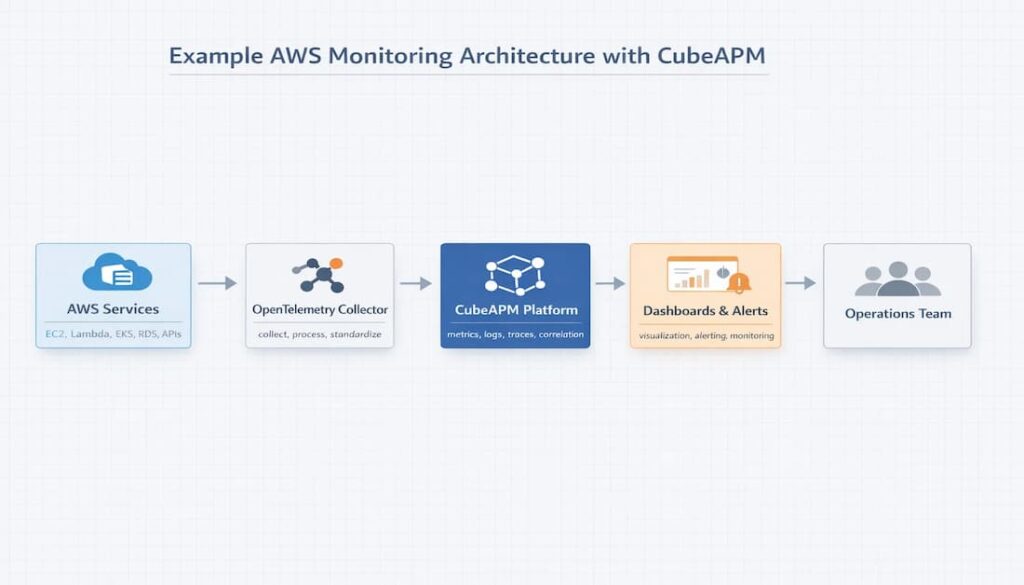
- AWS services provide the telemetry we need. EC2, Lambda, EKS, and various databases all produce metrics, logs, traces, and events. These elements collectively offer a window into system performance and behavior.
- OpenTelemetry Collector receives telemetry data, then standardizes it before processing and directing it. Think of it as a middleman, a neutral intermediary between your services and whatever monitoring platform you’re using.
- CubeAPM centralizes data ingestion and correlation, streamlining the process of linking signals and gaining a comprehensive understanding of system behavior.
- Dashboards offer a graphical overview of a system’s well-being and any developing patterns. Alerts, in contrast, act as warnings, alerting teams when something needs immediate attention.
AWS Monitoring Best Practices Checklist
- Centralize telemetry: Consolidate metrics, logs, and other signals into a single location. This simplifies both monitoring and troubleshooting.
- Monitor SLIs and SLOs: This means monitoring crucial service indicators such as latency, error rate, and availability, and comparing them to the targets you’ve set.
- Employ distributed tracing: Track requests as they traverse services, pinpointing the origins of slowdowns or breakdowns.
- Set up automated alerts. These alerts should trigger whenever key limits are surpassed, allowing teams to respond quickly.
- Adopting OpenTelemetry standards is key: Gives teams a consistent, vendor-neutral way to collect and manage telemetry data across services.
Conclusion
AWS monitoring becomes much more effective when teams focus on the right metrics, centralize telemetry, and use tools that scale with modern cloud environments. As AWS systems grow more distributed, a clearer monitoring architecture and stronger telemetry strategy make it easier to maintain performance, investigate issues, and control cost.
Disclaimer: This article is based on publicly available sources available at the time of publication. Product features, pricing, and packaging may change, so please verify the latest details from the vendor’s official website and documentation.
FAQs
1. What is AWS monitoring?
AWS monitoring is the process of keeping an eye on your cloud systems so you can see how they are performing and catch problems early. It usually means tracking signals like metrics, logs, traces, and events from your infrastructure and applications.
2. What tools are used for AWS monitoring?
AWS provides its own monitoring solutions, notably Amazon CloudWatch and AWS X-Ray. However, many teams opt for alternatives such as Datadog, Prometheus, and CubeAPM. These platforms offer expanded visibility, simplified troubleshooting, and improved cross-service correlation, which can be advantageous.
3. What metrics should you monitor in AWS?
The specific metrics you’ll find most valuable really depend on your particular application. However, most teams begin by monitoring CPU usage, memory consumption, latency, the rate of requests, the error rate, database connections, and network throughput. These indicators are essential for identifying slowdowns, failures, and resource strain before they escalate into more significant problems.
4. Is CloudWatch enough for monitoring AWS?
For some teams, yes. CloudWatch can cover the basics well, especially in smaller or AWS-only environments. But once systems become more complex, many teams look for a platform that makes it easier to connect logs, metrics, traces, and service behavior in one place.
5. Why is AWS monitoring important?
Good monitoring gives teams the ability to spot performance problems early. It helps them figure out what’s causing changes and respond quickly. The goal is to address issues before users even notice a dip in quality.