









Most teams discover they have a message queue monitoring problem during an incident, not before one. A consumer group falls silently behind. A broker edges toward its memory limit with nothing in application logs to warn anyone. By the time the failure surfaces as a user-facing error, the backlog is already too large to drain quickly.
Apache Kafka, RabbitMQ, and ActiveMQ collectively power the majority of enterprise messaging workloads. Kafka alone holds roughly 39% market share in the messaging and queuing category, with RabbitMQ at 29%. Each broker fails differently, exposes different telemetry, and requires a different monitoring approach. Watching CPU and disk on broker hosts is not enough.
This guide covers message queue monitoring for all three brokers in production: the metrics that predict failures, alert thresholds, instrumentation, distributed tracing across queue boundaries, and cross-broker practices.
What Is Message Queue Monitoring?
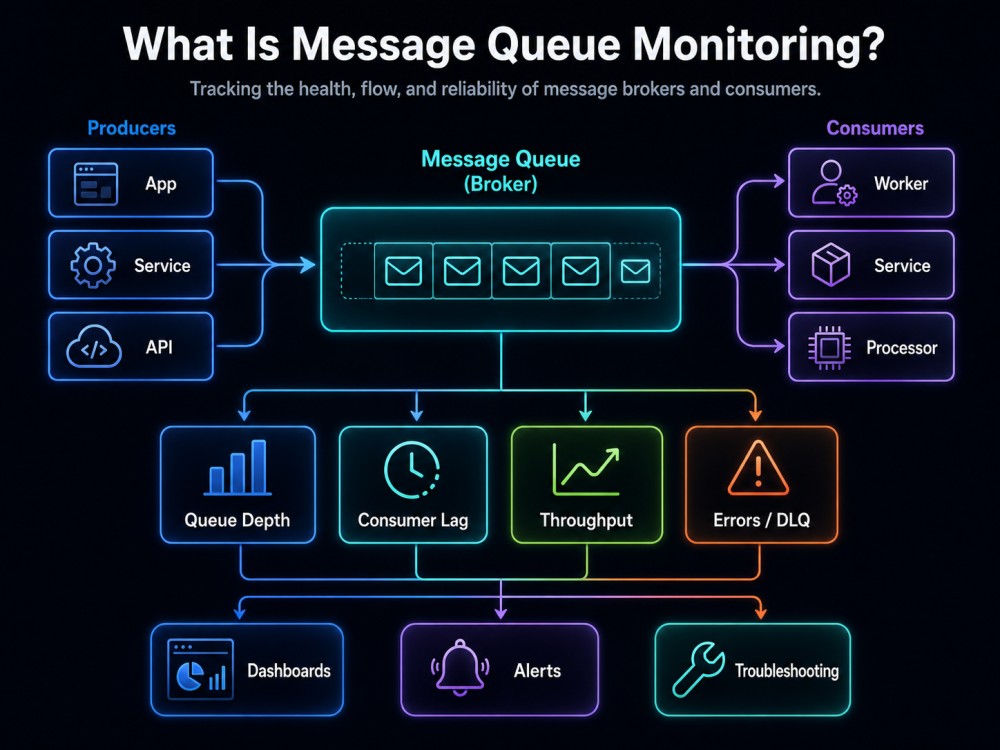
Message queue monitoring is the continuous collection, analysis, and alerting on performance and health signals from the message broker infrastructure. It covers broker resource utilization, message flow rates, consumer processing health, replication state, and queue-specific failure modes that standard infrastructure monitoring cannot see.
Unlike monitoring a web server or a database, monitoring a message queue means tracking an asynchronous pipeline where producers and consumers are decoupled and operate independently. CPU and memory on the broker host tell you whether the machine is stressed. They do not tell you whether messages are being processed, whether consumers are keeping pace with production, or whether a queue is accumulating a backlog that will eventually exhaust broker memory or breach a downstream SLA.
The Three Layers of Message Queue Monitoring
Message queue monitoring sits at the intersection of three distinct layers:
- Broker health: Broker health covers the stability of the broker process itself: whether partitions are replicated in Kafka, whether memory usage stays within safe limits in RabbitMQ, and whether disk utilization remains under control in ActiveMQ.
- Message flow: Message flow covers whether messages are moving through the system at the expected rate, specifically whether the publish rate and consume rate stay in balance, or whether a backlog is forming.
- Consumer health: Consumer health covers whether consumers are active, connected, and processing at the expected throughput, and whether they are acknowledging messages promptly or accumulating unacknowledged messages in broker memory.
Example: When Broker Health Looks Fine, but the System Is Failing
A practical example illustrates why all three layers matter.
Imagine an order processing system where an API service publishes order events to a Kafka topic, and a fulfillment service consumes those events to trigger warehouse picks. Broker health looks fine: no under-replicated partitions, JVM heap at 45%. But the fulfillment service recently deployed a new database query that takes 800ms instead of 80ms per message.
Consumer lag begins growing. After three hours, the lag reaches 2.4 million messages. Warehouse picks are running 4 hours behind real time. No alert fired because the broker was healthy and the consumer was running. The only signal was consumer lag trend on a specific consumer group, which nobody had set up an alert for. That is the gap message queue monitoring closes.
Why Queue Failures Are Hard to Catch
The Silent Accumulation Pattern
Most queue failures do not arrive with an alert. They build. A Kafka consumer group processes messages 15% slower than they arrive. Nothing throws an exception. No dashboard turns red. But the gap between produce rate and consume rate widens every minute. In two hours, the lag is unrecoverable within the team’s SLO window.
A RabbitMQ broker losing memory to unacknowledged messages follows the same pattern. Utilization climbs from 30% to 38% over 90 minutes. Then it hits 40%, the high watermark fires, every publisher connection in the cluster gets blocked, and services calling the broker time out simultaneously. From the outside, it looks like a sudden catastrophic failure. From the broker’s perspective, it was a slow walk to the edge.
This is the defining challenge of message queue monitoring: the signals that predict failures are leading indicators. Catching them requires trend analysis, not threshold alerts on current values.
What a Production Incident Looks Like Without Proper Monitoring
PagerDuty’s August 2025 Kafka outage is the most thoroughly documented recent example. A producer-instance leak in a pekko-connectors-kafka integration caused approximately 4.2 million new producers to register per hour, roughly 84 times the normal rate. Brokers exhausted JVM heap tracking producer metadata. The cluster cascaded. Approximately 95% of incoming events were rejected over 38 minutes.
PagerDuty‘s post-mortem explicitly named two causes: “previously minimal alerting on Kafka” and an “observability gap in Kafka producer and consumer telemetry, including anomaly detection for unexpected workloads.”
Broker CPU, disk, and network looked normal for the entire duration. The metric that would have caught it was active producer count per broker, a number that multiplied by 84x before anything else showed a problem. It was not being monitored.
Kafka Monitoring: How Kafka Works and Why It Requires a Different Mental Model
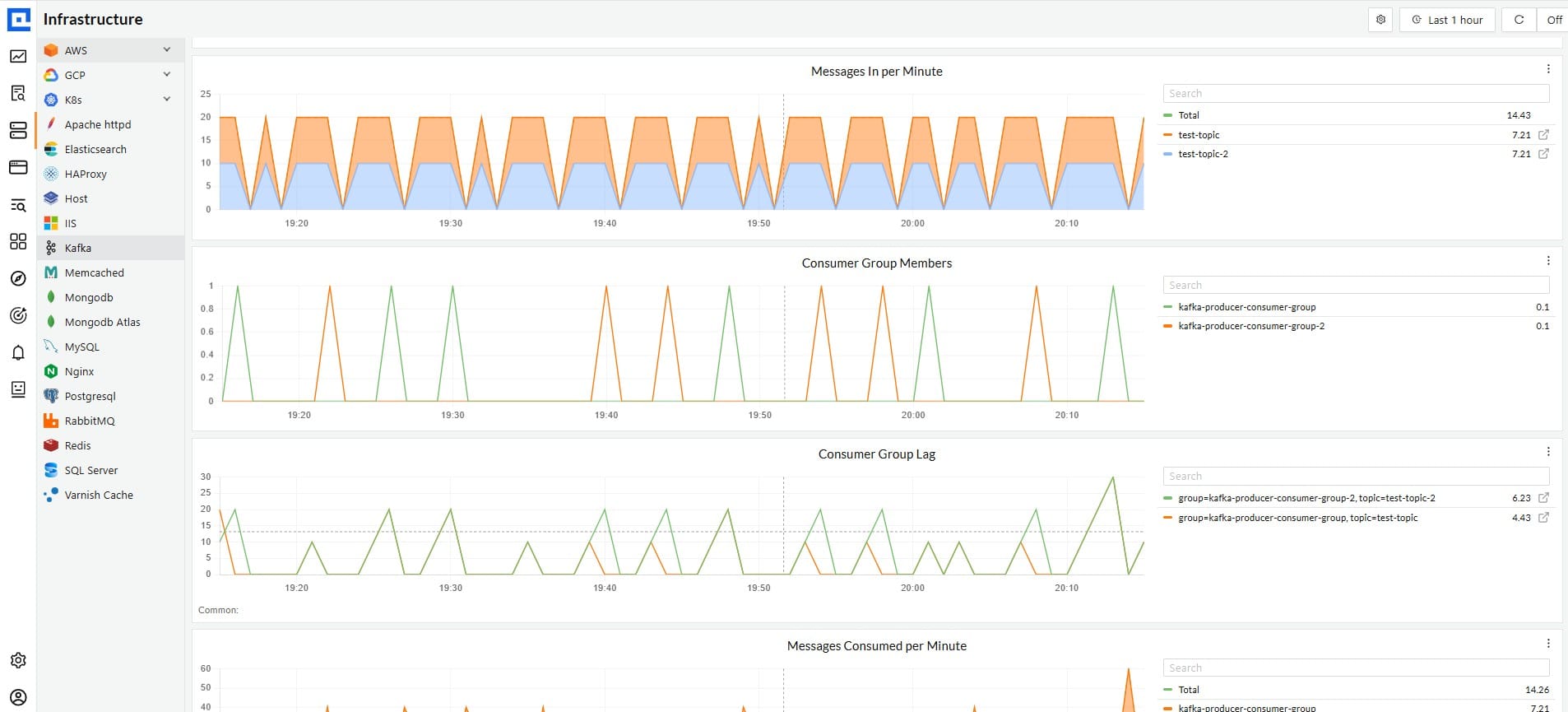
Apache Kafka is a distributed commit log. It stores messages as records in ordered, immutable partitions and retains them for a configurable period regardless of whether consumers have processed them. Consumer groups track their own read position using offsets. This architecture means Kafka failures are primarily about replication health, partition leadership, JVM stability, and the gap between where producers write and where consumers have read.
There is no such thing as a message disappearing when a consumer receives it. There is only the offset a consumer has committed versus the offset a producer has written to. The distance between them is consumer lag.
Kafka Broker Metrics That Matter
- Under-Replicated Partitions: It is the most critical Kafka metric. A partition is under-replicated when one or more of its In-Sync Replicas have fallen behind or disconnected. The JMX metric is kafka.server:type=ReplicaManager,name=UnderReplicatedPartitions. Any non-zero value reduces fault tolerance immediately. If the partition leader fails before replication catches up, data loss is possible. Alert on any non-zero value.
- Offline Partitions: It means no leader exists for a partition. Reads and writes to that partition are impossible. Alert immediately on any value above zero.
- Active Controller Count: It must equal exactly 1 at all times across the cluster. Zero means no coordinator exists. More than one indicates a split-brain. Both are emergencies.
- ISR Shrink Rate: It tracks how frequently replicas drop out of the In-Sync Replica set. Sustained shrinkage outside of expected rolling restarts indicates followers cannot keep pace with leader replication throughput. Disk I/O saturation and network congestion are the usual causes.
- Produce and Fetch Request Latency at p99: A degrading p99 that stays elevated is often the first visible broker signal of resource pressure, appearing before CPU or disk metrics reach alarming levels. Alert on p99 produces latency above 50ms.
- KRaft-specific metrics: Kafka has fully supported ZooKeeper-less operation via KRaft since version 3.7. Clusters running KRaft require additional monitoring: controller quorum health, leader election latency, and snapshot age. If your cluster still runs on ZooKeeper, monitor zookeeper.session.expired and zookeeper.read.latency.ms alongside broker metrics.
How to Monitor Kafka Consumer Lag Correctly
Consumer lag is the difference between the log-end offset (the position of the latest message in a partition) and the consumer group’s last committed offset. It measures how far behind a consumer group is in real-time.
The mistake most teams make is alerting on consumer lag as an absolute value. A lag of 100,000 means nothing without knowing the consumption rate. If a consumer group processes 200,000 messages per minute and lag holds stable at 100,000, the group maintains pace, and the lag represents about 30 seconds of buffer. If the same group processes 80,000 messages per minute against a production rate of 120,000, the lag grows by 40,000 per minute. In 20 minutes, it reaches 900,000.
Alert on consumer lag trend, not consumer lag value. Specifically, alert when a consumer group’s lag has grown continuously for more than 10 minutes. Add a secondary absolute threshold alert based on how much lag your downstream SLO can tolerate.
Key consumer metrics to track per consumer group and per partition:
- kafka.consumer.lag: per-partition lag for each consumer group
records_lag_max: the maximum lag across all partitions in the group; this single number defines your true worst-case exposure- Commit latency: when offset commits are slow, lag calculations become unreliable and often indicate deeper consumer health issues
- Rebalance count and duration: excessive rebalances pause all consumption in a consumer group and cause lag spikes that are easy to misdiagnose as capacity problems rather than stability problems
For tooling, the Prometheus JMX Exporter covers broker and producer metrics, but requires a separate Kafka Lag Exporter for consumer group lag metrics. The OpenTelemetry Collector’s JMX receiver supports Kafka natively. OpenTelemetry’s messaging.kafka.consumer.lag attribute was still marked experimental as of mid-2026; pin your instrumentation library versions before relying on it in production alerting.
What Kafka Producer Monitoring Catches That Nothing Else Does
Producers are the most under-monitored layer of a Kafka deployment. The PagerDuty incident above is the direct consequence of that gap. By the time the broker showed heap pressure, the producer count had been at 84x normal for long enough that the cascade was inevitable.
Track these producer signals:
- Record error rate: any sustained non-zero rate warrants investigation
- Request rate and outgoing byte rate: a sudden drop when upstream traffic is stable usually indicates broker pressure or network saturation
- Average request latency: producer-side latency that exceeds your end-to-end budget is a leading broker pressure signal
- Active producer count per broker: This is the metric PagerDuty lacked. Normal values for your workload define the baseline. Anomaly detection on this metric alone would have caught the August 2025 incident within the first few minutes
Dead Letter Queues and Poison Messages in Kafka
Unlike RabbitMQ and ActiveMQ, Kafka does not have a native dead letter queue mechanism. Applications that want to handle poison messages (records that fail processing repeatedly) must implement a dead letter topic explicitly, typically by catching processing exceptions and producing the failed record to a designated error topic.
If your application uses a dead letter pattern, monitor the dead letter topic’s consumer lag and message rate as a first-class signal. A growing dead letter topic means your application is encountering records it cannot process. This is an application-layer signal, not a broker signal, and it requires application-level instrumentation to surface.
Kafka JVM and Infrastructure Metrics
Both brokers and the JVM underneath them need monitoring:
- Full GC pause duration: pauses exceeding 1 second cause produce and fetch timeouts at connected clients even when all other broker metrics look normal. Alert on any full GC pause above 500ms
- Heap utilization: alert at 75% of the configured heap. Kafka’s recommended JVM heap is 4 to 8GB per broker; the OS page cache handles actual message data
- Disk write latency: sustained write latency above 5ms per operation warrants investigation in most production environments
- Network throughput per broker: a broker receiving significantly more traffic than peers indicates partition leadership imbalance and should trigger a rebalance
Kafka Alert Thresholds
| Metric | Warning | Critical |
| Under-replicated partitions | >0 | >0 |
| Offline partitions | >0 | >0 |
| Active controller count | Not exactly 1 | Not exactly 1 |
| Consumer lag trend | Growing 5 min | Growing 15 min |
| Produce request latency p99 | >50ms | >200ms |
| JVM heap utilization | >70% | >85% |
| ISR shrink rate (sustained) | >0/min | >5/min |
| Full GC pause duration | >200ms | >1s |
| Active producer count | >2x baseline | >5x baseline |
RabbitMQ Monitoring: How RabbitMQ Works and Why Memory Is the Core Risk
RabbitMQ routes messages through exchanges to queues using the AMQP protocol. Consumers subscribe to queues, receive messages, and send acknowledgments. Acknowledged messages are deleted. There is no offset tracking, no replay (unless you configure persistence explicitly), and no distributed log.
This architecture concentrates failure risk in two places: consumer health (messages accumulate if consumers fall behind or disconnect) and broker memory (unacknowledged messages and queue backlogs consume RAM until the broker protects itself by blocking publishers).
Understanding RabbitMQ’s Alarm System
RabbitMQ includes a built-in resource protection mechanism that most teams misunderstand until they hit it in production.
- When any node in the cluster exceeds its configured memory high watermark (40% of available RAM by default), RabbitMQ sends a connection.blocked AMQP notification to all publishing connections and stopped accepting new messages. This is not a crash. The broker is alive, and consumers continue processing. But publishers receive no response, and their connections are blocked. From the application side, it presents as a sudden broker unavailability.
- The default disk free limit is 50MB. When the available disk on any node drops below this, the same cluster-wide publisher block triggers. One node hitting its limit blocks the entire cluster.
Monitor both thresholds and alert before they fire. A memory alert at 30% gives 10% of headroom before the 40% default. A disk alert at 2GB of free space gives meaningful reaction time before the 50MB limit.
What Queue Depth and Message Rates Actually Tell You
These are the three signals that matter most for RabbitMQ message flow health:
- Queue depth: the count of messages in the “ready” state waiting for a consumer. A rising queue depth means consumers cannot keep pace with publishers. On its own, it is a lagging indicator; by the time it looks alarming, the problem has been building for a while.
- Publish rate vs deliver rate: the more useful signal. In a healthy system, these two rates stay approximately equal. When the publish rate persistently exceeds the delivery rate, the queue depth grows without bound until the broker runs out of memory or disk. Alert when publish rate exceeds deliver rate by more than 20% for more than 5 minutes on any critical queue.
- Unacknowledged messages: messages a consumer has received but not yet acknowledged. These sit in broker memory regardless of queue depth. Alert when the unacknowledged count exceeds twice your consumer count multiplied by your prefetch count.
- Prefetch count of zero: a misconfiguration worth monitoring explicitly. An unbounded prefetch means a consumer receives every message in the queue simultaneously, holding them all unacknowledged. This reliably triggers memory alarms during traffic spikes.
Dead Letter Exchanges in RabbitMQ
RabbitMQ’s Dead Letter Exchange (DLX) mechanism routes messages to a designated exchange when they are rejected, expire, or overflow a queue length limit. DLX is a native feature and a critical part of the production RabbitMQ architecture.
Monitor your dead letter queues as primary production signals. A growing dead letter queue means messages are failing processing, expiring before consumers handle them, or being rejected by consumers. The pattern and rate of growth tell you which failure mode you are in. Rapidly growing DLX queue depth combined with high consumer utilization usually indicates consumer processing errors. Slowly growing DLX depth with normal consumer utilization usually indicates messages timing out due to slow processing.
RabbitMQ Consumer and Cluster Health
RabbitMQ exposes a consumer utilization metric per queue representing the fraction of time consumers are active and processing. At 90% and above, consumers are saturated and cannot handle additional throughput.
Per-queue consumer signals to track:
- Consumer count: alert immediately when a production queue has zero consumers; messages accumulate with no processing
- Consumer utilization: alert when sustained above 85% for more than 10 minutes
- Channel count per connection: A sudden spike in channels without a corresponding increase in consumers indicates a connection leak in the application code
For cluster health, monitor node state on each member. A node in a partitioned state indicates a network split-brain, where nodes disagree about cluster membership. RabbitMQ Quorum Queues require a quorum for writes; a partition that removes a node from the quorum stops writes to affected queues.
Monitor rabbitmq_node_running per node and alert on any node reporting zero for more than 30 seconds.
RabbitMQ Alert Thresholds
| Metric | Warning | Critical |
| Node memory (% of RAM) | >30% | >38% |
| Disk free space | <2GB | <500MB |
| Queue depth growth trend | Growing 5 min | Growing 10 min |
| Unacknowledged messages | >2x expected max | >5x expected max |
| Consumer count (critical queue) | Below minimum | 0 |
| Consumer utilization | >85% | >95% |
| Node running state | Degraded | Any node down |
| Publish vs deliver rate delta | >20% for 5 min | >50% for 2 min |
| Dead letter queue growth | Any sustained growth | Rapid growth |
ActiveMQ Monitoring: ActiveMQ Classic vs Artemis: Two Brokers, Two Instrumentation Paths
ActiveMQ comes in two distinct versions.
- ActiveMQ Classic (5.x release line) is the traditional broker with decades of production history.
- ActiveMQ Artemis is the next-generation broker that also powers Red Hat AMQ. The monitoring concepts are similar but instrumentation differs.
Both expose metrics through JMX. Every broker, queue, topic, and connection is a JMX MBean with attributes for message count, consumer count, memory usage, and more.
Classic uses the MBean domain org.apache.activemq and requires the JMX Prometheus Exporter Java agent to produce Prometheus-format metrics. The OpenTelemetry Collector supports Classic natively via target_system: activemq.
Artemis uses org.apache.activemq.artemis and ships with a native Prometheus metrics plugin requiring only a one-line addition to broker.xml. The OpenTelemetry Collector requires custom YAML metric definitions for Artemis MBeans since native support targets Classic only.
ActiveMQ Broker-Level Metrics
ActiveMQ’s metric hierarchy has three levels: broker-level (the entire JVM process), destination-level (individual queues and topics), and connection-level (attached clients). Broker-level metrics affect everything.
- MemoryPercentUsage is the percentage of the broker’s configured memory limit currently in use. Alert at 70%. Critical at 85%. At 100%, the broker blocks all producers.
- StorePercentUsage is the percentage of the persistent message store (disk) in use. This includes messages written to disk due to being persistent or due to memory pressure forcing them to disk. Alert at 75%. Critical at 90%. At 100%, the broker blocks all message production.
- TempStorePercentUsage covers disk usage for non-persistent temporary messages. Alert at 75%, critical at 90%.
- TotalConnectionCount: sudden spikes often indicate a deployment gone wrong with multiple service instances connecting simultaneously. Sudden drops indicate client failures.
- TotalConsumerCount at the broker level: zero consumers on a production broker is an immediate alert.
ActiveMQ Destination-Level Metrics
- QueueSize is the number of messages waiting in the destination. Trend analysis matters more than point-in-time values. Alert when QueueSize has grown monotonically for 5 minutes.
- ConsumerCount per queue: a production queue with zero consumers stops processing immediately. Alert at zero.
- EnqueueCount and DequeueCount: these are cumulative counters. Derive the rate of change to get throughput. A queue where the enqueue rate consistently exceeds the dequeue rate is building a backlog.
- AverageEnqueueTime: the average time messages spend waiting before delivery. This is the most actionable early warning signal for consumer slowdown. When AverageEnqueueTime rises on a queue where ConsumerCount is stable, consumers are slowing down, not disappearing. Alert when AverageEnqueueTime exceeds twice your baseline value for that queue.
- ExpiredMessageCount: messages that exceeded their configured time-to-live. A growing expired message count means messages sit in queues longer than the application tolerates, which often reveals a consumer outage that no other alert caught.
Dead Letter Queues in ActiveMQ
ActiveMQ Classic routes expired and undeliverable messages to a Dead Letter Queue (DLQ) named ActiveMQ.DLQ by default, though this is configurable per destination. Monitor QueueSize and enqueue rate on your DLQ as a production health signal. A growing DLQ indicates messages failing processing, consumers rejecting messages, or messages expiring before delivery.
For Artemis, dead letter address configuration is per-address and per-queue in broker.xml. Monitor configured dead letter addresses for the same signals.
ActiveMQ JVM Metrics
Both Classic and Artemis run on the JVM:
- Alert on full GC pause duration exceeding 500ms
- Alert on heap utilization exceeding 75%
- Correlate MemoryPercentUsage spikes with GC activity; a sudden MemoryPercentUsage increase coinciding with reduced GC frequency usually means the GC is failing to reclaim memory fast enough
ActiveMQ Alert Thresholds
| Metric | Warning | Critical |
| MemoryPercentUsage | >70% | >85% |
| StorePercentUsage | >75% | >90% |
| TempStorePercentUsage | >75% | >90% |
| QueueSize growth trend | Growing 5 min | Growing 15 min |
| ConsumerCount (production queue) | Below minimum | 0 |
| AverageEnqueueTime | >2x baseline | >10x baseline |
| ExpiredMessageCount growth | Any sustained growth | Rapid growth |
| DLQ QueueSize | Growing steadily | Rapid growth |
| JVM heap utilization | >70% | >85% |
Cross-Broker Practices That Apply to All Three
Why Distributed Tracing Across Queue Boundaries Matters
A consumer group that slows down does not surface as a queue problem first. It surfaces as a service problem that causes a queue problem. Without distributed tracing that spans the queue boundary, you see the symptom (growing lag or queue depth) but not the cause (the specific service or operation bottleneck creating it).
OpenTelemetry messaging instrumentation creates spans for produce and consume operations. A producer span records when a message enters the broker. A consumer span records when processing begins and ends. When you correlate these spans with queue-level metrics (lag, depth, throughput), you identify the specific service, message pattern, or operation causing the slowdown.
Without this correlation, a Kafka consumer lag investigation means manually examining logs across multiple consumer services to find the slow one. With correlated traces, you open a delayed message’s trace and see the processing time directly. The difference is typically 40 minutes versus 5.
Alert on Trend, Not Just Absolute Value
Threshold-only alerting creates two problems simultaneously: false negatives when queues build slowly before a threshold, and false positives during traffic spikes that normalize within minutes.
Trend-based alerting fires when a metric grows monotonically for a set number of minutes. It catches the slow-build failures that threshold alerts miss while naturally filtering transient spikes. Apply trend alerting to consumer lag (Kafka), queue depth growth (RabbitMQ), and QueueSize growth (ActiveMQ) at a minimum.
Establish Workload Baselines Before Setting Thresholds
Queue behavior is workload-dependent. A Kafka consumer lag of 50,000 is normal for a high-throughput analytics pipeline and catastrophic for a payment processing queue. A RabbitMQ memory utilization of 35% may be normal during peak batch processing and alarming at midnight when the system is quiet.
Run monitoring for two to four weeks before setting absolute thresholds. Understand normal ranges during peak traffic, off-peak periods, deployment windows, and batch job execution. Set thresholds above the observed peak with enough headroom for your team to respond before an alert becomes an outage.
How Long to Retain Queue Telemetry
Queue incidents are hard to reconstruct without sufficient history. A consumer lag spike that resolved itself because a slow consumer was restarted leaves no evidence in the queue after the fact. The only record is in your metrics store.
Retain aggregated queue metrics for at least 13 months to support year-over-year capacity planning. Retain broker logs for 30 to 90 days. Retain distributed traces for at least 30 days. The worst time to discover you have two weeks of retention is during a post-mortem for an incident that started three weeks ago.
Message Queue Monitoring With CubeAPM
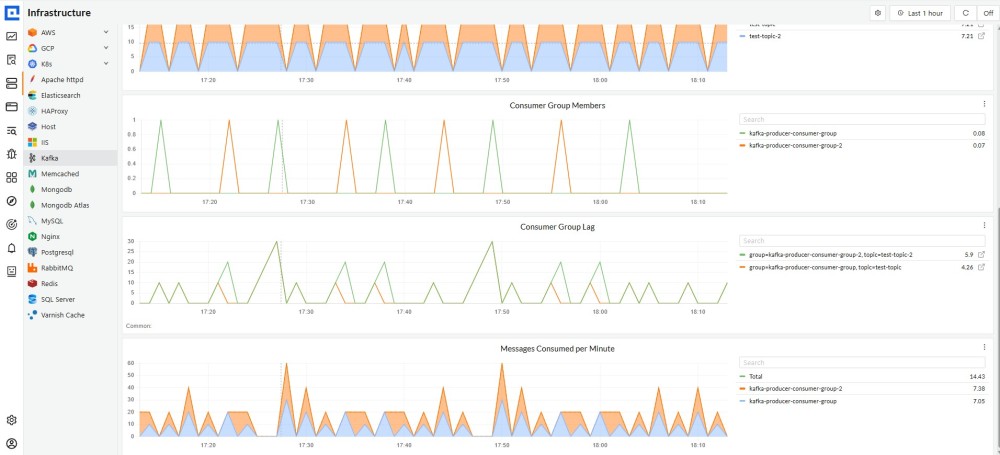
Queue monitoring reaches its full value when broker telemetry and application telemetry live in the same store. A Kafka consumer lag spike tells you something is wrong. A correlated trace showing your inventory service taking 9 seconds per message tells you why.
CubeAPM is an OpenTelemetry-native observability platform that ingests metrics, traces, and logs from Kafka, RabbitMQ, and ActiveMQ alongside application instrumentation, so broker signals and service signals are queryable together during an investigation.
What CubeAPM Monitors Per Broker
- Kafka: consumer group lag (kafka_consumergroup_lag), per-partition metrics, and producer and consumer service traces overlaid on lag data
- RabbitMQ: queue depth, consumer health, and node metrics ingested from the Management API, mapped to traces from the services publishing and consuming each queue
- ActiveMQ: broker and destination metrics via the JMX receiver, with JVM resource pressure correlated against message processing delays in application traces
Pricing and Deployment: CubeAPM uses per-GB ingestion pricing at $0.15/GB with unlimited retention and deploys inside your own VPC, making costs predictable for the high telemetry volumes that message-intensive environments generate.
Conclusion
Every broker in this guide exposes the signals that predict failures.
Kafka surfaces them through consumer lag trend, ISR shrink rate, and active producer count. RabbitMQ surfaces them through memory utilization, unacknowledged message accumulation, and publish-to-deliver ratio. ActiveMQ surfaces them through MemoryPercentUsage, AverageEnqueueTime, and dead letter queue growth.
The signals are there. The question is whether your monitoring tool watches them before they become incidents.
Start with the alert threshold tables in each section, build baselines from two to four weeks of real traffic, and add distributed tracing across queue boundaries so that when lag spikes, you can answer why in minutes rather than hours.
Disclaimer: The alert thresholds and metric recommendations in this guide reflect common production patterns across Kafka, RabbitMQ, and ActiveMQ deployments. Every workload behaves differently. Validate all thresholds against your own baselines before applying them in production.
FAQs
What is message queue monitoring?
Message queue monitoring is the continuous tracking of broker health, message flow rates, consumer processing rates, and resource utilization across systems like Kafka, RabbitMQ, and ActiveMQ. The goal is to detect failures and degradation before they affect downstream services.
What are the most important metrics to monitor in Apache Kafka?
Under-Replicated Partitions, Offline Partitions, consumer lag trend, produce request latency at p99, active producer count per broker, and JVM heap utilization. Under-Replicated Partitions and Offline Partitions should alert at any non-zero value.
How do you monitor Kafka consumer lag?
Alert on lag trend rather than absolute value. When a consumer group’s lag grows continuously for more than 10 minutes, something is wrong. Track records_lag_max as your worst-case exposure metric, and use a Kafka Lag Exporter alongside the JMX Exporter since the JMX Exporter alone does not expose consumer group lag.
Why does RabbitMQ block publishers and how do you prevent it?
RabbitMQ sends connection.blocked to all publishing connections when any node exceeds its memory high watermark (40% of RAM by default) or runs below its disk free limit (50MB by default), and this block is cluster-wide. Prevent it by alerting at 30% memory and 2GB free disk, setting prefetch counts appropriately, and monitoring unacknowledged message accumulation.
What is the difference between ActiveMQ Classic and Artemis for monitoring?
Classic requires the external JMX Prometheus Exporter agent and is natively supported by the OpenTelemetry Collector via target_system: activemq. Artemis ships with a native Prometheus plugin and requires custom YAML definitions for the OpenTelemetry Collector. The key metrics (MemoryPercentUsage, StorePercentUsage, QueueSize, AverageEnqueueTime) apply to both.
What is a dead letter queue and why monitor it?
A dead letter queue holds messages that failed processing, expired, or were rejected. A growing dead letter queue is often the first signal of an application bug, schema incompatibility, or consumer error. RabbitMQ and ActiveMQ have native dead letter mechanisms; Kafka requires applications to implement dead letter topics explicitly.
Should you use a single monitoring tool for all three brokers?
A unified platform that ingests Kafka, RabbitMQ, and ActiveMQ telemetry alongside application traces enables direct correlation between a queue signal and the service causing it. Separate tools per broker make that correlation slow and manual, which is where incident response time is lost.